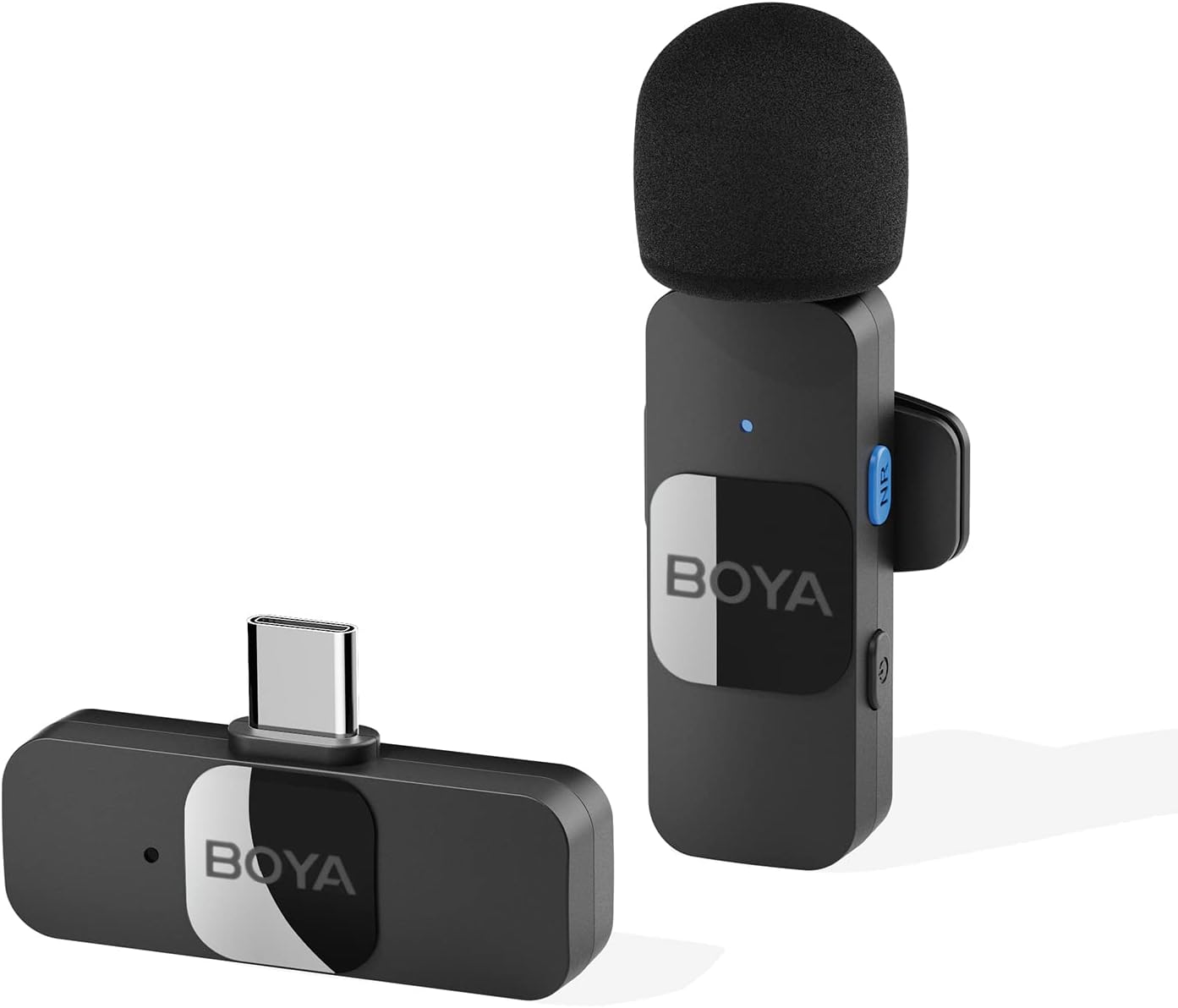
Thank you for choosing the BOYA BY-V10 Wireless Lavalier Microphone. This innovative microphone system is designed to provide high-quality audio for your video recording, live streaming, podcasting, and online conferencing needs. Its compact design, easy setup, and advanced features make it an excellent tool for content creators and professionals alike.
2. ماذا يوجد في الصندوق
BY-V10-TX Transmitter ×1
BY-V10-RX Receiver ×1
كابل شحن USB-C × 1
Foam Windscreen ×1
Figure 1: BOYA BY-V10 Wireless Lavalier Microphone system, showing the transmitter with a foam windscreen and the USB-C receiver.
3. دليل الإعداد
3.1 الشحن الأولي
Before first use, ensure both the transmitter and receiver are fully charged. Connect the provided USB-C charging cable to the charging ports on both units and a power source. A full charge takes approximately two hours, providing up to 9 hours of operation time.
Figure 2: The BOYA BY-V10 offers a long battery life, with a 95mAh capacity providing up to 9 hours of usage after a 2-hour charge.
3.2 الاتصال التلقائي
Plug the BY-V10-RX receiver directly into the USB-C port of your smartphone, tablet, or laptop.
Turn on the BY-V10-TX transmitter. The units will automatically pair within seconds.
ملاحظة هامة: For Android devices, ensure the USB OTG (On-The-Go) setting is enabled in your device's settings for proper microphone recognition.
Figure 3: The BY-V10 is widely compatible with Type-C smartphone devices and iOS system devices, including the iPhone 15 series.
4. تعليمات التشغيل
4.1 وضع الميكروفون
The BY-V10 transmitter can be handheld or clipped onto your shirt using its rotatable back clip. For optimal sound capture, position the microphone approximately 6-8 inches from your mouth.
4.2 إلغاء الضوضاء
The microphone features advanced noise reduction technology. To activate or deactivate noise cancellation, press the dedicated NR (Noise Reduction) button on the transmitter. This feature helps to minimize background noise for clearer audio, especially in noisy environments.
Figure 4: Enhance voice clarity with the one-click noise cancellation feature, activated by the NR button on the transmitter.
4.3 Omnidirectional Sound Pickup
Equipped with an omnidirectional pickup microphone, the BY-V10 captures 360-degree sound with precision. This ensures that no audio detail is missed, regardless of the surrounding environment or the direction of the sound source.
4.4 الإرسال اللاسلكي
The system operates on a 2.4G signal, providing stable and low-latency audio transmission. It supports a wireless range of up to 164 feet (50 meters) in open environments without obstacles or interference, allowing for flexible recording distances.
Figure 5: Experience reliable audio transmission up to 164 feet (50 meters) in open, unobstructed environments.
4.5 الشحن المتزامن
The receiver allows you to charge your device simultaneously while recording, ensuring uninterrupted long recording sessions for live streaming or course recording.
5. الصيانة
حافظ على نظافة الميكروفون وجهاز الاستقبال وخلوّهما من الغبار. استخدم قطعة قماش ناعمة وجافة للتنظيف.
قم بتخزين الوحدات في مكان بارد وجاف بعيدًا عن أشعة الشمس المباشرة ودرجات الحرارة القصوى.
Ensure the foam windscreen is securely attached to the transmitter to prevent loss and provide optimal wind noise reduction. Replacement windscreens can be acquired if needed.
تجنب إسقاط الوحدات أو تعريضها لصدمات قوية.
6. استكشاف الأخطاء وإصلاحها
مشكلة
السبب المحتمل
حل
Microphone not connecting/pairing.
USB OTG not enabled (Android). الوحدات غير مُشغّلة. بطارية منخفضة.
Enable USB OTG in your device settings. Ensure both transmitter and receiver are turned on. اشحن كلا الجهازين بالكامل.
Poor sound quality/excessive background noise.
Noise cancellation off. الميكروفون بعيد جدًا عن مصدر الصوت. التدخل البيئي.
Press the NR button to activate noise cancellation. Ensure microphone is within optimal range (6-8 inches). Move to a less noisy environment if possible.
عمر البطارية قصير.
لم يكتمل الشحن. Frequent use of power-intensive features.
Ensure units are charged for the full 2 hours. Minimize continuous use of noise cancellation if not critical.
7. المواصفات
ميزة
مواصفة
رقم الموديل
بي-V10
عامل شكل الميكروفون
لافاليير
النمط القطبي
متعدد الاتجاهات
تكنولوجيا الاتصال
2.4GHz اللاسلكية
نوع الموصل
يو إس بي من النوع سي
الأجهزة المتوافقة
هاتف ذكي، كمبيوتر محمول، جهاز لوحي
حساسية الصوت
42 ديسيبل
إشارة إلى نسبة الضوضاء
78 ديسيبل
نطاق التردد
20 هرتز - 16 كيلو هرتز
وزن العنصر
5.3 أونصة (150 جرامًا)
أبعاد المنتج
4.72 × 3.15 × 1.18 بوصة
مصدر الطاقة
يعمل بالبطارية (يتطلب بطاريتين ليثيوم أيون)
8. الضمان والدعم
For detailed warranty information and further support, please refer to the official Instructions for Use (IFU) PDF document provided by BOYA.
دليل مستخدم ميكروفون BOYA mini 2 اللاسلكي فائق الصغر المُطوّر دليل المستخدم الشامل لجهاز BOYA mini 2، وهو نظام ميكروفون لاسلكي فائق الصغر مُطوّر يتميز بتقنية تقليل الضوضاء بالذكاء الاصطناعي، وعمر بطارية طويل، وتوافق واسع مع الهواتف الذكية والأجهزة اللوحية والكاميرات. تعرّف على الإعداد والميزات والمواصفات وكيفية استكشاف الأخطاء وإصلاحها.