مقدمة
This manual provides detailed instructions for the setup, operation, and maintenance of your Taiahiro ML-981 Retro Mechanical Keyboard. Please read this guide thoroughly to ensure proper use and to maximize your keyboard's functionality.
محتويات الحزمة
تأكد من تضمين جميع العناصر المدرجة أدناه في الحزمة الخاصة بك:
- Taiahiro ML-981 Retro Mechanical Keyboard
- دليل المستخدم
- كيكاب بولير
- Spare Mechanical Blue Switches
- كابل طاقة USB-C
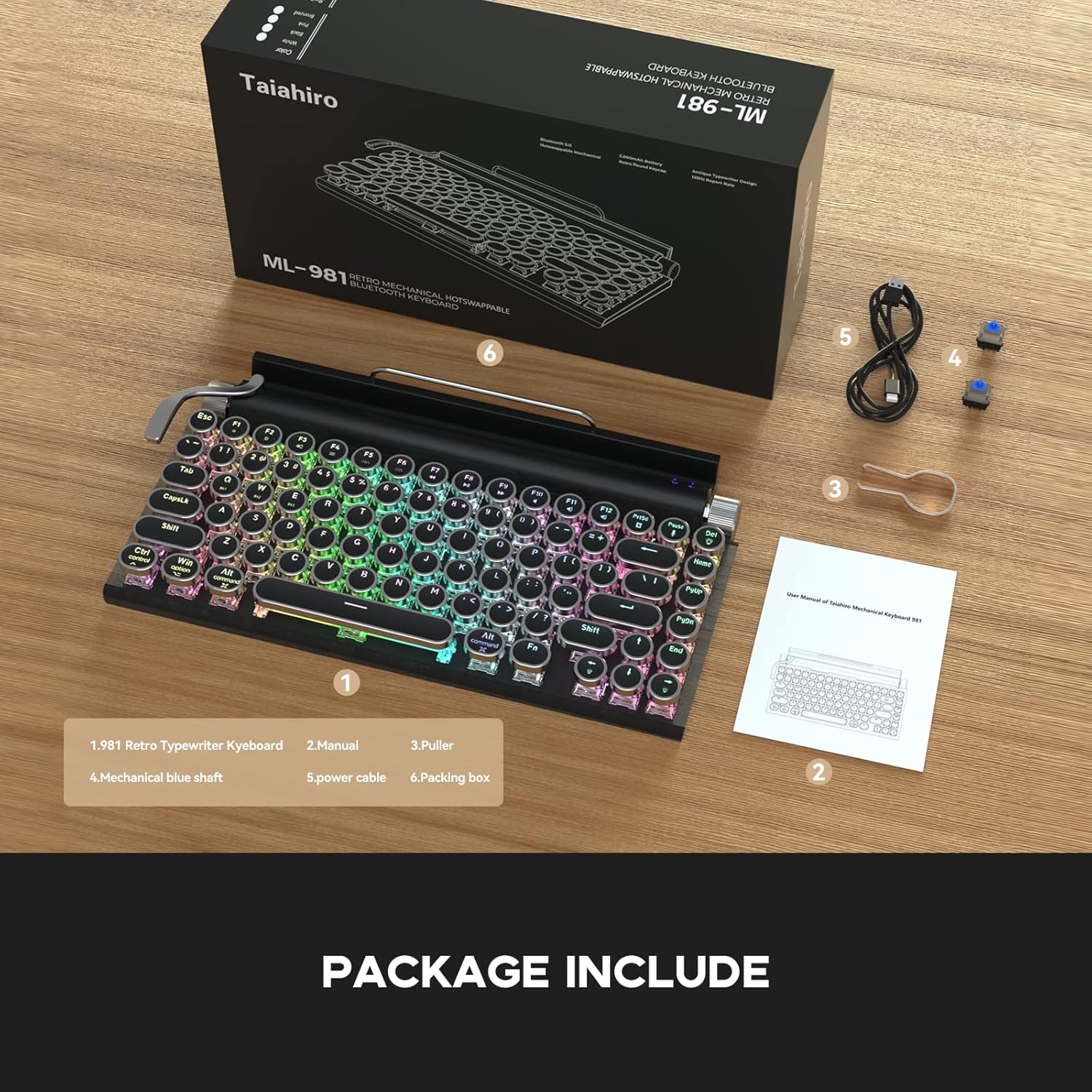
The image displays the Taiahiro ML-981 keyboard along with its accessories, including the user manual, keycap puller, spare mechanical blue switches, and USB-C charging cable.
المنتج انتهىview
The Taiahiro ML-981 keyboard features a retro design with modern functionality, offering multiple connectivity options and customizable backlighting.
المميزات الرئيسية:
- Dual-mode connectivity: USB-C wired and Bluetooth 5.0.
- Multi-device support: Connects up to 3 Bluetooth devices simultaneously.
- Integrated bracket for holding smartphones or tablets.
- Mechanical blue switches for tactile feedback.
- Adjustable RGB backlight with multiple lighting modes.
- Dedicated knobs for brightness and volume control.
- Compatibility with Windows, macOS, and Android operating systems.

This image illustrates the main features of the keyboard, such as its dual connectivity, multi-device pairing, and integrated stand.
مكونات لوحة المفاتيح:
- مقبض السطوع: Located on the right side, used to adjust backlight brightness.
- مقبض الصوت: Located on the right side, used to adjust audio volume.
- Backlight Lever: Located on the left side, used to cycle through backlight modes.
- دعامة مدمجة: Located at the top, designed to hold mobile devices.
- Wired Mode/Charging Port: USB-C port for wired connection and charging.
- System Switch Button: Toggles between Windows and Mac layouts.
- Power and Connection Switch Button: Controls power and switches between connection modes.

تفصيلية view of the keyboard's physical controls and ports, including the knobs, lever, and switches.
الإعداد والاتصال
شحن لوحة المفاتيح:
Connect the provided USB-C cable to the charging port on the keyboard and to a USB power source. The keyboard can be used while charging.
تشغيل/إيقاف التشغيل:
Locate the Power and Connection Switch Button on the side of the keyboard. Slide it to the 'ON' position to power on the device. Slide to 'OFF' to power off.
System Compatibility Switch:
Use the System Switch Button to select the appropriate operating system mode (Windows or Mac) for optimal key mapping.
الاتصال السلكي:
Connect the USB-C cable from the keyboard to your computer's USB port. The keyboard will automatically switch to wired mode.
اتصال بلوتوث 5.0:
The keyboard supports connecting up to three devices via Bluetooth. To pair a device:
- Ensure the keyboard is powered on and in Bluetooth mode (indicated by the Power and Connection Switch Button).
- On your device (PC, laptop, tablet, or phone), enable Bluetooth and search for available devices.
- Select 'Taiahiro Keyboard' from the list of devices.
- اتبع أي مطالبات تظهر على الشاشة لإكمال عملية الاقتران.
To switch between paired Bluetooth devices, use the designated function keys (refer to the keyboard layout for specific key combinations, often Fn + 1/2/3).

This image demonstrates the keyboard's dual-mode connectivity, showing both wired USB-C and wireless Bluetooth 5.0 connections.

The image highlights the keyboard's ability to pair with multiple devices, such as a tablet and a smartphone, for seamless switching.
تعليمات التشغيل
التحكم في الإضاءة الخلفية:
The keyboard features multiple LED backlight modes. To adjust:
- تغيير الوضع: Pull the backlight lever (located on the left side) to cycle through different lighting effects.
- ضبط السطوع/السرعة: Rotate the brightness knob (located on the right side) to increase or decrease the backlight intensity or animation speed.

This image displays the keyboard's vibrant LED backlighting, highlighting the various lighting modes available.
التحكم في مستوى الصوت:
Rotate the volume knob (located on the right side) to adjust the audio output volume of your connected device.
Using the Integrated Bracket:
The keyboard includes an integrated bracket at the top, designed to securely hold your smartphone or tablet while you type.
This video demonstrates the Taiahiro Retro Typewriter Keyboard in use, showcasing its typing experience and how it functions with a tablet and smartphone in the integrated holder.
صيانة
تنظيف:
To clean your keyboard, power it off and disconnect it from any devices. Use a soft, dry cloth to wipe down the surface. For deeper cleaning, a slightly damp cloth can be used, ensuring no moisture enters the key switches or internal components. Avoid harsh chemicals.
استبدال المفتاح:
The Taiahiro ML-981 keyboard features hot-swappable mechanical switches, allowing for easy replacement without soldering. Use the provided keycap puller to remove the keycap, then use the switch puller to carefully extract the switch. Align the pins of the new switch with the sockets and press firmly until it clicks into place. Replace the keycap.

This image illustrates the process of replacing a mechanical switch on the keyboard using the provided tools.
استكشاف الأخطاء وإصلاحها
- لوحة المفاتيح غير متصلة عبر البلوتوث:
Ensure the keyboard is charged and powered on. Verify that the Power and Connection Switch Button is in the correct Bluetooth mode. On your device, turn Bluetooth off and on again, then attempt to re-pair. Ensure no other devices are interfering with the connection. - المفاتيح لا تستجيب:
Check if the keyboard is properly connected (wired or Bluetooth). If using Bluetooth, ensure it's paired and selected. If wired, ensure the USB-C cable is securely connected. Try restarting the keyboard. - الإضاءة الخلفية لا تعمل أو عالقة:
Ensure the keyboard is powered on. Try pulling the backlight lever to cycle through modes. Adjust the brightness knob. If the issue persists, power cycle the keyboard. - إخراج مفتاح غير صحيح (على سبيل المثال، يكتب الحرف 'Z' الحرف 'Y'):
Verify that the System Switch Button is set to the correct operating system (Windows or Mac) for your connected device.
تحديد
| أبعاد المنتج | 12.6 × 7 × 1.5 بوصة |
| وزن العنصر | 2.23 رطل |
| الشركة المصنعة | تاياهيرو |
| البطاريات | 1 بطارية ليثيوم بوليمر (متضمنة) |
| تكنولوجيا الاتصال | بلوتوث 5.0، USB-C سلكي |
| وصف لوحة المفاتيح | ميكانيكي |
| الأجهزة المتوافقة | كمبيوتر محمول، كمبيوتر شخصي، هاتف ذكي، جهاز لوحي |
| المميزات الخاصة | Backlit, Integrated Stand, Round Key, Hot-swappable Switches |
| لون | أسود لامع |
| الخلفية الخلفية لوحة المفاتيح | اللون الأحمر والأخضر والأزرق |
| أسلوب | ريترو |
| مادة | معدن |
الضمان والدعم
For warranty information and technical support, please refer to the contact details provided on the product packaging or the official Taiahiro webموقع. احتفظ بإيصال الشراء الخاص بك لمطالبات الضمان.


