1. المقدمة
This manual provides detailed instructions for the assembly, operation, and maintenance of your Sharkoon SHA-VS4-WBK Mid-Tower PC Case. Please read this manual thoroughly before beginning installation to ensure proper setup and to maximize the lifespan of your components.
2. انتهى المنتجview
The Sharkoon SHA-VS4-WBK is a mid-tower PC case designed for ATX and Micro-ATX motherboards, featuring a full black aesthetic and an acrylic side window panel. It offers ample space for various components and efficient cable management.
المميزات الرئيسية:
- Acrylic side window panel for component visibility.
- Three 5.25-inch drive bays (two with tool-less mounting).
- Three 3.5-inch drive bays.
- Four 2.5-inch drive bays.
- Two external USB 3.0 ports on the front panel.
- Expansion card clearance up to 385mm (with 2.5-inch drive cage removed).
- CPU cooler height support up to 160mm.
- Convex side panel design for improved cable management space.
مرجع مرئي:

الشكل 2.1: الجانب الأمامي view of the Sharkoon SHA-VS4-WBK Mid-Tower PC Case, showcasing the acrylic side panel and front I/O ports.
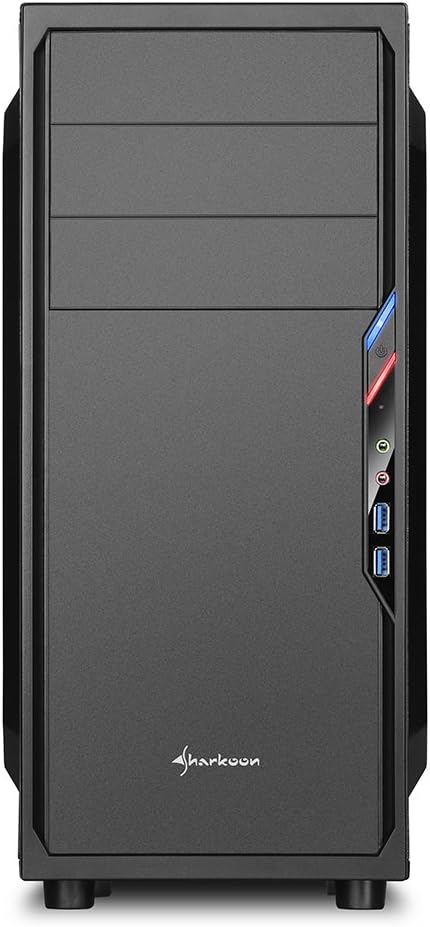
الشكل 2.2: الجبهة view of the PC case, highlighting the drive bays and front panel design.

الشكل 2.3: الجانب view of the PC case, clearly showing the acrylic window panel.

الشكل 2.4: خلفي view of the PC case, showing expansion slots and power supply mounting area.

الشكل 2.5: الداخلية view of the PC case, illustrating the motherboard tray, drive bays, and cable routing options.
3. الإعداد والتثبيت
Follow these steps for proper installation of your PC components into the SHA-VS4-WBK case.
3.1 إعداد القضية
- Carefully unpack the case and remove all packaging materials.
- قم بإزالة الألواح الجانبية عن طريق فك البراغي اليدوية الموجودة في الجزء الخلفي من العلبة.
3.2 تركيب اللوحة الأم
- Install the necessary standoffs onto the motherboard tray according to your motherboard's form factor (ATX or Micro-ATX).
- Place the I/O shield into the rear opening of the case.
- Carefully align your motherboard with the standoffs and I/O shield, then secure it with screws.
3.3 تركيب محرك الأقراص
- محركات أقراص بحجم 5.25 بوصة: For the two tool-less bays, simply slide the drive in until it clicks into place. For the third bay, secure with screws.
- محركات أقراص بحجم 3.5 بوصة: Mount 3.5-inch HDDs into the designated drive cages.
- محركات أقراص بحجم 2.5 بوصة: Mount 2.5-inch SSDs/HDDs into the designated drive cages. The 2.5-inch drive cage can be removed to accommodate longer expansion cards.
3.4 تركيب بطاقة التوسعة
- قم بإزالة أغطية فتحات التوسعة اللازمة من الجزء الخلفي للعلبة.
- Insert your expansion card (e.g., graphics card) into the appropriate PCIe slot on your motherboard.
- Secure the expansion card with the provided screws. Note the maximum clearance of 310mm, or 385mm if the 2.5-inch drive cage is removed.
3.5 تركيب مصدر الطاقة
- Install your power supply unit into the rear-mount power supply bay at the bottom of the case.
- Secure it with screws from the outside of the case. Ensure the power supply's fan faces the correct direction for optimal airflow.
3.6 إدارة الكابلات
Utilize the space behind the motherboard tray and the convex design of the side panel to route cables neatly. This improves airflow and the overall aesthetic of your build.
3.7 Connecting Front I/O Ports
Connect the front panel cables (USB 3.0, audio, power, reset, LED indicators) to the corresponding headers on your motherboard. Refer to your motherboard manual for specific header locations.
4. اعتبارات التشغيل
Once all components are installed, ensure all cables are securely connected and the side panels are reattached. Power on your system and verify all components are functioning correctly. Monitor temperatures to ensure adequate cooling.
5. الصيانة
تساعد الصيانة الدورية على ضمان الأداء الأمثل وطول عمر مكونات جهاز الكمبيوتر الخاص بك.
- تنظيف الغبار: Periodically clean dust from the interior of the case, especially from fans and heatsinks, using compressed air or a soft brush.
- التنظيف الخارجي: امسحي الأسطح الخارجية بقطعة ناعمة ، دamp قماش. تجنب المنظفات الكاشطة.
- Acrylic Panel Care: Clean the acrylic side panel with a soft, lint-free cloth and a mild plastic cleaner to prevent scratches.
6. استكشاف الأخطاء وإصلاحها
إذا واجهت مشاكل، فضع في اعتبارك خطوات استكشاف الأخطاء وإصلاحها الشائعة التالية:
- لا يوجد طاقة: Check all power connections, including the power supply to the wall outlet, the 24-pin ATX connector, and the 8-pin CPU power connector on the motherboard. Ensure the power button cable is correctly connected to the motherboard.
- Components Not Fitting: Double-check component dimensions against the case specifications. For long graphics cards, ensure the 2.5-inch drive cage is removed if necessary.
- Poor Airflow/Overheating: Verify all fans are spinning correctly and are oriented for optimal airflow. Ensure cables are neatly managed to avoid obstructing airflow.
- Front Panel I/O Issues: Confirm that all front panel connectors (USB, audio) are correctly plugged into the motherboard headers.
7. المواصفات
| ميزة | مواصفة |
|---|---|
| ماركة | شاركون |
| رقم الموديل | SHA-VS4-WBK |
| نوع الحالة | البرج الاوسط |
| التوافق مع اللوحة الأم | ATX، Micro-ATX |
| الأبعاد (الطول × العرض × الارتفاع) | 44.5 × 20 × 43 سم |
| وزن | 3.5 كجم |
| مادة | Acrylic (Side Panel) |
| حجرات محرك أقراص مقاس 5.25 بوصة | 3 (2 tool-less) |
| حجرات محرك أقراص مقاس 3.5 بوصة | 3 |
| حجرات محرك أقراص مقاس 2.5 بوصة | 4 |
| منافذ الإدخال / الإخراج الأمامية | 2 × يو اس بي 3.0 |
| Expansion Card Clearance | Max 310mm (385mm with 2.5-inch drive cage removed) |
| أقصى ارتفاع لمبرد وحدة المعالجة المركزية | 160mm (Note: May be 155mm depending on motherboard/cooler) |
| Power Supply Max Depth | 250 ملم |
| طريقة التبريد | تبريد الهواء |
8. الضمان والدعم
For warranty information and technical support, please refer to the official Sharkoon webالموقع أو تواصل مع موزعك المحلي. احتفظ بإيصال الشراء لطلبات الضمان.


