مقدمة
Thank you for choosing the Platinum Karaoke DK-88 Duo Speaker System. This manual provides essential information for the safe and efficient operation of your new device. Please read it thoroughly before use and retain it for future reference.
The DK-88 Duo is an all-in-one karaoke solution, featuring a built-in song library, wireless microphones, and various connectivity options. Its robust design and versatile features make it ideal for home parties, family gatherings, and outdoor events.
معلومات السلامة
- لا تعرض الجهاز للمطر أو الرطوبة لتجنب نشوب حريق أو التعرض لصدمة كهربائية.
- لا تفتح الصندوقasinز. إحالة جميع أعمال الصيانة إلى موظفين مؤهلين.
- تأكد من التهوية الجيدة حول الوحدة. لا تسد فتحات التهوية.
- استخدم محول الشحن المرفق فقط.
- قم بإبقاء الوحدة بعيدًا عن أشعة الشمس المباشرة ومصادر الحرارة والغبار الزائد.
- تجنب وضع أشياء ثقيلة فوق الوحدة.
- يحفظ بعيدًا عن متناول الأطفال.
محتويات الحزمة
يرجى التأكد من تضمين جميع العناصر المدرجة أدناه في الحزمة الخاصة بك:
- Main Unit (DK-88 Duo Speaker)
- محول الشحن
- 2 × ميكروفون لاسلكي
- جهاز التحكم عن بعد
- Batteries (for remote control and microphones)
- كبل AV
- دليل المستخدم
- بطاقة الضمان

الشكل 1: الملحقات والمكونات المرفقة
المنتج انتهىview
أمام View

الشكل 2: الجبهة View of the DK-88 Duo with LED Lighting
ضوابط اللوحة العلوية

الشكل 3: عناصر التحكم والمدخلات في اللوحة العلوية
اللوحة الخلفية

Figure 4: Rear Panel with Connectivity Ports
يثبت
1. Powering On/Charging
- طاقة التيار المتردد: Connect the charging adapter to the 'DC IN 20V/4A' port on the top panel and plug it into a wall outlet. The unit can be used while charging.
- طاقة البطارية: The unit has a built-in rechargeable battery providing up to 6 hours of playback. Ensure the unit is charged before portable use. The battery indicator on the display will show the current charge level.
2. إعداد الميكروفون
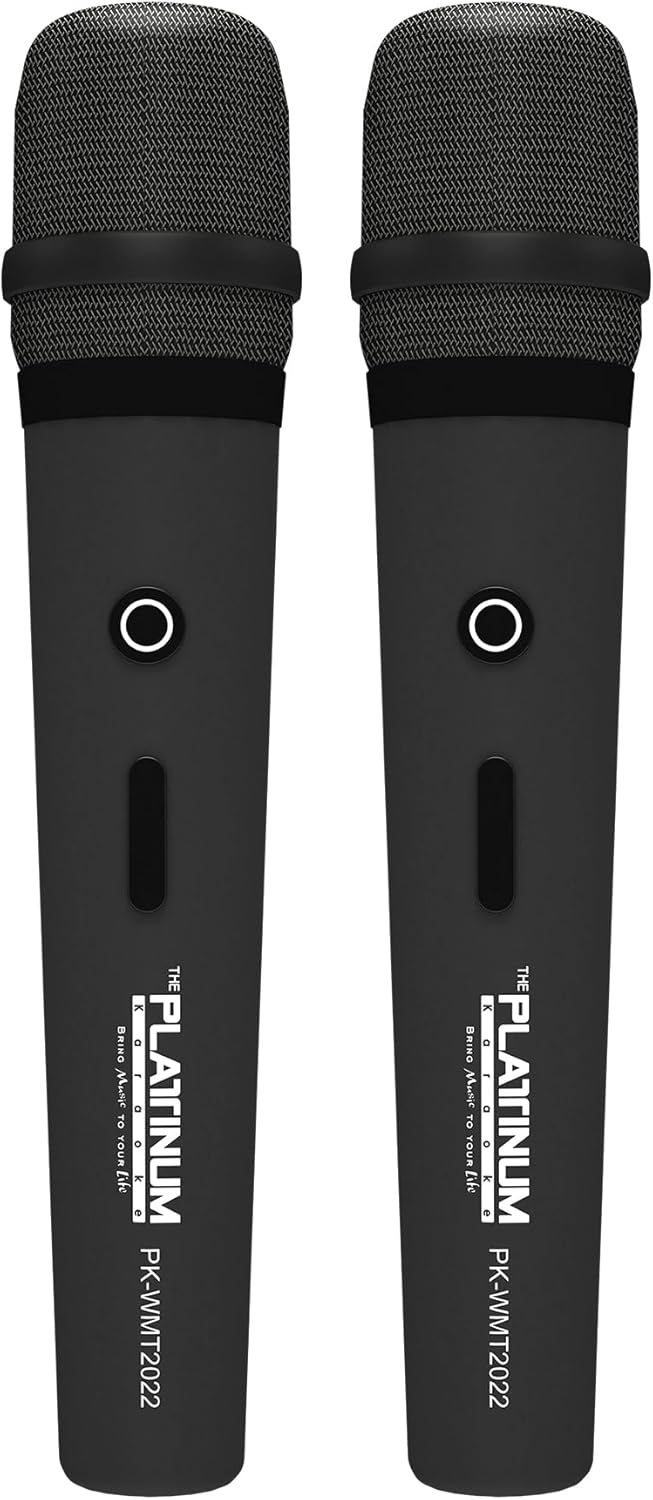
Figure 5: Wireless Microphones
- Insert the provided batteries into each wireless microphone.
- Turn on the microphones using their power switches. They will automatically connect to the DK-88 Duo unit.
- Adjust the 'MIC VOLUME' knob on the top panel to control the microphone output level.
3. توصيل مصادر الصوت
- بلوتوث: Turn on the unit. The Bluetooth indicator will flash. Enable Bluetooth on your mobile device and select 'DK-88 Duo' from the list of available devices to pair.
- محرك أقراص USB: أدخل محرك أقراص فلاش USB يحتوي على موسيقى MP3 files into the 'USB' port on the top panel. The system will automatically detect and play the files.
- بطاقة مايكرو التنمية المستدامة: Insert a Micro SD card (up to 32GB, pre-loaded with songs) into the 'MICRO SD' slot on the top panel. The system will automatically detect and play the songs.
- مدخلات AUX: Use the provided AV cable to connect external audio devices (e.g., DVD player, TV) to the 'AUX' input on the top panel.
- مدخلات الغيتار: Connect a guitar to the 'GUITAR IN' port on the top panel. Adjust the dedicated 'GUITAR' volume knob.
تعليمات التشغيل
1. التشغيل الأساسي
- تشغيل/إيقاف التشغيل: Use the 'POWER' switch on the top panel to turn the unit on or off.
- التحكم في مستوى الصوت: Rotate the 'VOLUME' knob to adjust the overall sound output.
- اختيار الوضع: Press the 'MODE' button to switch between input sources (Bluetooth, USB, Micro SD, AUX).
2. Karaoke Features
- اختيار الأغنية: Use the 'SKIP' buttons (|< / >> |) to navigate through songs.
- تأثير الصدى: Adjust the 'ECHO' knob to add or reduce echo to your vocals. This helps blend your voice with the music.
- تسجيل الأغنية: Press the 'REC' button to start recording your performance. The system will save the music and your vocals to the inserted Micro SD card or USB drive. To share, simply copy the recorded file لجهاز كمبيوتر.
- Vocal Assist (Training Songs): For training songs, the main vocals will automatically fade out when you sing into the microphone and reappear when you stop.
3. ضبط الصوت
- التحكم في الترددات العالية: Use the 'TREBLE' knob to adjust the high-frequency sounds of the music.
- التحكم في الجهير: Use the 'BASS' knob to adjust the low-frequency sounds of the music.
4. تأثيرات الإضاءة
- Press the 'LIGHT' button on the top panel to cycle through different colorful fire lighting modes. The lights glow and dance with the music, enhancing the party atmosphere.
5. Platinum Link App
- Download the 'Platinum Link' app from your mobile device's app store (available on Android and iOS).
- Connect your mobile phone to the DK-88 Duo via Bluetooth.
- Use the app to control song selection, browse the song library, reserve songs, and display karaoke lyrics directly on your phone screen.
- The app also features a karaoke recording function to measure your vocal performance and improve your singing skills.
صيانة
- نظّف الجهاز بقطعة قماش ناعمة وجافة. لا تستخدم المنظفات السائلة أو البخاخات.
- قم بتخزين الوحدة في مكان بارد وجاف عند عدم استخدامها.
- Remove batteries from the remote control and microphones if storing for extended periods to prevent leakage.
استكشاف الأخطاء وإصلاحها
| مشكلة | السبب المحتمل | حل |
|---|---|---|
| لا يوجد طاقة | Unit is not charged or not connected to AC power. | Connect the charging adapter and ensure it's plugged into a working outlet. Check battery level. |
| لا يوجد صوت من الميكروفونات | Microphones are off, batteries are low, or volume is too low. | Turn on microphones, replace batteries, increase 'MIC VOLUME' knob. |
| البلوتوث غير متصل | Bluetooth is not enabled on the unit or mobile device, or device is too far. | Ensure unit is in Bluetooth mode, enable Bluetooth on your device, move closer to the unit. |
| Cannot play songs from USB/SD | غير صحيح file تنسيق تالف files, or card/drive not inserted properly. | يضمن files are MP3 format. Reinsert the USB drive/SD card. Try a different drive/card. |
| الأضواء لا تعمل | تم إيقاف تشغيل خاصية الإضاءة. | Press the 'LIGHT' button to activate the lighting effects. |
تحديد
| ميزة | التفاصيل |
|---|---|
| رقم الموديل | دك-88 |
| الأبعاد (الطول × العرض × الارتفاع) | 35 × 38 × 78 سم |
| وزن | 13 كجم |
| مصدر الطاقة | Battery Powered (1 x 12V battery included), AC Powered |
| مدة تشغيل البطارية | تصل إلى 6 ساعة |
| تكنولوجيا الاتصال | يو اس بي، بلوتوث |
| منافذ USB | 1 |
| عدد مكبرات الصوت | 2 |
| ميزة خاصة | Built-in Song Track |
| لون | أسود |
| الاستخدامات الموصى بها | Home parties, family gatherings, karaoke bars, outdoor events, musical performances |
الضمان والدعم
Your Platinum Karaoke DK-88 Duo comes with a warranty. Please refer to the included Warranty Card for detailed terms and conditions, including warranty period and coverage.
For technical support, service, or inquiries not covered in this manual, please contact Platinum Karaoke customer service. Contact information can typically be found on the Warranty Card or the official Platinum Karaoke webموقع.


