1. المقدمة
The Formuler Z11 Pro Max is an advanced Android 11 streaming media player designed to deliver a high-quality entertainment experience. Featuring 4K resolution support, Wireless AX connectivity, and a Gigabit LAN port, this device provides robust performance for streaming various media content. This manual provides essential information for setting up, operating, and maintaining your Formuler Z11 Pro Max.
2. ما هو المشمول
يرجى التأكد من أن جميع العناصر المدرجة أدناه موجودة في الحزمة الخاصة بك:
- Formuler Z11 Pro Max Unit
- كابل HDMI
- كابل الطاقة
- جهاز التحكم عن بعد
- جهاز تمديد جهاز التحكم عن بعد بالأشعة تحت الحمراء
- 7 Colours Wireless Keyboard (Extra Accessory)
- Magnetic Car Mount (Extra Accessory)

Figure 2.1: Formuler Z11 Pro Max packaging and included accessories, including the main unit, remote, cables, wireless keyboard, and car mount.
3. انتهى المنتجview
Familiarize yourself with the components and features of your Formuler Z11 Pro Max.
3.1 ميزات الجهاز

Figure 3.1: The Formuler Z11 Pro Max device, showcasing its core features such as Android 11 operating system, 4GB DDR4 RAM, 32GB storage, 6th generation AX Wireless, Gigabit LAN, and 4K HDR10+ video support.
3.2 المنافذ والوصلات

الشكل 3.2: خلفي view of the Formuler Z11 Pro Max, displaying the Gigabit LAN port, HDMI output, USB 2.0 port, Micro SD Card slot, IR Extension port, and Power Input (12V/1A).
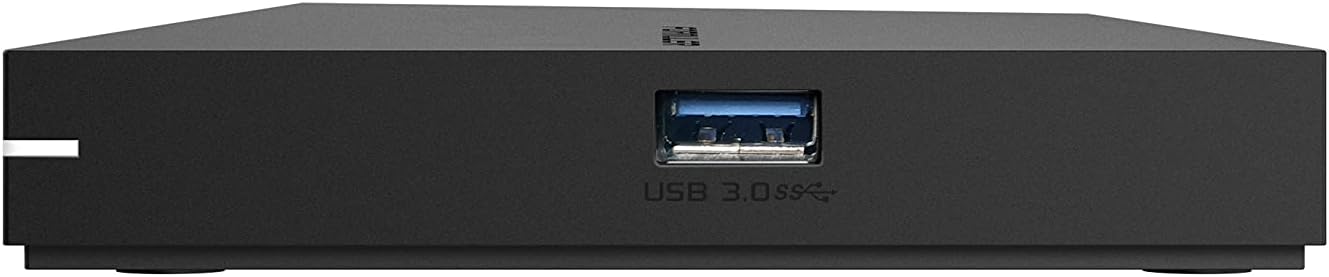
الشكل 3.3: الجانب view of the Formuler Z11 Pro Max, showing the USB 3.0 port for high-speed data transfer.
3.3 التحكم عن بعد

Figure 3.4: Diagram of the Formuler IR1 Premium Learning IR Remote, illustrating the functions of each button for both STB and TV control, including power, volume, channel navigation, menu access, and learning mode.
3.4 الملحقات المضمنة

Figure 3.5: The included 7-color wireless mini keyboard with a USB receiver, offering enhanced navigation and typing capabilities for the streaming media player.

Figure 3.6: The included magnetic car mount, designed for securing compatible devices in a vehicle.
4. تعليمات الإعداد
Follow these steps to set up your Formuler Z11 Pro Max.

Figure 4.1: Visual guide for the initial installation steps of the Formuler Z11 Pro Max.
- الاتصال بالتلفزيون: قم بتوصيل أحد طرفي كابل HDMI بمنفذ HDMI الموجود على جهاز Formuler Z11 Pro Max الخاص بك، والطرف الآخر بمدخل HDMI متاح على جهاز التلفزيون الخاص بك.
- توصيل الطاقة: Plug the power cable into the 'Power Input' port on the Formuler Z11 Pro Max, then connect the other end to a power outlet.
- Power On TV and Select Input: Turn on your television and use its remote control to select the correct HDMI input source that corresponds to where you connected the Formuler Z11 Pro Max.
- إتصال شبكة:
- شبكة سلكية: For a wired connection, connect an Ethernet cable from your router or modem to the 'Gigabit LAN' port on the Formuler Z11 Pro Max.
- شبكة لاسلكية: For a wireless connection, the device will prompt you to select your Wi-Fi network and enter the password during the initial setup process.
- الإعداد الأولي: Follow the on-screen instructions to complete the initial setup, which typically includes language selection, Google account login, and network configuration.
5. تعليمات التشغيل
This section provides general guidance on operating your Formuler Z11 Pro Max.
5.1 استخدام جهاز التحكم عن بعد
The included remote control allows you to navigate the user interface and control playback. Refer to Figure 3.4 for a detailed button layout and their functions. The remote also features a learning mode to control basic TV functions.
5.2 التنقل في واجهة Android TV
The Formuler Z11 Pro Max runs on Android 11, providing a user-friendly interface. Use the directional pad and 'OK' button on your remote to navigate through menus, select applications, and confirm actions. The 'Back' button returns to the previous screen, and the 'Home' button takes you to the main Android TV home screen.
5.3 تثبيت التطبيقات
You can download and install various applications from the Google Play Store directly on your device. Ensure you are logged in with a Google account to access the store.
5.4 تشغيل الوسائط
The device supports 4K resolution and various media formats. You can play content from installed streaming apps, local storage (via USB or Micro SD card), or network shares.
6. الصيانة
تضمن الصيانة المناسبة طول عمر جهازك وأداءه الأمثل.
- تنظيف: استخدم قطعة قماش ناعمة وجافة لتنظيف الجزء الخارجي من الجهاز. تجنب استخدام المنظفات السائلة أو المواد الكاشطة.
- تهوية: Ensure the device is placed in a well-ventilated area to prevent overheating. Do not block the ventilation openings.
- تحديثات البرامج: Periodically check for and install software updates to ensure you have the latest features and security enhancements. These can usually be found in the device's settings menu.
- دورة الطاقة: If the device becomes unresponsive, disconnect the power cable, wait 10 seconds, and then reconnect it to perform a power cycle.
7. استكشاف الأخطاء وإصلاحها
يتناول هذا القسم المشكلات الشائعة التي قد تواجهها.
7.1 لا يوجد طاقة
- Ensure the power cable is securely connected to both the device and a working power outlet.
- تأكد من أن منفذ الطاقة يعمل عن طريق توصيل جهاز آخر.
7.2 No Picture/Signal on TV
- Check that the HDMI cable is firmly connected to both the Formuler Z11 Pro Max and your TV.
- تأكد من ضبط التلفزيون الخاص بك على مصدر إدخال HDMI الصحيح.
- جرب كابل HDMI مختلفًا أو منفذ HDMI مختلفًا في جهاز التلفزيون الخاص بك.
7.3 مشاكل اتصال الشبكة
- السلكية: Ensure the Ethernet cable is properly connected to the device and your router. Check your router's status.
- لاسلكي: Go to Settings > Network & Internet to verify your Wi-Fi connection. Ensure the Wi-Fi password is correct. Restart your router and the Formuler Z11 Pro Max.
7.4 جهاز التحكم عن بعد لا يستجيب
- استبدال البطاريات في جهاز التحكم عن بعد.
- تأكد من عدم وجود أي عوائق بين جهاز التحكم عن بعد وجهاز استقبال الأشعة تحت الحمراء الخاص بالجهاز.
- If using the IR Extension cable, ensure it is properly connected and positioned.
8. المواصفات
المواصفات الفنية التفصيلية لجهاز Formuler Z11 Pro Max.
| ميزة | مواصفة |
|---|---|
| دقة الإخراج | 4K (3840 × 2160) |
| كبش | 4 جيجابايت DDR بسرعة 2400 ميجاهرتز |
| تخزين | 32 جيجابايت من ذاكرة إي إم إم سي |
| نظام التشغيل | أندرويد 11 |
| الاتصال اللاسلكي | AX 2x2 |
| بلوتوث | 5.0 |
| إيثرنت | 1000 ميجابايت (جيجابت) |
| الأبعاد (الطول × العرض × الارتفاع) | 105 ملم × 105 ملم × 21 ملم (4.13 × 4.13 × 0.83 بوصات) |
| وزن | 1.83 رطل |
| الموانئ | مدخل طاقة واحد، منفذ USB 3.0 واحد، منفذ USB 2.0 واحد، منفذ HDMI واحد، منفذ Gigabit LAN واحد، منفذ بطاقة Micro SD واحد، منفذ تمديد الأشعة تحت الحمراء واحد |
| لون | أسود |
| الشركة المصنعة | فورمولر زد 11 برو ماكس |
9. الضمان والدعم
للحصول على معلومات الضمان والدعم الفني، يرجى الرجوع إلى الوثائق المرفقة مع عملية الشراء أو زيارة موقع Formuler الرسمي. webالموقع. عادةً ما تتضمن موارد الدعم الأسئلة الشائعة، وأدلة استكشاف الأخطاء وإصلاحها، ومعلومات الاتصال بخدمة العملاء.


