1. انتهى المنتجview
The 8Bitdo Ultimate 2 Wireless 2.4G Controller is a versatile gamepad designed for an enhanced gaming experience across multiple platforms. It features advanced TMR joysticks, customizable RGB lighting, and flexible connectivity options.

Image 1: The 8Bitdo Ultimate 2 Wireless 2.4G Controller in white, shown with its charging dock and 2.4G USB adapter.
2. الإعداد والاتصال
2.1 التوافق
- كمبيوتر يعمل بنظام Windows: Supports 2.4G wireless and wired connections (Windows 10, version 1903 and above).
- أجهزة أندرويد: Supports Bluetooth wireless connection (Android 9.0 and above).
2.2 2.4G Wireless Connection (Windows PC)
- Locate the 2.4G USB adapter. It is typically stored within the integrated charging dock.
- Plug the charging dock into an available USB port on your Windows PC. The adapter is pre-plugged into the dock.
- The controller will automatically connect to your PC. When the controller is placed on the dock, it will disconnect from the PC and begin charging.

Image 2: The 8Bitdo Ultimate 2 Controller demonstrating its 2.4G wireless technology with the USB adapter.
2.3 Bluetooth Wireless Connection (Android)
- Ensure your Android device's Bluetooth is enabled.
- Refer to your controller's specific pairing instructions (usually involving holding a button combination) to enter Bluetooth pairing mode.
- Select the '8Bitdo Ultimate 2' from the list of available Bluetooth devices on your Android device to complete pairing.
2.4 اتصال سلكي
The controller can be connected directly to your Windows PC via a USB cable for a wired connection. This also supports a 1000Hz polling rate.
2.5 برنامج 8BitDo Ultimate الإصدار الثاني
Download and install the 8BitDo Ultimate Software V2 on your PC to customize controller settings, including button mapping, joystick dead zones, trigger sensitivity, vibration intensity, and RGB lighting effects.

Image 3: Screenshot of the 8Bitdo Ultimate Software V2 interface, showing options for RGB, motion, and other customizations.
3. تشغيل وحدة التحكم
3.1 TMR Joysticks
The controller is equipped with TMR (Tunnel Magnetoresistance) joysticks, offering enhanced sensitivity, precision, and durability. These joysticks also contribute to reduced energy consumption.

الصورة 4: لقطة مقربة view highlighting the TMR joysticks and their integrated RGB lighting.
3.2 Hall Effect Triggers & Mode Switching
Easily switch between linear Hall Effect triggers and non-linear tactile triggers using the dedicated mode switch. This allows for optimal control in various gaming scenarios, from racing to shooting games.

Image 5: Illustration of the two trigger modes, linear Hall Effect and non-linear tactile, with the mode switch visible on the controller.
3.3 Customizable Features
- Back Paddle Buttons: Two Pro back paddle buttons and extra R4/L4 bumpers provide additional customizable inputs for enhanced control.
- 6-Axis Motion Control: Utilize the customizable 6-axis motion control for immersive gameplay.
- وظيفة التربو: Activate the turbo function for rapid button presses.
- اهتزاز الدمدمة: Experience tactile feedback with the integrated rumble vibration motors.
- RGB Fire Ring: The joysticks feature an RGB Fire Ring with interactive light-tracing and multiple adjustable light modes for visual effects during gameplay.

Image 6: A user holding the controller, illustrating the 6-axis motion control feature during gameplay.
4. الصيانة
4.1 البطارية والشحن
The controller is equipped with a 1000mAh Lithium Metal battery. It supports 3-hour fast charging and provides approximately 15-28 hours of play time depending on usage.
- To charge, place the controller on its integrated charging dock.
- Ensure the charging dock is connected to a power source (e.g., your PC's USB port).

الصورة 7: داخلي view of the controller highlighting the 1000mAh battery and its charging capabilities.
4.2 التنظيف
Use a soft, dry cloth to clean the controller. Avoid using harsh chemicals or abrasive materials that could damage the surface.
5. استكشاف الأخطاء وإصلاحها
- وحدة التحكم غير متصلة: Ensure the 2.4G adapter is properly plugged into your PC or that Bluetooth is enabled and paired on your Android device. Try restarting the controller and the host device.
- قضايا الشحن: Verify the charging dock is connected to a working USB port and that the controller is correctly seated on the dock.
- تأخر الإدخال: For 2.4G wireless, ensure the adapter is not obstructed and is within range (up to 10m). For wired connections, ensure the USB cable is securely connected.
- Customization not applying: Ensure the 8BitDo Ultimate Software V2 is running and the controller is connected. Apply changes within the software.
6. المواصفات
| نموذج | Ultimate 2 Wireless 2.4G Controller |
| أبعاد | 6.3 × 5.31 × 3.15 بوصة |
| وزن | 1.32 رطل (حوالي 599 جرام) |
| بطارية | بطارية ليثيوم معدنية 1000 مللي أمبير في الساعة (متضمنة) |
| الاتصال | 2.4G Wireless, Bluetooth BLE, Wired USB |
| معدل التصويت | 1000Hz (2.4G and Wired) |
| التوافق | Windows 10 (1903+) and Android 9.0+ |
| العناصر المضمنة | 8Bitdo Ultimate 2 Wireless Controller, Charging dock, 2.4G adapter, USB cable, Instruction manual |
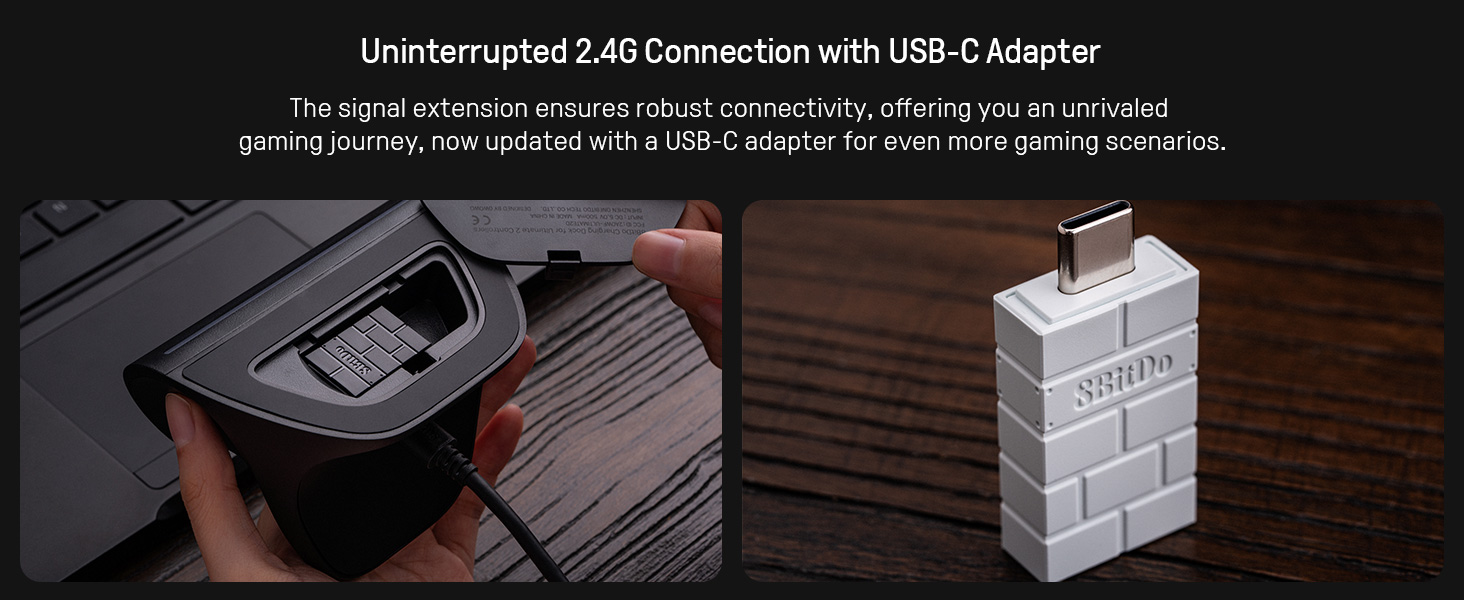
Image 8: A visual summary of the controller's connectivity, compatibility, dimensions, weight, and included items.
7. فيديو المنتج الرسمي
Video 1: Official product video from RunSnail showcasing the 8Bitdo Ultimate 2 Wireless 2.4G Controller's features and design.
8. الضمان والدعم
For warranty information and technical support, please refer to the official 8Bitdo webالموقع أو تواصل مع خدمة العملاء مباشرةً. احتفظ بإثبات الشراء لأي مطالبات بالضمان.


