مقدمة
The Xiaomi Redmi Pad L83 is a WiFi-only tablet designed for entertainment and productivity. It features a 10.61-inch display, an Octa-Core MediaTek Helio G99 processor, and a large 8000mAh battery. This manual provides essential information to help you set up, operate, and maintain your device.
ماذا يوجد في الصندوق
Upon unboxing your Xiaomi Redmi Pad, you should find the following items:
- 1 x Xiaomi Redmi Pad L83 Tablet
- 1 × شاحن سيارة
- 1 × كابل يو اس بي
Video: Unboxing and First Review of the Xiaomi Redmi Pad. This video demonstrates the contents of the product packaging and initial impressions of the device.
يثبت
- تشغيل الطاقة: Press and hold the Power button located on the top edge of the tablet until the Xiaomi logo appears.
- الترتيب الأولي: اتبع التعليمات التي تظهر على الشاشة لتحديد اللغة والمنطقة والاتصال بشبكة Wi-Fi.
- إعداد حساب Google: قم بتسجيل الدخول باستخدام حساب Google الخاص بك أو قم بإنشاء حساب جديد للوصول إلى خدمات Google ومتجر Play.
- قفل الشاشة: Set up a screen lock method (Pattern, PIN, Password, or Face Unlock) for security. Note that Face Unlock is less secure than other methods.
- تحديثات البرامج: Ensure your tablet is running the latest software by checking for updates in the Settings menu.
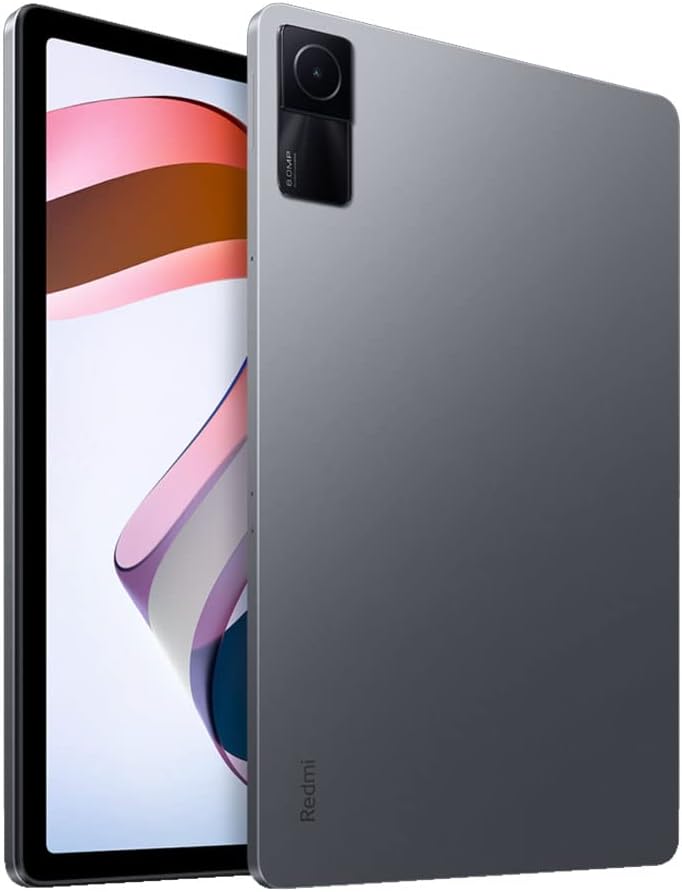
الصورة: الجبهة view of the Xiaomi Redmi Pad, showing the display and the location of the SIM/microSD card tray on the side.
تعليمات التشغيل
العرض والصوت
The Redmi Pad features a 10.61-inch IPS display with a resolution of 2000x1200 pixels and a 90Hz refresh rate, offering a smooth visual experience. It supports Dolby Atmos audio through its quad speakers, providing immersive sound for media consumption.
- عرض: 10.61-inch, 2000x1200 resolution, 90Hz refresh rate, 400 nits (typ) brightness.
- صوتي: Quad speakers with Dolby Atmos support for rich sound.
فيديو: مراجعة شاملةview of the Xiaomi Redmi Pad, highlighting its display quality, audio performance, and overall user experience.
الأداء والألعاب
Powered by the MediaTek Helio G99 Octa-core processor, the Redmi Pad delivers smooth performance for daily tasks and medium-graphic gaming. It is available with 3GB, 4GB, or 6GB of RAM and 64GB or 128GB of storage, expandable via microSD card.
- المعالج: MediaTek Helio G99 Octa-core.
- كبش: 3GB, 4GB, or 6GB options.
- تخزين: 64GB or 128GB, expandable via microSD.
Video: A detailed comparison between the Redmi Pad and Samsung Galaxy Tab S6 Lite 2022, focusing on performance, display, and overall value for money.
Software & Updates
The tablet runs MIUI 13 based on Android 12. Xiaomi promises two major Android updates and three years of security updates, ensuring your device remains up-to-date and secure.
- نظام التشغيل: Android 12 with MIUI 13.
- التحديثات: Two major Android updates and three years of security updates.
آلة تصوير
The Redmi Pad is equipped with an 8MP rear camera and an 8MP front camera (105° FOV with FocusFrame). Both cameras are suitable for casual photography, video calls, and document scanning.
- الكاميرا الخلفية: 8MP, Full HD Video Recording.
- الكاميرا الأمامية: 8MP (FOV - 105°), ideal for video calls.

الصورة: الخلف view of the Xiaomi Redmi Pad, showcasing the single 8MP rear camera module.
عمر البطارية
With an 8000mAh battery, the Redmi Pad offers extended usage times, making it suitable for long commutes or entertainment sessions. It supports 18W fast charging.
- سعة البطارية: 8000 مللي أمبير.
- الشحن: شحن سريع بقوة 18 واط.
صيانة
- تنظيف: استخدم قطعة قماش ناعمة وخالية من الوبر لتنظيف الشاشة وجسم الجهاز. تجنب المواد الكيميائية القاسية.
- تحديثات البرامج: قم بالتحقق من تحديثات النظام وتثبيتها بانتظام لضمان الأداء والأمان الأمثل.
- ادارة التخزين: قم بإزالة غير الضروري بشكل دوري files and apps to free up storage space and improve device speed.
- العناية بالبطارية: Avoid extreme temperatures and fully draining the battery frequently to prolong its lifespan.
استكشاف الأخطاء وإصلاحها
- الجهاز لا يستجيب: If the tablet becomes unresponsive, press and hold the Power button for about 10 seconds to force a restart.
- مشكلات الاتصال بشبكة Wi-Fi: Try restarting your Wi-Fi router and the tablet. If the issue persists, forget the network in Wi-Fi settings and reconnect.
- تعطل التطبيق: Clear the cache and data of the problematic app in Settings > Apps. If it continues, uninstall and reinstall the app.
- الأداء البطيء: Close background apps, clear cache, and ensure sufficient free storage. Consider a factory reset as a last resort (back up your data first).
- اتصل بالدعم: For persistent issues, refer to the Xiaomi support webالموقع أو الاتصال بخدمة العملاء.
مواصفات المنتج
| ميزة | مواصفة |
|---|---|
| ماركة | شاومي |
| اسم الموديل | ريدمي باد |
| رقم الموديل | ل83 |
| حجم الشاشة | 10.61 بوصة |
| دقة العرض | 2000×1200 |
| معدل تحديث الشاشة | 90 هرتز |
| المعالج | معالج MediaTek Helio G99 ثماني النواة (2.2 جيجاهرتز) |
| ذاكرة الوصول العشوائي (RAM) | 4 GB (available in 3GB, 4GB, 6GB variants) |
| سعة التخزين | 128 GB (available in 64GB, 128GB variants) |
| نظام التشغيل | Android 12 (MIUI 13) |
| الكاميرا الخلفية | 8 ميجا بكسل |
| الكاميرا الأمامية | 8 MP (105° FOV) |
| سعة البطارية | 8000 مللي أمبير |
| الاتصال | Wi-Fi 5, Bluetooth v5.3, USB-C |
| صوتي | Quad Speakers, Dolby Atmos supported |
الضمان والدعم
The Xiaomi Redmi Pad L83 comes with a limited warranty. For detailed warranty terms and conditions, please refer to the warranty card included in the box or visit the official Xiaomi support webموقع.
For technical support, troubleshooting assistance, or service requests, please contact Xiaomi customer support through their official channels.