1. المقدمة
This user manual provides comprehensive instructions for the installation, operation, and maintenance of your Weiser SmartCode Keypad Electronic Deadbolt. This advanced keyless entry system offers enhanced security and convenience for your home.
The SmartCode deadbolt features a sleek design, a backlit keypad for visibility, and the ability to store up to 50 user codes. It operates on 4 AA batteries and includes SmartKey re-key technology for added security and flexibility.
2. معلومات السلامة
Please read and understand all instructions before installing and using this product. Keep this manual for future reference.
- لا تحاول فك القفل أو تعديله. قد يؤدي ذلك إلى تلف المنتج وإبطال الضمان.
- استخدم فقط نوع البطارية المحدد (4 بطاريات قلوية AA). لا تخلط البطاريات القديمة والجديدة أو أنواعًا مختلفة من البطاريات.
- تأكد من القطبية الصحيحة عند إدخال البطاريات.
- Keep all keys and user codes in a secure location.
- Avoid exposing the lock to extreme temperatures or direct moisture.
- تحقق بانتظام من وظائف القفل ومستوى البطارية.
3. محتويات العبوة
تأكد من وجود كافة المكونات قبل البدء في التثبيت:

Image: Complete package contents of the Weiser SmartCode Keypad Electronic Deadbolt.
- Electronic Deadbolt (Exterior Keypad Assembly)
- Electronic Deadbolt (Interior Battery Unit)
- مزلاج
- لوحة الإضراب
- لوحة التركيب
- أدوات التثبيت (البراغي)
- 2 مفتاحا
- أداة المفتاح الذكي
- دليل التثبيت (هذا المستند)
Note: 4 AA batteries are required and not included in the package.
4. الإعداد والتثبيت
The Weiser SmartCode deadbolt is designed for easy installation. For a seamless setup experience, it is highly recommended to use the free BILT app, which provides step-by-step interactive 3D instructions with voice and video guidance.
4.1 توافق الباب
This lock is designed to fit standard doors 1-3/8" to 1-3/4" (35 mm - 44 mm) thick with an adjustable backset (2-3/8" or 2-3/4"). It is ideal for most exterior and interior residential doors.
4.2 خطوات التثبيت (أكثر منview)
- جهز الباب: Ensure your door is properly drilled and aligned for a deadbolt installation.
- تثبيت المزلاج: Insert the latch into the door edge, ensuring the correct backset is selected.
- تثبيت التجميع الخارجي: Place the exterior keypad assembly onto the door, feeding the cable through the cross bore.
- تثبيت لوحة التثبيت: Secure the mounting plate to the door using the provided screws, ensuring the cable passes through the plate.
- Connect the Cable and Install Interior Assembly: Connect the cable from the exterior assembly to the interior battery unit. Mount the interior unit to the mounting plate.
- تركيب البطاريات: Insert 4 AA alkaline batteries into the interior unit, observing polarity.
- تنفيذ عملية تسليم الباب: This crucial step teaches the lock the orientation of your door. Follow the specific instructions in the full manual or BILT app.
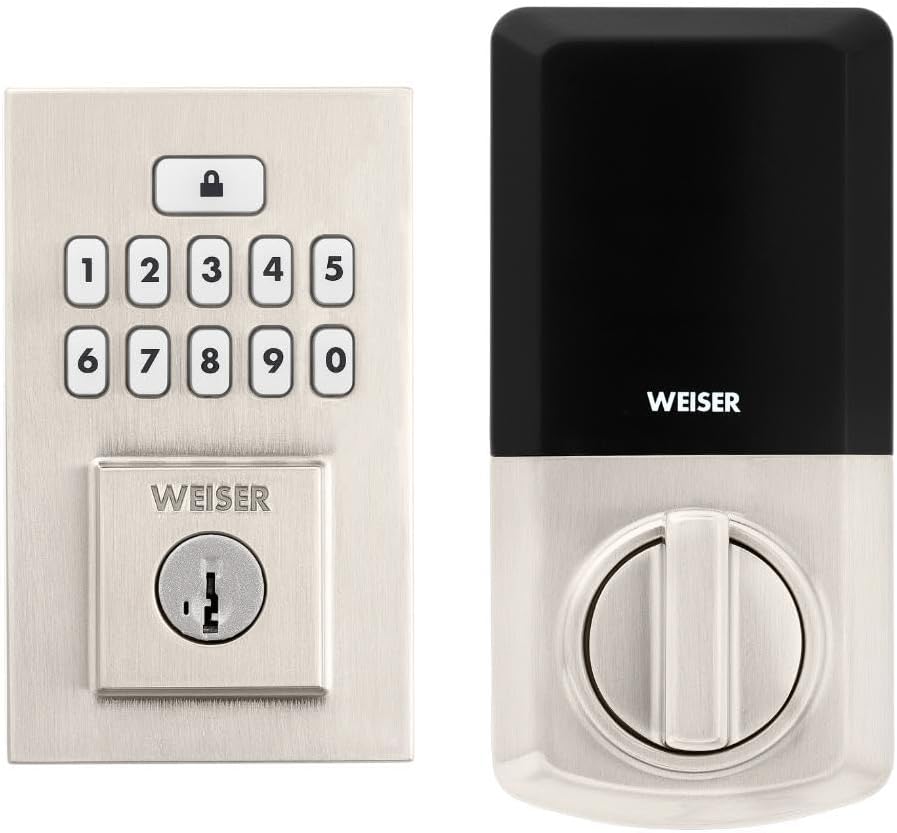
Image: Assembled Weiser SmartCode Keypad Electronic Deadbolt, showing both exterior and interior components.

Image: Close-up of the exterior keypad, featuring the backlit numeric buttons and keyhole.
5. تعليمات التشغيل
5.1 قفل الباب
- القفل بلمسة واحدة: Press the Lock button (top button with padlock icon) on the keypad. The deadbolt will extend.
- ميزة القفل التلقائي: If enabled, the deadbolt will automatically extend after a set period (e.g., 30 seconds) once unlocked.
5.2 فتح الباب
- استخدام رمز المستخدم: Enter your personalized 4-8 digit user code on the keypad. The deadbolt will retract.
- استخدام المفتاح: أدخل المفتاح المادي في ثقب المفتاح ثم قم بتدويره لفتح القفل.
5.3 برمجة أكواد المستخدم
The lock supports up to 50 user codes and 1 master code. Refer to the detailed programming instructions in the full manual for adding, deleting, or modifying codes.
- كود ماجستير: The master code is used to add and delete user codes. It does not unlock the door.
- رموز المستخدم: These codes are used to unlock the door.


Image: Icons illustrating user management, programming, and auto-lock features.
5.4 تقنية إعادة برمجة المفتاح الذكي
The SmartKey re-key technology allows you to re-key your lock in seconds, maintaining key control and protecting against lost, stolen, or unauthorized keys without removing the lock from your door. Use the provided SmartKey tool and follow the instructions carefully.

Image: SmartKey Security feature, demonstrating how to re-key the lock.
6. الصيانة
6.1 استبدال البطارية
The lock operates on 4 AA alkaline batteries. When the batteries are low, the lock will provide an audible and/or visual low battery warning. Replace all four batteries simultaneously to ensure optimal performance.
- قم بإزالة غطاء البطارية الموجود على الوحدة الداخلية.
- قم بإزالة البطاريات القديمة والتخلص منها بشكل صحيح.
- أدخل بطاريات قلوية جديدة من نوع AA، مع التأكد من صحة القطبية (+/-).
- استبدال غطاء البطارية.
Note: Battery life can vary based on usage frequency and environmental conditions. If the auto-lock feature is frequently used, battery life may be shorter.
6.2 التنظيف
نظف القفل بقطعة قماش ناعمة.amp تجنب استخدام المنظفات الكاشطة أو المذيبات أو البخاخات الكيميائية، لأنها قد تُلحق الضرر بالطبقة النهائية والمكونات الإلكترونية.
7. استكشاف الأخطاء وإصلاحها
| مشكلة | السبب المحتمل | حل |
|---|---|---|
| Lock does not respond or keypad is not lit. | البطاريات الميتة. | استبدل جميع بطاريات AA الأربع. |
| Lock beeps 3 times during programming or code entry. | Incorrect code, programming error, or lock not handed correctly. | Verify the code. Re-attempt programming steps carefully. Perform the door handing process again. If issues persist, reset the unit to factory settings (refer to full manual). |
| Deadbolt extends when door is open (Auto-lock issue). | The lock does not have a sensor to detect if the door is open or closed. Auto-lock activates after the set time regardless of door position. | This is normal operation. Ensure the door is closed before the auto-lock time expires, or disable the auto-lock feature if it causes inconvenience. |
| Keypad is difficult to see at night. | Backlight not active. | The keypad is backlit and stays lit for 30 seconds after inactivity. Ensure there is enough battery power. |
| Lock is not operating smoothly. | Misalignment of door or strike plate, or internal mechanism issue. | Check door and frame alignment. Ensure the strike plate is correctly installed. If the issue persists, contact customer support. |
8. المواصفات
| ميزة | التفاصيل |
|---|---|
| رقم الموديل | 9GED92600-003 |
| أبعاد المنتج | 6.99 x 2.86 x 13.97 cm (2.75 x 1.13 x 5.5 inches) |
| وزن العنصر | 454 جرام (1 رطل) |
| لون | الساتان النيكل |
| أسلوب | معاصر |
| ينهي | مصقول بالفرشاة |
| مادة | معدن |
| نوع القفل | مزلاج إلكتروني |
| لوحة المفاتيح | 10-Button, Backlit |
| رموز المستخدم | ما يصل إلى 50 رمز مستخدم، ورمز رئيسي واحد |
| مصدر الطاقة | 4 بطاريات AA (غير مدرجة) |
| توافق سمك الباب | 1-3/8" to 1-3/4" (35 mm - 44 mm) |
| انتكاسة | قابل للتعديل 2-3/8 بوصة أو 2-3/4 بوصة |
| المميزات الخاصة | مقاوم للعوامل الجوية، مقاوم للصدمات، قفل تلقائي، قفل بلمسة واحدة، لوحة مفاتيح بإضاءة خلفية، نظام أمان SmartKey |
| درجة ANSI | الصف الخامس |
| بلد المنشأ | الصين |
9. الضمان والدعم
9.1 معلومات الضمان
The Weiser SmartCode Keypad Electronic Deadbolt comes with a ضمان لمدة 1 سنوات يسري هذا الضمان من تاريخ الشراء. ويغطي عيوب المواد والتصنيع في ظل الاستخدام العادي. يرجى الاحتفاظ بإثبات الشراء لتقديم مطالبات الضمان.
For full warranty details and limitations, please refer to the official Weiser webالموقع أو الاتصال بدعم العملاء.
9.2 دعم العملاء
For technical assistance, troubleshooting, or warranty inquiries, please contact Weiser customer support:
- الدعم عبر الإنترنت: قم بزيارة موقع Weiser الرسمي website for FAQs, video tutorials, and contact forms.
- دعم الهاتف: Refer to the contact information provided on the Weiser packaging or webالموقع الإلكتروني لمعرفة ساعات الدعم عبر الهاتف.
- تطبيق BILT: Utilize the BILT app for interactive 3D installation and programming guidance.
When contacting support, please have your product model number (9GED92600-003) and purchase date available.


