1. المقدمة
This manual provides essential information for the proper setup, operation, and maintenance of your Sharp 32FG6EA 32-inch HD Android TV. The Sharp 32FG6EA offers a wide range of connection options and features the Android TV operating system, providing a modern and intuitive television experience. It functions as an all-in-one entertainment hub, integrating Google Assistant for a smarter viewing experience. Users can quickly access entertainment, control smart devices, and obtain on-screen information using voice commands.
2. معلومات السلامة
Please read all safety instructions carefully before using the television. Keep this manual for future reference.
- مزود الطاقة: تأكد من توصيل التلفزيون بمصدر طاقة بالجهد المناسبtagهـ. لا تفرط في تحميل منافذ الطاقة.
- تهوية: لا تسد فتحات التهوية. اترك مساحة كافية حول التلفزيون لتدفق الهواء بشكل صحيح ومنع ارتفاع درجة حرارته.
- الماء والرطوبة: Do not expose the TV to rain, moisture, or excessive humidity. Avoid placing objects filled with liquids on or near the TV.
- تنظيف: افصل التلفاز عن الكهرباء قبل التنظيف. استخدم قطعة قماش ناعمة وجافة. لا تستخدم المنظفات السائلة أو البخاخات.
- الموقع: ضع التلفاز على سطح مستوٍ وثابت. في حال تثبيته على الحائط، تأكد من تثبيت الحامل بإحكام وقدرته على تحمل وزن التلفاز.
- الخدمة: لا تحاول صيانة التلفزيون بنفسك. أحل جميع أعمال الصيانة إلى فني صيانة مؤهل.
3. محتويات العبوة
تأكد من وجود جميع العناصر في العبوة:
- Sharp 32FG6EA 32-inch HD Android TV
- جهاز التحكم عن بعد (مع بطاريتين AAA)
- Stand Type Base
- دليل التعليمات
- كابل الطاقة
4. الإعداد
4.1 فك التعبئة
Carefully remove the TV and all accessories from the packaging. Retain the packaging materials for future transport or servicing.
4.2 تركيب الحامل
If you are not wall-mounting the TV, attach the included stand base:
- ضع شاشة التلفزيون لأسفل على سطح ناعم ومستوٍ لمنع التلف.
- قم بمحاذاة قاعدة الحامل مع فتحات التثبيت الموجودة في الجزء السفلي من التلفزيون.
- ثبّت الحامل باستخدام البراغي المرفقة. تأكد من تثبيت الحامل بإحكام.
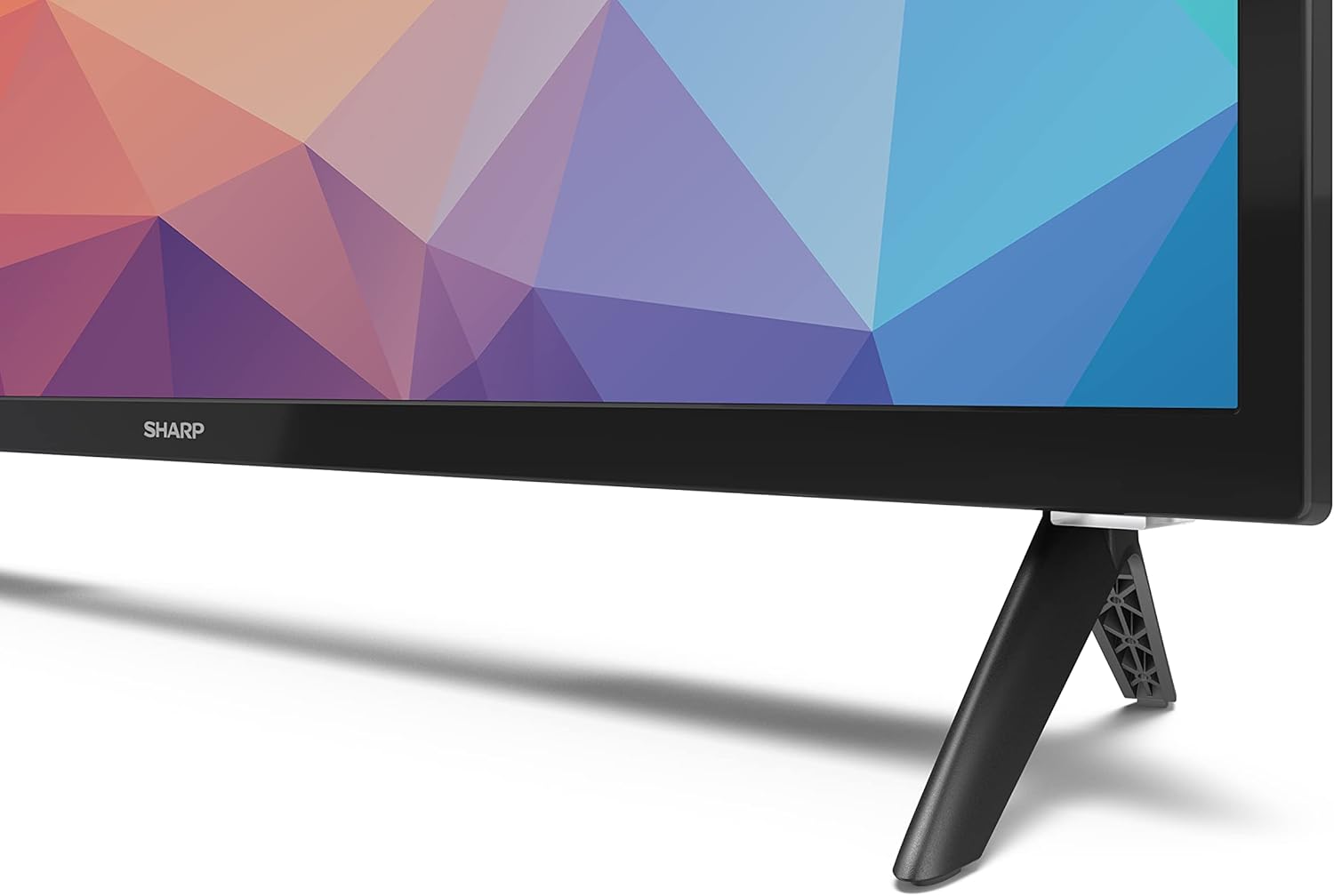
Image: Close-up of the TV stand attachment.
4.3 التركيب على الحائط
The Sharp 32FG6EA supports VESA wall mounts with dimensions of 75 x 75 mm. Wall mount hardware is not included. Follow the instructions provided with your wall mount kit.
4.4 توصيل الأجهزة الخارجية
يحتوي جهاز التلفزيون الخاص بك على منافذ متعددة لتوصيل أجهزة مختلفة:
- HDMI: Connect Blu-ray players, game consoles, or set-top boxes to the 2 HDMI ports.
- USB: Connect USB storage devices for media playback to the 2 USB ports.
- هوائي / كابل: قم بتوصيل هوائي أو مصدر تلفزيون الكابل لقنوات البث.
- إيثرنت: للاتصال بالإنترنت السلكي.
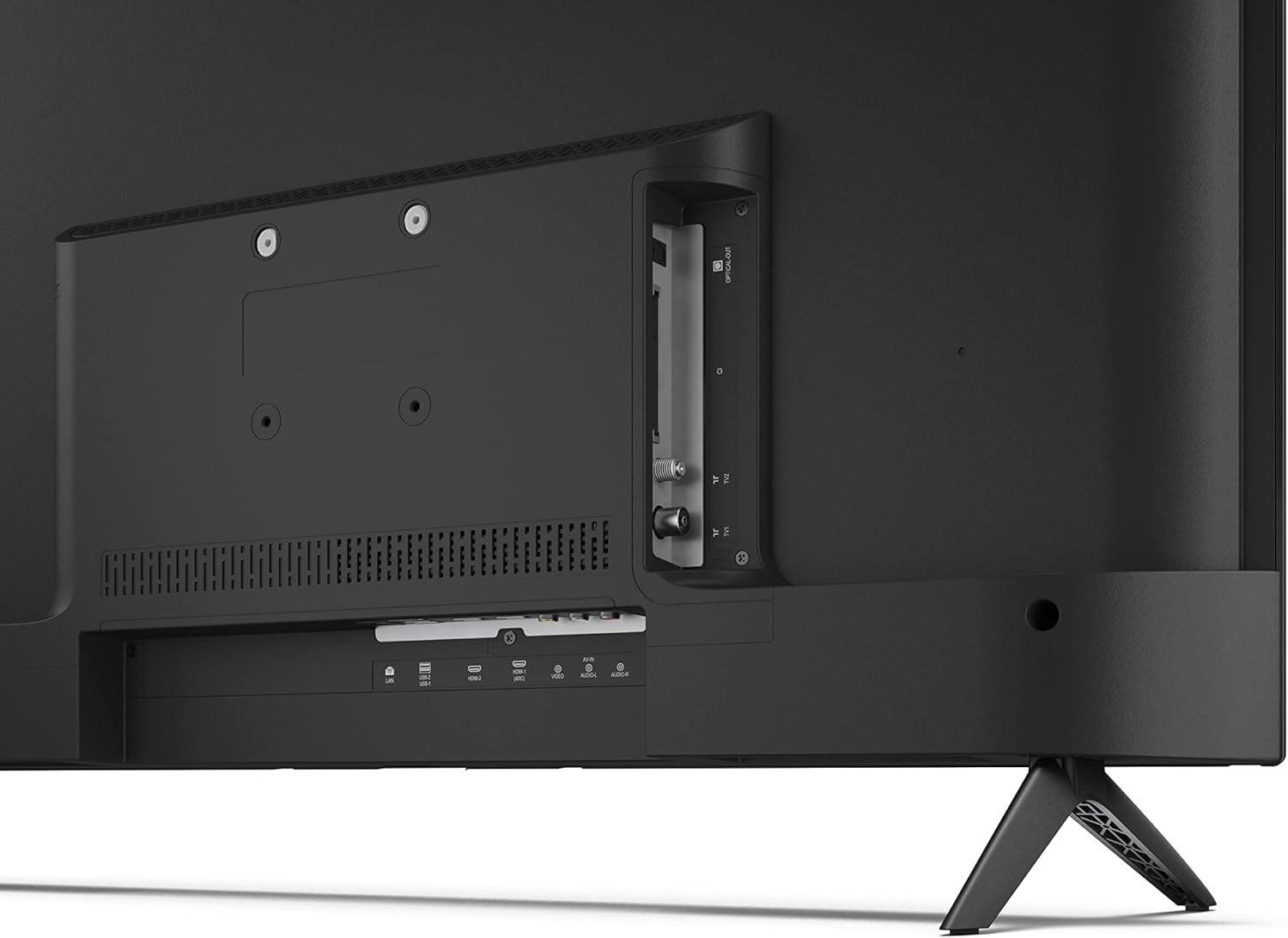
الصورة: الخلفية view يحتوي التلفزيون على منافذ توصيل.
4.5 توصيل الطاقة
After connecting all necessary devices, plug the power cable into the TV and then into a wall outlet.
4.6 معالج الإعداد الأولي
عند تشغيل التلفزيون لأول مرة، سيرشدك خلال عملية الإعداد الأولية. يتضمن ذلك:
- اختيار اللغة.
- اتصال الشبكة (Wi-Fi أو Ethernet).
- Google account sign-in (required for full Android TV features).
- مسح القناة.
5. التشغيل
5.1 التحكم عن بعد أكثرview
The included remote control allows you to navigate the TV's features. Insert the 2 AAA batteries into the remote control before use.
- زر الطاقة: تشغيل التلفزيون أو إيقاف تشغيله.
- لوحة الاتجاهات (D-Pad) وزر موافق: التنقل عبر القوائم وتأكيد الاختيارات.
- زر الرجوع: العودة إلى الشاشة السابقة.
- زر الصفحة الرئيسة: الوصول إلى الشاشة الرئيسية لجهاز Android TV.
- رفع/خفض الصوت: ضبط مستوى الصوت.
- القناة لأعلى/لأسفل: تغيير القنوات التلفزيونية.
- زر مساعد جوجل: تفعيل التحكم الصوتي.
- أزرار اختصار التطبيق: أزرار مخصصة لخدمات البث الشهيرة مثل نتفليكس، وبرايم فيديو، ويوتيوب.
5.2 Android TV Interface Navigation
The Android TV home screen provides access to your installed apps, recommended content, and settings. Use the directional pad on your remote to navigate through the interface.
5.3 مساعد جوجل
Press the Google Assistant button on your remote and speak into the microphone to:
- بحث عن الأفلام، أو البرامج، أو المعلومات.
- التحكم في أجهزة المنزل الذكية.
- افتح الطلبات.
- اضبط إعدادات التلفزيون.
5.4 جهاز Chromecast المدمج
The TV includes Chromecast built-in, allowing you to cast content from compatible apps on your smartphone, tablet, or computer directly to the TV screen.
5.5 اتصال البلوتوث
Connect Bluetooth devices such as headphones or speakers to your TV for a personalized audio experience. Navigate to the TV's settings menu to pair new Bluetooth devices.
5.6 إعدادات الصوت
The TV supports Dolby Audio with 2 x 6 W RMS speakers. You can adjust audio settings, including sound modes and equalizer, through the TV's settings menu.
6. الصيانة
6.1 تنظيف التلفزيون
To clean the TV screen and cabinet:
- افصل سلك الطاقة من مأخذ الحائط.
- Use a soft, lint-free cloth to gently wipe the screen and surfaces.
- بالنسبة للعلامات العنيدة، د قليلاًampبللي قطعة القماش بالماء أو بمنظف شاشات متخصص (ضعيه على قطعة القماش، وليس مباشرة على الشاشة).
- لا تستخدم المنظفات الكاشطة أو الشمع أو المذيبات.
6.2 تحديثات البرامج
Your Android TV may receive periodic software updates to improve performance and add new features. Ensure your TV is connected to the internet to receive these updates. You can check for updates manually in the TV's settings menu.
7. استكشاف الأخطاء وإصلاحها
إذا واجهت مشكلات مع التلفزيون الخاص بك، فراجع المشكلات والحلول الشائعة التالية:
- لا يوجد طاقة: تأكد من توصيل كابل الطاقة بإحكام بكل من التلفزيون ومأخذ الحائط العامل. جرب مأخذًا آخر.
- لا صورة/صوت: Check that the correct input source is selected. Verify all cables (HDMI, antenna) are properly connected.
- جهاز التحكم عن بعد لا يعمل: تأكد من تركيب البطاريات بشكل صحيح. وجّه جهاز التحكم عن بُعد مباشرةً نحو مستشعر الأشعة تحت الحمراء في التلفزيون.
- جودة الصورة رديئة: Check antenna/cable connections. Adjust picture settings in the TV menu. For streaming content, ensure a stable internet connection.
- لا يوجد اتصال بالإنترنت: Verify Wi-Fi password or Ethernet cable connection. Restart your router and the TV.
- التطبيقات لا تعمل: تأكد من تحديث برنامج التلفزيون. حاول مسح ذاكرة التخزين المؤقت للتطبيق أو إعادة تثبيته.
If problems persist, consult the Sharp support webالموقع أو الاتصال بخدمة العملاء.
8. المواصفات
| ميزة | مواصفة |
|---|---|
| رقم الموديل | 32FG6EA |
| ماركة | حاد |
| حجم الشاشة | 32 بوصات (81 سم قطريًا) |
| تكنولوجيا العرض | قاد |
| دقة | 720 بكسل (1366 × 768 بكسل) |
| نسبة العرض إلى الارتفاع | 16:9 |
| معدل التحديث | 50 هرتز |
| نظام التشغيل | أندرويد تي في 11 |
| المميزات الخاصة | Android TV, Google Assistant, Chromecast built-in |
| مخرج الصوت | 2 x 6 W RMS, Dolby Audio |
| منافذ HDMI | 2 |
| منافذ USB | 2 |
| الاتصال | واي فاي، بلوتوث، إيثرنت |
| حامل حائط VESA | 75 × 75 ملم |
| الأبعاد مع الحامل (العرض × الارتفاع × العمق) | 731 × 486 × 177 ملم |
| الأبعاد بدون الحامل (العرض × الارتفاع × العمق) | 731 × 433 × 68 ملم |
| أبعاد المنتج (العمق × العرض × الارتفاع) | 16 x 73 x 46.4 cm (approximate, with stand) |
| وزن | 3.9 كجم |
| فئة كفاءة الطاقة | E |

Image: TV dimensions diagram.

صورة: ملصق الطاقة. لمزيد من التفاصيل، تفضل بزيارة قاعدة بيانات إيبريل.
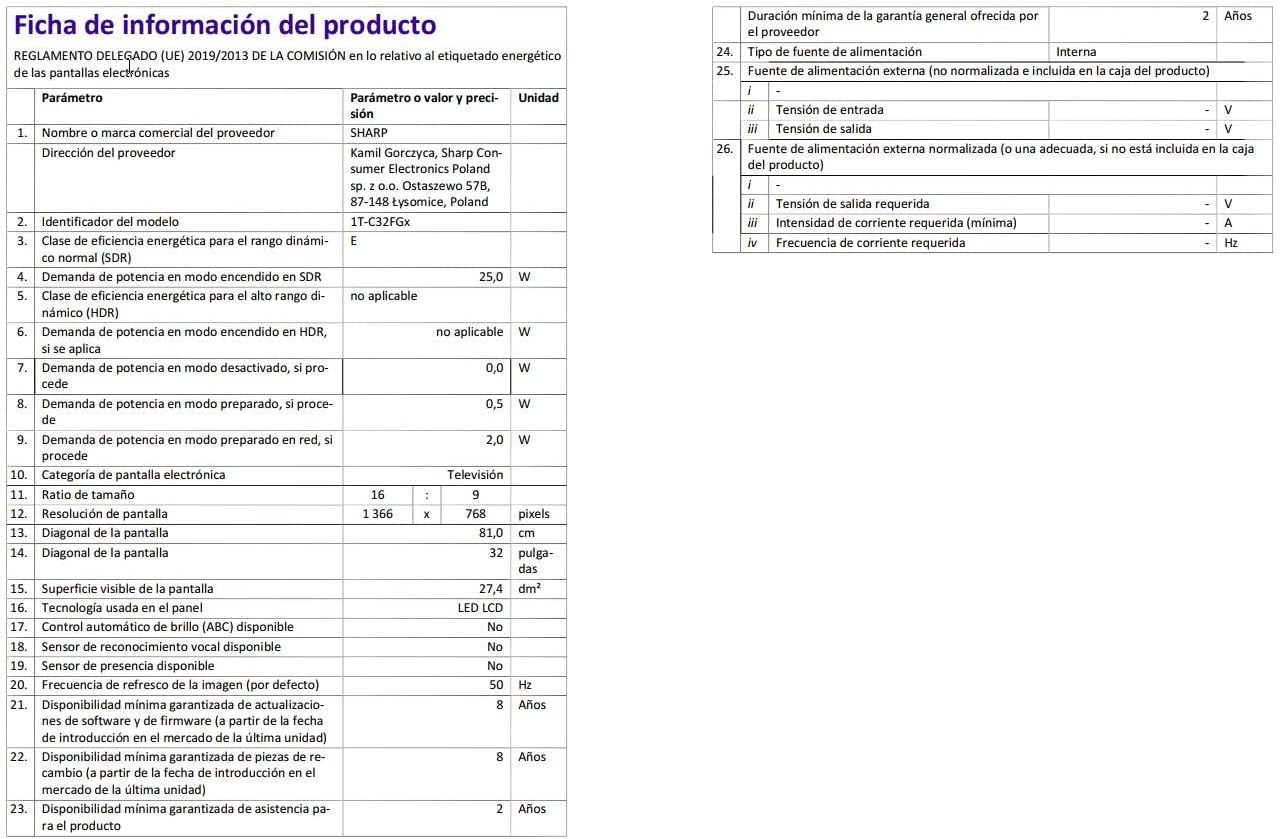
Image: Detailed product information sheet.
9. الضمان والدعم
The Sharp 32FG6EA television comes with a minimum general warranty duration of 2 years from the provider.
For technical support, warranty claims, or further assistance, please refer to the contact information provided with your purchase documentation or visit the official Sharp support webموقع لمنطقتك.


