مقدمة
Thank you for choosing the Baseus GaN5 Pro 100W Quick Wall Charger. This high-performance charger is designed to provide efficient and fast charging for a wide range of devices, including laptops, tablets, and smartphones. Please read this manual carefully before use to ensure proper operation and to maximize the lifespan of your device.
معلومات السلامة
- لا تعرض الشاحن للماء أو الرطوبة أو الرطوبة العالية.
- تجنب إسقاط الشاحن أو تعريضه للصدمات أو تفكيكه.
- يحفظ بعيدًا عن متناول الأطفال.
- استخدمه فقط في المناطق جيدة التهوية.
- افصل الشاحن أثناء العواصف الرعدية أو عند عدم استخدامه لفترات طويلة.
- Do not operate if the charger or cable is damaged.
المنتج انتهىview
The Baseus GaN5 Pro 100W Quick Wall Charger features a compact design with multiple fast-charging ports, utilizing advanced GaN technology for efficient power delivery.
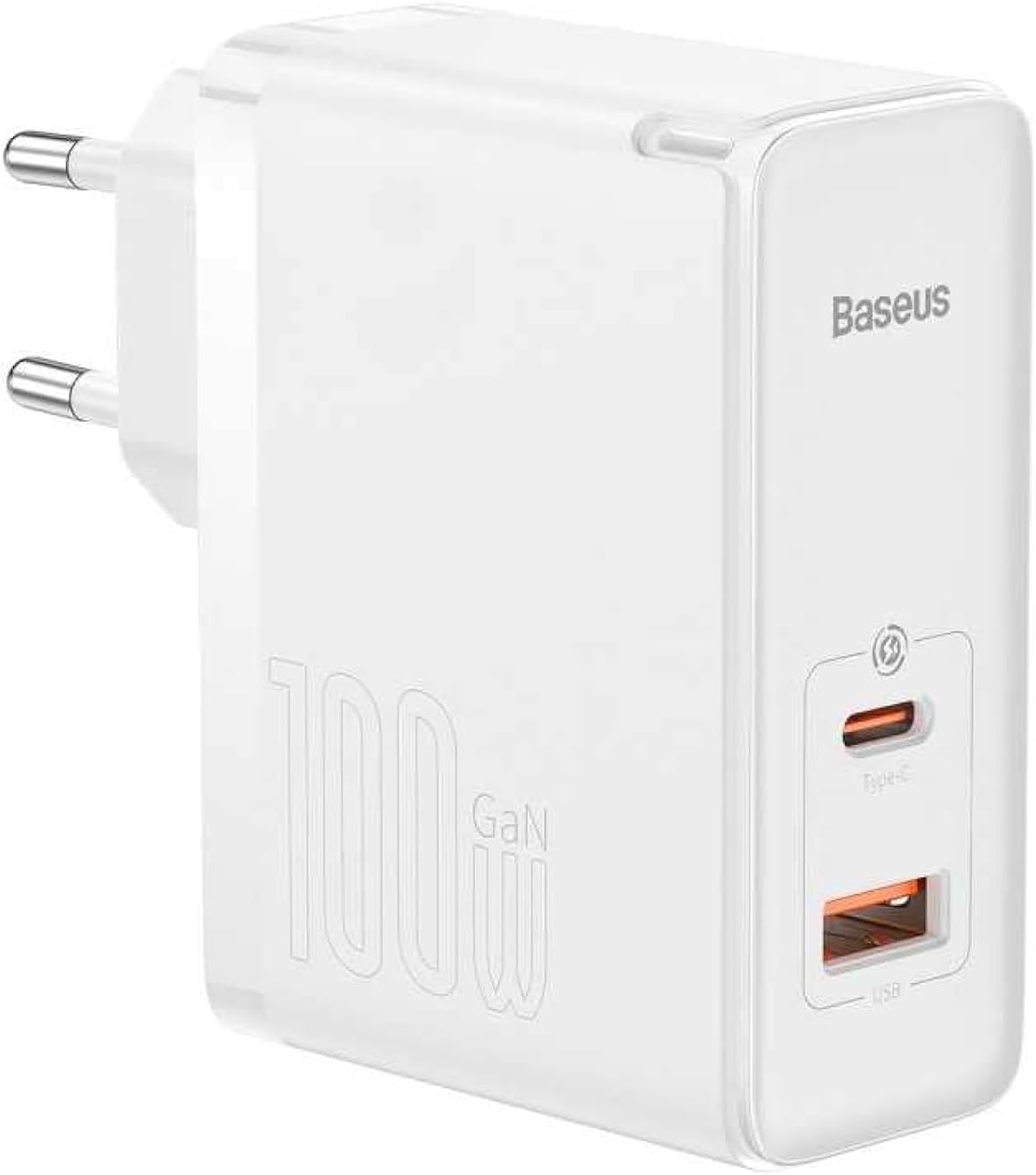
الصورة: الجبهة view of the Baseus GaN5 Pro 100W Quick Wall Charger, showcasing its compact white design and the USB-C and USB-A output ports.

الصورة: أعلى view of the charger, highlighting the USB-C (Type-C) and USB-A output ports, ready for device connection.
يثبت
To set up your Baseus GaN5 Pro 100W Quick Wall Charger, follow these simple steps:
- أفرغ: قم بإزالة الشاحن من عبوته بعناية.
- قم بالتوصيل: Insert the charger's EU plug into a standard wall outlet. Ensure the connection is firm.

الصورة: الجانب view of the Baseus charger, showing the integrated EU plug ready for insertion into a wall socket.
تعليمات التشغيل
Using your Baseus GaN5 Pro 100W Quick Wall Charger is straightforward:
- توصيل الجهاز: Use a compatible charging cable (not included) to connect your device (e.g., laptop, smartphone, tablet) to either the USB-C or USB-A port on the charger.
- يبدأ الشحن: Charging will begin automatically. The charger intelligently detects the connected device and delivers the optimal charging power.
- أجهزة متعددة: You can charge two devices simultaneously using both the USB-C and USB-A ports. The charger will distribute power efficiently.
Image: The Baseus charger actively charging a laptop via its USB-C port and a smartphone via its USB-A port, demonstrating its multi-device charging capability.
صيانة
- تنظيف: افصل الشاحن عن مصدر الطاقة وعن جميع الأجهزة قبل التنظيف. استخدم قطعة قماش ناعمة وجافة لمسح السطح. لا تستخدم المنظفات السائلة أو البخاخات.
- تخزين: قم بتخزين الشاحن في مكان بارد وجاف بعيدًا عن أشعة الشمس المباشرة ودرجات الحرارة القصوى.
- التعامل: Handle the charger and cables gently to prevent damage.
استكشاف الأخطاء وإصلاحها
| مشكلة | السبب المحتمل | حل |
|---|---|---|
| الجهاز لا يشحن | الشاحن غير متصل بشكل صحيح؛ الكابل معيب؛ عدم توافق الجهاز. | Ensure charger is firmly plugged into outlet. Try a different charging cable. Verify device compatibility with charger specifications. |
| الشحن البطيء | الكابل لا يدعم الشحن السريع؛ الجهاز لا يدعم الشحن السريع؛ أجهزة متعددة متصلة. | Use a high-quality, fast-charging compatible cable. Check if your device supports PD3.0/QC4.0+. If charging two devices, power distribution may reduce individual speeds. |
| الشاحن ساخن | Normal operation under heavy load; poor ventilation. | It is normal for the charger to warm up during operation, especially when delivering high power. Ensure adequate ventilation around the charger. If excessively hot, disconnect and allow to cool. |
تحديد
| ميزة | التفاصيل |
|---|---|
| ماركة | باسيس |
| رقم الموديل | CCGP090202 |
| لون | Black (Note: Product image shows white, but specification lists black) |
| تكنولوجيا الاتصال | USB |
| نوع الموصل | منفذ USB من النوع C + منفذ USB من النوع A |
| الأجهزة المتوافقة | Smartwatch, Laptops, Smartphones, Tablets (general compatibility) |
| ميزة خاصة | تصميم مناسب للسفر |
| إجمالي منافذ USB | 2 |
| واتtage | 100 واط |
| مصدر الطاقة | كهرباء سلكية |
| أبعاد العنصر (الطول × العرض × الارتفاع) | 5.5 × 3 × 7.5 سم |
| وزن المنتج | 229 جرام |
الضمان والدعم
يأتي منتج Baseus هذا مع ضمان الشركة المصنعة لمدة عامينيرجى الاحتفاظ بإثبات الشراء الخاص بك لاستخدامه في المطالبات بالضمان.
For technical support or warranty inquiries, please contact Baseus customer service through their official website or the retailer where the product was purchased. Provide your product model number (CCGP090202) and a detailed description of the issue.


