مقدمة
This manual provides detailed instructions for the setup, operation, maintenance, and troubleshooting of your WGP Smart Watch GTS2. Please read this manual carefully before using the device to ensure proper functionality and to maximize your user experience.

الصورة: الجبهة view of the WGP Smart Watch GTS2, displaying various health and time metrics.
1. الإعداد
1.1 شحن الجهاز
Before first use, fully charge your WGP Smart Watch GTS2. Connect the magnetic charging cable to the charging points on the back of the watch and plug the USB end into a compatible power adapter (not included) or a computer USB port. A full charge typically provides up to 12 days of battery life.
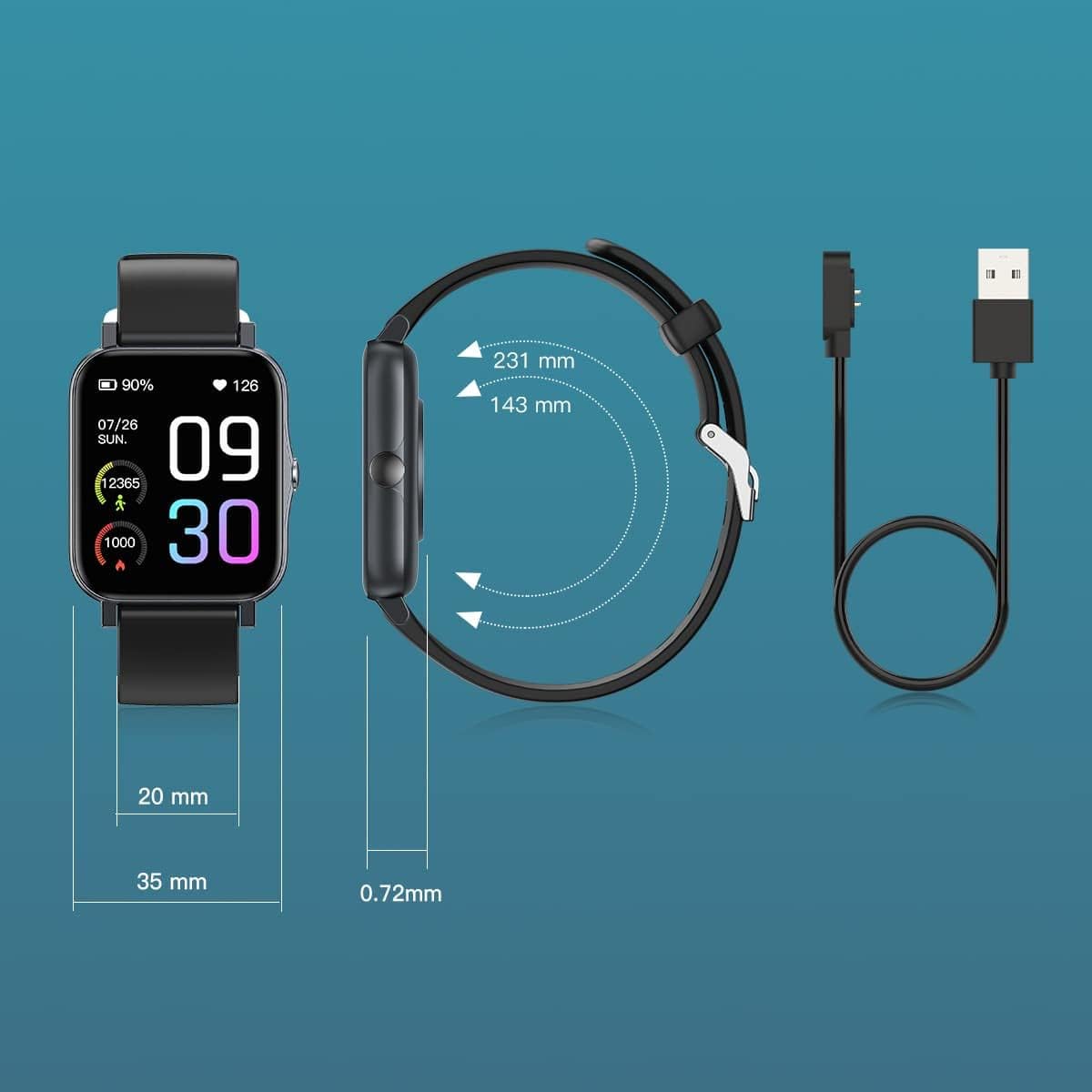
Image: Diagram illustrating the watch dimensions and the magnetic charging cable for power input.
1.2 تثبيت التطبيق وإقرانه
To unlock the full features of your smart watch, download the companion application. The recommended application is Runmifit, available on both Android and iOS app stores. Follow these steps:
- Scan the QR code provided in the watch's packaging or search for "Runmifit" in your device's app store.
- قم بتثبيت التطبيق على هاتفك الذكي.
- Open the Runmifit app and follow the on-screen instructions to create an account or log in.
- قم بتمكين البلوتوث على هاتفك الذكي.
- Within the app, navigate to the device pairing section and select "WGP Smart Watch GTS2" from the list of available devices.
- قم بتأكيد طلب الاقتران على كل من ساعتك والهاتف الذكي.

Image: A smartphone screen showing a QR code for pairing the watch with the Runmifit application.
2. تشغيل الساعة الذكية
2.1 الملاحة الأساسية
The WGP Smart Watch GTS2 features a 1.7-inch full-screen display. Navigate through menus and functions by swiping left, right, up, or down, and tap to select options. The side button typically serves as a power button or a back button, depending on the context.
2.2 وضعًا رياضيًا
The watch supports over 100 built-in sports modes, catering to various indoor and outdoor activities. To access sports modes:
- Swipe on the watch face to find the "Sports" or "Workout" icon.
- انقر للدخول إلى وضع اختيار الرياضة.
- Scroll through the list and select your desired activity (e.g., running, cycling, football, basketball, hiking, yoga, climbing).
- Tap to start the activity tracking. The watch will record relevant data such as duration, calories burned, and heart rate.

Image: Visual representation of the 100+ sports modes supported by the watch.
2.3 مراقبة الصحة
The WGP Smart Watch GTS2 is equipped with three professional sensors for comprehensive health monitoring, including heart rate, blood oxygen, and sleep tracking. Data can be viewed directly on the watch or in more detail within the Runmifit app.
- رصد معدل ضربات القلب: The watch continuously monitors your heart rate. Access the heart rate interface on the watch to view البيانات في الوقت الحقيقي.
- مراقبة الأكسجين في الدم: قم بقياس مستويات تشبع الأكسجين في الدم.
- مراقبة النوم: تتعقب الساعة أنماط نومك تلقائيًا، بما في ذلك النوم العميق والنوم الخفيف وأوقات الاستيقاظ.view جودة نومك في التطبيق.


Image: Visuals demonstrating heart rate monitoring and an overview of the watch's health and fitness features.
2.4 الإشعارات
Once paired with your smartphone, the watch can display call and message reminders, as well as notifications from various applications (e.g., text messages, emails, social media). Ensure notification permissions are enabled in both your phone's settings and the Runmifit app.

Image: The watch displaying incoming message notifications from a connected smartphone.
3. الصيانة
3.1 التنظيف
Regularly clean your smart watch to ensure optimal performance and hygiene. Use a soft, lint-free cloth to wipe the screen and watch body. For stubborn dirt, slightly dampاغسل قطعة القماش بالماء. تجنب استخدام المواد الكيميائية القاسية أو المواد الكاشطة.
3.2 مقاومة الماء
The WGP Smart Watch GTS2 features IP68 waterproof rating, utilizing double-layer waterproof ring technology. This means you can wear it while washing hands or swimming in a pool. However, it is not suitable for hot showers, saunas, or diving. After exposure to water, especially saltwater, rinse the watch with fresh water and dry it thoroughly.

Image: The watch being splashed with water, illustrating its IP68 waterproof rating.
3.3 التخزين
When not in use for extended periods, store the watch in a cool, dry place away from direct sunlight and extreme temperatures. It is recommended to charge the watch periodically to maintain battery health.
4. استكشاف الأخطاء وإصلاحها
If you encounter issues with your WGP Smart Watch GTS2, please refer to the following common solutions:
| مشكلة | الحل المحتمل |
|---|---|
| الساعة لا تعمل ولا تشحن. | Ensure the charging cable is securely connected to both the watch and the power source. Try a different USB port or power adapter. Allow the watch to charge for at least 30 minutes before attempting to turn it on. |
| غير قادر على الاقتران بالهاتف الذكي. | Make sure Bluetooth is enabled on your phone and the watch is within range. Restart both the watch and your phone. Ensure you are using the correct app (Runmifit). Forget the device in your phone's Bluetooth settings and try pairing again. |
| Inaccurate health readings (e.g., heart rate, blood pressure). | Ensure the watch is worn snugly on your wrist, about one finger's width above the wrist bone. Avoid excessive movement during measurements. Note that smart watch health data is for reference only and not intended for medical diagnosis. |
| عدم ظهور الإشعارات. | Check notification permissions in your phone's settings for the Runmifit app. Also, verify notification settings within the Runmifit app itself. Ensure the app is running in the background. |
| Watch face/skin issues or inability to save multiple faces. | Ensure the Runmifit app is updated to the latest version. Some watch faces may require more memory or specific app versions. Try restarting the app and watch. |
5. المواصفات
| ميزة | التفاصيل |
|---|---|
| نموذج | WGP Smart Watch GTS2 |
| حجم العرض | 1.7 بوصة (4.3 سم) |
| سعة البطارية | بطارية ليثيوم أيون 230 مللي أمبير في الساعة (متضمنة) |
| عمر البطارية | حتى 12 أيام (الاستخدام النموذجي) |
| تصنيف مقاومة الماء | IP68 |
| الاتصال | بلوتوث |
| أجهزة الاستشعار | Heart Rate Monitor, Blood Oxygen Monitor, Sleep Monitor, Activity Tracker |
| أوضاع الرياضة | أكثر من 100 وضع |
| التوافق | أنظمة Android و iOS |
| وزن العنصر | 3.52 أونصة (99.8 جرام) |
| أبعاد الحزمة | 10.67 × 3.78 × 0.67 بوصة (27.1 × 9.6 × 1.7 سم) |
| الشركة المصنعة | WGP |
| أول تاريخ متاح | 31 أغسطس 2022 |
6. الضمان والدعم
For warranty information and customer support, please refer to the documentation included with your product packaging or contact the retailer from whom you purchased the WGP Smart Watch GTS2. Keep your proof of purchase for warranty claims.


