1. المقدمة
This manual provides essential information for setting up, operating, maintaining, and troubleshooting your Alienware X17 R2 Gaming Laptop. Please read this guide thoroughly to ensure optimal performance and longevity of your device.
The Alienware X17 R2 is designed for high-performance gaming and demanding tasks, featuring advanced cooling technologies, powerful processors, and dedicated graphics.
2. انتهى المنتجview
The Alienware X17 R2 is engineered to deliver an immersive gaming experience in a thin 17-inch form factor. Key features include:
- Powerful Intel CPUs: Experience high-performance action across all your favorite games with 12th Gen Intel Core processors.
- Next-Gen GPUs: Game unrestrained with NVIDIA GeForce RTX 3070Ti graphics, Dynamic Boost 2.0, and Deep Learning Super Sampling technology.
- Patented Quad Cooling: An industry-first design uses four intelligently controlled and programmable fans to dissipate heat.
- وقت اللعب الممتد: Improve battery life with Advanced Optimus technology from NVIDIA—now available on all display options.
- Legend 2.0 Industrial Design: A fresh evolution in design with a high-endurance finish and customizable AlienFX lighting.

الشكل 2.1: الجبهة view of the Alienware X17 R2 Gaming Laptop displaying a game.
3. الإعداد
3.1 فك الصندوق والفحص الأولي
- قم بإزالة الكمبيوتر المحمول وجميع الملحقات من العبوة بعناية.
- تأكد من وجود جميع العناصر المدرجة في قسم "محتويات الصندوق".
- افحص جهاز الكمبيوتر المحمول بحثًا عن أي تلف مادي. في حال وجود أي تلف، اتصل بالبائع فورًا.
3.2 توصيل الطاقة
- Connect the power adapter to the charging port located at the rear of the laptop.
- قم بتوصيل سلك الطاقة بمأخذ الحائط.
- The power indicator light will illuminate, indicating the laptop is receiving power.
3.3 التمهيد الأول وإعداد نظام التشغيل
- Press the Alienware head power button to turn on the laptop.
- اتبع التعليمات التي تظهر على الشاشة لإكمال عملية تثبيت نظام التشغيل Windows 11 Home. يتضمن ذلك اختيار منطقتك، والاتصال بشبكة Wi-Fi، وإنشاء حساب مستخدم.
- السماح للنظام بتنزيل وتثبيت أي تحديثات ضرورية.
4. تشغيل الكمبيوتر المحمول
4.1 لوحة المفاتيح ولوحة اللمس
The Alienware X17 R2 features a backlit keyboard and a responsive touchpad. The AlienFX lighting allows for customizable colors and effects across the keyboard and other zones.

الشكل 4.1: مفصل view من لوحة المفاتيح ذات الإضاءة الخلفية ولوحة اللمس.
4.2 العرض والرسومات
Enjoy stunning visuals on the 17.3-inch FHD display with a 480Hz refresh rate and 3ms response time. The NVIDIA GeForce RTX 3070Ti graphics card ensures smooth gameplay and high-fidelity rendering. The laptop supports Dolby Vision for optimized color profiles.
4.3 صوت
Experience immersive 3D sound via Dolby Atmos, designed to deliver audio as studios intended.
4.4 المنافذ والاتصال
The laptop offers a variety of ports for peripherals and external displays:

الشكل 4.2: خلفي view يوضح منافذ الاتصال المختلفة.
- منافذ USB 3.0: 3 ports for connecting various USB devices.
- منافذ USB-C: For versatile connectivity, including Thunderbolt 4.
- HDMI 2.1: Supports up to 4K/120Hz output for external displays.
- إيثرنت: Killer E3100 RJ45 Ethernet for stable wired network connections.
- لاسلكي: Killer Wi-Fi 6 (802.11ax) and Bluetooth for wireless connectivity.
5. الصيانة
5.1 التنظيف
- استخدم قطعة قماش ناعمة وخالية من الوبر لتنظيف الشاشة والأسطح الخارجية.
- تجنب استخدام المواد الكيميائية القاسية أو المواد الكاشطة.
- قم بتنظيف فتحات التبريد بانتظام لمنع تراكم الغبار، الذي يمكن أن يؤثر على الأداء.
5.2 تحديثات البرامج
Ensure your operating system and drivers are kept up-to-date. Windows Update will handle OS updates, and Alienware Command Center can assist with driver and firmware updates.
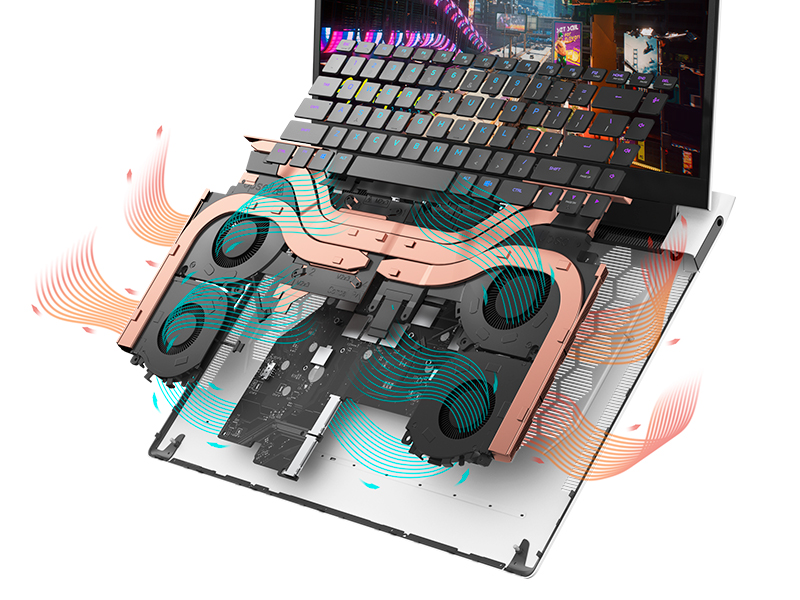
Figure 5.1: Alienware Command Center for system management.
6. استكشاف الأخطاء وإصلاحها
If you encounter issues with your Alienware X17 R2, consider the following basic troubleshooting steps:
- لا يوجد طاقة: تأكد من توصيل محول الطاقة بإحكام بكل من الكمبيوتر المحمول ومأخذ كهربائي يعمل. تحقق من ضوء مؤشر الطاقة.
- مشاكل العرض: If the screen is black, try connecting an external monitor to verify if the issue is with the laptop's display or the graphics card. Update graphics drivers.
- ارتفاع درجة الحرارة: Ensure cooling vents are clear of obstructions. Use Alienware Command Center to monitor temperatures and adjust fan profiles.
- تباطؤ الأداء: Close unnecessary applications. Check for background processes consuming high CPU or RAM. Ensure sufficient free space on the SSD.
- مشاكل البرمجيات: Restart the laptop. If issues persist, consider performing a system restore or reinstalling the problematic software.
7. المواصفات
| ميزة | مواصفة |
|---|---|
| حجم الشاشة | 17.3 بوصة |
| دقة الشاشة | 1920 × 1080 بكسل (FHD) |
| المعالج | Intel Core i9-12900H (3.8 GHz, 14 Cores) |
| كبش | 16 جيجابايت DDR5 (4800 ميجاهرتز) |
| القرص الصلب | قرص صلب SSD بسعة 1 تيرابايت (حالة صلبة) |
| معالج الرسوميات المساعد | إنفيديا جي فورس آر تي إكس 3070 تي آي (8 جيجابايت GDDR6) |
| نظام التشغيل | ويندوز 11 هوم |
| نوع لاسلكي | 802.11ax (Killer Wi-Fi 6), Bluetooth |
| منافذ USB 3.0 | 3 |
| وزن العنصر | 6.82 رطل |
| أبعاد المنتج | 11.79 × 15.72 × 0.58 بوصة |
8. ماذا يوجد في الصندوق
- كمبيوتر محمول Alienware X17 R2 للألعاب
- محول الطاقة
- سلك الطاقة
- التوثيق
9. مقاطع فيديو رسمية للمنتج
Alienware X17 R2 Gaming Laptop Overview
فيديو 9.1: مسؤول فوقview of the Alienware X17 R2 Gaming Laptop, highlighting its design, cooling, and performance features.
About Alienware X17 R2 Gaming Laptop
Video 9.2: A detailed look at the Alienware X17 R2 Gaming Laptop, showcasing its features and design elements.
10. الضمان والدعم
Your Alienware X17 R2 Gaming Laptop comes with a standard manufacturer's warranty. For detailed warranty information, please refer to the documentation included with your product or visit the official Alienware support webموقع.
For technical support, driver downloads, and service requests, please visit the Alienware support portal. You can also find FAQs and community forums for additional assistance.


