Noctua NM-AM5/4-MP83 SecuFirm2 Mounting-Kit Installation Manual
For AMD AM5 & AM4 Sockets
1. المقدمة
The Noctua NM-AM5/4-MP83 SecuFirm2 Mounting-Kit is designed to enable the installation of compatible Noctua CPU coolers on AMD's AM5 and AM4 platforms. This kit ensures continued use of your existing Noctua heatsink with the latest AMD Ryzen processors, providing optimal contact pressure and straightforward installation.
2. محتويات العبوة
Verify that all components are present in your NM-AM5/4-MP83 kit:
- 2x NM-AMB4 Mounting Bars
- 4x NM-APS4 Spacers
- 4x NM-ALS4 Screws

Image: Contents of the Noctua NM-AM5/4-MP83 SecuFirm2 Mounting-Kit, including two mounting bars, four spacers, and four screws.

Image: The retail packaging for the Noctua NM-AM5/4-MP83 SecuFirm2 Mounting-Kit.
3. التوافق
This mounting kit is compatible with Noctua CPU coolers featuring an 83mm mounting pitch. It is specifically designed for AMD AM5 and AM4 sockets, supporting Ryzen 5, Ryzen 7, and Ryzen 9 processors. For detailed compatibility information regarding specific Noctua cooler models, please refer to the official Noctua webموقع.
4. تعليمات التثبيت
Follow these steps carefully to install your Noctua CPU cooler using the NM-AM5/4-MP83 mounting kit. Ensure your system is powered off and disconnected from the mains before proceeding.
الخطوة 4.1: تحضير اللوحة الأم
Remove any existing CPU cooler mounting hardware. The NM-AM5/4-MP83 kit utilizes the motherboard's stock AMD backplate. Ensure this backplate is securely in place behind the CPU socket area.
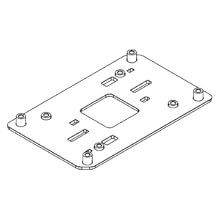
Image: Diagram illustrating the motherboard with the stock AMD backplate in position, ready for mounting hardware installation.
Step 4.2: Install Spacers and Mounting Bars
Place the four NM-APS4 spacers over the screw threads of the stock backplate. Then, position the two NM-AMB4 mounting bars on top of the spacers, aligning the holes. Secure the mounting bars using the four NM-ALS4 screws, tightening them evenly until snug.

Image: Diagram showing the placement of the four spacers onto the motherboard's backplate screws, followed by the installation of the two mounting bars.
الخطوة 4.3: وضع المعجون الحراري
Apply a small amount of thermal paste (not included with this kit) to the center of the CPU's integrated heat spreader (IHS). A pea-sized drop is typically sufficient. Refer to your thermal paste manufacturer's instructions for specific application methods.

Image: A visual representation of thermal paste being applied to the center of a CPU for optimal heat transfer.
Step 4.4: Mount the CPU Cooler
Carefully place your compatible Noctua CPU cooler onto the CPU, aligning its mounting holes with the threaded posts on the newly installed mounting bars. Secure the cooler by tightening the cooler's retention screws evenly, alternating between screws to ensure balanced pressure. Do not overtighten.

Image: Diagram depicting a CPU cooler being lowered onto the CPU and secured to the mounting bars with screws.
5. الصيانة
The NM-AM5/4-MP83 mounting kit itself requires no specific maintenance. Ensure that the CPU cooler is securely mounted and that thermal paste is applied correctly to maintain optimal thermal performance. Periodically check the cooler's mounting screws for tightness, especially after transporting the system.
6. استكشاف الأخطاء وإصلاحها
- Cooler not fitting: Double-check that your Noctua CPU cooler has an 83mm mounting pitch and is listed as compatible with AM5/AM4 sockets. Ensure the mounting bars are oriented correctly.
- High CPU temperatures: Verify that thermal paste was applied correctly and that the CPU cooler is making firm, even contact with the CPU's IHS. Ensure all cooler retention screws are tightened appropriately.
- تركيب غير محكم: Ensure all screws are tightened evenly. Avoid overtightening, which can damage components.
7. المواصفات
| رقم الموديل | NM-AM5/4-MP83 |
| أبعاد المنتج | 6.02 × 4.33 × 1.18 بوصة |
| وزن العنصر | 1.62 أونصات |
| مادة | معدن |
| المقابس المتوافقة | AMD AM5, AM4 |
8. الضمان والدعم
Noctua products are known for their reliability and quality. For any questions regarding installation, compatibility, or product support, please visit the official Noctua website or contact Noctua customer service directly. Keep your proof of purchase for any warranty claims.


