1. المقدمة
This manual provides detailed instructions for the installation, operation, and maintenance of your Spedal MINIEYE AC1 Dash Cam. Please read this manual thoroughly before using the device to ensure proper functionality and safety. The MINIEYE AC1 is designed to record your driving journey in high definition and offers advanced features for enhanced road safety.
2. انتهى المنتجview
2.1 الميزات الرئيسية
- 1944P Ultra Full HD Recording: يلتقط فيديو واضحًاtage with a 140° wide-angle field of view.
- AI ADAS (Advanced Driver-Assistance System): Provides real-time alerts for collision avoidance.
- مستشعر جي مدمج: Automatically detects sudden movements or impacts and locks footage.
- مراقبة مواقف السيارات على مدار 24 ساعة: Monitors your vehicle even when parked (requires hardwire kit, sold separately).
- رؤية ليلية قوية: Ensures clear recordings in low-light conditions.
- التسجيل المتكرر: يستبدل أقدم ملف footage عندما تمتلئ بطاقة الذاكرة، مما يضمن التسجيل المستمر.
- التحكم في التطبيق: إدارة الإعدادات، view فوtage, and download videos via a dedicated mobile application.
2.2 محتويات العبوة
تأكد من وجود جميع العناصر المدرجة أدناه في الحزمة الخاصة بك:
- MINIEYE AC1 Dash Cam Unit
- شاحن السيارة
- كابل الطاقة
- كابل الشاشة
- Host Base
- وحدة نظام تحديد المواقع العالمي (GPS)
- ملصق كهرباء
- عتلة (لتمرير الكابلات)
- مستوى الفقاعة
- Free 32GB TF Card (MicroSD Card)
- دليل المستخدم (هذا المستند)
2.3 مكونات الجهاز
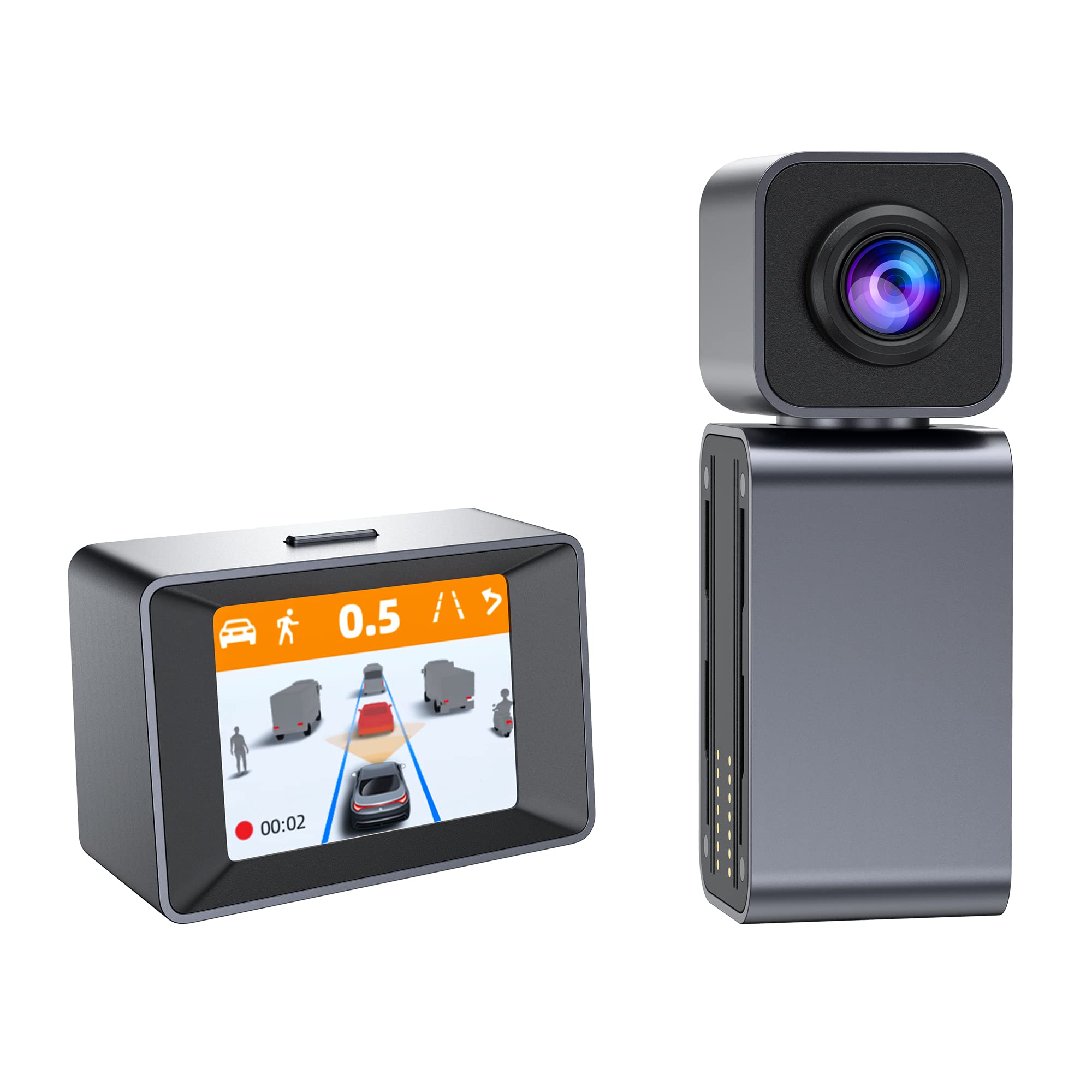
Image: The MINIEYE AC1 Dash Cam showing the main recording unit with its lens and the separate display unit. The display unit shows a simulated traffic scenario with distance warnings, illustrating the ADAS functionality.
3. الإعداد
3.1 التثبيت
- تجهيز الزجاج الأمامي: Clean the area on your windshield where the dash cam will be mounted. Ensure it is free of dust and grease.
- تطبيق الملصق الكهروستاتيكي: Apply the electrostatic sticker to the cleaned area. This helps in easy removal and prevents residue on the windshield.
- Attach Host Base: Secure the host base to the electrostatic sticker. Use the bubble level to ensure the base is level for optimal camera angle.
- تركيب كاميرا السيارة: Attach the MINIEYE AC1 Dash Cam unit to the host base.
- أدخل بطاقة الذاكرة الخارجية (TF): Insert the provided 32GB TF card into the designated slot on the dash cam. Ensure it is inserted correctly until it clicks into place.
- توصيل الطاقة: Connect the power cable to the dash cam and route it along the windshield edge and dashboard using the crowbar to tuck it neatly. Plug the car charger into your vehicle's cigarette lighter socket.
- Connect Monitor (if applicable): If using an external monitor, connect it using the monitor cable.
- ربط وحدة GPS: Attach the GPS module to the dash cam for location and speed data recording.
3.2 التشغيل الأولي والإعدادات
- تشغيل الطاقة: Start your vehicle. The dash cam will automatically power on and begin recording.
- تنسيق بطاقة TF: It is recommended to format the TF card upon first use and periodically thereafter to ensure optimal performance. This can usually be done through the device settings or the mobile app.
- ضبط زاوية الكاميرا: Adjust the camera lens to ensure it captures the road ahead clearly, covering the desired field of view.
3.3 إعداد التحكم في التطبيق
- تحميل التطبيق: بحث عن the "MINIEYE" in your smartphone's app store (iOS or Android) and install it.
- الاتصال بشبكة Wi-Fi: Enable Wi-Fi on your smartphone and connect to the dash cam's Wi-Fi network. The network name and password can typically be found in the dash cam's settings or manual.
- إقران الجهاز: Open the MINIEYE app and follow the on-screen instructions to pair your dash cam.
- تكوين الإعدادات: Use the app to adjust recording resolution, G-sensor sensitivity, parking monitoring settings, and other preferences.
4. تعليمات التشغيل
4.1 التسجيل الأساسي
Once powered on, the MINIEYE AC1 automatically begins continuous loop recording. Video files are saved in segments (e.g., 1, 3, or 5 minutes) to the TF card. When the card is full, the oldest unprotected fileتم الكتابة فوقها.
4.2 مستشعر التسارع والتسجيل في حالات الطوارئ
The built-in G-Sensor detects sudden impacts or rapid acceleration/deceleration. When triggered, the current video segment is automatically locked and saved to a protected folder, preventing it from being overwritten by loop recording. The sensitivity of the G-Sensor can be adjusted via the mobile app.
4.3 مراقبة وقوف السيارات
With the optional hardwire kit (not included), the dash cam can monitor your vehicle while parked. If an impact or motion is detected, the dash cam will automatically record a short video segment. Ensure this feature is enabled and configured in the app settings.
4.4 نظام مساعدة السائق المتقدم (ADAS)
The AI ADAS features provide real-time alerts to enhance driving safety:
- تحذير الاصطدام الأمامي (FCW): Alerts you if you are approaching a vehicle ahead too quickly.
- نظام التحذير من مغادرة المسار (LDW): Notifies you if your vehicle drifts out of its lane without signaling.
- تنبيه بدء تشغيل السيارة الأمامية: Informs you when the vehicle in front of you has started moving after a stop.
These alerts are typically visual on the display and/or audible. Calibration may be required for optimal ADAS performance.
4.5 Viewجي وتنزيل Footage
فوtagيمكن أن يكون viewed directly on the dash cam's display (if available) or more conveniently through the MINIEYE mobile application. Use the app to browse recorded videos, download important clips to your smartphone, or share them.
5. الصيانة
- تنظيف العدسة: Regularly clean the camera lens with a soft, lint-free cloth to ensure clear video quality.
- تنسيق بطاقة TF: Format the TF card every 2-4 weeks to prevent data corruption and maintain optimal recording performance. Back up any important fileقبل التنسيق.
- تحديثات البرامج الثابتة: Check the MINIEYE app or official website periodically for firmware updates. Keeping your dash cam's firmware updated ensures access to new features and performance improvements.
- تخزين: عند عدم استخدام كاميرا السيارة لفترات طويلة، قم بتخزينها في مكان بارد وجاف بعيدًا عن أشعة الشمس المباشرة.
6. استكشاف الأخطاء وإصلاحها
- كاميرا لوحة القيادة لا تعمل:
- Check the car charger connection and ensure the vehicle's cigarette lighter socket is functioning.
- Ensure the power cable is securely connected to the dash cam.
- مشاكل التسجيل (مثل التجميد، التلف) fileالصورة):
- قم بتهيئة بطاقة TF.
- Try a different high-speed (Class 10 or U1/U3) TF card.
- Ensure the TF card is not full of locked files.
- مشاكل اتصال التطبيق:
- تأكد من تفعيل خاصية الواي فاي في كاميرا السيارة.
- أعد تشغيل كل من كاميرا لوحة القيادة والهاتف الذكي الخاص بك.
- Verify you are connecting to the correct Wi-Fi network and using the correct password.
- تنبيهات أنظمة مساعدة السائق المتقدمة لا تعمل:
- Ensure ADAS features are enabled in the app settings.
- Perform ADAS calibration if available in the app.
- تأكد من أن عدسة الكاميرا نظيفة وغير مسدودة.
7. المواصفات
| ميزة | التفاصيل |
|---|---|
| اسم الموديل | MINIEYE AC1 |
| ماركة | سبيدال |
| دقة التقاط الفيديو | 1944 بكسل |
| زاوية حقيقية View | 140 درجة |
| تكنولوجيا الاتصال | USB, Wireless (for App Control) |
| طريقة التحكم | برنامج |
| نوع التركيب | جبل شفط |
| نوع خدمة المركبة | سيارة |
| الشركة المصنعة | Shenzhen Youjia Innov Tech Co., Ltd |
8. الضمان والدعم
For warranty information, technical support, or service inquiries, please refer to the warranty card included with your product or visit the official Spedal website. You may also contact Spedal customer service directly through the contact information provided on their website or within the MINIEYE mobile application.
يرجى الاحتفاظ بإثبات الشراء الخاص بك لمطالبات الضمان.


