1. انتهى المنتجview
The UNV NVR302-16E2 is a high-performance Network Video Recorder (NVR) designed for advanced surveillance systems. It supports 4K resolution recording and playback, offering robust video management capabilities for up to 32 channels. This NVR is compatible with various camera protocols, including ONVIF, and features Ultra H.265 compression for efficient storage.
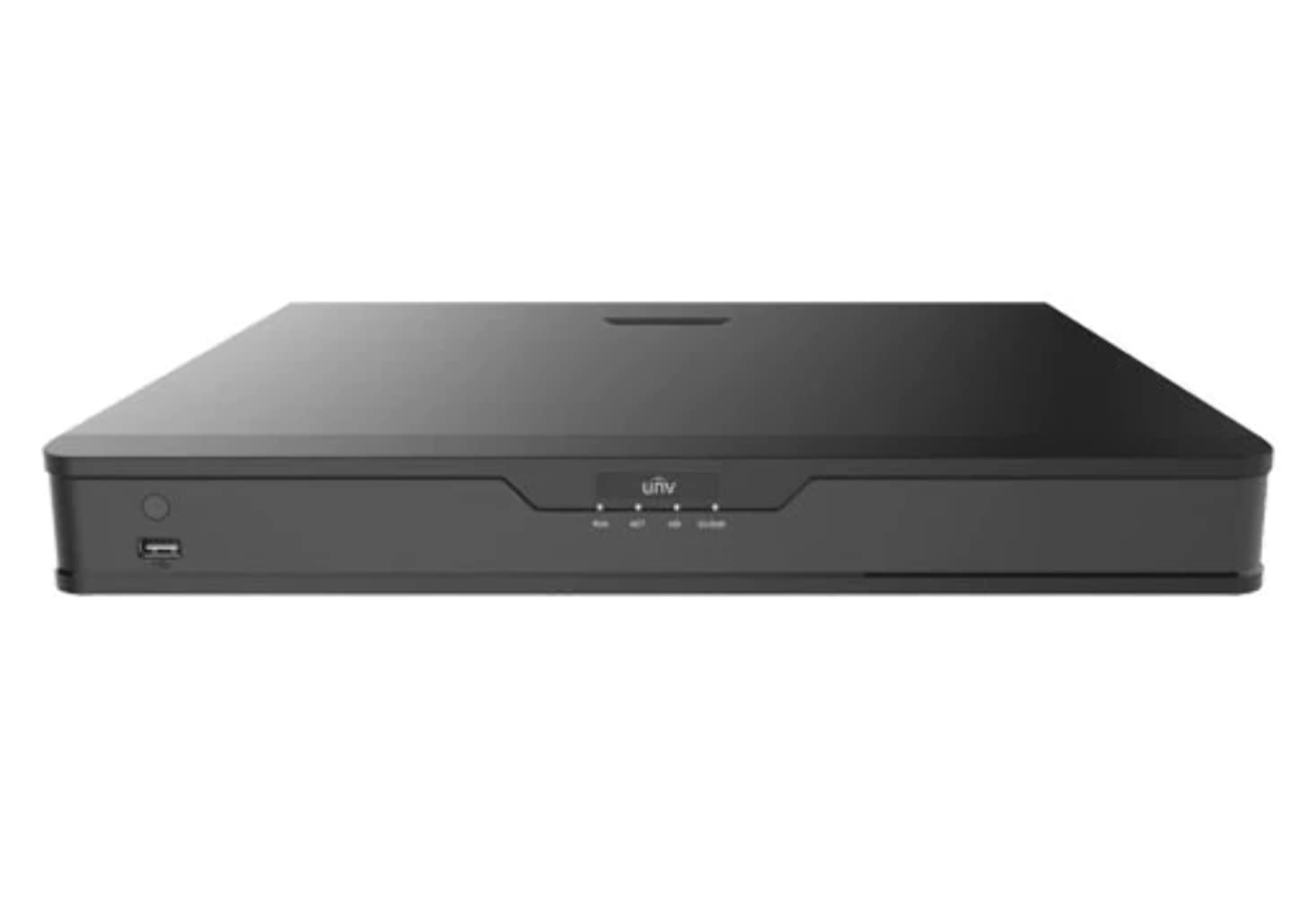
الشكل 1: الجبهة view of the UNV NVR302-16E2 4K NVR. The front panel includes a power button, a USB port, and indicator lights for power, HDD activity, network status, and alarm.
2. الميزات الرئيسية
- Supports Ultra H.265/H.265/H.264 video formats for efficient compression.
- 8/16-channel input with Plug & Play functionality via independent PoE network interfaces.
- Compatibility with mainstream cameras supporting ONVIF conformance (Profile S ، بروfile جي ، بروfile T) and RTSP protocols.
- Equipped with 1-channel HDMI and 1-channel VGA outputs, with HDMI supporting up to 4K (3840x2160) resolution.
- Independent HDMI and VGA outputs for flexible display options.
- Supports recording resolutions up to 12 Megapixels.
- Accommodates 2 SATA HDDs, with support for up to 10TB per HDD.
- Features various fisheye dewarping modes for live view and playback, accessible via both web interface and GUI.
- Incorporates ANR (Automatic Network Replenishment) technology to enhance storage reliability during network disconnections.
- Supports cloud upgrade for convenient firmware updates.
3. محتويات العبوة
Please check the package contents upon unboxing. If any items are missing or damaged, contact your vendor immediately.
- UNV NVR302-16E2 NVR Unit
- محول الطاقة
- ماوس USB
- SATA Data Cables (for HDD installation)
- براغي تثبيت القرص الصلب
- دليل البدء السريع
4. الإعداد
4.1 التثبيت المادي
- تركيب الأقراص الصلبة:
Unscrew and remove the NVR cover. Securely mount the SATA hard disk drives (HDDs) into the designated bays using the provided screws. Connect the SATA data and power cables from the NVR motherboard to the HDDs. Replace the NVR cover and secure it with screws.
- توصيل الشاشة:
Connect a monitor to the NVR's HDMI or VGA output port using a compatible cable.
- توصيل الماوس:
قم بتوصيل فأرة USB بأحد منافذ USB الخاصة بجهاز NVR.
- ربط الشبكة:
قم بتوصيل كابل إيثرنت من منفذ LAN الخاص بجهاز NVR إلى جهاز توجيه الشبكة أو المحول الخاص بك.
- ربط الكاميرات:
For PoE cameras, connect them directly to the NVR's independent PoE ports. For non-PoE cameras, ensure they are connected to the same network as the NVR and powered separately.
- توصيل الطاقة:
قم بتوصيل محول الطاقة بمدخل الطاقة الخاص بجهاز التسجيل الشبكي (NVR)، ثم قم بتوصيله بمأخذ كهربائي. سيتم تشغيل جهاز التسجيل الشبكي تلقائيًا.
4.2 التكوين الأولي
Upon the first boot, the NVR will guide you through an initial setup wizard. Follow the on-screen prompts to configure essential settings.
- تعيين كلمة مرور المسؤول: Create a strong password for the 'admin' user. This is crucial for security.
- إعدادات الشبكة: Configure the NVR's IP address (DHCP or Static IP). Ensure it is on the same network as your cameras for proper communication.
- التاريخ والوقت: اضبط التاريخ والوقت والمنطقة الزمنية بشكل صحيح.
- تهيئة القرص الصلب: The NVR will prompt you to initialize (format) the newly installed HDDs. This step is necessary before recording can begin.
- البحث عن الكاميرا وإضافتها: The NVR will automatically search for connected cameras. Select and add the cameras you wish to manage.
5. تشغيل جهاز تسجيل الفيديو الشبكي (NVR)
5.1 مباشر View
After setup, the NVR will display the live view من الكاميرات المتصلة. يمكنك التبديل بين وضع الكاميرا الواحدة viewشبكة متعددة الكاميرات view, and customize the display layout.
- اختيار القناة: Click on a channel window to select it.
- تحكم PTZ: If using PTZ cameras, use the on-screen controls or joystick (if connected) to pan, tilt, and zoom.
- التشغيل الفوري: Right-click on a channel and select "Instant Playback" to view التسجيلات الأخيرة.
5.2 إدارة التسجيل
The NVR supports various recording modes.
- التسجيل المجدول: Configure recording schedules based on time, day, and event (e.g., motion detection).
- تسجيل كشف الحركة: Set up motion detection zones and sensitivity for each camera to trigger recording only when movement is detected.
- التسجيل اليدوي: Start or stop recording manually from the live view واجهة.
5.3 التشغيل
الوصول إلى foo المسجلtagهـ لإعادةview.
- انتقل إلى قائمة "التشغيل".
- Select the camera(s) and date/time range for playback.
- استخدم المخطط الزمني للتنقل بين التسجيلات.
- Options include fast forward, rewind, pause, and frame-by-frame playback.
أبدا النسخ الاحتياطي
Export recorded video clips to an external USB drive.
- أدخل ذاكرة فلاش USB في منفذ USB الخاص بجهاز NVR.
- Go to the "Backup" menu.
- Select the camera, time range, and desired video format for export.
- Start the backup process.
5.5 الوصول عن بعد
Access your NVR remotely via a web متصفح أو تطبيق جوال.
- Web المتصفح: أدخل عنوان IP الخاص بجهاز تسجيل الفيديو الشبكي (NVR) في web افتح المتصفح على جهاز كمبيوتر متصل بنفس الشبكة. سجّل الدخول باستخدام بيانات اعتمادك.
- تطبيق الهاتف المحمول: قم بتنزيل النسخة الرسمية من Uniview mobile application (e.g., EZView). Register an account, add your NVR by scanning the QR code or entering its serial number, and view live feeds or playback remotely.
6. الصيانة
6.1 تحديثات البرامج الثابتة
Regularly check for and install firmware updates to ensure optimal performance, security, and access to new features. Updates can typically be performed via the NVR's web interface or local GUI, often with cloud upgrade support.
6.2 إدارة القرص الصلب
Monitor the health and status of your hard drives. The NVR provides tools to check HDD status, format drives, and configure overwrite settings when storage is full.
6.3 سجلات النظام
Review system logs for any errors, warnings, or important events. This can assist in troubleshooting and system monitoring.
7. استكشاف الأخطاء وإصلاحها
| مشكلة | السبب المحتمل | حل |
|---|---|---|
| لا يوجد إخراج فيديو على الشاشة. | Loose cable connection; incorrect display resolution; NVR not powered on. | Check HDMI/VGA cable connections. Ensure NVR is powered. Try a different monitor or cable. Adjust NVR output resolution if possible. |
| الكاميرات لا تعرض البيانات. | Network issue; incorrect camera IP; camera not powered; camera not added to NVR. | Verify network connectivity. Ensure cameras are powered. Check camera IP addresses and add them to the NVR if not already done. |
| لا يمكن الوصول إلى جهاز تسجيل الفيديو الشبكي (NVR) عن بُعد. | Network configuration issue (port forwarding, DDNS); NVR offline; incorrect credentials. | Verify NVR's network settings. Ensure necessary ports are forwarded on your router. Check internet connection. Confirm login credentials. |
| لا تسجيل. | HDD not initialized or full; recording schedule not set; camera not recording. | Initialize the HDD. Check recording schedules and ensure they are active. Verify camera status and ensure it's configured to record. |
8. المواصفات
| ميزة | التفاصيل |
|---|---|
| رقم الموديل | NVR302-16E2 |
| صيغ الفيديو المدعومة | Ultra H.265 / H.265 / H.264 |
| إدخال القناة | 8/16-channel (with independent PoE interfaces) |
| مخرج HDMI | 1-channel, up to 4K (3840x2160) resolution |
| إخراج VGA | 1 قنوات |
| أقصى دقة للتسجيل | تصل إلى 12 ميجابكسل |
| دعم محركات الأقراص الصلبة | 2 SATA HDDs, up to 10TB each (20TB total) |
| تكنولوجيا الاتصال | HDMI, VGA, Ethernet, USB |
| الأجهزة المتوافقة | IP Cameras (ONVIF Profile S, G, T; RTSP) |
| أبعاد المنتج | 18 × 14 × 4 بوصة (45.72 × 35.56 × 10.16 سم) |
| وزن العنصر | 3.97 رطل (1.8 كجم) |
| الشركة المصنعة | جامعةview |
9. الضمان والدعم
جامعةview products typically come with a limited manufacturer's warranty. For specific warranty terms and conditions, please refer to the warranty card included with your product or visit the official Uniview webموقع.
For technical support, troubleshooting assistance, or service inquiries, please contact Uniview customer support through their official channels. You can usually find contact information, FAQs, and support resources on the Uniview webموقع (www.uniview.كوم).
المستندات ذات الصلة - NVR302-16E2
 |
استكشاف أخطاء Uni وإصلاحهاview NVR Two-Way Audio Issues | Uniview يدعم Comprehensive guide to troubleshoot and resolve two-way audio problems on Uniview NVRs and cameras. Includes steps for web interface, mobile app, and NVR GUI. |
 |
جامعةview دليل سريع لجهاز تسجيل الفيديو الشبكي دليل سريع للجامعةview Network Video Recorders (NVRs), covering device indicators, interface ports, disk installation for various HDD configurations (1, 2, 4, 8, 9, 16-bay), startup and shutdown procedures, local operations like adding IP devices and playback, UNV-Link mobile app usage, web login, and essential safety warnings, disclaimers, and regulatory compliance information. |
 |
كيفية تغيير الجامعةview إعدادات الوقت في NVR دليل خطوة بخطوة حول كيفية ضبط إعدادات الوقت والتاريخ لـ Uniview مسجلات الفيديو الشبكية (NVRs) باستخدام طرق مختلفة بما في ذلك web الواجهة، والوصول المباشر إلى الشاشة، وبرنامج EZTools، وتطبيقات الهاتف المحمول مثل EZView ورابط برنامج متطوعي الأمم المتحدة. |
 |
جامعةview مسجل الفيديو الرقمي من سلسلة XVR301-G3: ورقة بيانات متوافقة مع قانون تفويض الدفاع الوطني ورقة بيانات شاملة للجامعةview مسجل الفيديو الرقمي من سلسلة XVR301-G3، بما في ذلك الطرازات XVR301-04G3 وXVR301-08G3 وXVR301-16G3. تفاصيل الميزات والمواصفات والاتصال والتوافق. |
 |
جامعةview 2021 Product Guide: Network Cameras, NVRs, VMS & Security Solutions Discover the comprehensive Uniview 2021 Product Guide, detailing a wide array of professional video surveillance solutions. This guide covers Network Cameras, NVRs, VMS, Professional Storage, Display & Control systems, and Accessories, featuring advanced technologies like LightHunter and PixelSense. Find detailed specifications and model information for Easy, Prime, and Pro series products, suitable for various applications from residential security to large-scale enterprise deployments. |
 |
NVR-B3601.33.45.221212 ملاحظات الإصدار - Zhejiang Uniview التكنولوجيات ملاحظات الإصدار الرسمية لجامعة تشجيانغview برنامج مسجل الفيديو الشبكي NVR-B3601.33.45.221212 من شركة Technologies، والذي يتضمن تفاصيل معلومات الإصدار والميزات الجديدة والتغييرات وإجراءات الترقية. |