1. المقدمة
Thank you for choosing the Seenda Wireless Backlit Keyboard, Model JP300W. This keyboard is specifically designed for Mac OS systems, offering a full-size layout with 110 scissor-flex keys, including a numeric keypad and 20 Mac OS-specific shortcuts. It features a 2.4GHz wireless connection, adjustable backlighting, and a rechargeable battery. This manual provides detailed instructions for setup, operation, maintenance, and troubleshooting to ensure optimal performance.
2. محتويات العبوة
يرجى التأكد من وجود جميع العناصر في الحزمة الخاصة بك:
- Seenda Wireless Backlit Keyboard (JP300W)
- مستقبل USB-A
- نوع C محول
- كابل شحن USB-A إلى USB-C
- دليل المستخدم (هذا المستند)
3. انتهى المنتجview
The Seenda JP300W keyboard features a comprehensive layout designed for efficiency and comfort.

الشكل 3.1: Full layout of the Seenda Wireless Backlit Keyboard, showing all keys including the numeric keypad and function row.
تتضمن الميزات الرئيسية ما يلي:
- تخطيط بالحجم الكامل: 110 keys with a dedicated numeric keypad.
- Mac OS Specific Keys: Includes 20 shortcuts for common Mac functions.
- Scissor Switches: Provides a responsive and comfortable typing experience.
- إضاءة خلفية قابلة للتعديل: Three levels of white backlighting for various environments.
- Dual Connectivity Adapters: USB-A receiver and a Type-C adapter for broad compatibility.
- بطارية قابلة لإعادة الشحن: Built-in 1300mAh Lithium battery.

الشكل 3.2: Keyboard dimensions: 17 inches (length), 4.8 inches (width), 0.8 inches (height at thickest point), 0.3 inches (height at thinnest point).
4. تعليمات الإعداد
4.1. الشحن الأولي
Before first use, it is recommended to fully charge the keyboard. Connect the provided USB-A to USB-C charging cable to the keyboard's USB-C port and the other end to a USB-A power source (e.g., computer USB port, USB wall adapter). The charging indicator light will show the charging status.
الشكل 4.1: The keyboard features a USB-C charging port and a 1300mAh built-in battery.
4.2. توصيل لوحة المفاتيح
The keyboard connects wirelessly via a 2.4GHz USB receiver. It includes both a standard USB-A receiver and a Type-C adapter for wider compatibility with Apple devices.
- Locate the USB-A receiver and the Type-C adapter in the package.
- For devices with a USB-A port: Plug the USB-A receiver directly into an available USB-A port on your Mac device.
- For devices with a USB-C port (e.g., newer MacBooks): Attach the Type-C adapter to the USB-A receiver, then plug the combined unit into an available USB-C port on your Mac device.
- Turn on the keyboard using the ON/OFF switch, usually located on the top edge of the keyboard.
- Your Mac device should automatically detect and connect to the keyboard. No additional drivers are typically required.

الشكل 4.2: The 2.4GHz USB-A receiver and Type-C adapter facilitate stable wireless connection to various Apple devices.
5. تعليمات التشغيل
5.1. تشغيل/إيقاف التشغيل
Locate the ON/OFF switch on the keyboard. Slide it to the 'ON' position to power on the keyboard. Slide it to 'OFF' to conserve battery when not in use.
5.2. التحكم في الإضاءة الخلفية
The keyboard features an adjustable white backlight. To control the backlight:
- Press the dedicated light button (often marked with a light bulb icon) to cycle through backlight levels: Low, Medium, High, and Off.
- Adjust the brightness according to your preference and ambient lighting conditions.

الشكل 5.1: The keyboard offers three adjustable backlight levels (Low, Medium, High) and an off setting.
5.3. Mac OS Specific Shortcuts and Multimedia Keys
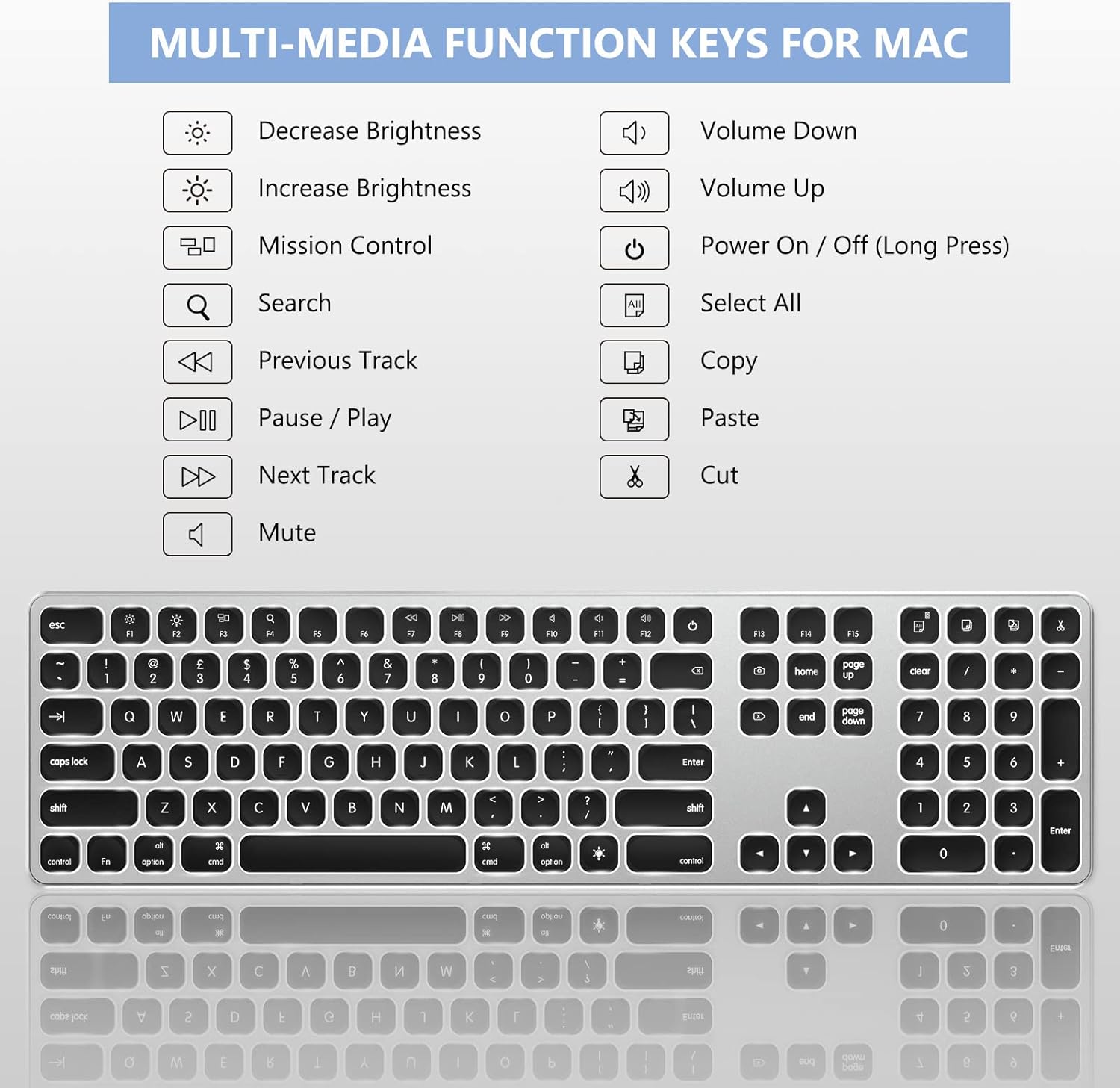
The keyboard includes a row of function keys (F1-F12) that double as Mac OS specific shortcuts and multimedia controls. These keys allow quick access to functions such as brightness adjustment, Mission Control, media playback, volume control, and more.

الشكل 5.2: زيادةview of the multimedia and function keys, including Decrease Brightness, Increase Brightness, Mission Control, Search, Previous Track, Pause/Play, Next Track, Mute, Volume Down, Volume Up, Power On/Off (long press), Select All, Copy, and Cut.
تشمل الاختصارات الشائعة ما يلي:
- ف1/ف2: Decrease/Increase Brightness
- ف3: مركز التحكم
- ف4: بحث
- F7/F8/F9: Previous Track/Play-Pause/Next Track
- F10/F11/F12: Mute/Volume Down/Volume Up
- Power Button (F13): الضغط لفترة طويلة لتشغيل / إيقاف.
- Select All (F14), Copy (F15), Cut (F16): Dedicated keys for these common actions.
5.4. Numeric Keypad Usage
The dedicated numeric keypad functions as expected for number entry. If you experience issues with the numeric keypad not responding or behaving unexpectedly (e.g., controlling the mouse cursor), refer to the Troubleshooting section (Section 7.2).
6. معلومات الشحن والبطارية
The Seenda JP300W keyboard is equipped with a built-in 1300mAh Lithium battery, providing extended usage times.
- سعة البطارية: 1300 مللي أمبير.
- الشحن: Use the provided USB-A to USB-C cable to charge the keyboard. Connect the USB-C end to the keyboard and the USB-A end to a power source.
- عمر البطارية: Up to 800 hours on a single charge without backlight. Approximately 18 hours of continuous use with the backlight on.
- وضع السكون التلقائي: To conserve power, the keyboard will automatically enter sleep mode after 30 minutes of inactivity. Press any key to wake it up.
- مؤشر الطاقة: A low battery indicator light will notify you when charging is required.
7. استكشاف الأخطاء وإصلاحها
7.1. Keyboard Not Responding or Disconnecting
- التحقق من الطاقة: Ensure the keyboard is turned ON and has sufficient battery charge. Recharge if necessary.
- تحقق من اتصال: Verify that the USB receiver (with or without Type-C adapter) is securely plugged into your Mac's USB port. Try a different USB port if available.
- دورة الطاقة: Turn the keyboard OFF, wait a few seconds, then turn it back ON.
- تدخل: Move the keyboard closer to the USB receiver and away from other wireless devices that might cause interference.
7.2. Numeric Keypad Not Working or Controlling Mouse
If your numeric keypad is not functioning correctly or is controlling the mouse cursor, it is likely due to the "Mouse Keys" accessibility feature being enabled in macOS. To resolve this:
- اذهب الى إعدادات النظام (أو تفضيلات النظام on older macOS versions) on your Mac.
- انتقل إلى إمكانية الوصول.
- In the sidebar, select التحكم بالمؤشر (أو Mouse & Trackpad).
- حدد خيار Enable Mouse Keys وتأكد من ذلك غير مفحوص.
- Close System Settings. Your numeric keypad should now function normally.
8. المواصفات
| ميزة | التفاصيل |
|---|---|
| رقم الموديل | JP300W |
| ماركة | سيندا |
| تكنولوجيا الاتصال | 2.4GHz Wireless (USB-A, USB-C) |
| الأجهزة المتوافقة | iMac, MacBook, iPad, iPhone (Mac OS + iOS) |
| تخطيط لوحة المفاتيح | Full-Size, 110 Scissor Flex Keys, Mac OS Layout |
| الإضاءة الخلفية | White, 3 Adjustable Levels |
| نوع البطارية | بطارية ليثيوم مدمجة |
| سعة البطارية | 1300 مللي أمبير |
| منفذ الشحن | يو اس بي-سي |
| عمر البطارية (بدون إضاءة خلفية) | تصل إلى 800 ساعة |
| Battery Life (With Backlight) | تقريبا. 18 ساعة (استخدام مستمر) |
| وضع السكون التلقائي | بعد 30 دقيقة من عدم النشاط |
| أبعاد | 44.6 × 13.59 × 3.3 سم (تقريبًا 17 × 4.8 × 0.8 بوصة) |
| وزن العنصر | 630 جرام |
| مادة | البلاستيك، الألومنيوم |
9. الصيانة
لضمان طول عمر لوحة المفاتيح لديك وأدائها الأمثل، اتبع إرشادات الصيانة التالية:
- تنظيف: استخدم قطعة قماش ناعمة وجافة وخالية من الوبر لمسح سطح لوحة المفاتيح. لإزالة الأوساخ العنيدة، افركها برفق.ampاغسل القماش بالماء أو بمنظف لطيف غير كاشط. تجنب الرطوبة الزائدة.
- تجنب السوائل: Do not expose the keyboard to liquids. Spills can cause damage to internal components.
- تخزين: عند عدم الاستخدام لفترات طويلة، قم بتخزين لوحة المفاتيح في مكان بارد وجاف.
- التعامل معها بحذر: تجنب إسقاط لوحة المفاتيح أو تعريضها لصدمات قوية.
10. الضمان والدعم
This Seenda product is covered by a ضمان لمدة 12 شهرًا من تاريخ الشراء. يغطي هذا الضمان عيوب التصنيع والتصنيع في ظل الاستخدام العادي.
For technical support, warranty claims, or any questions regarding your Seenda Wireless Backlit Keyboard, please contact Seenda customer service. Refer to the product packaging or the official Seenda webالموقع للحصول على أحدث معلومات الاتصال.


