مقدمة
Thank you for choosing the Varmilo MA Series V2 Summit R2 Mechanical Keyboard. This manual provides essential information for setting up, operating, maintaining, and troubleshooting your new keyboard. Please read this manual thoroughly to ensure optimal performance and longevity of your device.
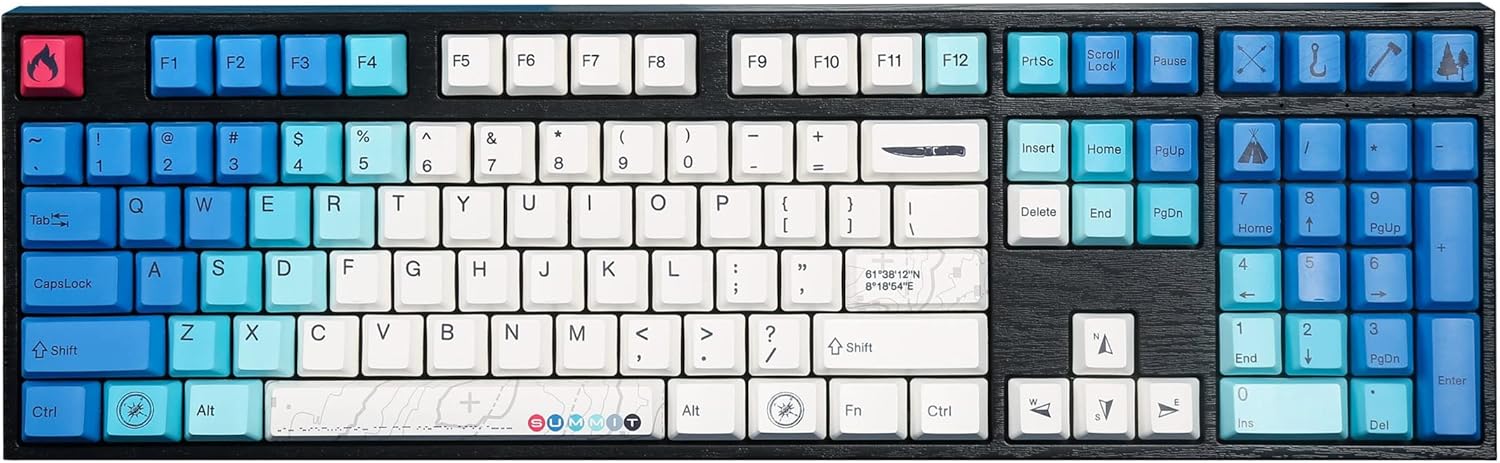
Image: The Varmilo MA Series V2 Summit R2 Mechanical Keyboard, showcasing its full layout and unique keycap design.
يثبت
1. unboxing
Carefully remove the keyboard and all accessories from the packaging. Ensure the following items are present:
- Varmilo MA Series V2 Summit R2 Mechanical Keyboard
- كابل USB-C
- ساحب غطاء المفتاح (إذا كان متضمنًا)
- دليل المستخدم (هذا المستند)
2. توصيل لوحة المفاتيح
- حدد موقع منفذ USB-C الموجود في الجزء الخلفي من لوحة المفاتيح.
- قم بتوصيل أحد طرفي كابل USB-C المقدم بلوحة المفاتيح.
- قم بتوصيل الطرف الآخر من كابل USB-C بمنفذ USB المتوفر على جهاز الكمبيوتر الخاص بك.
- لوحة المفاتيح سهلة الاستخدام، ويجب أن يتعرف عليها نظام التشغيل الخاص بك تلقائيًا.
3. ضبط زاوية لوحة المفاتيح
The Varmilo MA Series V2 features a double-section kickstand, allowing for two different typing angles. Gently flip out the desired sections of the kickstand located on the underside of the keyboard to adjust its height and angle for ergonomic comfort.

الصورة: الجانب المحترفfile of the Varmilo keyboard, illustrating the adjustable kickstand in an extended position.
تعليمات التشغيل
1. الوظائف الأساسية
The keyboard features a standard full-size (104-key) layout. All alphanumeric and standard function keys operate as expected. The Varmilo EC Ivy V2 switches provide a smooth and responsive typing experience.
2. Function (Fn) Key Combinations
The Fn key (typically located near the right Alt key) allows access to secondary functions printed on certain keycaps. Hold down the Fn key and press the desired function key simultaneously.
- Fn + F1-F12: Multimedia controls (e.g., volume, play/pause, stop).
- Fn + مفاتيح الأسهم: LED brightness or effect control (refer to specific keycap legends).
- Fn + Win: قفل/فتح مفتاح Windows.

الصورة: لقطة مقربة view of the right side of the Varmilo keyboard, highlighting the special function keys and their legends.
3. LED Backlighting Control
The keyboard features White LED backlighting. Use the Fn key combinations to adjust the brightness and switch between various lighting effects. Specific key legends will indicate the corresponding functions for LED control.
صيانة
1. تنظيف لوحة المفاتيح
للحفاظ على مظهر لوحة المفاتيح ووظائفها:
- افصل لوحة المفاتيح عن الكمبيوتر قبل التنظيف.
- استخدم قطعة قماش ناعمة وخالية من الوبر وامسحها برفق.ampامسح أغطية المفاتيح بالماء أو بمحلول تنظيف خفيف.asing.
- لإزالة الغبار والحطام بين أغطية المفاتيح، استخدم الهواء المضغوط.
- Avoid using harsh chemicals, abrasives, or solvents, as these can damage the PBT keycaps and finish.
2. إزالة أغطية المفاتيح واستبدالها
The keyboard features durable Dye Sub PBT keycaps. If you need to remove keycaps for deep cleaning or customization:
- Use the provided keycap puller (if applicable) or a similar tool.
- Gently attach the keycap puller to the keycap and pull straight up to remove it. Avoid twisting or excessive force.
- للاستبدال، قم بمحاذاة غطاء المفتاح مع ساق المفتاح واضغط لأسفل بقوة حتى يستقر في مكانه.

Image: A collection of individual Varmilo keycaps, including special design keycaps, demonstrating their PBT material and dye-sublimated legends.
استكشاف الأخطاء وإصلاحها
If you encounter issues with your Varmilo keyboard, please refer to the following common solutions:
- لوحة المفاتيح لا تستجيب:
- تأكد من توصيل كابل USB-C بشكل آمن بكل من لوحة المفاتيح والكمبيوتر.
- حاول توصيل لوحة المفاتيح بمنفذ USB مختلف على جهاز الكمبيوتر الخاص بك.
- قم باختبار لوحة المفاتيح على جهاز كمبيوتر آخر لاستبعاد المشكلات الخاصة بالنظام.
- أعد تشغيل الكمبيوتر الخاص بك.
- LEDs Not Working or Incorrect:
- Ensure the LED brightness is not set to the lowest level using Fn key combinations.
- Check if any specific lighting modes are active that might turn off certain LEDs.
- المفاتيح غير مسجلة:
- Remove the keycap and inspect the switch for any obstructions.
- Clean around the switch stem with compressed air.
إعادة ضبط المصنع
If issues persist, a factory reset may resolve them. Consult the Varmilo official website or support for specific reset procedures for your model, as these can vary.
تحديد
The following are the technical specifications for the Varmilo MA Series V2 Summit R2 Mechanical Keyboard:
| ميزة | التفاصيل |
|---|---|
| ماركة | فارميلو |
| نموذج | MA Series V2 Summit R2 |
| تَخطِيط | Full-size (104 + 4 keys) |
| نوع المفتاح | Varmilo EC Ivy V2 Mechanical Switches |
| المواد Keycap | Dye Sub PBT |
| الاتصال | يو اس بي-سي |
| الإضاءة الخلفية | الصمام الثنائي الباعث للضوء الأبيض |
| مادة | Polybutylene Terephthalate, Silicone |
| مصدر الطاقة | USB بالطاقة |
| الأجهزة المتوافقة | الكمبيوتر (عبر USB-C) |
الضمان والدعم
Varmilo products are manufactured to high-quality standards. For information regarding warranty coverage, technical support, or service inquiries, please visit the official Varmilo webيمكنك زيارة الموقع الإلكتروني أو الاتصال بخدمة دعم العملاء مباشرةً. احتفظ بإيصال الشراء كإثبات للشراء لتقديم مطالبات الضمان.
Official Varmilo Store: Varmilo Store on Amazon


