1. المقدمة
This manual provides detailed instructions for the safe and efficient installation, operation, and maintenance of your Link2Home Extend & Tilt TV Wall Mount. Designed for televisions ranging from 42 to 90 inches and supporting up to 154 pounds, this mount offers versatile viewing options with its extendable, swivel, and tilt features. Please read all instructions carefully before beginning installation.
المميزات الرئيسية:
- Universal TV Wall Mount for 42" to 90" screen sizes.
- يتحمل وزنًا يصل إلى 154 رطلاً.
- Compatible with Flat and Curved Screen TVs & Monitors.
- محترفfile extends 3.1" to 5.3" from the wall.
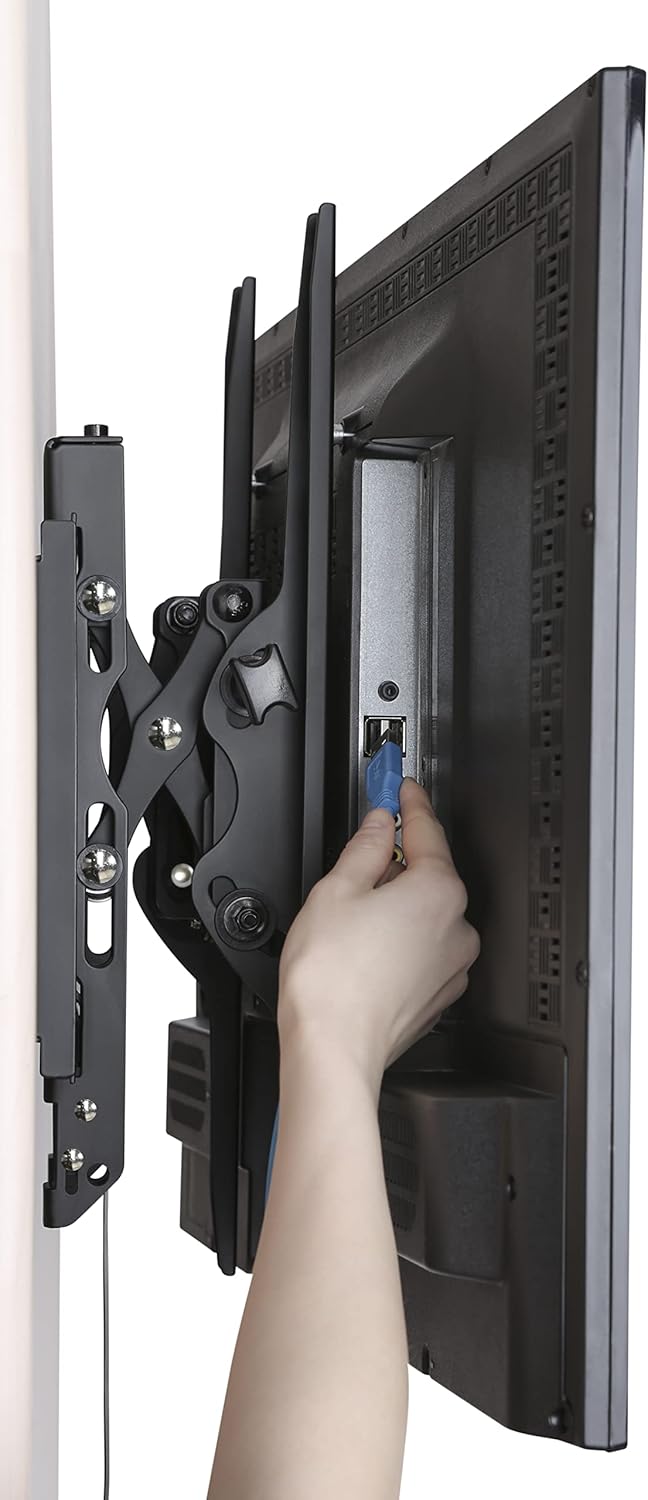
- Open architecture for increased ventilation and easy access to wires.
- Adjustable tilt range: +5° to -12°.
- Adjustable swivel range: +5° to -5°.
- Screen level adjustment: +-0.98".
- Easy-grip knobs for quick, toolless tilt and lock.
- Anti-theft locking hole (padlock not included).
- Automatic click-in spring lock for secure hold.
- VESA compatibility: 200x200 mm to 600x400mm.
- Includes all necessary hardware and a built-in level.
- Mounts on wood studs, brick, concrete, and sheetrock/plasterboard walls.
2. معلومات السلامة
- قدرة الوزن: Do not exceed the maximum weight capacity of 154 lbs (70 kg). This mount is designed for use with specified maximum weights. Use with products heavier than the maximum weights indicated may result in instability causing possible injury.
- حجم الشاشة: This mount is suitable for TVs between 42" and 90".
- تصاعد السطح: تأكد من أن سطح التثبيت يمكنه تحمل الوزن الإجمالي للمعدات وجميع الأجهزة المرفقة بشكل آمن.
- التثبيت الاحترافي: إذا كنت غير متأكد من عملية التركيب أو مدى ملاءمة الجدار الخاص بك، فاستشر متخصصًا مؤهلًا.
- التوافق مع VESA: Verify your TV's VESA mounting pattern (distance between screw holes on the back of the TV) is within the supported range of 200x200mm to 600x400mm.
- أدوات: استخدم الأدوات المناسبة للتركيب. ارتدِ نظارات السلامة دائمًا.
- أطفال: أبقِ الأطفال بعيدًا عن منطقة التثبيت.
3. محتويات العبوة
Your Link2Home Extend & Tilt TV Wall Mount package includes the following components and hardware:
- تجميع لوحة الحائط
- حوامل التلفزيون (يسار ويمين)
- مجموعة متنوعة من براغي التلفزيون، والحلقات، والفواصل
- Lag Bolts and Wall Anchors (for various wall types)
- المستوى المدمج
- Cable Ties (for cord management)
- دليل التعليمات

4. الإعداد والتثبيت
Follow these steps carefully to install your TV wall mount:
الخطوة 1: قم بتثبيت حوامل التلفزيون على جهاز التلفزيون الخاص بك
- ضع جهاز التلفزيون الخاص بك بعناية ووجهه لأسفل على سطح ناعم ونظيف لمنع الخدوش.
- قم بتحديد فتحات التثبيت VESA الموجودة على الجزء الخلفي من التلفزيون الخاص بك.
- Select the appropriate screws, washers, and spacers from the provided hardware kit that fit your TV's VESA pattern.
- Attach the left and right TV brackets to the back of your TV, ensuring they are securely fastened. The hooks on the brackets should face upwards.

Step 2: Locate Mounting Position on Wall
- حدد الارتفاع المطلوب للتلفزيون الخاص بك.
- Use a stud finder to locate wood studs in your wall. Mark the edges and center of the studs. For brick or concrete walls, ensure you have the correct anchors.
- Hold the wall plate against the wall at your desired height and use the built-in level to ensure it is perfectly horizontal. Mark the pilot hole locations.
الخطوة 3: تثبيت لوحة الحائط على الحائط
- Drill pilot holes at the marked locations. The size of the drill bit will depend on your wall type (wood, brick, concrete).
- If installing into concrete or brick, insert the appropriate wall anchors into the pilot holes.
- Align the wall plate with the pilot holes and secure it to the wall using the provided lag bolts. Tighten all bolts firmly.

الخطوة 4: تعليق التلفزيون على لوحة الحائط
- With assistance, carefully lift the TV and hook the attached TV brackets onto the wall plate.
- Ensure both TV brackets are properly seated and engaged with the wall plate. The automatic click-in spring lock will snap into place for a secure hold.
تركيب الفيديو:
5. تعليمات التشغيل
Your Link2Home Extend & Tilt TV Wall Mount offers flexible viewزوايا جي:
ضبط الإمالة:
- To adjust the vertical tilt angle (+5° to -12°), loosen the easy-grip knobs on the TV brackets.
- Adjust the TV to your desired tilt angle.
- Tighten the easy-grip knobs to lock the TV in place.
Adjusting Swivel:
- The mount allows for a swivel range of +5° to -5°. Gently push or pull the side of the TV to achieve the desired horizontal viewزاوية جي.
التمديد/الطي:
- The mount can extend from 3.1" to 5.3" from the wall. Gently pull the TV forward or push it back towards the wall.

Accessing Wires:
- The extendable profile and open architecture provide easy access to cables and ports on the back of your TV.
6. الصيانة
- التفتيش الدوري: Periodically check that all screws and bolts are securely tightened.
- تنظيف: نظّف الحامل بقطعة قماش ناعمة وجافة. تجنّب استخدام المنظفات أو المذيبات الكاشطة.
- تشحيم: No lubrication is required for the moving parts.
7. استكشاف الأخطاء وإصلاحها
- التلفزيون ليس على المستوى: Use the screen level adjustment feature by twisting the screws on the arms for micro-adjustment. Ensure the wall plate was installed level using the built-in level.
- صعوبة ضبط الإمالة/الدوران: Ensure the easy-grip knobs are sufficiently loosened before attempting to adjust the tilt. For swivel, apply gentle, even pressure.
- التلفزيون يبدو غير مقيد: Double-check that all mounting bolts on the wall plate and TV brackets are securely tightened. Ensure the automatic click-in spring lock is engaged.
- Cannot Remove TV from Mount: Pull the release strings located at the bottom of the TV brackets to disengage the locking mechanism.
8. المواصفات
| مواصفة | التفاصيل |
|---|---|
| ماركة | Link2Home |
| نموذج | B0B72CCPY4 |
| توافق حجم الشاشة | 42" - 90" |
| سعة الوزن | حتى 154 أرطال (70 كجم) |
| التوافق مع VESA | 200x200mm إلى 600x400mm |
| زاوية الميل | +5° إلى -12° |
| زاوية الدوران | +5° إلى -5° |
| تمديد بروfile | من 3.1 بوصة إلى 5.3 بوصة |
| مادة | معدن |
| لون | أسود |
| نوع التركيب | حامل الحائط |
| أبعاد المنتج | 28.15 × 8.54 × 3.62 بوصة |
| وزن العنصر | 10.38 رطل |
9. الضمان والدعم
The Link2Home Extend & Tilt TV Wall Mount comes with a ضمان مدى الحياة. For any questions, technical support, or warranty claims, please refer to the contact information provided in your product packaging or visit the official Link2Home webموقع.


