1. انتهى المنتجview
The Fitbit Versa 4 is a fitness smartwatch designed to help you track your health and fitness goals. It features integrated GPS, continuous heart rate monitoring, and a long battery life, compatible with both iOS and Android devices.

الصورة 1.1: أمام view of the Fitbit Versa 4 Smartwatch, showing the display with current time and activity metrics.
المميزات الرئيسية:
- 6+ days battery life with rapid charging.
- Integrated GPS for tracking outdoor activities.
- Continuous heart rate monitoring with PurePulse 2.0.
- 40+ exercise modes and automatic activity tracking.
- Sleep tracking with personalized profile، سtages, and score.
- Stress management tools and daily stress score.
- SpO2 (blood oxygen saturation) monitoring.
- Smart notifications for calls, texts, and app alerts.
- Google Maps for turn-by-turn navigation on your wrist.
- Google Wallet for contactless payments.
- Built-in microphone and speaker for Bluetooth calls.
- Water resistant up to 50 meters.
2. الإعداد
2.1 محتويات الصندوق
- Fitbit Versa 4 Smartwatch
- Classic bands (one small, one large)
- كابل الشحن

الصورة 2.1: The Fitbit Versa 4 package contents, including the device, two band sizes, and the charging cable.
2.2 شحن جهازك
- Connect the charging cable to a USB power source (e.g., computer USB port, USB wall adapter).
- Align the charger's pins with the corresponding contacts on the back of your Versa 4. The charger is magnetic and will snap into place.
- A battery icon will appear on the screen to indicate charging.
The Versa 4 supports rapid charging, providing approximately 24 hours of battery life with just 12 minutes of charging. A full charge typically takes about 2 hours.
2.3 Installing the Fitbit App and Pairing
- قم بتنزيل تطبيق Fitbit من متجر تطبيقات Apple (لأجهزة iOS) أو متجر Google Play (لأجهزة Android).
- افتح تطبيق Fitbit واتبع التعليمات التي تظهر على الشاشة لإنشاء حساب أو تسجيل الدخول إلى حساب موجود.
- اضغط على المحترف الخاص بكfile picture in the Fitbit app, then select 'Set Up a Device'. Choose Versa 4 from the list.
- Follow the app's instructions to pair your Versa 4 with your smartphone via Bluetooth. Ensure your phone's Bluetooth is enabled.
- The app will guide you through the remaining setup steps, including connecting to Wi-Fi (if applicable) and updating firmware.
The Fitbit Versa 4 is compatible with iOS 15 or higher and Android OS 9.0 or higher.
3. Operating Your Versa 4
3.1 الملاحة
- شاشة تعمل باللمس: Swipe left, right, up, or down to navigate through menus, widgets, and notifications. Tap to select items.
- الزر المادي: Press the button on the left side to return to the clock face or access the app menu.
- الإعدادات السريعة: Swipe down from the clock face to access quick settings like Do Not Disturb, Sleep Mode, and screen brightness.
- إشعارات: Swipe up from the clock face to view الإشعارات الأخيرة.
3.2 تتبع اللياقة البدنية
The Versa 4 offers comprehensive fitness tracking capabilities:
- معدل ضربات القلب المستمر: يراقب معدل ضربات قلبك طوال اليوم وأثناء التمارين الرياضية.
- نظام تحديد المواقع المتكامل: Tracks your pace and distance during outdoor activities without needing your phone.
- دقائق المنطقة النشطة: Earn credit for time spent in fat burn, cardio, or peak heart rate zones.
- أكثر من 40 وضعًا للتمرين: Select specific modes for various activities like running, swimming, yoga, and more to get real-time stats.
- Daily Recovery Score: (Requires Fitbit Premium) Provides a personalized score indicating your body's readiness for exercise.
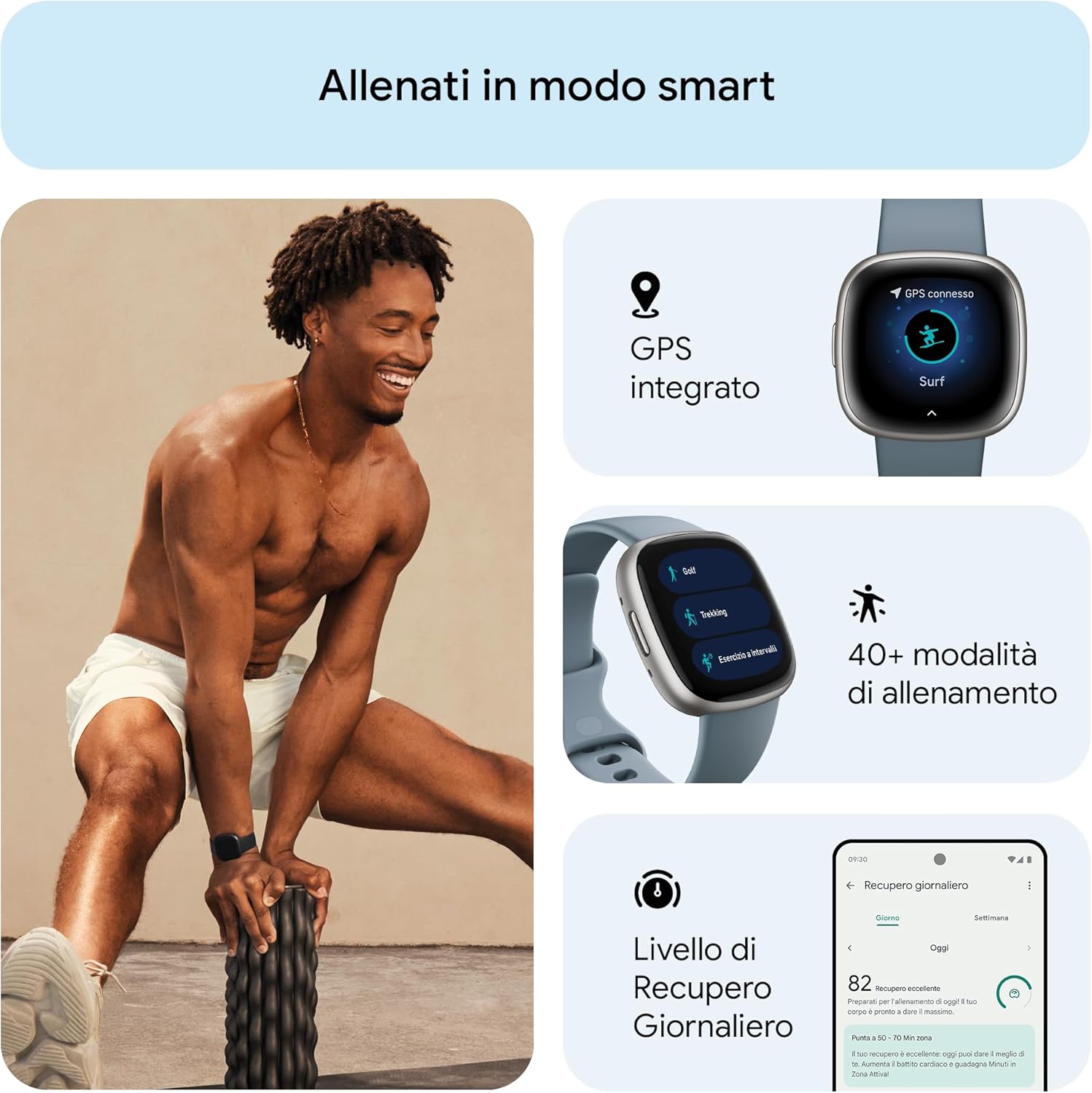
الصورة 3.1: زيادةview of fitness tracking features, including GPS, multiple workout modes, and daily recovery.
3.3 مراقبة الصحة والعافية
Monitor various aspects of your health with the Versa 4:
- تتبع النوم: يسجل نومكtages (light, deep, REM), provides a sleep score, and offers a personalized sleep profile. Smart Wake gently wakes you during an optimal sleep stage.
- إدارة الإجهاد: Daily stress management score helps you understand your body's response to stress. Access guided breathing and mindfulness sessions.
- مراقبة SpO2: Measures your blood oxygen saturation, typically overnight, to help identify potential changes in your well-being.
- Health Metrics Dashboard: Track trends in breathing rate, heart rate variability, skin temperature, and resting heart rate in the Fitbit app.
- تتبع الدورة الشهرية: Log periods, record symptoms, and estimate fertile windows.

الصورة 3.2: Sleep tracking features, including analysis, scoring, smart alarms, and sleep profiles.

الصورة 3.3: Wellness tracking features, including continuous heart rate, heart rate variability, and SpO2 monitoring.
3.4 الميزات الذكية
The Versa 4 keeps you connected and convenient:
- إشعارات: Receive alerts for calls, text messages, calendar events, and apps like Gmail and WhatsApp directly on your wrist.
- خرائط جوجل: Get turn-by-turn directions on your wrist when your phone is nearby.
- محفظة جوجل: Make contactless payments directly from your wrist using NFC.
- مساعد صوت: Use the integrated Alexa to get news, weather, set alarms, control smart home devices, and more.
- مكالمات بلوتوث: Use the built-in microphone and speaker to take calls hands-free, redirect to voicemail, and adjust volume.
- العثور على هاتفي: If you misplace your phone, use this feature on your Versa 4 to make it ring and vibrate.
- ردود سريعة: (Android only) Respond to messages with pre-set quick replies or voice dictation.

الصورة 3.4: Smart features including Google Maps, notifications, and Google Wallet.
3.5 عمر البطارية والشحن
The Versa 4 offers 6+ days of battery life, depending on usage. Features like always-on display and frequent GPS use will reduce battery life. For rapid charging, 12 minutes of charge provides approximately 24 hours of use.

الصورة 3.5: Battery life and compatibility highlights of the Versa 4.
4. الصيانة
4.1 Cleaning Your Versa 4
- Regularly clean your watch and band to prevent skin irritation and maintain device functionality.
- Wipe the device and band with a soft, lint-free cloth. If necessary, dampفي القماش مع الماء.
- Do not use soaps, sanitizers, or abrasive cleaners, as these can damage the device or cause skin irritation.
- After cleaning or sweating, ensure the device and your wrist are completely dry before wearing.
4.2 مقاومة الماء
The Fitbit Versa 4 is water resistant up to 50 meters (5 ATM). This means it is suitable for swimming and showering. However, it is not recommended for use in hot tubs, saunas, or steam rooms, as extreme temperatures can damage the device.
4.3 العناية بالسوار
The Versa 4 comes with classic silicone bands. Ensure the band is not too tight or too loose for optimal heart rate tracking and comfort. If you use other band materials (e.g., vegan leather, Horween leather, sport bands), follow specific care instructions for those materials.
5. استكشاف الأخطاء وإصلاحها
5.1 المشكلات والحلول الشائعة
- الجهاز لا يستجيب: If your Versa 4 is unresponsive, try restarting it. Hold the physical button for about 10 seconds until you see the Fitbit logo.
- مشاكل المزامنة: Ensure your phone's Bluetooth is on and the Versa 4 is within range. Open the Fitbit app to initiate a sync. If syncing fails after the battery has been depleted, manually open the app to sync once the device is charged.
- الإشعارات لا تظهر: Check your phone's notification settings for the Fitbit app and ensure Bluetooth is connected. Verify that 'Do Not Disturb' or 'Sleep Mode' is not active on your Versa 4.
- قراءات معدل ضربات القلب غير دقيقة: Ensure the watch is worn snugly but comfortably on your wrist, about a finger's width above your wrist bone. Clean the sensor on the back of the device.
- Display Not Activating with Wrist Movement: Check the quick settings to ensure 'Screen Wake' is enabled. If the issue persists, a restart may resolve it.
5.2 تحديثات البرامج الثابتة
Periodically, Fitbit releases firmware updates to improve performance and add new features. Ensure your Versa 4 is charged and connected to Wi-Fi during updates. Follow the prompts in the Fitbit app to install any available updates.
6. المواصفات
| ميزة | مواصفة |
|---|---|
| رقم الموديل | FB523SRAG |
| عرض | 1.58 بوصات (336 × 336 بكسل) |
| الاتصال | Bluetooth v5.0, BLE, GPS, GLONASS, NFC |
| أجهزة الاستشعار | 3-axis accelerometer, Optical heart rate sensor, SpO2 sensor, Altimeter, Ambient light sensor |
| نوع البطارية | بوليمر الليثيوم |
| عمر البطارية | 6+ days (typical usage) |
| شحن سريع | 12 minutes for 24 hours of battery |
| الأبعاد (الساعة) | 40.5 × 40.5 × 11.2 ملم |
| Weight (Watch) | 37.64 grams (approximate, without band) |
| مقاومة الماء | 5 ضغط جوي (حتى 50 متراً) |
| نظام التشغيل | Proprietary Fitbit OS |
| التوافق | iOS 15 أو أعلى، Android OS 9.0 أو أعلى |
| مادة | ألومنيوم جasing |
7. الضمان والدعم
7.1 معلومات الضمان
For detailed warranty information, please refer to the warranty card included with your product or visit the official Fitbit webقد تختلف شروط وأحكام الضمان حسب المنطقة والتاجر.
7.2 دعم العملاء
If you encounter any issues or have questions not covered in this manual, please visit the official Fitbit support website or contact their customer service. You can usually find contact information on the Fitbit webالموقع أو في عبوة منتجك.
8. معلومات هامة حول السلامة
Please read all safety instructions before using your Fitbit Versa 4 to avoid injury or damage to the device. Keep the device and accessories out of reach of small children. Consult a medical professional before starting any new exercise program or if you have any health concerns.
9. مصادر الفيديو
لم يتم العثور على أي مقاطع فيديو رسمية ذات صلة بالمنتج من البائع في البيانات المقدمة لإدراجها في هذا الدليل.


