1. المقدمة
This manual provides essential information for the safe and efficient operation of your Powertech MB3904 8 Step Intelligent Lead Acid and Lithium Battery Charger. Please read this manual thoroughly before use and retain it for future reference.
2. معلومات السلامة
احرص دائمًا على مراعاة احتياطات السلامة التالية:
- تأكد من فصل الشاحن عن مصدر الطاقة قبل إجراء أو قطع التوصيلات بالبطارية.
- استخدم الشاحن في المناطق ذات التهوية الجيدة فقط.
- تجنب شحن البطاريات المجمدة.
- لا تعرض الشاحن للمطر أو الرطوبة الزائدة.
- يحفظ بعيدًا عن متناول الأطفال.
- This charger is designed for 6V or 12V Lead Acid or LiFePO4 batteries only. Do not use with other battery types.
3. محتويات العبوة
تأكد من وجود جميع العناصر في العبوة:
- Powertech MB3904 8 Step Intelligent Battery Charger Unit
- بطارية Clamp موصلات (أحمر وأسود)
- Ring Terminal Connectors
- سلك الطاقة المتردد
- دليل المستخدم (هذا المستند)
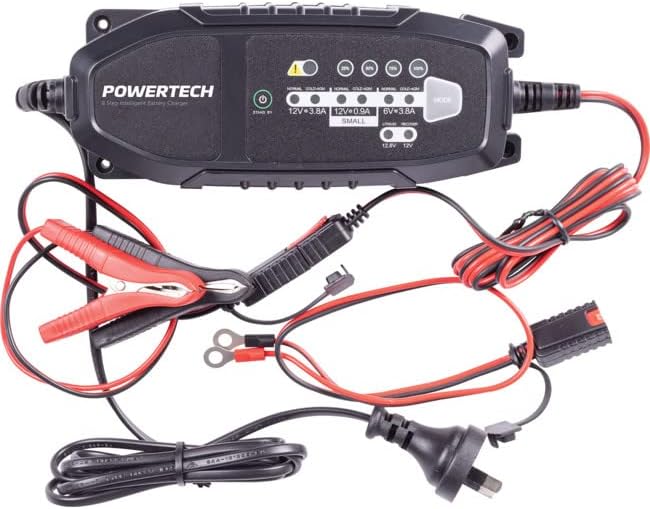
Image: The Powertech MB3904 battery charger unit shown with its various included accessories, including battery clamps, ring terminals, and the AC power cord.
4. مواصفات المنتج
The Powertech MB3904 charger offers advanced features for optimal battery maintenance:
- 8-Step Charging Process: Ensures thorough and efficient charging for various battery types.
- متعدد الحجمtagالتوافق ه: Suitable for both 6V and 12V lead acid and LiFePO4 batteries.
- الحماية الشاملة: Includes overload, short circuit, reverse polarity, safety timer, and wrong battery protection.
- مؤشرات LED بديهية: Clearly display charge status and selected mode.
- زر اختيار الوضع: Allows easy switching between charging modes.
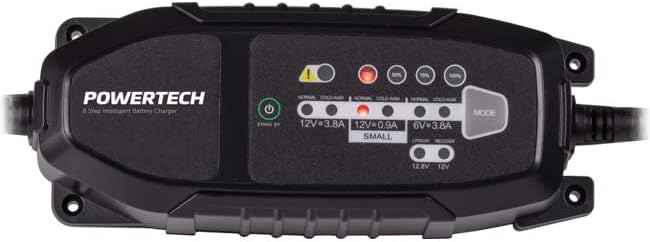
الصورة: من أعلى إلى أسفل view of the Powertech MB3904 charger, highlighting the LED indicators for charge status and the 'MODE' button for selecting charging programs.
5. الإعداد
- الموقع: ضع الشاحن على سطح مستوٍ وثابت في منطقة جيدة التهوية، بعيدًا عن أشعة الشمس المباشرة أو مصادر الحرارة.
- توصيل البطارية: Ensure the battery terminals are clean. Connect the red (+) clamp/ring terminal to the positive (+) battery terminal and the black (-) clamp/ring terminal to the negative (-) battery terminal. Ensure a secure connection.
- توصيل الطاقة: Plug the AC power cord into a suitable wall outlet. The charger will enter standby mode.
6. تعليمات التشغيل
6.1. Selecting Charging Mode
After connecting the battery and power, press the وضع button to cycle through the available charging programs. The corresponding LED will illuminate to indicate the selected mode:
- 12V 3.8A (Normal): Standard charging for 12V lead acid batteries.
- 12V 3.8A (Cold/AGM): For charging 12V lead acid batteries in cold conditions or AGM batteries.
- 12V 0.9A (Small): For charging smaller 12V lead acid batteries.
- 6 فولت 3.8 أمبير: For charging 6V lead acid batteries.
- Lithium (12.8V/12V): For charging 12V LiFePO4 batteries.
- بصلح: A special mode for desulfation of deeply discharged lead acid batteries.
6.2. عملية الشحن
Once a mode is selected, the charger will automatically begin the 8-step charging process. The progress LEDs (25%, 50%, 75%, 100%) will illuminate sequentially to indicate the battery's charge level. When the 100% LED is solid, the battery is fully charged.
6.3. فصل الشاحن
- افصل سلك طاقة التيار المتردد من مأخذ الحائط.
- افصل الأسود (-) clamp/ring terminal from the negative (-) battery terminal.
- افصل الأحمر (+) clamp/ring terminal from the positive (+) battery terminal.
7. الصيانة
- تنظيف: تنظيف الشاحنasinامسح بقطعة قماش ناعمة وجافة. لا تستخدم المنظفات الكاشطة أو المذيبات.
- تخزين: قم بتخزين الشاحن في مكان بارد وجاف عند عدم استخدامه.
- فحص الكابلات: Periodically inspect the power cord and battery cables for any signs of damage. Do not use the charger if cables are damaged.
8. استكشاف الأخطاء وإصلاحها
| مشكلة | السبب المحتمل | حل |
|---|---|---|
| الشاحن لا يعمل. | لا يوجد طاقة من المنفذ؛ اتصال فضفاض. | تحقق من منفذ الطاقة؛ تأكد من توصيل سلك الطاقة بشكل آمن. |
| أضاء مؤشر الخطأ LED. | Reverse polarity; short circuit; wrong battery type. | Check battery connections for correct polarity; inspect cables for shorts; ensure battery type matches selected mode. |
| البطارية لا تشحن. | البطارية فارغة تمامًا/تالفة؛ تم اختيار وضع غير صحيح. | Try "Repair" mode for lead acid batteries; test battery with a multimeter; ensure correct charging mode is selected. |
9. المواصفات
- نموذج: MB3904
- حجم الإدخالtage: 220-240 فولت تيار متردد، 50/60 هرتز
- حجم الإخراجtage: 6 فولت / 12 فولت تيار مستمر
- تيار الشحن: 0.9أ / 3.8أ
- أنواع البطاريات: Lead Acid (WET, MF, CA, EFB, GEL, AGM), LiFePO4
- حماية: Overload, Short Circuit, Reverse Polarity, Safety Timer, Wrong Battery
- أبعاد: حوالي 20.4 × 7.4 × 4.8 سم
- وزن: حوالي 534 جرام
- امتثال: CE
10. الضمان والدعم
This Powertech product is covered by a standard manufacturer's warranty. For specific warranty terms and conditions, please refer to the warranty card included with your purchase or contact your retailer.
For technical support or service inquiries, please contact Jaycar Electronics customer service or visit their official webالموقع. احتفظ بإثبات الشراء الخاص بك لتقديم مطالبات الضمان.
جايكار للإلكترونيات Webموقع: www.jaycar.com.au


