1. المقدمة
The Inrico B01 Wireless Bluetooth Speaker Microphone is designed to enhance communication for users of Android and iOS smart devices. This device pairs easily via Bluetooth 4.2 and offers features such as Push-to-Talk (PTT) and volume control, making it ideal for use with applications like Zello and RealPTT. Full functionality may vary depending on the specific application and its support for external devices.
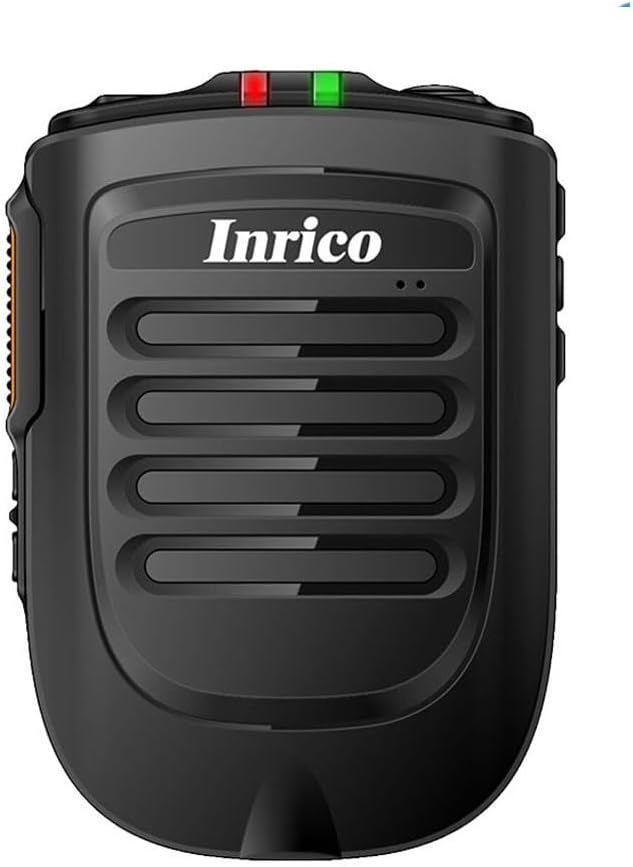
الشكل 1: الجبهة view of the Inrico B01 Wireless Bluetooth Speaker Microphone. This image shows the sleek black design with the Inrico logo and speaker grille.
2. مواصفات المنتج
- Embedded PTT and Volume Control Buttons: Designed for easy access and operation, compatible with applications like Zello and other popular communication platforms.
- مقبس سماعة أذن مقاس 3.5 ملم: Allows for connection of external listen-only earpieces for private audio.
- مؤشر LED: A discreet LED on the top of the speaker provides visual status in various environments.
- توافق التطبيق: Works effectively with Zello and RealPTT. Note that some features may not be fully supported by other applications.
- Desktop Charger Compatibility: Designed to be compatible with the B01 Desktop Charger (sold separately).
- المكونات المتضمنة: Comes with a Micro USB Cable for charging.
3. محتويات العبوة
عند فتح العبوة، يرجى التأكد من تضمين جميع العناصر التالية:
- Inrico B01 Wireless Bluetooth Speaker Microphone
- شاحن يو اس بي
- كابل بيانات USB
- دليل التعليمات (هذا المستند)
- مشبك الحزام
- بطارية ليثيوم أيون (مثبتة مسبقًا أو منفصلة)
4. تخطيط الجهاز وعناصر التحكم
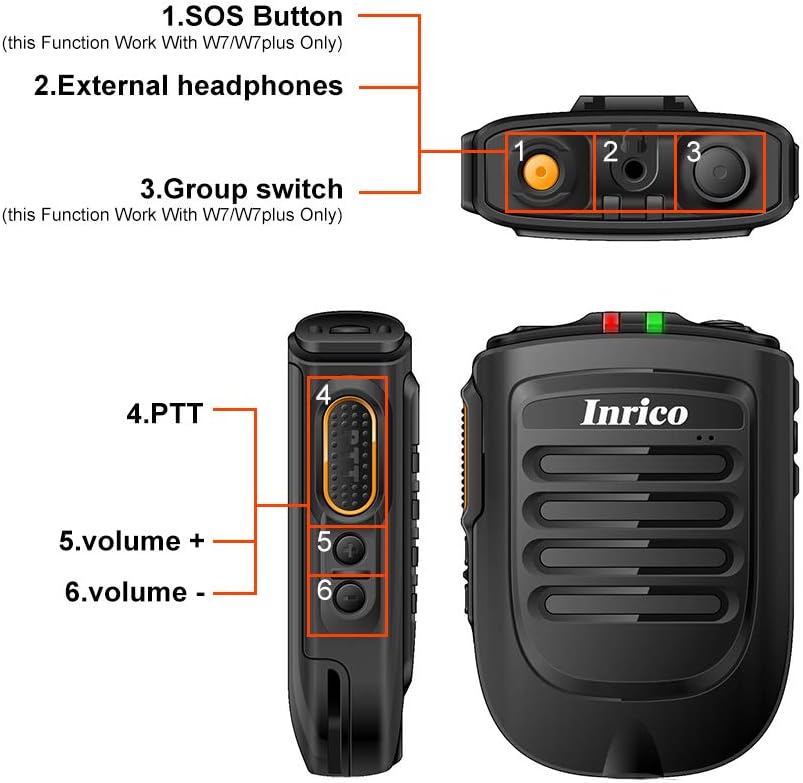
Figure 2: Detailed diagram illustrating the various buttons and ports on the Inrico B01.
- 1. SOS Button: (Functionality may depend on application and device compatibility, e.g., W7/W7plus).
- 2. External Headphones Jack: 3.5mm port for connecting an external earpiece.
- 3. Group Switch: (Functionality may depend on application and device compatibility, e.g., W7/W7plus).
- 4. PTT (Push-to-Talk) Button: Main communication button.
- 5. Volume + Button: يزيد من حجم الصوت.
- 6. Volume - Button: يقلل من حجم الصوت.
5. الإعداد
5.1 شحن الجهاز
Before initial use, fully charge the Inrico B01. Connect the provided USB data cable to the device's charging port and the other end to a USB charger or a computer's USB port. The LED indicator will show charging status (refer to LED indicator section for details).

Figure 3: Illustration of the Inrico B01's 2000mAh battery capacity and estimated usage times. The image shows battery level indicators and approximate talking, PTT, and standby times.
| متري | الوقت التقريبي |
|---|---|
| وقت التحدث | حوالي 14 ساعة |
| PTT time | حوالي 14 ساعة |
| وقت الانتظار | >90 ساعة |
5.2 اقتران بلوتوث
- Ensure the Inrico B01 is powered on and in pairing mode (refer to device's LED indicator for pairing status, usually a blinking blue light).
- On your smartphone (Android or iOS), navigate to the Bluetooth settings.
- بحث عن available devices. The Inrico B01 should appear in the list (e.g., "Inrico B01" or similar).
- Select the Inrico B01 to initiate pairing. If prompted for a passcode, enter "0000" (four zeros).
- Once paired, the LED indicator on the B01 will change to a solid blue light, indicating a successful connection.
6. تعليمات التشغيل
6.1 Using Push-to-Talk (PTT)
After successfully pairing the device with your smartphone and configuring it within your chosen communication application (e.g., Zello, RealPTT):
- Open your communication application on your smartphone.
- To transmit, press and hold the PTT button (labeled '4' in Figure 2) on the Inrico B01. Speak clearly into the microphone.
- Release the PTT button to stop transmitting and listen for replies.
6.2 ضبط مستوى الصوت
Use the Volume + (labeled '5' in Figure 2) and Volume - (labeled '6' in Figure 2) buttons on the side of the device to adjust the speaker's output volume.
6.3 Using the Earphone Jack
For private listening, connect a 3.5mm listen-only earpiece to the external headphones jack (labeled '2' in Figure 2) on the top of the device. Audio will be routed to the earpiece instead of the internal speaker.
6.4 حالة مؤشر LED
- يومض مؤشر LED باللون الأزرق: Device is in pairing mode or waiting for connection.
- Blue LED Solid: Device is successfully connected via Bluetooth.
- Red LED Solid: الجهاز قيد الشحن.
- الصمام الأخضر الصلب: الجهاز مشحون بالكامل.
- يومض LED أحمر: تحذير من انخفاض مستوى البطارية.
7. الصيانة
- تنظيف: امسح الجهاز بقطعة قماش ناعمة وجافة. لا تستخدم مواد كيميائية قاسية أو منظفات كاشطة.
- تخزين: قم بتخزين الجهاز في مكان بارد وجاف بعيدًا عن أشعة الشمس المباشرة ودرجات الحرارة القصوى.
- العناية بالبطارية: لإطالة عمر البطارية، تجنب تفريغها بالكامل بشكل متكرر. اشحن الجهاز بانتظام، حتى في حال عدم استخدامه لفترات طويلة.
- مقاومة الماء: هذا الجهاز غير مقاوم للماء. تجنب تعريضه للماء أو الرطوبة الزائدة.

Figure 4: Image showing the metal sheet on the battery cover, designed for compatibility with magnetic car holders. This feature allows for convenient mounting in vehicles.
8. استكشاف الأخطاء وإصلاحها
| مشكلة | السبب المحتمل | حل |
|---|---|---|
| الجهاز لا يعمل. | شحن البطارية منخفض أو معدوم. | Charge the device fully using the provided USB cable and charger. |
| لا يمكن الاقتران بالهاتف الذكي. | Bluetooth is off on smartphone; device not in pairing mode; too far from smartphone. | Ensure Bluetooth is enabled on your phone. Put the B01 into pairing mode. Keep devices within 10 meters. Try restarting both devices. |
| No audio from speaker/earpiece. | Volume too low; device not connected; application not configured correctly. | Increase volume. Verify Bluetooth connection. Check audio settings within your communication application. |
| PTT button not working. | Application not running or not configured to recognize the PTT button. | Ensure your communication application is active and properly configured to use the external PTT button. Some applications may require specific settings. |
9. المواصفات

Figure 5: Physical dimensions and weight of the Inrico B01. The image provides measurements in both millimeters and feet, and weight in grams and ounces.
| المعلمة | قيمة |
|---|---|
| ماركة | إينريكو |
| اسم الموديل | ب01 |
| نسخة البلوتوث | 4.2 |
| بروتوكول البلوتوث | HFP / HSP / A2DP / AVRCP / SPP |
| انتقال المدى | 10م |
| قوة النقل | الفئة 2، 4 ديسيبل |
| حساسية | 80dBm < 0.1%BER |
| الأداء الصوتي | SBC Decode |
| Audio to Noise Ratio | ≥75 ديسيبل |
| قوة مكبر الصوت | 1W/8R (116dB) |
| مؤشر LED | Blue/Green LED Indicator |
| مقبس سماعة الأذن | 3.5 ملم |
| سعة البطارية | 2000mA @ 3.7V (Lithium Ion) |
| الأبعاد (الطول*العرض*الارتفاع) | 90 × 63 × 25.6 ملم (تقريبًا 3.54 × 2.48 × 1.01 بوصة) |
| وزن العنصر | 8.8 أونصة (حوالي 249 جرامًا) |
| الأجهزة المتوافقة | Smartphone (Android and iOS) |
| رمز المنتج الموحد | 785582409181 |

Figure 6: The Inrico B01 is compatible with various mobile radios, such as the TM-7 7plus, expanding its utility beyond just smartphones.
10. الضمان والدعم
للحصول على معلومات الضمان والدعم الفني، يرجى الرجوع إلى موقع Inrico الرسمي. webيمكنك زيارة الموقع الإلكتروني أو الاتصال بنقطة الشراء. احتفظ بإيصال الشراء كإثبات للشراء لتقديم مطالبات الضمان.
لمزيد من المساعدة، يمكنك أيضًا الرجوع إلى صفحة المنتج على أمازون.


