1. المقدمة
Thank you for choosing the COMAOGO T002-W Mini Projector. This manual provides essential information for setting up, operating, and maintaining your projector to ensure optimal performance and longevity. The T002-W is a versatile projector featuring 9500 Lumens brightness, 1080P support, 5G WiFi, and Bluetooth 5.1 connectivity, designed for an immersive viewجي تجربة تصل إلى 220 بوصة.
2. محتويات العبوة
يرجى التحقق من الحزمة للعناصر التالية:
- 1 x COMAOGO T002-W Mini Projector
- 1 × جهاز التحكم عن بعد
- 1 × كابل الطاقة
- 1 × كابل HDMI
- شنومكس x أف كابل
- 1 × دليل المستخدم
3. انتهى المنتجview
تعرّف على مكونات جهاز العرض وواجهاته.

Image: COMAOGO T002-W Projector with 5G and 2.4G WiFi capabilities, showing wireless screen synchronization with a tablet and smartphone.
The projector features various ports for connectivity, including HDMI, USB, VGA, AV, and a TF card slot, along with a 3.5mm audio output. It also supports dual-band 5G and 2.4G WiFi for stable wireless connections and Bluetooth 5.1 for audio devices.

Image: COMAOGO T002-W Projector connected to various devices including a laptop, game console, and streaming stick, highlighting its multiple input ports (AV, HDMI, USB, TF, VGA).
4. الإعداد
4.1 التنسيب
Position the projector on a stable, flat surface or mount it on a tripod. Ensure there are no obstructions to the ventilation vents. For optimal viewing, the projection distance should be between 1.5 meters and 5.5 meters, yielding a screen size from 45 inches to 220 inches.
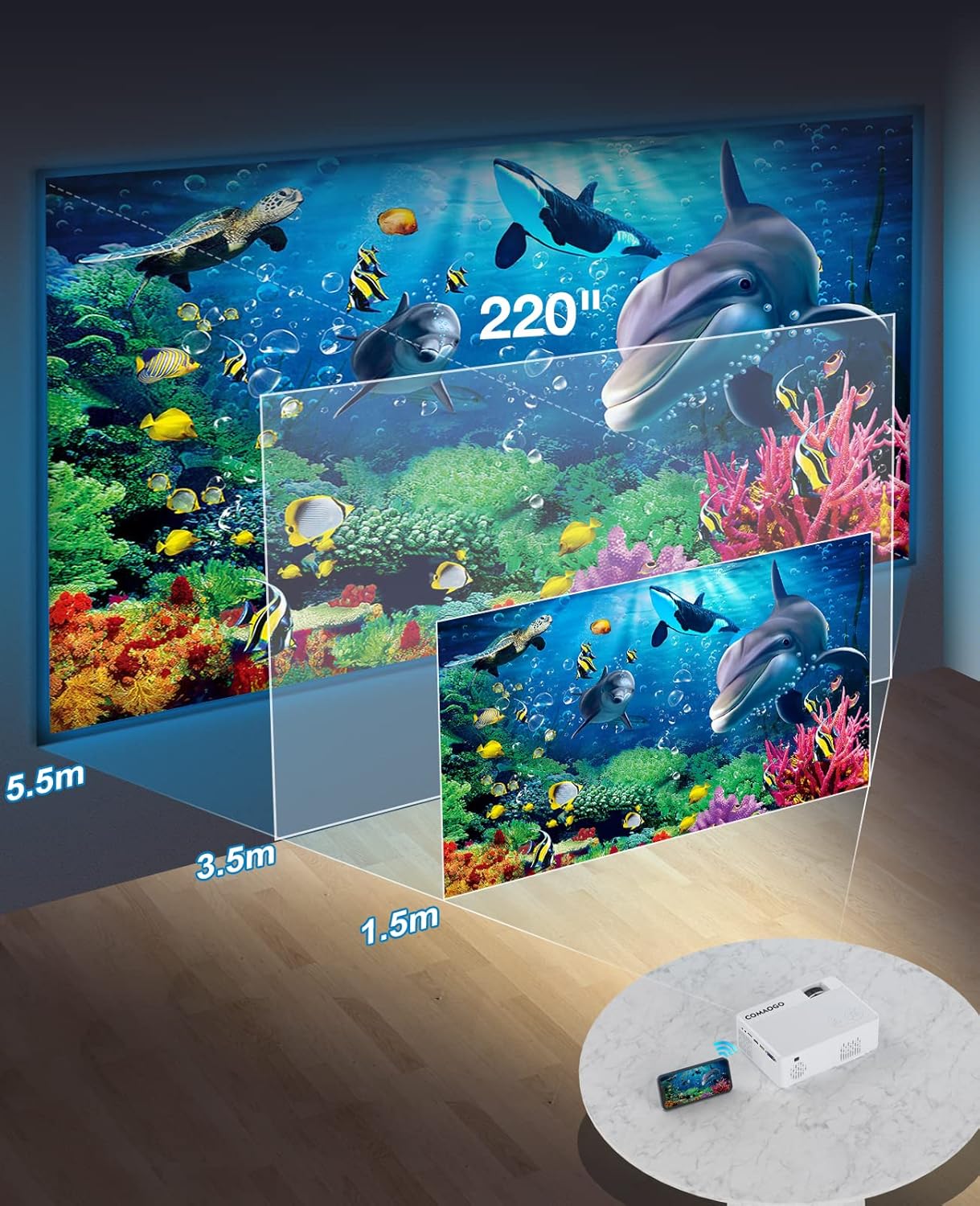
Image: Diagram illustrating the projection distances (1.5m to 5.5m) and corresponding screen sizes (45 to 220 inches) for the COMAOGO T002-W Projector.
4.2 توصيل الطاقة
Connect the power cable to the projector's power input and then plug it into a power outlet (AC 220V).
4.3 التركيز وتصحيح الانحراف
To achieve a clear and rectangular image:
- ضبط التركيز: قم بتدوير حلقة التركيز الموجودة على عدسة جهاز العرض حتى تظهر الصورة واضحة.
- تصحيح الانحراف: Adjust the keystone correction dial (if available, or via menu settings) to correct trapezoidal distortion, ensuring the image is rectangular. The projector supports ±15° keystone correction.

Image: Illustration of keystone correction and focus adjustment for the COMAOGO T002-W Projector, showing how to achieve a clear, rectangular image.
5. تعليمات التشغيل
5.1 تشغيل/إيقاف التشغيل
- تشغيل الطاقة: اضغط على زر الطاقة الموجود بجهاز العرض أو جهاز التحكم عن بُعد.
- إيقاف التشغيل: اضغط على زر الطاقة مرة أخرى لإيقاف تشغيل جهاز العرض.
5.2 اختيار مصدر الإدخال
Use the "Source" button on the remote control or the projector's control panel to select the desired input source (e.g., HDMI, USB, VGA, AV).
5.3 الاتصال اللاسلكي (واي فاي)
The projector supports dual-band 5G and 2.4G WiFi for stable screen mirroring.
- Navigate to the WiFi settings on the projector's menu.
- Select your desired WiFi network (5G for faster, more stable connection; 2.4G for longer range and better penetration).
- أدخل كلمة المرور للاتصال.
- For screen mirroring, select the appropriate option (e.g., "iOS Cast" or "Android Cast") on the projector and follow the on-screen instructions to connect your smartphone or tablet.
5.4 اتصال البلوتوث
Connect external Bluetooth audio devices like speakers or headphones.

Image: COMAOGO T002-W Projector demonstrating Bluetooth 5.1 connection with a speaker and headphones.
- انتقل إلى إعدادات البلوتوث في قائمة جهاز العرض.
- تأكد من أن جهاز البلوتوث الخاص بك في وضع الاقتران.
- حدد جهازك من القائمة لإقرانه.
- Note: The projector's Bluetooth function is for connecting output devices (speakers, headphones) only.
5.5 الاتصالات السلكية
قم بتوصيل الأجهزة المختلفة باستخدام المنافذ المتاحة:
- HDMI: Connect laptops, PCs, game consoles (Xbox), TV sticks (Roku, Chromecast), DVD players.
- USB: لعب وسائل الإعلام fileمباشرة من محركات أقراص USB.
- VGA: قم بتوصيل أجهزة الكمبيوتر أو أجهزة الكمبيوتر المحمولة القديمة.
- من: قم بتوصيل أجهزة الفيديو القديمة.
- بطاقة TF: Insert a TF card to play media files.
- Important: Copyright-protected content from services like Netflix or Disney+ is not directly supported via screen mirroring. For these services, use an HDMI connection with a compatible adapter (e.g., Lightning Digital AV Adapter for iOS devices) or a streaming stick.
6. الصيانة
6.1 تنظيف العدسة
Use a soft, lint-free cloth or lens cleaning paper to gently wipe the projector lens. Avoid using abrasive materials or harsh chemicals that could damage the lens coating.
6.2 نظام التبريد
The projector features an updated cooling system designed to reduce noise and maintain optimal operating temperature. Ensure the ventilation vents are clear of dust and obstructions to prevent overheating. Regular cleaning of the vents with a soft brush or compressed air is recommended.
7. استكشاف الأخطاء وإصلاحها
إذا واجهت مشاكل مع جهاز العرض الخاص بك، فراجع الحلول الشائعة التالية:
- لا توجد صورة:
- تحقق من توصيل الطاقة وتأكد من تشغيل جهاز العرض.
- Verify the input source selection matches your connected device.
- Ensure all cables (HDMI, VGA, etc.) are securely connected.
- اضبط التركيز وتصحيح الانحراف.
- لا يوجد صوت:
- اضبط مستوى صوت جهاز العرض.
- إذا كنت تستخدم مكبرات صوت خارجية، فتأكد من توصيلها وتشغيلها بشكل صحيح.
- Check Bluetooth connection for external audio devices.
- Ensure the audio output from your source device is enabled.
- WiFi/Screen Mirroring Issues:
- تأكد من أن كلاً من جهاز العرض وجهازك متصلان بشبكة الواي فاي نفسها.
- Check for strong WiFi signal.
- Restart both the projector and your source device.
- For Android devices, ensure "Wireless Projection" or "Screen Mirroring" is enabled. For iOS, use "Screen Mirroring" from Control Center.
- الصورة ضبابية:
- ضبط حلقة التركيز على العدسة.
- تأكد من أن مسافة العرض تقع ضمن النطاق الموصى به.
- الصورة شبه منحرفة:
- Adjust the keystone correction dial or setting.
For further assistance or software updates, please contact COMAOGO customer support.
8. المواصفات
| ميزة | مواصفة |
|---|---|
| ماركة | كوماوجو |
| نموذج | T002-W |
| سطوع | 9500 لومن (220 مقياس قياس الطاقة الأمريكي) |
| نسبة التباين | 6000:1 |
| الدقة الأصلية | 1280 × 720 |
| الدقة المدعومة | 1080 بكسل |
| حجم العرض | 45" - 220" |
| مسافة الإسقاط | 1.5 متر - 5.5 متر |
| تصحيح الانحراف | ±15 درجة |
| اتصال واي فاي | Dual-band (5G + 2.4G) |
| بلوتوث | بلوتوث 5.1 |
| واجهة الأجهزة | 3.5mm Audio, TF Card, USB 2.0, VGA, HDMI |
| مكبر صوت مدمج | نعم |
| مستوى الضوضاء | 45 ديسيبل |
| استهلاك الطاقة | 48 واط |
| أبعاد | 20.32 × 15.24 × 7.62 سم |
| وزن | 1 كيلوجرام |
9. فيديو المنتج الرسمي
Watch this video for a visual guide on the COMAOGO T002-W Mini Projector's features and operation.
Video: An official product video demonstrating the features and usage of the COMAOGO T002-W Mini Projector, including connectivity and display capabilities.
10. الضمان والدعم
The COMAOGO T002-W Mini Projector comes with a standard manufacturer's warranty. For warranty claims, technical support, or inquiries regarding software updates, please contact COMAOGO customer service through the retailer where you purchased the product or visit the official COMAOGO webموقع.
SOFTWARE UPDATES can be provided; please contact us if needed.


