
1. المقدمة وما فوقview
The ZEBRONICS Cozy is a 6-button vertical USB gaming mouse designed for comfort and high-precision gaming. It features a maximum DPI of 3200, a durable 1.8m braided cable, vibrant LED lights, a high-resolution sensor, and a smooth rubber finish. Its ergonomic design promotes natural hand posture, reducing strain during extended use. This plug-and-play device is ready for immediate use with your computer or laptop.
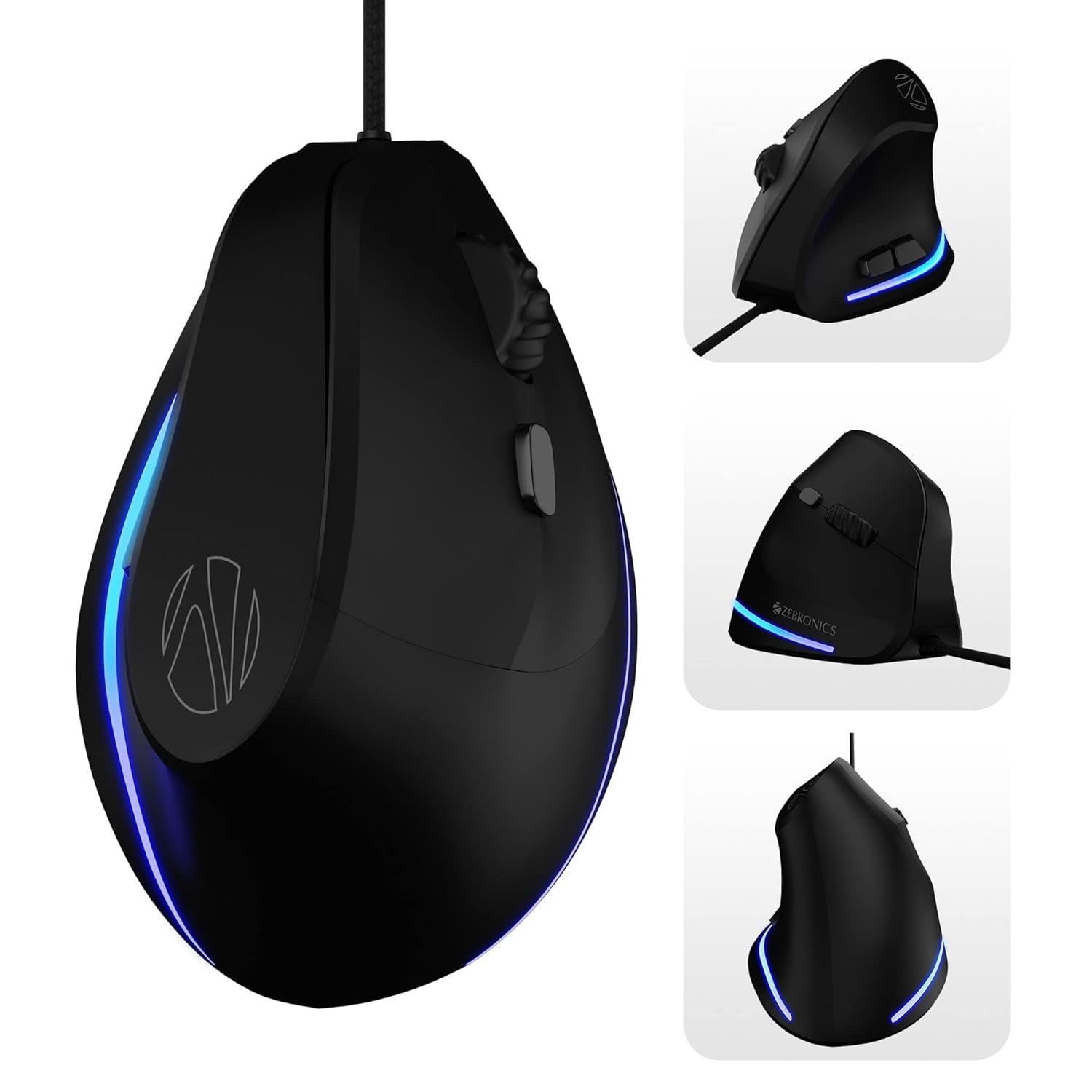
Image: Various angles of the ZEBRONICS Cozy mouse, highlighting its unique vertical shape.
2. الميزات الرئيسية
- تصميم عمودي مريح: Redefines comfort with a high-precision gaming-grade sensor, promoting a natural handshake grip to reduce wrist strain.
- DPI قابل للتعديل: Supports up to 3600 DPI, with four preset levels (1200 / 1600 / 2400 / 3200 DPI) for customizable sensitivity.
- 6 أزرار قابلة للبرمجة: Includes dedicated buttons for forward, backward, and DPI adjustment, offering versatile control.
- بنية متينة: Designed for hardcore gaming with a 5 million click cycle lifespan.
- كابل مضفر: Features a 1.8-meter high-quality braided cable with a USB connector for reliable, uninterrupted gaming.
- Rubber Finish: A smooth rubber finish ensures easy handling and comfort during long hours of use.
- أضواء LED: Stunning LED lights enhance your gaming station's aesthetics.
- التوصيل والتشغيل: Simple USB connection for immediate use with computers and laptops.

Image: Visual representation of the mouse's ergonomic design, DPI settings, USB interface, LED lights, braided cable, button count, high-resolution sensor, DPI switch, and rubber finish.

Image: A comparison illustrating the ergonomic benefits of a vertical mouse over a standard mouse, showing natural wrist alignment.

الصورة: عن قرب view of the ZEB-COZY mouse highlighting its vibrant LED lighting.
3. الإعداد
متطلبات النظام:
- Compatible with most computers and laptops.
- USB port available.
توصيل الماوس:
- حدد موقع منفذ USB المتاح على جهاز الكمبيوتر أو الكمبيوتر المحمول.
- Insert the USB connector of the ZEB-COZY mouse firmly into the USB port.
- الماوس يعمل بمجرد التوصيل، مما يعني أنه سيتم التعرف عليه تلقائيًا بواسطة نظام التشغيل الخاص بك دون الحاجة إلى تثبيت برامج تشغيل إضافية.
- The LED lights on the mouse will illuminate upon successful connection.

Image: Illustration of the USB interface, indicating simple plug-and-play connectivity.

Image: The ZEB-COZY mouse positioned between a Mac and Windows computer, signifying broad compatibility.
4. تعليمات التشغيل
الاستخدام الأساسي:
Once connected, the ZEB-COZY mouse functions like a standard mouse. Move the mouse to control the cursor on your screen. Use the left and right click buttons for primary and secondary actions, respectively. The scroll wheel allows for vertical scrolling through documents and web الصفحات.
تعديل DPI:
The ZEB-COZY mouse features a dedicated DPI button, typically located near the scroll wheel. Press this button to cycle through the four available DPI settings:
- 1200 نقطة في البوصة (افتراضي)
- 1600 نقطة في البوصة
- 2400 نقطة في البوصة
- 3200 نقطة في البوصة (كحد أقصى)
Adjusting the DPI changes the cursor speed and sensitivity, allowing you to optimize performance for different tasks, from precise graphic design to fast-paced gaming.

Image: Close-up of the mouse indicating its maximum 3200 DPI capability.
وظائف الأزرار:
In addition to the standard left, right, and scroll wheel click, the ZEB-COZY mouse includes dedicated forward and backward buttons, usually located on the side for thumb access. These buttons are commonly used for navigation in web المتصفحات و file المستكشفون.
5. الصيانة
To ensure the longevity and optimal performance of your ZEB-COZY mouse, follow these simple maintenance guidelines:
- تنظيف: امسح سطح الفأرة بانتظام بقطعة قماش ناعمة وجافة وخالية من الوبر. لإزالة الأوساخ المستعصية، افركها برفق.ampامسح بقطعة قماش مبللة بالماء أو بمحلول تنظيف خفيف. تجنب المواد الكيميائية القاسية أو المواد الكاشطة.
- العناية بالمستشعر: حافظ على نظافة المستشعر البصري أسفل الفأرة وخلوه من الغبار والأوساخ. استخدم قطعة قطن أو هواءً مضغوطًا إذا لزم الأمر.
- إدارة الكابلات: تجنب ثني الكابل المضفر بشدة أو شده بقوة لمنع تلفه الداخلي. خزّن الكابل بشكل منظم عند عدم استخدامه.
- تخزين: قم بتخزين الفأرة في مكان بارد وجاف بعيدًا عن أشعة الشمس المباشرة ودرجات الحرارة القصوى.
6. استكشاف الأخطاء وإصلاحها
If you encounter any issues with your ZEB-COZY mouse, please refer to the following common problems and their solutions:
| مشكلة | السبب المحتمل | حل |
|---|---|---|
| الماوس لا يستجيب / المؤشر لا يتحرك. | اتصال USB فضفاض، منفذ USB معيب، مشكلة في برنامج التشغيل. | Ensure the USB cable is securely plugged in. Try a different USB port. Restart your computer. |
| Erratic or jumpy cursor movement. | مستشعر بصري متسخ، سطح غير مناسب، تداخل برمجي. | Clean the optical sensor on the bottom of the mouse. Use the mouse on a clean, non-reflective surface or a mouse pad. Check for conflicting software. |
| DPI button not changing sensitivity. | Software conflict, temporary glitch. | Ensure no other mouse software is interfering. Restart your computer. |
| مصابيح LED لا تعمل. | مشكلة في الطاقة، عطل داخلي. | Check USB connection. Try a different USB port. If the mouse functions otherwise, this might be a minor cosmetic issue. |
If the problem persists after trying these solutions, please contact ZEBRONICS customer support for further assistance.
7. المواصفات
| ميزة | التفاصيل |
|---|---|
| ماركة | الزبرونيك |
| اسم الموديل | ZEB-COZY |
| لون | أسود |
| تكنولوجيا الاتصال | USB (سلكي) |
| تقنية كشف الحركة | بصري |
| مستويات DPI | 1200 / 1600 / 2400 / 3200 DPI (Max) |
| عدد الأزرار | 6 |
| طول الكابل | 1.8 meters (Braided) |
| أبعاد العنصر (LxWxH) | 7.5 × 12 × 9 سم |
| وزن العنصر | 157 جرام |
| المكونات المضمنة | فأرة - وحدة واحدة |
| توافق نظام التشغيل | Computers, Laptops (Mac and Windows compatible) |
| المميزات الخاصة | Dedicated buttons for DPI, Forward & Backward, Works on most surfaces, Rubber finish, High Precision, LED Lights, Comfortable and Ergonomic design. |
8. الضمان والدعم
The ZEBRONICS Cozy 6 Button Vertical USB Gaming Mouse comes with a ضمان لمدة سنة واحدة من تاريخ الشراء. يرجى الاحتفاظ بإيصال الشراء لتقديم مطالبات الضمان.
For technical support, warranty claims, or any product-related inquiries, please contact ZEBRONICS customer service. Refer to the official ZEBRONICS webللحصول على أحدث معلومات الاتصال، يرجى زيارة الموقع الإلكتروني أو الاطلاع على عبوة المنتج.
Manufacturer: Zebronics India Private Limited, 13/7, Smith Road, Royapettah CHENNAI-600002
9. فيديو المنتجview
فيديو: مسؤول فوقview of the ZEBRONICS Cozy 6 Button Vertical USB Gaming Mouse, highlighting its features and design.


