1. انتهى المنتجview
The Kuephom Portable CD Player (Model PM11-Black) is a versatile audio device designed for personal and multi-user listening. It features a built-in speaker, rechargeable battery, and anti-skip protection, making it suitable for various environments including home, car, and travel. The player supports multiple audio formats and offers adjustable playback speed for learning purposes.

Image 1.1: Kuephom Portable CD Player and accessories.
المميزات الرئيسية:
- بطارية قابلة لإعادة الشحن: Integrated 1500mAh battery provides up to 8 hours of playback with earphones or 5 hours with the built-in speaker on a 4-hour charge.
- مكبر صوت مدمج: Allows direct listening without external headphones or speakers.
- حماية ضد التخطي: Ensures uninterrupted audio playback during movement or light shocks.
- Memory Playing: Resumes playback from the last played track when the device is turned on again.
- التوافق الواسع: Supports CD, CD-R, CD-RW, MP3, and WMA formats.
- خيارات اتصال متعددة: Includes 3.5mm AUX input/output, USB port, and headphone jack.
- Adjustable Playback Speed: Useful for language learning or musical practice.
2. دليل الإعداد
2.1 شحن الجهاز
Before initial use, fully charge the CD player. The device features a built-in rechargeable battery, eliminating the need for disposable AA batteries.
- Locate the charging port on the side of the CD player.
- Connect the provided USB charging cable to the player and a compatible USB power source (e.g., wall charger, power bank, car charger, computer USB port).
- سيضيء مؤشر الشحن. تستغرق عملية الشحن الكامل عادةً حوالي 4 ساعات.

Image 2.1: Charging options for the CD player.
2.2 تحميل قرص مضغوط
The CD player supports standard CD, CD-R, CD-RW, MP3, and WMA disc formats.
- Locate the 'OPEN' switch on the side of the player.
- Slide the switch to the 'OPEN' position to release the lid.
- Gently place the CD onto the central spindle with the label side facing up. Ensure the CD is securely seated.
- أغلق الغطاء بإحكام حتى تسمع صوت طقطقة عند إغلاقه.
Video 2.2: Demonstrates the basic functions and usage scenarios of the Kuephom Portable CD Player, including loading a CD and identifying ports.
2.3 توصيل الأجهزة الخارجية
- سماعات الرأس: Plug the included earbuds or your preferred 3.5mm headphones into the headphone jack (blue port).
- وصلة AUX: Use the provided 3.5mm audio cable to connect the player's AUX port (green port) to external speakers or a car's AUX input.
- تشغيل USB: Insert a USB flash drive into the USB port to play compatible audio file(MP3، WMA).

Image 2.3: Connecting the CD player to a car's audio system.
3. تعليمات التشغيل
3.1 تشغيل/إيقاف التشغيل
Locate the power switch on the side of the player. Slide it to the 'ON' position to power on the device. Slide it to 'OFF' to power off.
3.2 عناصر التحكم الأساسية في التشغيل
The control panel on the top of the player features intuitive buttons:
- Play/Pause (►▮): اضغط لبدء التشغيل أو إيقافه مؤقتًا.
- Previous Track (◀◀): Press once to go to the beginning of the current track. Press twice to go to the previous track.
- Next Track (►►): اضغط للانتقال إلى المسار التالي.
- رفع الصوت (+): يزيد من مستوى الصوت.
- اخفض الصوت (-): يقلل من مستوى الصوت.
3.3 وظائف التشغيل المتقدمة
- كرر (REP): Cycles through repeat modes (e.g., repeat one, repeat all, random).
- الوضع (MODE): Switches between different playback modes (e.g., CD, USB, AUX).
- A-B Repeat (A-B): Allows repeating a specific segment of audio.
- البرنامج (PROG): Enables programming a custom playback order for tracks.
- Speed Adjustment (SPEED +/-): Adjusts the playback speed, useful for language learning or transcribing audio.

Image 3.1: The adjustable playback speed feature is beneficial for learning.
3.4 Anti-Skip and Memory Functions
- حماية ضد التخطي: This function is automatically activated when the player is turned on, providing a buffer against minor shocks and vibrations to ensure continuous playback.
- Memory Playing: The device remembers the last played track and position, resuming from that point when powered on again.
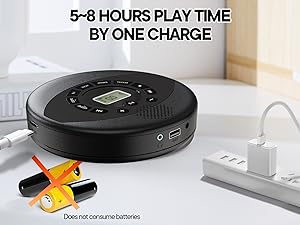
Image 3.2: Anti-shock protection for active use.
4. الصيانة
4.1 Cleaning the CD Player
- استخدم قطعة قماش ناعمة وجافة لتنظيف الجزء الخارجي من المشغل.
- For the lens, use a specialized CD lens cleaning kit. Do not touch the lens directly.
- تجنب استخدام المنظفات الكاشطة أو المذيبات.
4.2 العناية بالبطارية
- لإطالة عمر البطارية، تجنب تفريغ البطارية بالكامل بشكل متكرر.
- قم بتخزين الجهاز في مكان بارد وجاف عندما لا يكون قيد الاستخدام لفترات طويلة.
- Charge the device at least once every three months if unused to prevent deep discharge.
4.3 العناية بالقرص المضغوط
- Handle CDs by their edges to avoid fingerprints and scratches.
- Clean CDs with a soft, lint-free cloth, wiping from the center outwards.
- Store CDs in their cases to protect them from dust and damage.
5. استكشاف الأخطاء وإصلاحها
| مشكلة | السبب المحتمل | حل |
|---|---|---|
| المشغل لا يعمل. | البطارية فارغة. مفتاح التشغيل مُطفأ. | Charge the battery. Ensure the power switch is in the 'ON' position. |
| لا يوجد صوت. | Volume is too low. Headphones/AUX cable not connected properly. CD/USB not playing. | Increase volume. Check connections. Ensure CD/USB is playing and not paused. |
| تخطي القرص المضغوط أو عدم تشغيله. | CD is dirty or scratched. CD is not properly seated. Incorrect CD format. | Clean the CD. Re-seat the CD. Ensure the CD format (CD, CD-R, CD-RW, MP3, WMA) is supported. |
| تشغيل الملفات عبر منفذ USB لا يعمل. | USB drive not properly inserted. Incompatible file شكل. | Ensure USB drive is fully inserted. Check if files are MP3 or WMA format. |
6. مواصفات المنتج
| ميزة | التفاصيل |
|---|---|
| رقم الموديل | PM11-Black |
| أبعاد المنتج | 5.7 × 5.7 × 1.2 بوصة |
| وزن العنصر | 1.01 رطل |
| نوع البطارية | 1 بطارية ليثيوم بوليمر (متضمنة) |
| الاتصال | مساعد ، USB |
| المميزات الخاصة | Anti-Skip Protection, Portable, Programmable Memory, Rechargeable |
| المكونات المضمنة | CD player X 1, Earbuds X 1, Audio cable X 1, Charging cable X 1, Pouch X 1 |
| التنسيقات المدعومة | CD ، CD-R ، CD-RW ، MP3 ، WMA |
7. الضمان والدعم
For warranty information and customer support, please contact Kuephom directly. Details regarding product warranty periods and service procedures are typically provided with your purchase documentation or can be found on the official Kuephom webموقع.
If you encounter any issues not covered in this manual, please reach out to Kuephom customer service for assistance.


