مقدمة
The Hyperkin X91 Ice Wired Controller is designed for use with Xbox Series X|S, Xbox One systems, and Windows 10/11 PCs. It features a classic 90s-style design combined with modern controller functionalities, offering a comfortable and responsive gaming experience.

Image: Hyperkin X91 Ice Wired Controller (Ruby Red) and its retail packaging.
المميزات الرئيسية:
- Retro Design with Modern Ergonomics: Combines a classic aesthetic with comfortable handling for extended play sessions.
- Precision Analog Triggers: يوفر مدخلات دقيقة وسريعة الاستجابة للألعاب.
- مقبس سماعة رأس 3.5 ملم: Allows connection of a compatible headset for audio and communication.
- زر المشاركة: Dedicated button for capturing and sharing gameplay moments on Xbox Series X|S.
- بنية متميزة: صُممت لتدوم طويلاً وتؤدي أداءً موثوقاً.
تعليمات الإعداد
The Hyperkin X91 Ice Wired Controller is a plug-and-play device. Follow these steps to connect it to your system:
- For Xbox Series X|S or Xbox One:
- تأكد من تشغيل جهاز Xbox الخاص بك.
- Locate an available USB port on your console.
- Plug the USB connector of the Hyperkin X91 controller into the USB port.
- The controller will automatically be detected and configured by the console.
- For Windows 10/11 PC:
- تأكد من تشغيل جهاز الكمبيوتر الخاص بك.
- حدد موقع منفذ USB متاح على جهاز الكمبيوتر الخاص بك.
- Plug the USB connector of the Hyperkin X91 controller into the USB port.
- Your PC should automatically install the necessary drivers. This may take a few moments.
- Once drivers are installed, the controller is ready for use with compatible games.
No additional software or batteries are required for operation.
تشغيل وحدة التحكم
Familiarize yourself with the controller's layout and functions:
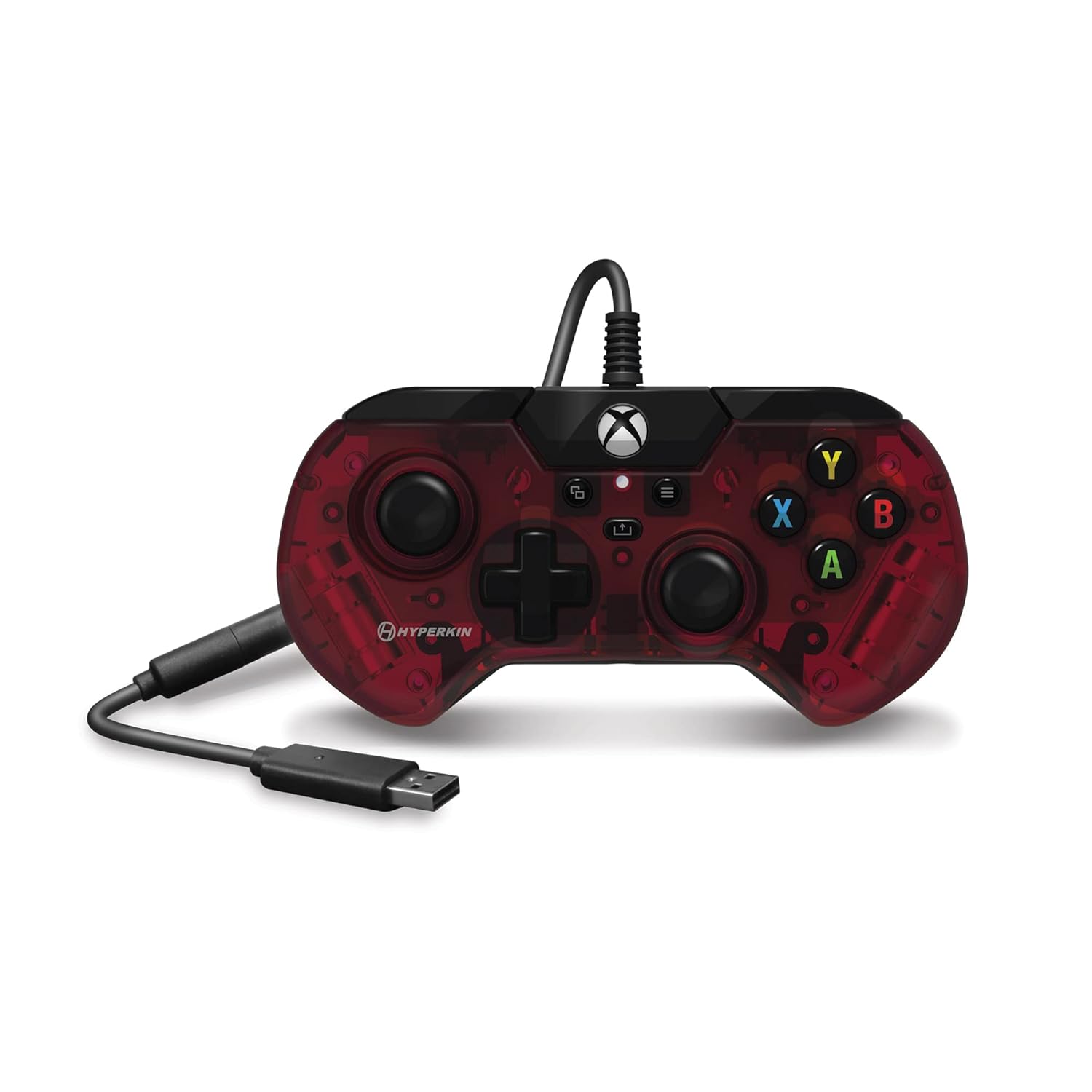
الصورة: أعلى view of the Hyperkin X91 Ice Wired Controller, highlighting button placement.
- العصي التناظرية اليسرى/اليمنى: تُستخدم للتحكم في الحركة والكاميرا في الألعاب.
- لوحة الاتجاهات (D-Pad): For precise directional input, often used in menus or for specific game actions.
- الأزرار A، B، X، Y: Standard action buttons, typically color-coded and labeled.
- زر القائمة: Accesses in-game menus or system settings.
- View زر: Provides additional in-game options or system functions.
- زر Xbox: Powers on the console (if off), opens the Xbox Guide, or returns to the home screen.
- زر المشاركة: (Xbox Series X|S only) Press to capture screenshots or record game clips.

Image: Detail of the Share button, located near the center of the controller.
- مصدات اليسار/اليمين (LB/RB): Located on the top edge, typically used for secondary actions.
- أزرار الزناد اليسرى/اليمنى (LT/RT): Analog triggers on the underside of the top edge, providing pressure-sensitive input for actions like acceleration or shooting.

صورة: View of the Left and Right Triggers (LT/RT) on the controller's top edge.
- مقبس سماعة رأس 3.5 ملم: Located on the bottom edge of the controller. Plug in a compatible headset for game audio and voice chat.

Image: Detail of the 3.5 mm headset jack on the bottom of the controller.
الصيانة والعناية
To ensure the longevity and optimal performance of your Hyperkin X91 controller, follow these maintenance guidelines:
- تنظيف: استخدم قطعة قماش ناعمة وجافة لمسح وحدة التحكم. لإزالة الأوساخ العنيدة، امسحها برفق.ampامسح بقطعة قماش مبللة بالماء أو بمحلول تنظيف خفيف. تجنب المواد الكيميائية القاسية أو المواد الكاشطة.
- تخزين: Store the controller in a clean, dry place away from direct sunlight, extreme temperatures, and excessive dust.
- العناية بالكابلات: Avoid sharply bending or twisting the USB cable. Do not pull the controller by its cable. Always grasp the USB connector when plugging or unplugging.
- تجنب القطرات: Protect the controller from drops or impacts, as this can damage internal components or affect button responsiveness.
استكشاف الأخطاء وإصلاحها
If you encounter issues with your Hyperkin X91 controller, refer to the following common solutions:
- وحدة التحكم لا تستجيب:
- تأكد من توصيل كابل USB بإحكام بكل من وحدة التحكم وجهاز الألعاب/الكمبيوتر.
- حاول توصيل وحدة التحكم بمنفذ USB مختلف.
- أعد تشغيل جهازك أو جهاز الكمبيوتر الخاص بك.
- Test the controller on another compatible device if possible to determine if the issue is with the controller or the system.
- Buttons or Analog Sticks Not Working Correctly:
- Check for any physical obstructions or debris around the buttons or analog sticks.
- Gently press and release the affected buttons multiple times.
- If an analog stick exhibits "drift" (input without touching), ensure the controller's firmware is up to date (if applicable, check Hyperkin's official support webموقع).
- No Audio from Headset Jack:
- Ensure your headset is fully plugged into the 3.5 mm jack on the controller.
- Check your console/PC audio settings to ensure output is directed to the headset.
- اختبر سماعة الرأس بجهاز آخر للتأكد من أنها تعمل بشكل صحيح.
- Adjust volume levels on both the headset and the system.
If problems persist, contact Hyperkin customer support for further assistance.
تحديد
| رقم الموديل | إكس 91 |
| التوافق | Xbox Series X|S, Xbox One, Windows 10/11 PCs |
| الاتصال | USB سلكي |
| منفذ الصوت | مقبس سماعة رأس مقاس 3.5 ملم |
| الأبعاد (تقريبًا) | 7.05 × 5.43 × 3.23 بوصة (أبعاد العبوة) |
| الوزن (تقريبا) | 12 أونصات |
| الشركة المصنعة | هايبركين |
الضمان والدعم
For warranty information, product registration, or technical support, please visit the official Hyperkin website or contact their customer service department. Details regarding specific warranty periods and support procedures are typically provided with your product purchase or on the manufacturer's webموقع.
Hyperkin Official Webموقع: www.hyperkin.com


