1. المقدمة
The HyperX DuoCast is a versatile USB condenser microphone designed for clear audio capture across various applications, including gaming, streaming, podcasting, and voiceovers. It features customizable RGB lighting, multiple polar patterns, and convenient controls for an optimized user experience.

الصورة 1.1: الجبهة view of the HyperX DuoCast microphone with its integrated stand and RGB light ring.
2. محتويات العبوة
تأكد من وجود جميع العناصر في العبوة:
- HyperX DuoCast USB Condenser Microphone
- كابل USB من النوع C إلى النوع A
- دليل البدء السريع

Image 2.1: Contents of the HyperX DuoCast retail package, including the microphone, USB cable, and documentation.
3. تعليمات الإعداد
3.1 توصيل الميكروفون
- Connect the USB Type-C end of the provided cable to the USB-C port on the back of the HyperX DuoCast microphone.
- Connect the USB Type-A end of the cable to an available USB port on your PC, PS5, PS4, or Mac.
- The microphone will automatically be detected by your operating system.
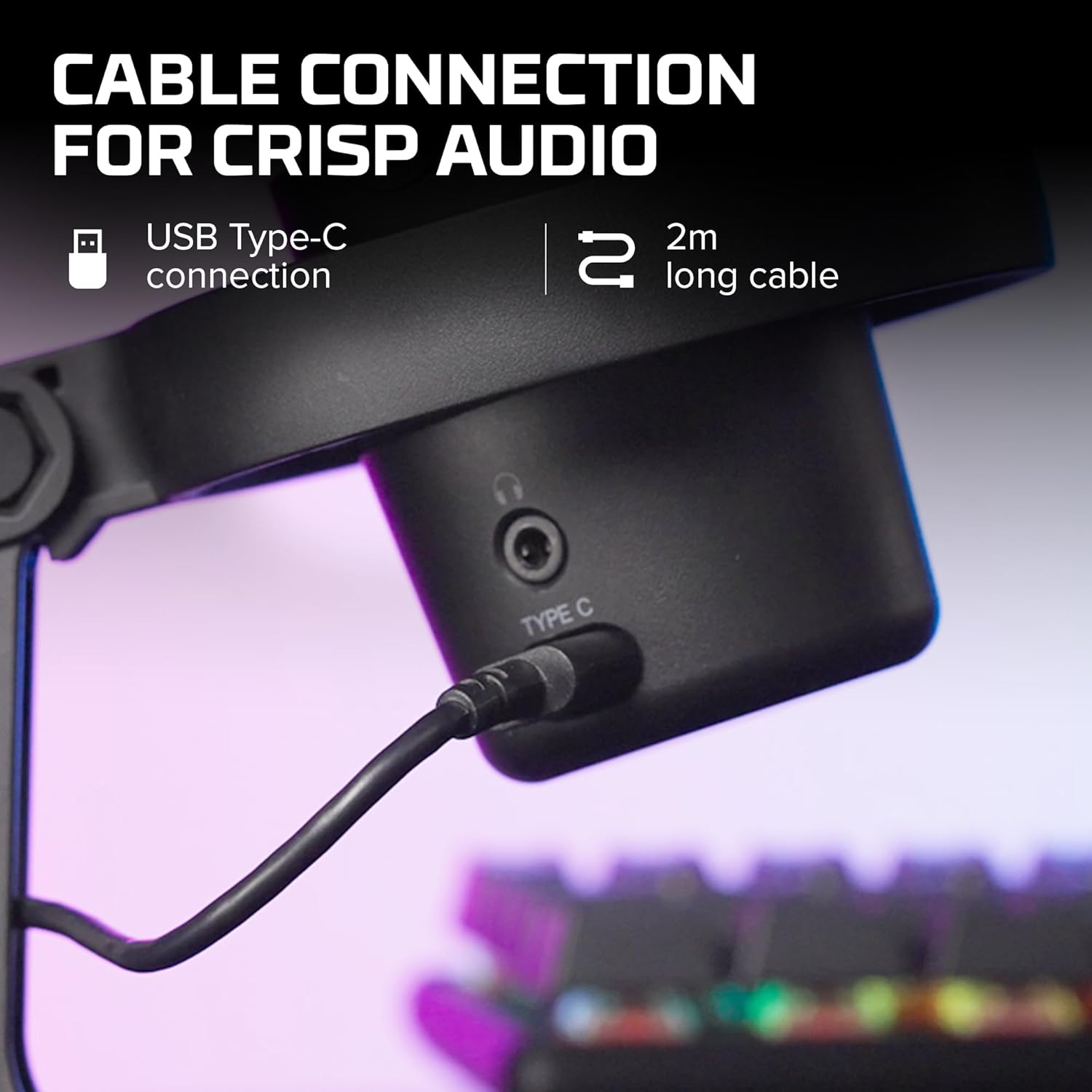
الصورة 3.1: عن قرب view of the USB Type-C connection port on the HyperX DuoCast microphone.
3.2 Positioning the Microphone
The DuoCast features a low-profile shock mount to reduce unwanted vibrations. For optimal audio quality, position the microphone directly in front of you, approximately 6-12 inches (15-30 cm) from your mouth.

Image 3.2: HyperX DuoCast microphone positioned on a boom arm for optimal recording, with a user wearing headphones.
3.3 تثبيت البرنامج (اختياري)
For advanced customization of RGB lighting and other settings, download and install the HyperX NGENUITY Software from the official HyperX website. This software is compatible with Windows operating systems.

Image 3.3: User customizing the RGB lighting of the HyperX DuoCast microphone using the HyperX NGENUITY software interface on a computer screen.
4. Operating the Microphone
4.1 Polar Patterns
The DuoCast offers two selectable polar patterns: Cardioid and Omnidirectional. Switch between these patterns using the button located on the microphone.
- قلبي الشكل: Ideal for single-person recording, such as streaming, podcasts, and voiceovers. It captures sound primarily from the front, reducing background noise.
- احادي: Suitable for multi-person recordings, conference calls, or capturing ambient sounds, as it picks up sound equally from all directions.

Image 4.1: Diagram illustrating the Cardioid and Omnidirectional polar patterns and their recommended use cases.
4.2 Tap-to-Mute Sensor
The microphone features a convenient tap-to-mute sensor on the top. Tapping the top of the microphone will instantly mute or unmute your audio. The RGB light ring will change color to indicate the mute status.

Image 4.2: Close-up of the microphone's top showing the tap-to-mute sensor and the gain control knob.
4.3 ضبط التحكم في الكسب
Adjust the microphone's input sensitivity (gain) using the control knob located on the microphone. Rotate the knob to increase or decrease the gain to achieve optimal audio levels and prevent distortion.
إضاءة RGB 4.4
The DuoCast features a customizable RGB light ring with two zones. The lighting can be personalized using the HyperX NGENUITY Software (Windows only) to match your setup or preference.
4.5 مخرج سماعة الرأس
A 3.5mm headphone jack is integrated into the microphone for direct monitoring of your audio output. Connect your headphones to this port to hear your voice in real-time.
5. الصيانة
To ensure the longevity and optimal performance of your HyperX DuoCast microphone, follow these maintenance guidelines:
- تنظيف: Use a soft, dry cloth to clean the microphone's exterior. Avoid using harsh chemicals, solvents, or abrasive materials.
- تخزين: عند عدم الاستخدام، قم بتخزين الميكروفون في بيئة نظيفة وجافة بعيدًا عن درجات الحرارة والرطوبة الشديدة.
- التعامل: Handle the microphone with care. Avoid dropping it or subjecting it to strong impacts, which can damage internal components.
6. استكشاف الأخطاء وإصلاحها
If you encounter issues with your HyperX DuoCast microphone, refer to the following common solutions:
| مشكلة | السبب المحتمل | حل |
|---|---|---|
| لا يوجد مدخل صوتي | الميكروفون غير متصل بشكل صحيح Incorrect input device selected تم كتم صوت الميكروفون | تأكد من توصيل كابل USB بشكل آمن. Verify the DuoCast is selected as the default input device in your system settings. Tap the top of the microphone to unmute. |
| مستوى الصوت منخفض | Gain setting too low System input volume too low | Adjust the gain control knob on the microphone. Increase the microphone input volume in your system's sound settings. |
| صوت مشوه | Gain setting too high الميكروفون قريب جدًا من مصدر الصوت | Decrease the gain control knob on the microphone. حرك الميكروفون بعيدًا عن مصدر الصوت. |
| ضوضاء خلفية مفرطة | Incorrect polar pattern selected إعداد الكسب العالي | Switch to Cardioid polar pattern for single-person use. قم بتخفيض مستوى التضخيم. تأكد من أنك في بيئة هادئة. |
| إضاءة RGB لا تعمل | مشكلة في البرنامج USB connection problem | Ensure HyperX NGENUITY Software is installed and updated (Windows only). أعد توصيل كبل USB. |
7. المواصفات
| ميزة | التفاصيل |
|---|---|
| نوع الميكروفون | مكثف USB |
| الأنماط القطبية | قلبي ، متعدد الاتجاهات |
| حساسية الصوت | 6 ديسيبل |
| إشارة إلى نسبة الضوضاء | 70 ديسيبل |
| استجابة التردد | 20 هرتز - 20 كيلو هرتز |
| دقة التسجيل | 24 بت / 96kHz |
| الاتصال | USB (Type-C to Type-A) |
| الأجهزة المتوافقة | PC, PS5, PS4, Mac |
| المميزات الخاصة | Customizable RGB Light Ring, Tap-to-Mute Sensor, Gain Control, Low-profile Shock Mount, Internal Pop Filter, 3.5mm Headphone Output |
| الأبعاد (الطول × العرض × الارتفاع) | 5.5 × 9.3 × 5 بوصة (140 × 236 × 127 مم) |
| وزن العنصر | 8.6 أونصة (243.2 جرام) |
| رقم الموديل | 4P5E2AA |

Image 7.1: Diagram showing the physical dimensions (width, height, depth) and weight of the HyperX DuoCast microphone.
8. الضمان والدعم
For warranty information and technical support, please visit the official HyperX website or contact HyperX customer service. Keep your proof of purchase for warranty claims.
الدعم عبر الإنترنت: www.hyperx.com/support


