مقدمة
This manual provides essential information for the proper setup, operation, and maintenance of your Sony PXW-Z190V 4K XDCAM Camcorder. Please read this manual thoroughly before using the product to ensure optimal performance and longevity.

Image: The Sony PXW-Z190V 4K XDCAM Camcorder displayed with its comprehensive professional bundle, including various lenses, a monitor, microphones, batteries, and a carrying case.
ماذا يوجد في الصندوق
تأكد من تضمين جميع العناصر المدرجة أدناه في الحزمة الخاصة بك:
- 1 x Sony PXW-Z190 4K 3-CMOS 1/3" Sensor XDCAM Camcorder
- 1 x Sony ECM-VG1 Electret Condenser Shotgun Microphone
- 2 x BP-U30 Lithium-Ion Battery
- 1 x 7" Full HD Monitor with 4K Support
- 1 x Wireless Lapel & Handheld Microphone System
- 1 x Professional 160 LED Video Light Studio Series
- 1 x Sony 64GB UHS-I SDXC Memory Card (Class 10)
- 1 x Professional Full Size Tripod
- 1 x 82mm 4-Piece +1 +2 +4 +10 Close-Up Macro Filter Set with Case
- 1 x 82mm 3 Piece Filter Kit (UV, Fluorescent, Polarizer)
- 1 x Soft Padded Carrying Case
- 1 x 6 x 6 inch Straps (Assorted Colors)
- 1 x Lens Cleaning Solution
- 1 x Blower Brush
- 1 x Microfiber Cloth
- 1 x Lens Tissue Paper
- 1 x 5pc Cotton Swabs
- 1 x Lens Pen Cleaner
- محفظة واحدة لبطاقات الذاكرة
- 1 x SD Card USB Reader
يثبت
1. تركيب البطارية
- تأكد من إيقاف تشغيل كاميرا الفيديو.
- حدد مكان حجرة البطارية في الجزء الخلفي من كاميرا الفيديو.
- Insert a charged BP-U30 Lithium-Ion Battery into the compartment, ensuring it clicks securely into place.
2. إدخال بطاقة الذاكرة
- افتح غطاء فتحة بطاقة الذاكرة.
- Insert the 64GB SDXC Memory Card with the label facing the correct direction until it locks.
- أغلق غطاء فتحة بطاقة الذاكرة.
3. ملحق الميكروفون
- Attach the Sony ECM-VG1 Electret Condenser Shotgun Microphone to the camcorder's microphone holder.
- Connect the microphone cable to the appropriate audio input jack on the camcorder.
4. اتصال الشاشة
- Mount the 7" Full HD Monitor to a suitable accessory shoe or mounting point on the camcorder or tripod.
- Connect the monitor to the camcorder using an HDMI cable for video output.
5. إعداد الحامل الثلاثي
- Extend the legs of the Professional Full Size Tripod to the desired height.
- Securely attach the camcorder to the tripod head using the mounting plate.
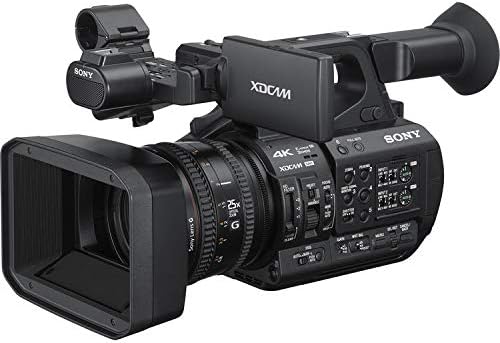
Image: A front-right view of the Sony PXW-Z190V camcorder, highlighting its lens, body, and control layout.
تعليمات التشغيل
1. تشغيل / إيقاف التشغيل
Locate the power switch, typically near the battery compartment or on the side panel. Slide it to the 'ON' position to power on the camcorder. To power off, slide it to the 'OFF' position.
2. التسجيل الأساسي
- Ensure a formatted SDXC card is inserted.
- Press the 'RECORD' button to start recording. The recording indicator will illuminate.
- اضغط على زر "تسجيل" مرة أخرى لإيقاف التسجيل.
- The camcorder supports 4K 60p recording for high-resolution video.
3. Zoom Lens Operation
Use the zoom rocker on the camcorder's handle or the zoom ring on the lens to adjust the 25x optical zoom. The camcorder features an integrated Sony G Optical Zoom Lens.
4. Electronic Variable ND Filter
The Electronic Variable ND Filter allows for precise control over exposure, even in bright conditions, without changing the aperture. Adjust the ND filter using the dedicated controls on the camcorder body.
5. التحكم في التركيز
The camcorder supports Auto Focus (AF) for convenient operation. Manual focus is also available for precise control. Switch between AF and MF using the focus mode switch on the lens barrel.
6. اتصال واي فاي
The built-in 2.4/5 GHz Wi-Fi allows for remote control and file transfer. Refer to the camcorder's on-screen menu for Wi-Fi setup and connection instructions.
7. تثبيت الصورة
The camcorder features both electronic and optical image stabilization to reduce blur caused by camera shake during handheld shooting.
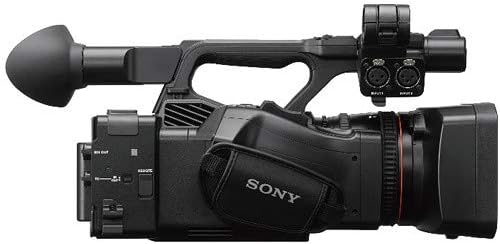
Image: A top-left view of the Sony PXW-Z190V camcorder, showing the handle, microphone input, and various control buttons.
صيانة
1. تنظيف كاميرا الفيديو
- عدسة: Use the provided Lens Pen Cleaner or a Blower Brush to remove dust. For smudges, apply a small amount of Lens Cleaning Solution to a Microfiber Cloth or Lens Tissue Paper and gently wipe in a circular motion.
- جسم: امسح جسم كاميرا الفيديو بقطعة قماش ناعمة وجافة. لإزالة الأوساخ العنيدة، امسحها برفق.ampبللي قطعة القماش بالماء. تجنبي استخدام المواد الكيميائية القاسية.
- أجهزة الاستشعار: Sensor cleaning should only be performed by authorized service personnel.
2. العناية بالبطارية
- قم بشحن البطاريات بالكامل قبل الاستخدام.
- قم بتخزين البطاريات في مكان بارد وجاف عندما لا تكون قيد الاستعمال.
- تجنب تعريض البطاريات لدرجات الحرارة العالية.
3. التخزين
When not in use, store the camcorder in the Soft Padded Carrying Case in a dry, dust-free environment. Remove batteries if storing for extended periods.
استكشاف الأخطاء وإصلاحها
If you encounter issues with your camcorder, consider the following general troubleshooting steps:
- لا يوجد طاقة: Ensure batteries are charged and correctly inserted. Check power connections if using an AC adapter.
- مشاكل التسجيل: Verify that a memory card is inserted and has sufficient free space. Check card compatibility and format if necessary.
- جودة الصورة: Ensure the lens is clean and free from smudges. Check focus settings (Auto/Manual).
- مشاكل الاتصال: For Wi-Fi or USB issues, ensure cables are properly connected and device settings are correct.
For persistent problems, consult the full user manual available on the Sony support webالموقع أو اتصل بدعم عملاء Sony.
تحديد
| ميزة | التفاصيل |
|---|---|
| ماركة | سوني |
| رقم الموديل | ESONPXWZ190VUP5 |
| نوع كاميرا الفيديو | كاميرا فيديو |
| تقنية مستشعر الصور | CMOS (Three 1/3" Exmor R CMOS Sensors) |
| دقة التقاط الفيديو | 4K (4K 60p Recording) |
| نوع ذاكرة فلاش | SD, SDXC |
| تنسيق التقاط الفيديو | إم بي 4 |
| تنسيق الصوت المدعوم | AAC، MP3، PCM |
| حجم الشاشة | 7 Inches (External Monitor) |
| تكنولوجيا الاتصال | USB, Wi-Fi (Built-In 2.4/5 GHz) |
| التكبير البصري | 25 x (Integrated Sony G Optical Zoom Lens) |
| تثبيت الصورة | Yes (Electronic, Optical) |
| نوع التركيز | التركيز التلقائي |
| أوضاع التصوير | الحركة البطيئة |
| وزن العنصر | 27.9 Pounds (Bundle Weight) |
| عدد البطاريات | 2 Lithium Ion batteries required (BP-U30) |
| مستوى مقاومة الماء | غير مقاوم للماء |
الضمان والدعم
معلومات الضمان
يأتي هذا المنتج مع ضمان محدود لمدة 90 يومًايرجى الاحتفاظ بإيصال الشراء للمطالبة بالضمان. يغطي الضمان عيوب التصنيع في ظروف الاستخدام العادية.
دعم العملاء
For technical assistance, service, or further information, please contact Sony customer support. You can find contact details and additional resources on the official Sony webموقع.


