مقدمة
The WOLFBOX i07 is a high-performance 3-channel dash camera system designed to provide comprehensive video surveillance for your vehicle. It simultaneously records footage from the front, interior, and rear of your car, ensuring 360-degree protection. Equipped with advanced features such as 4K resolution, infrared night vision, built-in GPS, Wi-Fi connectivity, and multiple parking modes, the i07 offers reliable evidence collection and enhanced driving safety.

الصورة: أكثر منview of the WOLFBOX i07 Dash Cam system, including the main unit, rear camera, and mobile app interface.
ماذا يوجد في الصندوق
يرجى التأكد من وجود جميع المكونات وأنها في حالة جيدة عند فتح العلبة:
- i07 Dash Cam (Main Unit)
- 1080P IP68 Rear Camera
- وحدة نظام تحديد المواقع العالمي (GPS)
- بطاقة MicroSD بسعة 32 جيجابايت
- 20-foot Rear Camera Cable
- Type-C Power Supply Cable with Car Charger
- دليل المستخدم
- ملصق كهرباء
- أداة تقليم أسلاك السيارة

Image: Contents of the WOLFBOX i07 package.
يثبت
1. إدخال بطاقة الذاكرة
Before initial use, insert the provided 32GB MicroSD card into the dash cam's card slot. Ensure the card is inserted correctly until it clicks into place. It is recommended to format the card within the dash cam's settings before first use.

Image: Inserting the 32GB MicroSD card.
2. تركيب الوحدة الرئيسية
- قم بتنظيف منطقة الزجاج الأمامي حيث سيتم تثبيت كاميرا لوحة القيادة.
- Apply the electrostatic sticker to the clean windshield.
- Attach the main unit onto the electrostatic sticker using the adhesive mount. Ensure it does not obstruct your driving view.
- Connect the Type-C power cable to the dash cam and route it along the windshield edge and A-pillar to the car's cigarette lighter socket.
3. تركيب الكاميرا الخلفية
- قم بتركيب الكاميرا الخلفية على الزجاج الأمامي الخلفي، مع التأكد من وضوح الرؤية. view.
- Connect the 20-foot rear camera cable to the main unit and route it discreetly along the vehicle's interior trim to the rear camera.
- Ensure the rear camera's headphone jack is firmly inserted for proper detection.

Image: Easy installation and cable routing for the dash cam and rear camera.
تعليمات التشغيل
1. تشغيل/إيقاف التشغيل
The dash cam will automatically power on and begin recording when connected to the car's power supply and the vehicle is started. It will power off automatically when the car is turned off.
2. أوضاع التسجيل
The WOLFBOX i07 supports various recording configurations:
- التسجيل بأربعة قنوات: Simultaneously records Front (2.5K), Interior (1080P), and Rear (1080P) footage.
- التسجيل ثنائي القناة: Records Front (4K UHD) and Interior (1080P FUD) footage.

Image: Triple Channel Recording overview.

Image: Dual Channel Recording overview.
3. رؤية ليلية بالأشعة تحت الحمراء
The interior camera features 6 infrared LED lights and advanced STARVIS technology to capture clear and balanced video in low-light conditions, ensuring visibility inside the cabin even at night.

Image: Infrared Night Vision capability.
4. Parking Modes (24/7 Protection)
The i07 offers two parking monitoring modes for continuous vehicle protection:
- تسجيل صوت اصطدام السيارة: The dash cam will automatically power on and record when an impact is detected while the vehicle is parked.
- تسجيل بتقنية الفاصل الزمني: Captures 24-hour time-lapse footage at 1 frame per second (FPS) when the vehicle is parked. Note: Collision Boot Recording does not function in Time-Lapse Mode.
A hardwire kit (sold separately) is required for 24/7 parking monitoring functionality.

Image: Parking Modes (Collision Boot Recording and Time-Lapse).
5. Built-in GPS & Wi-Fi
The integrated GPS module accurately records driving routes, speeds, and times, embedding this data into video files for evidence. Built-in Wi-Fi allows you to connect the dash cam to your smartphone via the WOLFBOX app for easy management, video playback, editing, and sharing.

Image: Built-in Wi-Fi and GPS features with app connectivity.
6. مستشعر التسارع والتسجيل الحلقي
- مستشعر الجاذبية: يكتشف الصدمات أو الاصطدامات المفاجئة ويقوم تلقائيًا بقفل إطار الفيديو الحاليtagلمنع الكتابة فوقه.
- التسجيل المتكرر: Continuously records video in short segments. When the memory card is full, the oldest unlocked footage is automatically overwritten by new recordings.
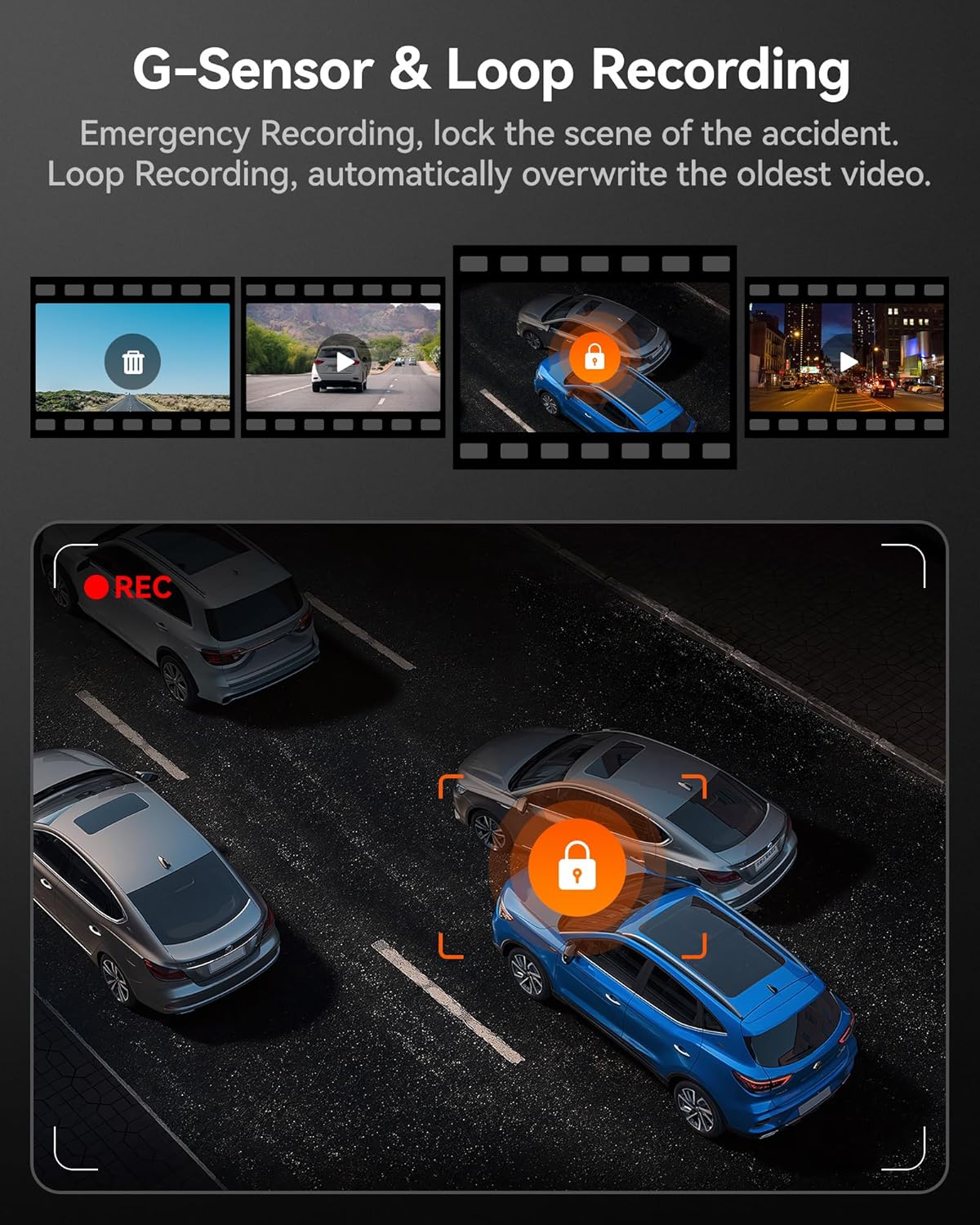
Image: G-Sensor and Loop Recording functionality.
صيانة
- التنسيق العادي: To maintain optimal performance and prevent data corruption, it is recommended to format the MicroSD card every 2-4 weeks using the dash cam's settings.
- تنظيف العدسات: نظّف عدسات الكاميرا برفق باستخدام قطعة قماش ناعمة وخالية من الوبر لضمان جودة فيديو واضحة. تجنّب استخدام المواد الخشنة.
- تحديثات البرامج الثابتة: Check the official WOLFBOX webقم بزيارة الموقع بشكل دوري للحصول على تحديثات البرامج الثابتة لضمان حصول كاميرا السيارة الخاصة بك على أحدث الميزات وإصلاحات الأخطاء.
- اعتبارات درجة الحرارة: The dash cam is designed to operate within a wide temperature range due to its supercapacitor. However, extreme prolonged heat or cold can affect battery life (if applicable) and overall longevity.
استكشاف الأخطاء وإصلاحها
| مشكلة | السبب المحتمل | حل |
|---|---|---|
| كاميرا لوحة القيادة لا تعمل. | No power supply; faulty cable; car charger issue. | Check power connection; try a different USB port or car charger; ensure vehicle's ignition is on. |
| توقف التسجيل أو تجمد. | Memory card full/corrupted; low-quality SD card; firmware issue. | Format the SD card; use a high-speed (Class 10 or U3) MicroSD card; update firmware. |
| Rear camera not detected. | Loose connection; damaged cable. | Ensure the rear camera cable's headphone jack is firmly inserted into the main unit. Check cable for damage. |
| مشاكل في الاتصال بشبكة Wi-Fi. | Incorrect app usage; interference. | Ensure Wi-Fi is enabled on the dash cam and your phone; restart both devices; try connecting in a different location. |
| نظام تحديد المواقع العالمي (GPS) لا يستقبل إشارة. | Poor satellite reception; GPS module obstructed. | تأكد من أن وحدة تحديد المواقع العالمية (GPS) خالية من العوائق view of the sky; move the vehicle to an open area. |
تحديد
| ميزة | التفاصيل |
|---|---|
| اسم الموديل | اي07 |
| أبعاد المنتج | 4.72 × 1.38 × 3.07 بوصة |
| وزن العنصر | 5 أونصات |
| دقة الكاميرا الأمامية | Up to 4K (2160p) |
| Interior Camera Resolution | 1080 بكسل |
| دقة الكاميرا الخلفية | 1080 بكسل |
| عرض | شاشة ال سي دي 3 بوصة |
| Lens Angle (Front/Interior/Rear) | 150 ° / 160 ° / 155 ° |
| الرؤية الليلية | 6 Infrared LEDs (Interior Camera) |
| مصدر الطاقة | Type-C Power Input, Supercapacitor |
| الاتصال | Built-in Wi-Fi, Built-in GPS |
| تخزين | Supports MicroSD Card (32GB included) |
| المميزات الخاصة | 4K HDR, 3-channel All-round Protection, App Control, Parking Monitor, Compact Design, WDR, G-Sensor, Loop Recording |
| نوع خدمة المركبة | Bus, Car, Minivan, Truck |
الضمان والدعم
WOLFBOX is committed to providing high-quality products and excellent customer service.
- ضمان: The WOLFBOX i07 Dash Cam comes with a 12-month assurance from the date of purchase.
- سياسة العائدات: A 7-day return policy is available for defects.
- خدمة العملاء: For any queries, technical support, or warranty claims, please contact our dedicated after-sale service team.
بريد إلكتروني: Service@wolfbox.com
هاتف: +1 888 296 8399
يرجى تجهيز طراز المنتج ومعلومات الشراء عند الاتصال بالدعم.


