مقدمة
The ATUVOS Air Tracker Tags are designed to help you locate your personal belongings quickly and efficiently. Utilizing Apple's Find My network, these compact and durable trackers allow you to keep tabs on items such as luggage, keys, wallets, bags, and backpacks. This manual provides detailed instructions on how to set up, operate, and maintain your ATUVOS Air Tracker Tags.

Image: The ATUVOS Air Tracker Tags, a set of four white, square-shaped devices with rounded corners and a small circular button on the front, designed for tracking personal items.
يثبت
Pairing Your ATUVOS Air Tracker Tag
The ATUVOS Air Tracker Tags are designed for easy pairing with your iOS device using the Apple Find My app. Please note that these trackers are compatible with iOS devices only and do not support Android.
- Ensure your iOS device is updated to iOS 17 or later for full functionality, especially for sharing features.
- Turn on the 'Find My' App and Bluetooth on your iOS device.
- In the 'Find My' App, navigate to the "Items" menu.
- Tap "Add Item" located at the bottom of the "Items" menu.
- Select "Other Supported Item" from the options.
- Press and hold the button on your ATUVOS Tag for 10 seconds to reset it and initiate pairing. The pairing process should complete within 30 seconds.

Image: Visual guide demonstrating the three-step pairing process for the ATUVOS Tag with an iOS device via the Find My app, including turning on Bluetooth, adding an item, and pressing the tag's button.
تركيب البطارية
The ATUVOS Air Tracker Tag uses a replaceable CR2032 coin cell battery. When the battery is low, the device will notify you to replace it. Battery life varies with usage and environmental conditions.

الصورة: انفجار view diagram illustrating the simple process of opening the ATUVOS tracker to access and replace its CR2032 coin cell battery.
Operating Your ATUVOS Air Tracker Tag
العثور على العناصر القريبة
When your item is within Bluetooth range (up to 200 ft / 60m), you can use the 'Find My' app or Siri to make your ATUVOS Tag ring. The tag emits a loud sound (80-100 dB) to help you locate it quickly.

Image: A visual representation of finding a nearby lost item using the Find My app, showing the phone interface with a map and sound options, and the ATUVOS tracker emitting a beeping sound.
Finding Far Away Items
If your item is outside of Bluetooth range, the Apple Find My network can help you locate it. Hundreds of millions of Apple devices worldwide anonymously and securely relay the location of your ATUVOS Tag to you. You can view its last known location on a map and get directions to its vicinity.

Image: A person using the Find My app on their iPhone to locate a lost item far away, with the app providing map directions to the item's last known location.
Left Behind Remind
Receive instant notifications if your ATUVOS Bluetooth tracker disconnects from your iOS device's Bluetooth connection. This feature helps prevent you from accidentally leaving your belongings behind.

Image: An iPhone displaying a "Left Behind Remind" notification, indicating that the ATUVOS tracker (attached to keys) is no longer detected nearby, serving as a prompt to retrieve the item.
الوضع المفقود
If your item is truly lost, you can enable Lost Mode in the Find My app. If someone finds your ATUVOS Tag, they can tap it with their NFC-enabled smartphone to see your contact information, allowing them to return your item.

Image: An iPhone screen showing the "Anti-lost Mode" interface within the Find My app, which allows a finder to obtain contact information for a lost ATUVOS Tag by tapping it with their phone.
Share This Item (iOS 17+)
With iOS 17 or later, you can share your ATUVOS Tag with up to 5 other borrowers in the Find My app. They will be able to see the item's location on a map. Borrowers will not receive tracking notifications when the item moves with them, ensuring privacy for shared items.

Image: Two iPhone screens demonstrating the "Share This Item" feature in the Find My app, allowing users to share the location of their ATUVOS tracker with up to five other individuals.
التحكم الصوتي مع Siri
You can use Siri to help you find your items. Simply say, "Hey Siri, find my [item name]" (e.g., "Hey Siri, find my keys") and your ATUVOS Tag سيصدر صوتًا.

Image: An ATUVOS tracker next to an iPhone, highlighting its compatibility with Apple Find My and Siri for easy item location.
صيانة
استبدال البطارية
The ATUVOS Air Tracker Tag is powered by a standard CR2032 coin cell battery. The battery life is designed to last an impressive year, but this can vary based on usage and environmental factors. When the battery level is low, you will receive a notification to replace it. Refer to the "Battery Installation" section under Setup for instructions on how to replace the battery.
مقاومة الماء
The ATUVOS Air Tracker Tag features an IP67 waterproof rating. This means it is designed to withstand water splashes, rain, and even brief submersion. While it offers robust protection against water, it is not recommended for prolonged submersion or use during swimming.

Image: An ATUVOS tracker shown partially submerged in water, illustrating its IP67 water-resistant capability.
تنظيف
To clean your ATUVOS Tag, wipe it gently with a soft, dry cloth. Avoid using abrasive cleaners or solvents that could damage the device.
استكشاف الأخطاء وإصلاحها
- جهاز التتبع لا يتصل بتطبيق "Find My": Ensure Bluetooth is enabled on your iOS device. Try resetting the ATUVOS Tag by pressing and holding its button for 10 seconds until it beeps. Make sure your iOS device is updated to the latest version.
- Tracker not ringing: تحقق مما إذا كان tag is within Bluetooth range of your iOS device. Ensure the volume on your iOS device is turned up.
- الموقع غير دقيق: The accuracy of the location depends on the density of Apple devices in the Find My network. In areas with fewer Apple devices, location updates might be less frequent or precise.
- استنزاف البطارية بسرعة: Battery life can be affected by frequent use of the ringing feature or extreme environmental conditions. Ensure you are using a fresh CR2032 battery.
- التوافق: Remember, ATUVOS Air Tracker Tags are designed exclusively for iOS devices and are not compatible with Android phones.
تحديد
| رقم الموديل | AT2301 |
| أبعاد | 1.75 × 1.75 × 0.83 بوصة (4.45 × 4.45 × 2.11 سم) |
| وزن العنصر | 2.08 أونصة (59 جرام) |
| نوع البطارية | CR2032 coin cell (included) |
| مدى البلوتوث | يصل إلى 200 قدمًا (60 مترًا) |
| مستوى الصوت | حتى 100 ديسيبل |
| مقاومة الماء | IP67 |
| التوافق | iOS Only (Apple Find My network) |
| مادة | بلاستيك |
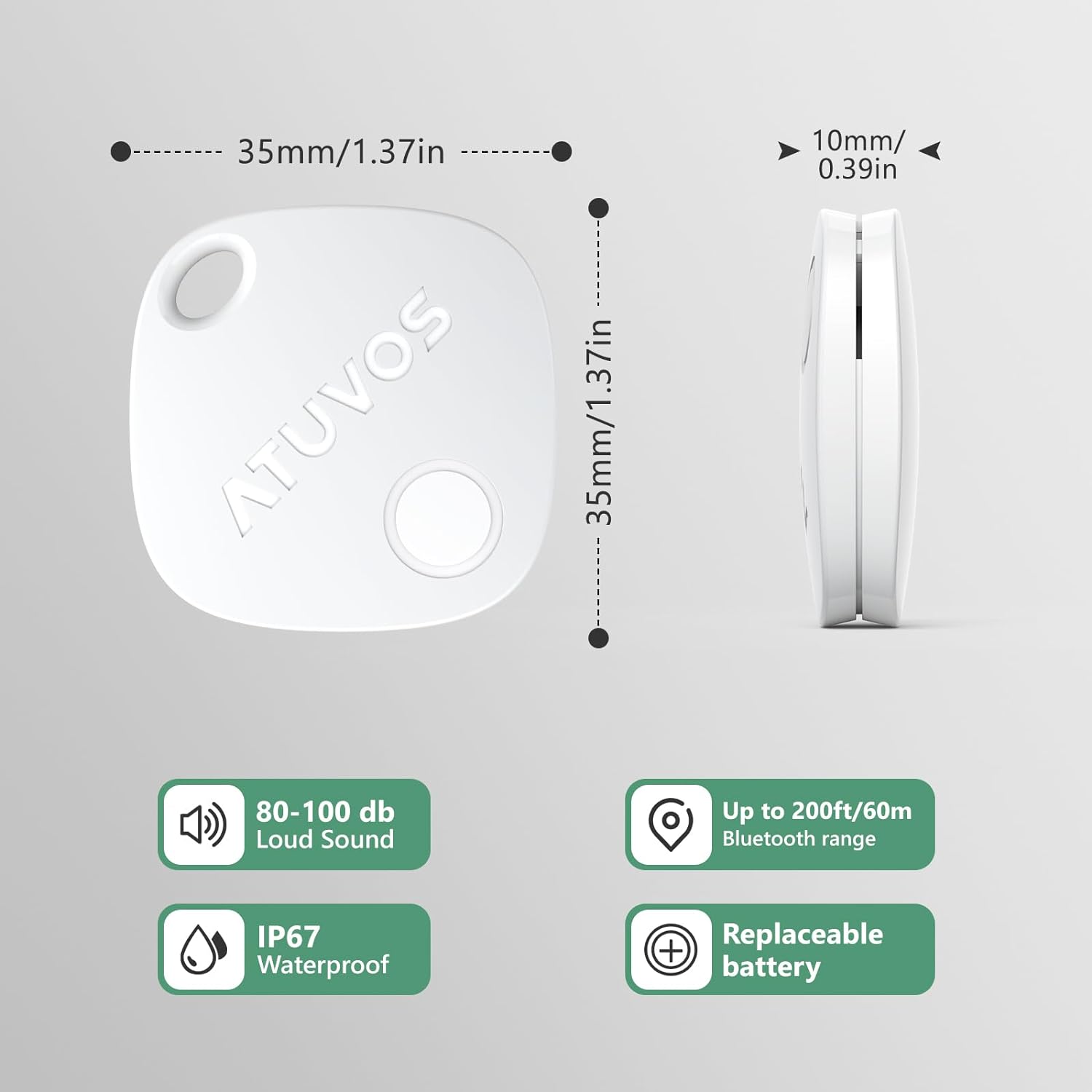
Image: A detailed diagram outlining the physical dimensions and key technical specifications of the ATUVOS tracker, including its sound level, Bluetooth range, water resistance, and battery type.
ضمان
The ATUVOS Air Tracker Tags تأتي مع ضمان لمدة سنة واحدة from the date of purchase. Please retain your proof of purchase for warranty claims. This warranty covers manufacturing defects and issues arising from normal use.
دعم العملاء
For any questions regarding the use, setup, or troubleshooting of your ATUVOS Air Tracker Tags, please contact our customer service team. We offer 24-hour customer service to assist you.
بريد إلكتروني: support@atuvos.com


