مقدمة
Thank you for choosing the iJoy Ultra Wireless Over-Ear Bluetooth Headphones. These headphones are designed to provide a versatile audio experience with multiple connectivity options and comfortable wear. This manual will guide you through the features, setup, and operation of your new headphones.

Image: iJoy Ultra Wireless Over-Ear Bluetooth Headphones, showcasing the sleek design and over-ear cushions.
ماذا يوجد في الصندوق
يرجى التأكد من وجود جميع العناصر في الحزمة الخاصة بك:
- iJoy Ultra Wireless Over-Ear Bluetooth Headphones
- كابل شحن USB من النوع C.
- كابل AUX (3.5 مم)
المنتج انتهىview
تعرّف على عناصر التحكم والمنافذ الخاصة بسماعات الرأس:

الصورة: الجانب view of the headphone ear cup, highlighting the control buttons for volume, track skipping, and power/play/pause/call management.
- Volume + / Skip Song: Hold for Volume Up, Press for Next Song.
- Power / Play / Pause / Answer/Reject Calls: Press to Play/Pause or Answer/Reject Calls. Hold to Power On/Off.
- مستوى الصوت - / الأغنية السابقة: Hold for Volume Down, Press for Previous Song.
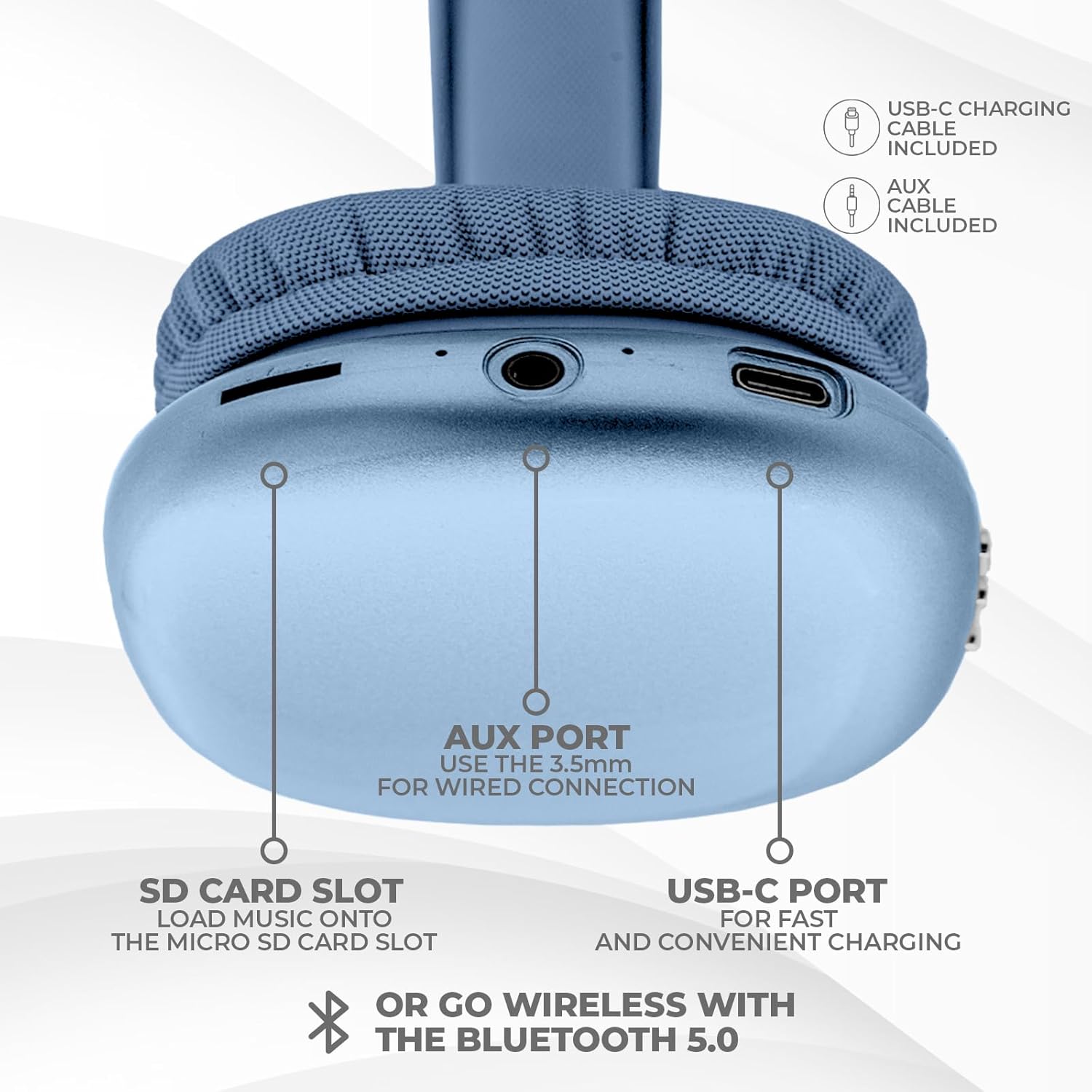
الصورة: أسفل view of the headphone ear cup, showing the USB-C charging port, AUX port, and SD card slot.
- منفذ USB-C: لشحن سماعات الرأس.
- AUX Port (3.5mm): للاتصال الصوتي السلكي.
- فتحة بطاقة SD: For direct audio playback from a Micro SD card.
يثبت
1. شحن سماعات الرأس
قبل الاستخدام الأول، اشحن سماعات الرأس بالكامل. يستغرق الشحن الكامل حوالي ساعتين.
- Connect the provided USB Type C charging cable to the USB-C port on the headphone.
- قم بتوصيل الطرف الآخر من كابل USB بمصدر طاقة USB متوافق (على سبيل المثال، محول الحائط، منفذ USB في الكمبيوتر).
- سيُظهر مؤشر LED حالة الشحن، وسينطفئ أو يتغير لونه عند اكتمال الشحن.
2. اقتران بلوتوث
لتوصيل سماعات الرأس لاسلكيًا:
- تأكد من شحن سماعات الرأس وإيقاف تشغيلها.
- اضغط مع الاستمرار على زر الطاقة حتى يومض مؤشر LED، مما يشير إلى وضع الاقتران.
- على جهازك (الهاتف الذكي، الجهاز اللوحي، الكمبيوتر المحمول)، قم بتمكين البلوتوث وابحث عن الأجهزة المتاحة.
- Select "iJoy Ultra" from the list of devices.
- Once connected, the LED indicator will typically show a solid light or slow flash.
Note: The Bluetooth range is approximately 10 meters (33 feet).
3. التوصيل السلكي (AUX)
For a non-wireless connection or when the battery is low:
- Connect one end of the provided 3.5mm AUX cable to the AUX port on the headphone.
- Connect the other end of the AUX cable to the 3.5mm audio jack on your device.
- سيتم تحويل سماعات الرأس تلقائيًا إلى الوضع السلكي.
4. تشغيل بطاقة SD
لتشغيل الموسيقى مباشرة من بطاقة Micro SD:
- أدخل بطاقة ذاكرة مايكرو إس دي (تحتوي على موسيقى) files) into the SD card slot on the headphone.
- ستكتشف سماعات الرأس البطاقة تلقائيًا وتبدأ تشغيل الموسيقى.
- Use the track control buttons to navigate your music.
تعليمات التشغيل
تشغيل/إيقاف الطاقة
- تشغيل الطاقة: اضغط مع الاستمرار على زر الطاقة لمدة 3 ثوانٍ تقريبًا.
- إيقاف التشغيل: اضغط مع الاستمرار على زر الطاقة لمدة 3 ثوانٍ تقريبًا.
تشغيل الموسيقى
- تشغيل/إيقاف مؤقت: اضغط على زر التشغيل مرة واحدة.
- المسار التالي: اضغط على زر رفع الصوت مرة واحدة.
- المسار السابق: اضغط على زر خفض الصوت مرة واحدة.
- رفع الصوت: Hold the Volume + button.
- اخفض الصوت: Hold the Volume - button.
استدعاء إدارة
When connected via Bluetooth:
- الرد على المكالمة: اضغط على زر التشغيل مرة واحدة.
- إنهاء المكالمة: اضغط على زر الطاقة مرة واحدة أثناء المكالمة.
- رفض المكالمة: اضغط مع الاستمرار على زر الطاقة لمدة 2 ثوانٍ تقريبًا.
عمر البطارية
The headphones offer up to 10 hours of wireless playtime on a single charge.

Image: Visual representation of the headphones' battery life, indicating up to 10 hours of wireless playtime.
صيانة
To ensure the longevity and optimal performance of your iJoy Ultra headphones:
- نظف سماعات الرأس بانتظام بقطعة قماش ناعمة وجافة.
- تجنب تعريض سماعات الرأس لدرجات الحرارة العالية أو الرطوبة أو أشعة الشمس المباشرة.
- لا تستخدم المنظفات أو المذيبات الكاشطة.
- قم بتخزين سماعات الرأس في مكان بارد وجاف عندما لا تكون قيد الاستعمال.
- تجنب إسقاط سماعات الرأس أو تعريضها لصدمات قوية.
استكشاف الأخطاء وإصلاحها
إذا واجهت مشكلات مع سماعات الرأس، فراجع الحلول الشائعة التالية:
| مشكلة | حل |
|---|---|
| لا يتم تشغيل سماعات الرأس. | تأكد من شحن سماعات الرأس بالكامل. قم بتوصيلها بمصدر طاقة باستخدام كابل USB-C. |
| لا يمكن الاقتران عبر البلوتوث. | Make sure the headphones are in pairing mode (flashing LED). Turn off and on Bluetooth on your device. Ensure no other devices are currently connected to the headphones. Try 'forgetting' the device on your phone and re-pairing. |
| No sound or choppy audio. | Check volume levels on both headphones and your device. Ensure Bluetooth connection is stable or try a wired AUX connection. If using an SD card, ensure it is properly inserted and the fileمتوافقة. |
| Headphones are uncomfortable or too tight. | Adjust the headband for a better fit. The over-ear cushions are designed for comfort, but individual fit may vary. |
| Cannot connect to multiple devices simultaneously. | These headphones typically support connection to one device at a time. Disconnect from the current device before attempting to connect to another. |
تحديد
| ميزة | التفاصيل |
|---|---|
| اسم الموديل | ألترا |
| رقم موديل العنصر | IJHP21 |
| تكنولوجيا الاتصال | لاسلكي (بلوتوث)، سلكي (AUX 3.5 مم) |
| تكنولوجيا الاتصالات اللاسلكية | بلوتوث |
| مدى البلوتوث | 10 Meters (قدم 33) |
| مقبس سماعات الرأس | 3.5 ملم جاك |
| المميزات الخاصة | SD Card Slot, Soft Cushion Padding, USB Type C |
| عمر البطارية | حتى ساعتين |
| وقت الشحن | 2 ساعة |
| نوع التحكم | Volume Control, Track Management, Call Management |
| وضع الأذن | فوق الأذن |
| مادة | بلاستيك |
| وزن العنصر | 8 أونصة |
| أبعاد المنتج | 7 × 3 × 8 بوصة |
| رمز المنتج الموحد | 842700193053 |
فيديو المنتج الرسمي
Video: An official product video from iJoy Electronics showcasing the features and design of the iJoy Ultra Bluetooth Over-Ear Headphones.
الضمان والدعم
For warranty information or technical support, please refer to the documentation included with your product or contact iJoy customer service directly. Keep your proof of purchase for any warranty claims.


