مقدمة
This manual provides comprehensive instructions for the safe and efficient use of your Shargeek STORM2 Slim Portable Charger. Please read this manual thoroughly before operating the device and retain it for future reference.
The Shargeek STORM2 Slim is a high-capacity portable power bank featuring a unique transparent design and an IPS display screen. It offers 130W max output with 100W USB-C and 30W USB-A ports, suitable for charging various devices including laptops, tablets, and smartphones.

Image: The Shargeek STORM2 Slim portable charger, showcasing its transparent design that reveals internal components and the included yellow USB-C to USB-C cables.
مميزات المنتج
- تصميم شفاف: The see-through casing reveals the internal battery and circuit layout, highlighting the device's engineering.
- IPS Display Screen: A clear screen provides real-time information on battery life, output distribution, temperature, operation hours, and active ports.
- قدرة عالية: 20000mAh battery capacity, capable of multiple charges for various devices.
- الشحن السريع: Features a 100W USB-C PD port and a 30W USB-A port, supporting 130W max output for rapid charging.
- التوافق العالمي: Charges laptops, phones, tablets, and other devices with USB-C or USB ports.

الصورة: تفصيلية view of the Shargeek STORM2 Slim's IPS LCD screen, showing various data points such as input/output wattagه ، المجلدtage, current, battery level, and temperatures.
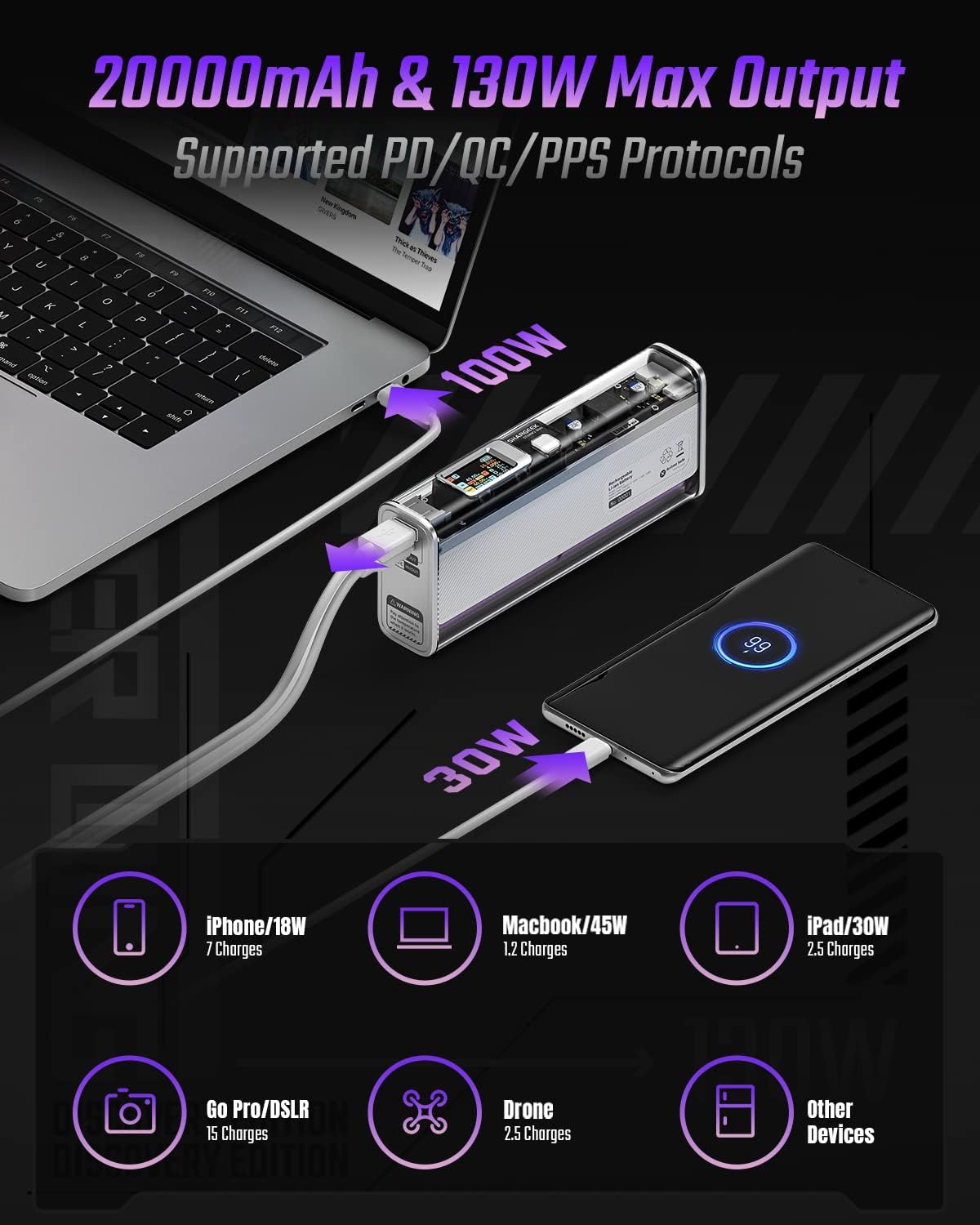
Image: The Shargeek STORM2 Slim connected via USB-C to a laptop for 100W charging and via USB-A to a smartphone for 30W charging, demonstrating its dual-port capability.
الإعداد والاستخدام الأول
محتويات الحزمة:
- Shargeek STORM2 Slim Portable Charger
- كابل USB-C إلى USB-C
- دليل المستخدم (هذا المستند)
الشحن الأولي:
- Before first use, fully charge your STORM2 Slim.
- Connect the provided USB-C to USB-C cable to the USB-C port on the STORM2 Slim.
- Connect the other end of the cable to a compatible USB-C power adapter (not included) with a minimum of 100W output for fastest charging.
- The IPS screen will display charging status and battery percentage. The device is fully charged when the screen indicates 100%.
- A full recharge typically takes approximately 90 minutes with a 100W power adapter.
تعليمات التشغيل
أجهزة الشحن:
- Identify the appropriate charging cable for your device (USB-C to USB-C or USB-A to device-specific cable).
- Connect one end of the cable to your device and the other end to the corresponding port (USB-C or USB-A) on the STORM2 Slim.
- The IPS screen will automatically activate and display the charging output (watts, volts, amps) for the connected device(s).
- The STORM2 Slim can charge two devices simultaneously using both the USB-C and USB-A ports.
Understanding the IPS Screen:
The IPS screen provides detailed real-time information. Use the physical button on the side of the power bank to navigate through different display modes or access settings.
- Input/Output Dashboard: Shows power input (IN) when charging the power bank and power output (OUT) when charging devices, including wattagه ، المجلدtage, and current for each port.
- مستوى البطارية: يعرض نسبة البطارية المتبقيةtage and a visual icon.
- المجلدtag& الحالي: Detailed readings for the internal battery cells.
- درجة حرارة: Shows the internal circuit board and battery temperatures.
- مدة التشغيل: A resettable timer indicating the duration of current operation.
To access menus: Long-press the button. للتنقل: Short-press. لتحديد: Long-press.
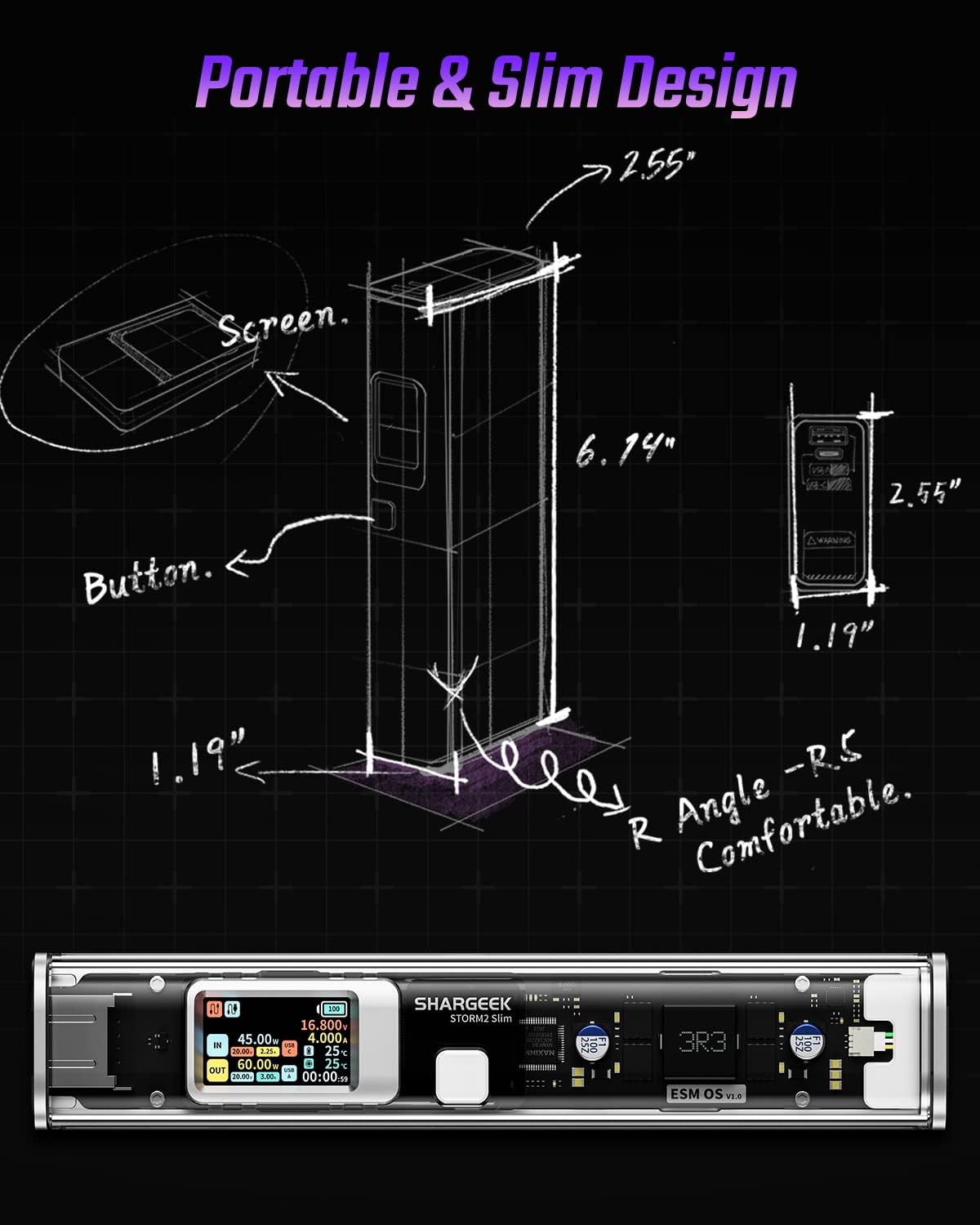
Image: A technical drawing illustrating the dimensions of the Shargeek STORM2 Slim and pointing out the screen and button locations.
صيانة
- تنظيف: استخدم قطعة قماش ناعمة وجافة لتنظيف الجزء الخارجي من بنك الطاقة. تجنب استخدام المواد الكيميائية القاسية أو المواد الكاشطة.
- تخزين: قم بتخزين الجهاز في مكان بارد وجاف بعيدًا عن أشعة الشمس المباشرة ودرجات الحرارة القصوى والرطوبة العالية.
- العناية بالبطارية: To prolong battery life, avoid fully discharging the power bank frequently. Recharge it when the battery level is low. If storing for extended periods, charge it to approximately 50-70% every 3-6 months.
- تجنب القطرات: While designed with an aluminum alloy frame for durability, avoid dropping the device as it may damage internal components or the transparent casing.
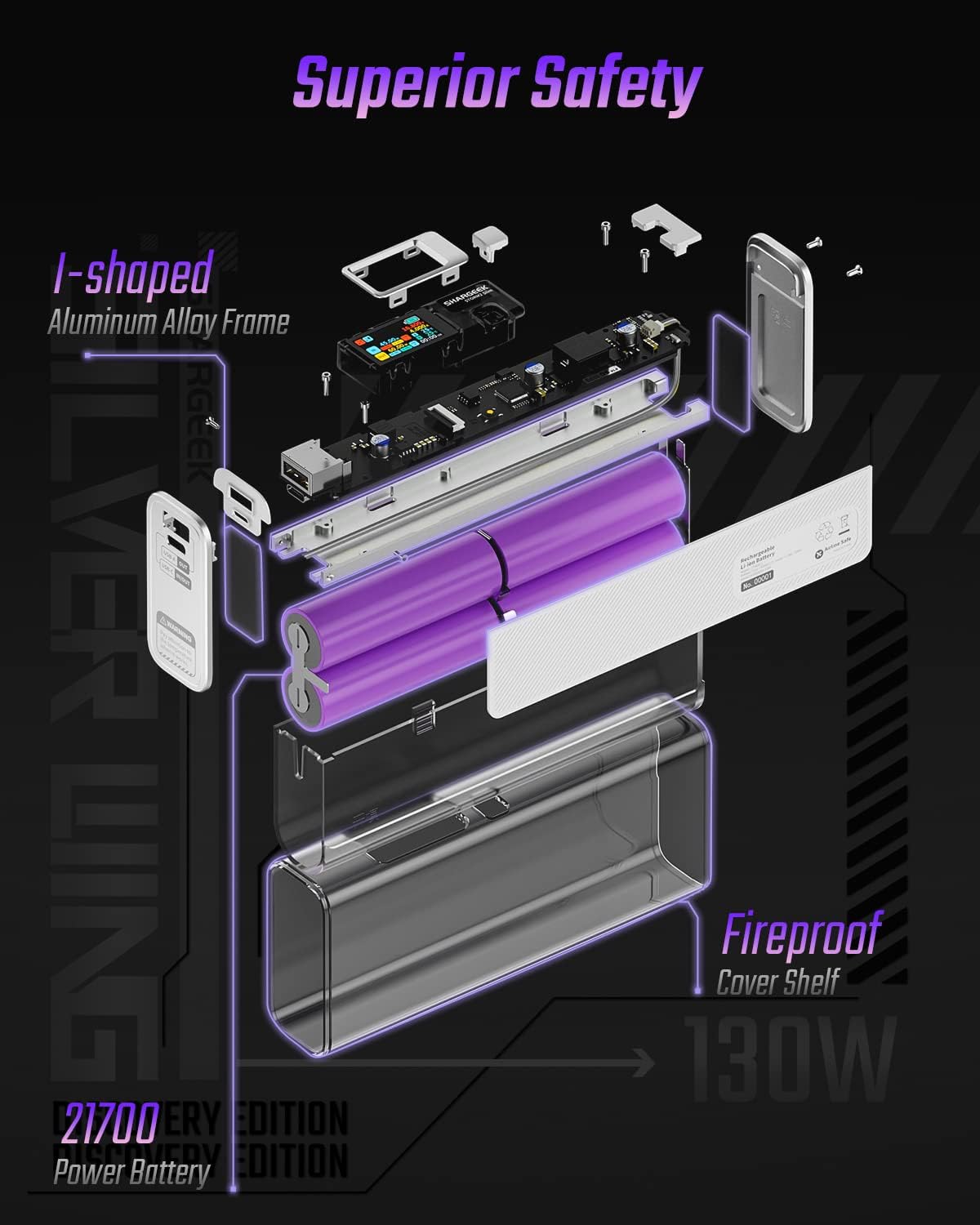
Image: An exploded diagram of the Shargeek STORM2 Slim, illustrating its internal structure including the I-shaped aluminum alloy frame, fireproof cover shelf, and 21700 power batteries, highlighting its robust construction.
استكشاف الأخطاء وإصلاحها
| مشكلة | السبب المحتمل | حل |
|---|---|---|
| الجهاز لا يتم شحنه من بنك الطاقة. | Low power bank battery; incompatible cable; device not properly connected; device requires more power than available. | Recharge the STORM2 Slim. Ensure cable is fully inserted and compatible. Check device power requirements against power bank output. Try a different cable or port. |
| بنك الطاقة لا يشحن. | Charging cable or adapter faulty; power bank port damaged. | Try a different USB-C cable and power adapter. Ensure the adapter meets the recommended power output (e.g., 100W). If problem persists, contact support. |
| IPS screen is blank or unresponsive. | البطارية المحمولة مطفأة؛ خلل برمجي مؤقت. | Press the button to activate the screen. If unresponsive, try connecting a device to charge or connecting the power bank to a charger to see if it activates. If problem persists, contact support. |
| الشحن البطيء. | الكابل لا يدعم الشحن السريع؛ الجهاز لا يدعم الشحن السريع؛ أجهزة متعددة متصلة. | Ensure you are using a high-quality USB-C PD cable. Verify your device supports fast charging. Charging multiple devices simultaneously may reduce individual charging speeds. |
تحديد
- رقم الموديل: STM2E-1
- سعة البطارية: 20000 مللي أمبير
- الحد الأقصى للإخراج: 130 واط
- مخرج USB-C: توصيل الطاقة حتى 100 واط (PD)
- إخراج USB-A: حتى 30 وات
- مدخل: USB-C (up to 100W PD)
- عرض: شاشة IPS
- أبعاد: 3 × 6.5 × 15.59 سم (حوالي 1.18 × 2.56 × 6.14 بوصة)
- وزن: حوالي 689 جرام (1.52 رطل)
- نوع البطارية: أيون الليثيوم
الضمان والدعم
معلومات الضمان:
Shargeek products are covered by a limited warranty against defects in materials and workmanship. Please refer to the warranty card included with your purchase or visit the official Shargeek webالموقع للحصول على شروط وأحكام الضمان التفصيلية.
دعم العملاء:
For technical assistance, troubleshooting, or warranty claims, please contact Shargeek customer support through their official webالموقع أو معلومات الاتصال المقدمة على عبوة المنتج الخاص بك.
Official Shargeek Store Link: Shargeek Official Store
معلومات السلامة
- لا تعرض الجهاز للماء أو الرطوبة أو درجات الحرارة العالية.
- لا تقم بتفكيك الجهاز أو تعديله أو محاولة إصلاحه بنفسك. سيؤدي ذلك إلى إلغاء الضمان وقد يتسبب في تلفه أو إصابتك.
- يحفظ بعيدًا عن متناول الأطفال.
- استخدم فقط كابلات ومحولات الشحن المعتمدة والمتوافقة.
- تجنب إسقاط الجهاز أو تعريضه لصدمات قوية.
- Dispose of the device responsibly according to local regulations for electronic waste.


