1. المقدمة
This manual provides comprehensive instructions for the setup, operation, and maintenance of your Cherry MW 9100 Wireless Rechargeable Mouse. The MW 9100 is a compact, versatile mouse offering dual connectivity options (Bluetooth or 2.4 GHz USB receiver) and a convenient rechargeable battery.
تتضمن الميزات الرئيسية ما يلي:
- Compact design with charging functionality.
- Flexible operation: use while charging via USB-C cable.
- Dual connectivity: Bluetooth or 2.4 GHz USB receiver.
- Magnetic storage for the USB receiver, ideal for travel.
- Adjustable DPI settings for varied usage.
2. محتويات العبوة
تأكد من وجود جميع العناصر في العبوة:
- Cherry MW 9100 Wireless Rechargeable Mouse
- كابل شحن USB-C
- جهاز استقبال يو اس بي 2.4 جيجا هرتز
- الحقيبة الواقية
- دليل التعليمات (هذا المستند)
3. الإعداد
3.1 شحن الماوس
The Cherry MW 9100 mouse features a built-in rechargeable battery. Before initial use, or when the battery is low, connect the included USB-C cable to the mouse and to a USB power source (e.g., computer USB port, USB wall adapter). The mouse can be used normally while charging.

الصورة 3.1: قمة view of the Cherry MW 9100 mouse, showing the charging indicator light.
3.2 توصيل الماوس
The MW 9100 offers two connection methods: 2.4 GHz wireless via USB receiver or Bluetooth.
3.2.1 اتصال لاسلكي بتردد 2.4 جيجاهرتز
- Locate the USB receiver. It is magnetically stored in a compartment on the underside of the mouse.
- أدخل مستقبل USB في منفذ USB متاح على جهاز الكمبيوتر الخاص بك.
- On the underside of the mouse, slide the switch to the "RF" position.
- يجب أن يتصل الماوس بالكمبيوتر تلقائيًا.
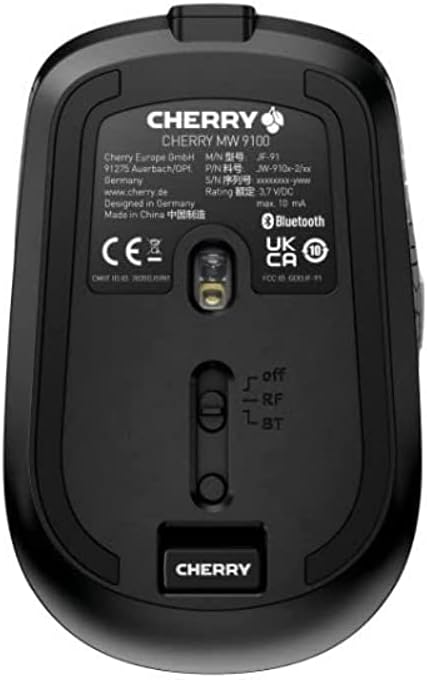
الصورة 3.2: Underside of the Cherry MW 9100 mouse, highlighting the USB receiver storage and the connection mode switch.
3.2.2 اتصال البلوتوث
- On the underside of the mouse, slide the switch to the "BT" (Bluetooth) position.
- Press and hold the small pairing button located near the connection switch on the underside of the mouse until the LED indicator on the mouse starts blinking, indicating pairing mode.
- على جهاز الكمبيوتر الخاص بك أو جهازك، افتح إعدادات البلوتوث وابحث عن أجهزة جديدة.
- Select "Cherry MW 9100" from the list of available devices to complete the pairing process.
4. تعليمات التشغيل
4.1 الوظائف الأساسية
The Cherry MW 9100 mouse features standard left and right click buttons, a scroll wheel (which also functions as a middle click button), and two side buttons for navigation (typically forward/back).
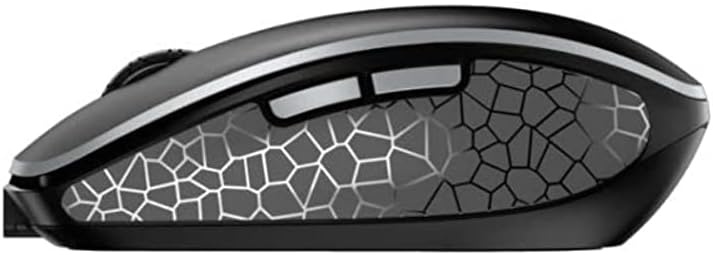
الصورة 4.1: جانب view of the Cherry MW 9100 mouse, illustrating the ergonomic design and side buttons.
4.2 ضبط DPI
The mouse includes a DPI (Dots Per Inch) button, usually located near the scroll wheel, allowing you to adjust the cursor sensitivity. Press this button to cycle through different DPI settings to match your preference or task requirements.

الصورة 4.2: A hand demonstrating the comfortable grip on the Cherry MW 9100 mouse during use.
5. الصيانة
To ensure optimal performance and longevity of your Cherry MW 9100 mouse:
- تنظيف: استخدم قطعة قماش ناعمة وجافة لتنظيف سطح الفأرة. لإزالة الأوساخ العنيدة، امسحها برفق بقطعة قماش جافة.amp cloth can be used, but ensure no moisture enters the device. Avoid harsh chemicals or abrasive materials.
- تخزين: When not in use, especially during travel, store the mouse in the provided protective pouch to prevent scratches and damage.
- العناية بالبطارية: تجنب استنزاف البطارية بالكامل بشكل متكرر. أعد شحن الماوس عند ظهور مؤشر انخفاض مستوى البطارية.
6. استكشاف الأخطاء وإصلاحها
| مشكلة | السبب المحتمل | حل |
|---|---|---|
| الماوس لا يستجيب | Low battery, incorrect connection mode, USB receiver not connected, Bluetooth not paired. |
|
| Intermittent connection (Bluetooth) | Interference, device driver issues, distance from device. |
|
| حركة المؤشر غير منتظمة أو بطيئة | Dirty optical sensor, low battery, incorrect DPI setting. |
|
7. المواصفات
| ميزة | التفاصيل |
|---|---|
| ماركة | الكرز |
| رقم الموديل | JW-9100US-2 |
| تكنولوجيا الاتصال | Bluetooth, 2.4 GHz USB Wireless |
| كشف الحركة | بصري |
| المميزات الخاصة | خفيف الوزن، محمول، قابل لإعادة الشحن |
| أبعاد المنتج | 4 × 3 × 2 بوصة |
| وزن العنصر | 6.4 أونصات |
| لون | أسود |
8. الضمان والدعم
For warranty information and technical support, please refer to the official Cherry website or contact Cherry customer service directly. Keep your proof of purchase for warranty claims.
الشركة المصنعة: الكرز
Webموقع: www.cherry.de


