DAREU EK807G

DAREU EK807G Wireless TKL Mechanical Keyboard User Manual

Model: EK807G | Brand: DAREU

1. المقدمة

This manual provides comprehensive instructions for the DAREU EK807G Wireless TKL Mechanical Keyboard. Designed for office use, this keyboard features an aluminum alloy panel, function keys, and stable 2.4G wireless connectivity, compatible with PC, Mac, and Windows systems. Please read this manual thoroughly to ensure proper use and longevity of your device.

ماذا يوجد في الصندوق

  • DAREU EK807G Wireless TKL Mechanical Keyboard
  • مستقبل USB (2.4 جيجا هرتز)
  • كيكاب بولير
  • دليل المستخدم
DAREU EK807G Wireless TKL Mechanical Keyboard on a desk setup

Image 1.1: The DAREU EK807G Wireless TKL Mechanical Keyboard in a typical office setup.

2. الإعداد

2.1 Inserting Batteries and USB Receiver

The DAREU EK807G keyboard requires two AAA batteries (not included) for operation. The 2.4G USB receiver is conveniently stored within the keyboard's battery compartment.

  1. حدد موقع غطاء حجرة البطارية على الجانب السفلي من لوحة المفاتيح.
  2. Remove the cover to access the battery slots and the stored USB receiver.
  3. Carefully remove the 2.4G USB receiver from its storage slot.
  4. Insert two AAA batteries into the compartment, ensuring correct polarity (+/-).
  5. قم باستبدال غطاء حجرة البطارية.
Underside of DAREU EK807G keyboard showing battery compartment and USB receiver

Image 2.1: The battery compartment and USB receiver storage on the keyboard's underside.

2.2 الاتصال بجهازك

The keyboard uses a 2.4G wireless connection for stable and reliable performance.

  1. قم بتوصيل جهاز استقبال USB بتردد 2.4 جيجا هرتز بمنفذ USB متاح على جهاز الكمبيوتر أو الكمبيوتر المحمول أو الجهاز اللوحي.
  2. Locate the ON/OFF switch on the upper side of the keyboard.
  3. حرك المفتاح إلى وضع "التشغيل".
  4. Your device should automatically detect and connect to the keyboard. No additional drivers are typically required.
DAREU EK807G keyboard overview with 2.4G wireless icon

Image 2.2: The keyboard features 2.4G wireless connectivity.

3. تعليمات التشغيل

3.1 الطباعة الأساسية وبيئة العمل

The DAREU EK807G features a classic TKL (Tenkeyless) 87-key layout, providing a comfortable typing experience. The keyboard is designed with an ergonomic 5° optimum slope when the folding holder is used, preventing wrist strain during long typing sessions. Anti-slide pads ensure stability.

This model is equipped with DAREU Red Switches, known for their linear and quiet operation, making them suitable for office and study environments where minimal noise is preferred.
Close-up of DAREU Red Switches on the keyboard

Image 3.1: The DAREU EK807G features quiet Red Switches for comfortable typing.

3.2 Function (Fn) Key Shortcuts

The keyboard includes 12 hotkeys accessible via the Fn key, allowing for quick access to various functions.

  • الجبهة الوطنية + F1: جهاز الكمبيوتر الخاص بي
  • الجبهة الوطنية + F2: الصفحة الرئيسية
  • الجبهة الوطنية + F3: بريد إلكتروني
  • الجبهة الوطنية + F4: آلة حاسبة
  • الجبهة الوطنية + F5: توقف (وسائط)
  • الجبهة الوطنية + F6: Last Song (Media)
  • الجبهة الوطنية + F7: Play/Pause (Media)
  • الجبهة الوطنية + F8: Next Song (Media)
  • الجبهة الوطنية + F9: خفض الصوت
  • الجبهة الوطنية + F10: رفع الصوت
  • الجبهة الوطنية + F11: صامت
  • الجبهة الوطنية + F12: Switch Left Win & Left Alt keys
Diagram showing Fn key combinations for shortcuts

Image 3.2: Shortcut keys activated by pressing the Fn key in combination with F1-F12.

3.3 Anti-Ghosting Technology

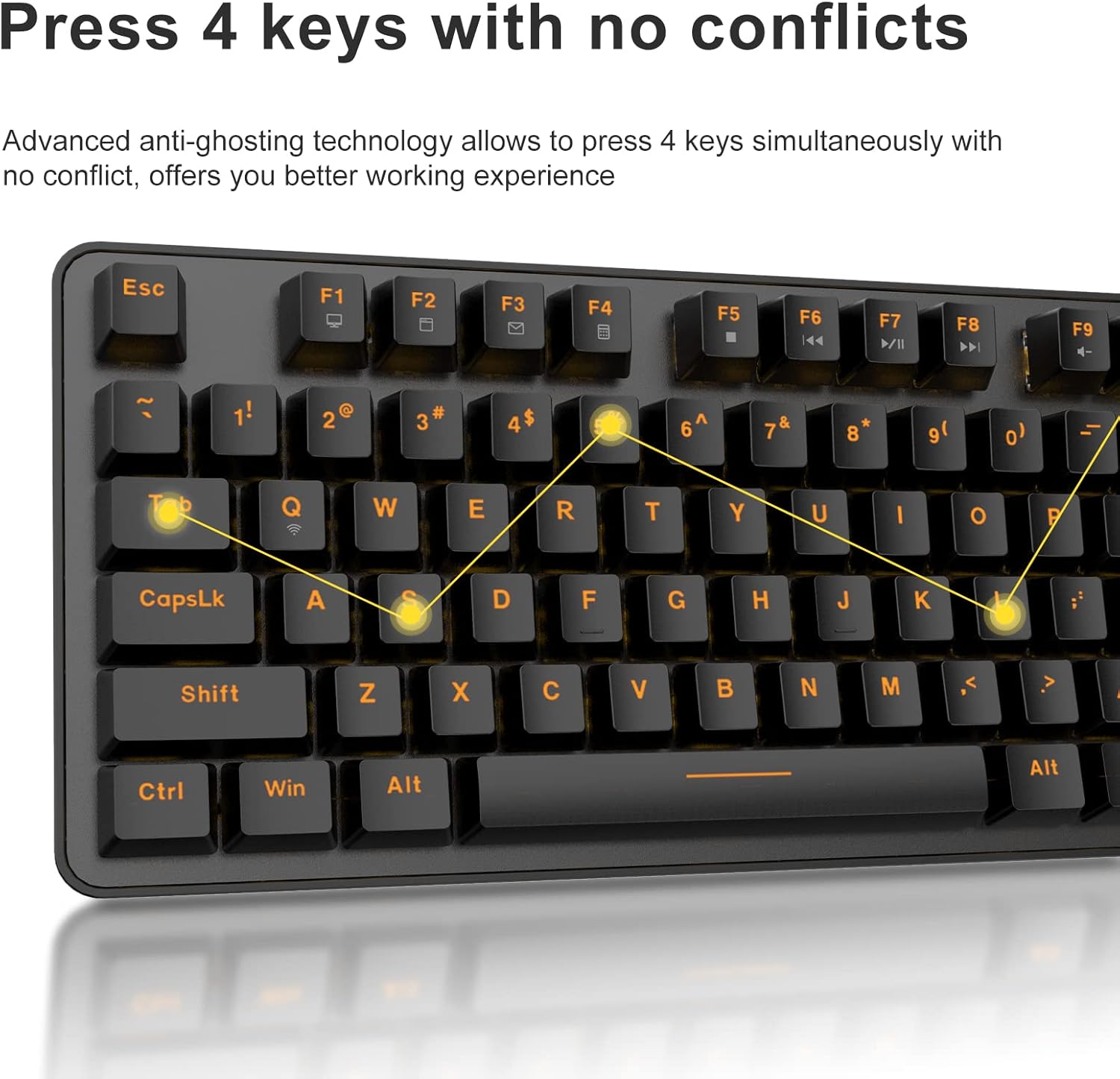
The DAREU EK807G features advanced anti-ghosting technology, allowing up to 6 keys to be pressed simultaneously without conflict. This ensures all your commands are registered accurately, improving efficiency.

Diagram illustrating anti-ghosting technology on the keyboard

Image 3.3: Anti-ghosting technology ensures multiple key presses are registered accurately.

3.4 Automatic Power Saving

To conserve battery life, the keyboard enters an automatic sleeping mode after 6 seconds of inactivity. To wake the keyboard, simply press any key. With this feature, the keyboard can last approximately 90 days of continuous use, and up to half a year between battery changes.

Image depicting long battery life and automatic sleep mode

Image 3.4: The keyboard features automatic power saving for extended battery life.

4. الصيانة

4.1 تنظيف لوحة المفاتيح

يساعد التنظيف المنتظم في الحفاظ على أداء لوحة المفاتيح ومظهرها.

  • النظافة العامة: استخدم قطعة قماش ناعمة وجافة لمسح سطح لوحة المفاتيح. بالنسبة للأوساخ المستعصية، استخدم قطعة قماش ناعمة قليلاً.amp يمكن استخدام قطعة قماش مع صابون خفيف، مع التأكد من عدم دخول أي سائل إلى لوحة المفاتيح.
  • تنظيف غطاء المفاتيح: The DAREU EK807G features removable double-shot keycaps, which are resistant to fading and easy to clean. Use the included keycap puller to carefully remove keycaps. Clean them with a soft brush or a damp cloth. Ensure keycaps are completely dry before reattaching.
  • Aluminum Alloy Panel: The aluminum alloy panel is designed to be sweat-resistant and anti-rust. Wipe it with a soft cloth to keep it clean.

5. استكشاف الأخطاء وإصلاحها

5.1 مشاكل الاتصال

  • لوحة المفاتيح لا تستجيب:
    • Ensure the keyboard's ON/OFF switch is in the "ON" position.
    • Check if the AAA batteries are correctly inserted and have sufficient charge. Replace if necessary.
    • تأكد من توصيل مستقبل USB بتردد 2.4 جيجا هرتز بشكل صحيح بمنفذ USB يعمل على جهازك. جرب منفذ USB آخر.
    • أعد تشغيل الكمبيوتر أو الجهاز.
  • اتصال متقطع:
    • Ensure the keyboard is within the operating distance of 33 feet (10m) from the USB receiver.
    • Avoid placing the keyboard near strong electromagnetic interference sources (e.g., Wi-Fi routers, other wireless devices).

5.2 قضايا الوظائف الرئيسية

  • المفاتيح غير مسجلة أو غير ظاهرة:
    • While the keyboard has anti-ghosting for up to 6 keys, excessive simultaneous presses beyond this limit may not register.
    • Ensure keycaps are properly seated. If a key feels stuck, gently remove the keycap with the puller and reattach it.
    • Clean any debris under the keycaps (refer to Maintenance section).
  • Fn key shortcuts not working:
    • Ensure you are pressing the Fn key simultaneously with the desired F-key.
    • If Fn + F12 (Switch L-Win & L-Alt) was accidentally activated, press it again to revert the key functions.

6. المواصفات

ماركةداريو
رقم الموديلإي كيه 807 جي
وصف لوحة المفاتيحميكانيكي (مفتاح أحمر)
تكنولوجيا الاتصال2.4 جيجا لاسلكي
مسافة التشغيلحتى 33 قدم (10 متر)
الأجهزة المتوافقةLaptop, PC, Tablet (Mac, Windows, Chromebook)
مصدر الطاقةبطاريتان AAA (غير متضمنة)
مادةAluminum Alloy Panel
أبعاد المنتج14.17 بوصة طول × 5.31 بوصة عرض × 1.57 بوصة ارتفاع (36.0 × 13.5 × 4.0 سم)
وزن العنصر1.65 رطل (0.75 كجم)
المميزات الخاصةErgonomic design, Hotkeys, Multimedia Keys, Anti-ghosting, Removable Double-shot Keycaps

7. الضمان والدعم

7.1 خدمة الضمان

DAREU provides a 180-day warranty service for the EK807G Wireless TKL Mechanical Keyboard from the date of purchase. This warranty covers manufacturing defects and issues arising from normal use.

7.2 دعم العملاء

If you encounter any problems during the use of your DAREU keyboard, please contact DAREU customer support. Our team is available to assist you with troubleshooting, product inquiries, and warranty claims.

Please refer to the contact information provided on the product packaging or the official DAREU webالموقع للحصول على قنوات الدعم الأحدث.

المستندات ذات الصلة - إي كيه 807 جي

قبلview دليل مستخدم لوحة المفاتيح Dareu EK807G
دليل المستخدم للوحة المفاتيح Dareu EK807G، مع تفاصيل المنتج viewتعليمات الإعداد، واختصارات المفاتيح، والمواصفات، ومعلومات التوافق مع لجنة الاتصالات الفيدرالية (FCC).
قبلview دليل المستخدم ولوحة المفاتيح الميكانيكية Dareu Z82
دليل مستخدم شامل للوحة المفاتيح الميكانيكية Dareu Z82، مع تفاصيل الإعداد، وخيارات الاتصال (2.4G، وBluetooth، وسلكي)، وتثبيت برنامج التشغيل، والميزات الرئيسية للأداء الأمثل.
قبلview دليل مستخدم لوحة مفاتيح DAREU EK75 - الميزات والمواصفات
دليل المستخدم للوحة مفاتيح DAREU EK75، والذي يغطي محتويات العلبة، والمواصفات الفيزيائية والكهربائية، ومواصفات المنتج. viewوشرح مفصل لمفاتيح الوظائف المركبة وإعدادات الإضاءة الخلفية المخصصة.
قبلview دليل مستخدم لوحة المفاتيح الميكانيكية من سلسلة DAREU A87
دليل المستخدم للوحة المفاتيح الميكانيكية من سلسلة DAREU A87، والذي يغطي المعلومات الأساسية، وإعادة إنتاج المنتج.viewأوضاع الإضاءة، والإعداد، والتثبيت، واستخدام برنامج التشغيل.
قبلview دليل مستخدم لوحة المفاتيح الميكانيكية ثلاثية الأوضاع DAREU A87
دليل شامل للوحة المفاتيح الميكانيكية DAREU A87 ثلاثية الأوضاع، يغطي الإعداد وطرق التوصيل والميزات واستبدال المفاتيح. يتضمن معلومات الضمان.
قبلview دليل مستخدم لوحة الألعاب اللاسلكية Dareu H101X Bluetooth
اكتشف دليل مستخدم لوحة الألعاب اللاسلكية Dareu H101X بتقنية البلوتوث، والذي يوفر تعليمات شاملة للاتصال والميزات والإعداد على أجهزة الكمبيوتر الشخصية، وSwitch، وiOS، وMac، وAndroid. تعرّف على الجيروسكوب سداسي المحاور، ووظيفة Turbo، ووضعي الإدخال/الإخراج Xinput/Dinput لتجربة لعب مثالية.