1. المقدمة
شكرا لك على الشراءasing the ZEBRONICS Zeb-PIXAPLAY 11 Portable LED Projector. This manual provides essential information for setting up, operating, and maintaining your projector. Please read it thoroughly before use to ensure proper functionality and to maximize your viewتجربة رائعة.
The Zeb-PIXAPLAY 11 is designed for home entertainment, offering FHD 1080p support, multiple connectivity options, and a compact design for portability. Enjoy movies, TV shows, and gaming on a large screen up to 381cm (150 inches).
2. معلومات السلامة
- لا تنظر مباشرة إلى عدسة جهاز العرض عندما يكون الضوءamp هو على.
- تأكد من التهوية المناسبة حول جهاز العرض لمنع ارتفاع درجة الحرارة.
- Use only the provided power adapter or a compatible 5V DC, 3A USB power source.
- أبقِ جهاز العرض بعيدًا عن الماء والرطوبة ودرجات الحرارة القصوى.
- لا تحاول تفكيك جهاز العرض أو إصلاحه بنفسك. اتصل بفنيي الصيانة المؤهلين.
- قم بتنظيف العدسة وفتحات التهوية بانتظام للحفاظ على الأداء الأمثل.
3. محتويات العبوة
تأكد من تضمين جميع العناصر المدرجة أدناه في الحزمة الخاصة بك:
- جهاز عرض (وحدة واحدة)
- جهاز تحكم عن بعد (وحدة واحدة)
- محول طاقة (وحدة واحدة)
- AV Cable (1 unit)
- كابل HDMI (وحدة واحدة)
- دليل المستخدم

الشكل 3.1: Projector and Included Accessories
This image displays the ZEBRONICS Zeb-PIXAPLAY 11 projector along with its complete set of accessories: a remote control, a power adapter, an AV cable, an HDMI cable, and a QR code for the user manual. These items are typically found in the product packaging.
4. انتهى المنتجview
تعرّف على مكونات جهاز العرض وأدوات التحكم فيه.

الشكل 4.1: الجبهة والأعلى View of the Projector with Remote
This image shows the ZEBRONICS Zeb-PIXAPLAY 11 portable LED projector from a front and slightly top-down angle, with its accompanying remote control placed beside it. The projector features a two-tone design, with the lens visible at the front.
4.1 عناصر التحكم في اللوحة العلوية

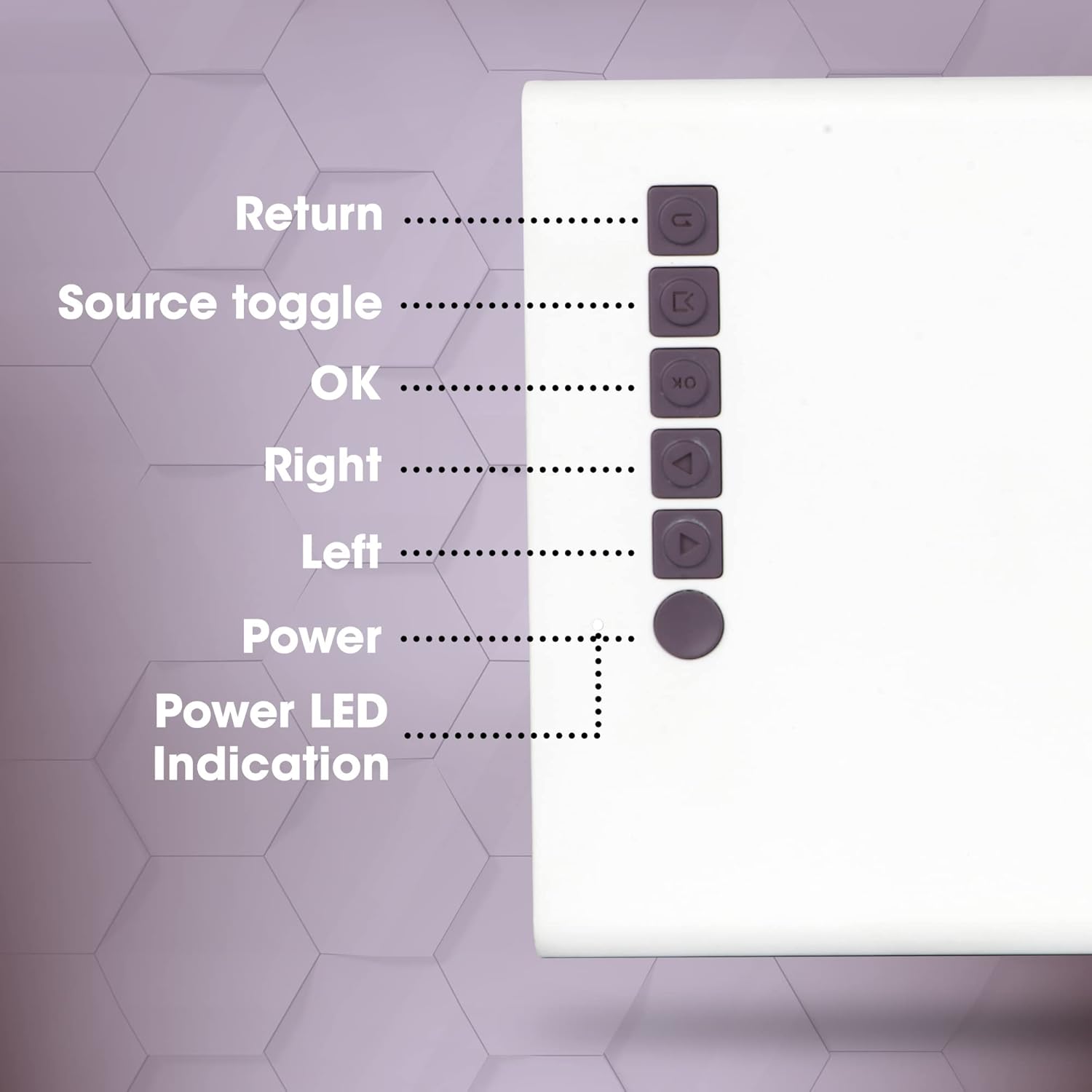
الشكل 4.2: ضوابط اللوحة العلوية
This close-up image highlights the control buttons located on the top panel of the ZEBRONICS Zeb-PIXAPLAY 11 projector. The buttons are labeled for their functions: Return, Source toggle, OK, Right, Left, Power, and Power LED Indication.
- يعود: التنقل مرة أخرى في القوائم.
- Source toggle: Switches between input sources (HDMI, USB, mSD, AV).
- OK: يؤكد التحديدات.
- يمين شمال: يتنقل بين خيارات القائمة.
- قوة: يقوم بتشغيل/إيقاف تشغيل جهاز العرض.
- مؤشر LED للطاقة: يظهر حالة الطاقة.
4.2 Rear and Side Ports
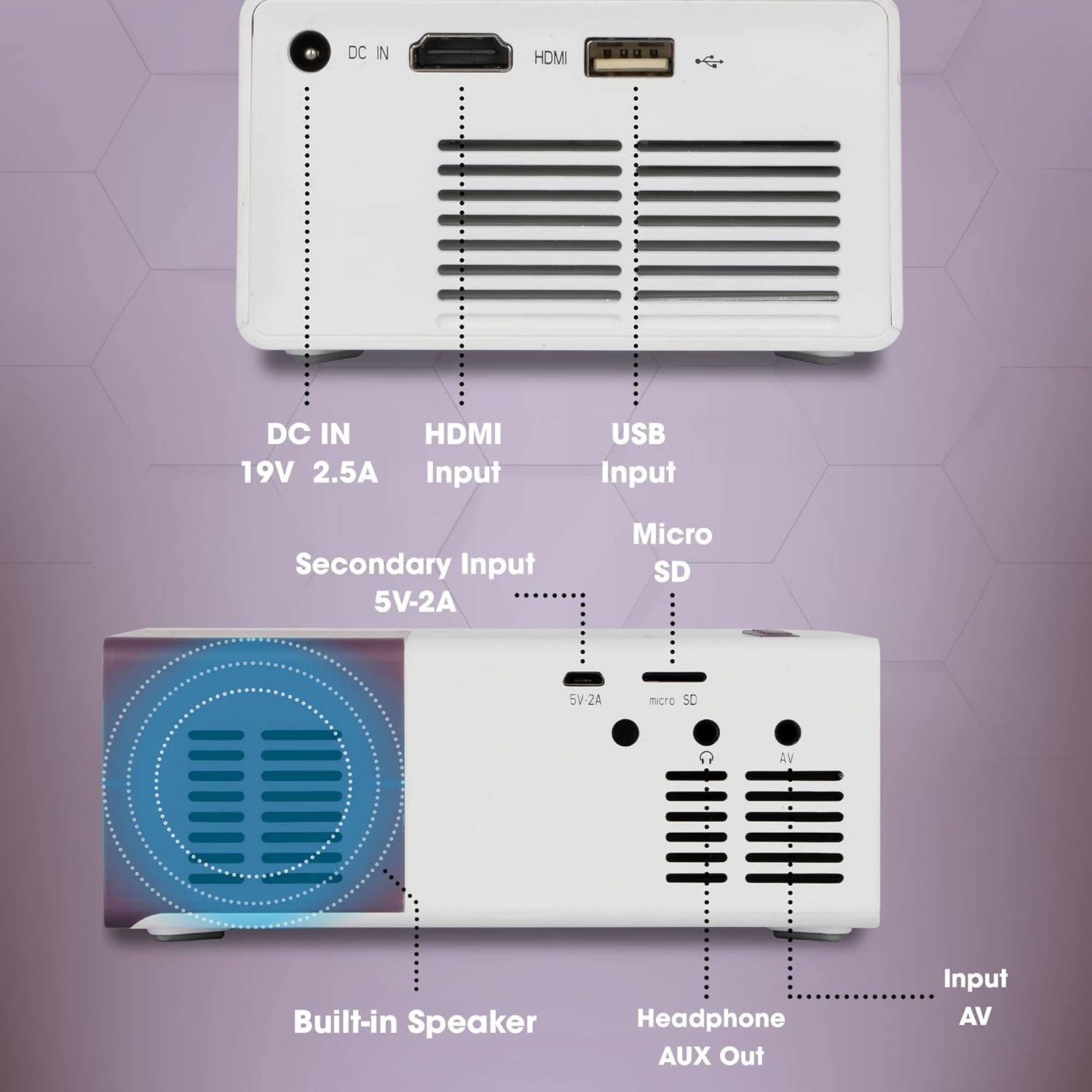
الشكل 4.3: Rear and Side Connectivity Ports
توفر هذه الصورة تفصيلاً view of the connectivity ports located on the rear and side of the ZEBRONICS Zeb-PIXAPLAY 11 projector. Labels indicate the functions of each port: DC IN (19V 2.5A), HDMI Input, USB Input, Micro SD slot, Secondary Input (5V-2A), Built-in Speaker, Headphone AUX Out, and Input AV.
- DC IN (19V 2.5A): مدخل الطاقة الرئيسي.
- Secondary Input (5V-2A): Alternative power input via USB (e.g., power bank).
- مدخلات HDMI: Connects to devices like laptops, gaming consoles, TV boxes.
- مدخل USB: يتصل بمحركات أقراص USB المحمولة لتشغيل الوسائط.
- بطاقة مايكرو اس دي: Slot for Micro SD cards for media playback.
- Input AV: Connects to devices using the included AV cable.
- Headphone AUX Out: يتصل بمكبرات صوت خارجية أو سماعات رأس.
- مكبر صوت مدمج: مخرج صوت مدمج.
5. الإعداد
5.1 توصيل الطاقة
- قم بتوصيل محول الطاقة المرفق بـ DC IN (19 فولت 2.5 أمبير) port on the projector and then to a power outlet.
- Alternatively, for portable use, connect a 5V DC, 3A USB power source (e.g., a power bank) to the Secondary Input (5V-2A) ميناء.
الشكل 5.1: Dual Power Input Capability
This image illustrates the ZEBRONICS Zeb-PIXAPLAY 11 projector's compatibility with both a standard adapter and a 5V power bank, highlighting its portability for outdoor use. Children are shown enjoying a movie projected onto a screen in a garden setting.
5.2 موضع الشاشة وحجمها
- ضع جهاز العرض على سطح ثابت ومستوٍ.
- Position the projector at an appropriate distance from the projection surface (wall or screen) to achieve the desired screen size. The projector supports a maximum screen size of 381cm (150 inches).
- Ensure the projection path is clear of obstructions.

الشكل 5.2: Large Screen Projection and Picture Clarity
This image demonstrates the ZEBRONICS Zeb-PIXAPLAY 11 projector's capability to project a large screen size of up to 381cm (150 inches) with FHD 1080p support, emphasizing the stunning picture clarity it delivers.
5.3 تعديل التركيز
Locate the focus ring near the projector lens. Rotate it until the projected image appears sharp and clear on the screen.
6. تعليمات التشغيل
6.1 تشغيل/إيقاف التشغيل
- اضغط على قوة button on the projector or the remote control to turn the unit on. The Power LED will illuminate.
- اضغط على قوة زر مرة أخرى لإيقاف تشغيل الوحدة.
6.2 تحديد مصدر الإدخال
بعد تشغيل الجهاز، استخدم Source toggle button on the projector or the remote control to cycle through available input sources: HDMI, USB, mSD, and AV.
6.3 توصيل الأجهزة
- HDMI: Connect an HDMI cable from your laptop, gaming console, or TV box to the projector's HDMI input port. Select HDMI as the input source.
- USB: Insert a USB flash drive into the USB input port. Select USB as the input source and navigate through your media files using the remote or top panel controls.
- بطاقة مايكرو اس دي: Insert a Micro SD card into the Micro SD slot. Select mSD as the input source and browse your media.
- من: Use the included AV cable to connect older devices (e.g., DVD players) to the AV input port. Select AV as the input source.
6.4 إخراج الصوت
- The projector has a built-in speaker for audio playback.
- For enhanced audio, connect external speakers or headphones to the Headphone AUX Out المنفذ باستخدام كابل صوت مقاس 3.5 ملم.
6.5 تنسيقات الوسائط المدعومة
The projector supports various video file formats including 3GP, AVI, DIVX, H264, MOV, MP4, MPEG1, MPEG2, MKV, and VOB.
7. الصيانة
- تنظيف العدسات: امسح عدسة جهاز العرض برفق بقطعة قماش ناعمة وخالية من الوبر. تجنب استخدام المنظفات الكاشطة.
- تنظيف فتحة التهوية: Periodically clean the ventilation openings to ensure proper airflow and prevent dust buildup. Use a soft brush or compressed air.
- تخزين: عند عدم الاستخدام، قم بتخزين جهاز العرض في مكان بارد وجاف، بعيدًا عن أشعة الشمس المباشرة ودرجات الحرارة القصوى.
- Lamp عمر: الصمام لamp ويقدر عمرها الافتراضي بـ 30,000 ساعة.

الشكل 7.1: Projector Brightness and Lamp عمر
This image visually represents the ZEBRONICS Zeb-PIXAPLAY 11 projector's key specifications: 1500 lumens of brightness and a long-lasting LED lamp بعمر افتراضي يبلغ 30,000 ساعة.
8. استكشاف الأخطاء وإصلاحها
إذا واجهت مشكلات مع جهاز العرض الخاص بك، فراجع المشكلات والحلول الشائعة التالية:
| مشكلة | السبب المحتمل | حل |
|---|---|---|
| لا يوجد طاقة | كابل الطاقة غير موصول؛ مأخذ الطاقة معطل | تأكد من توصيل محول الطاقة بإحكام؛ جرب منفذ طاقة مختلف. |
| لا يوجد صورة | Incorrect input source; Cable not connected; Device not outputting signal | Select correct input source; Check cable connections; Ensure source device is on and configured to output. |
| صورة ضبابية | لم يتم ضبط التركيز؛ جهاز العرض قريب جدًا/بعيد جدًا | Adjust the focus ring; Reposition the projector for optimal distance. |
| لا يوجد صوت | Volume too low; External speakers not connected; Source device audio issue | Increase projector volume; Connect external speakers via AUX out; Check audio settings on source device. |
9. المواصفات
| ميزة | مواصفة |
|---|---|
| ماركة | الزبرونيك |
| رقم الموديل | GC-RB-2725 |
| دقة العرض | 1280 x 720 (Native HD), 1080p FHD Support |
| سطوع | 1500 لومن |
| Lamp عمر | 30,000 Hours (LED) |
| الحد الأقصى لحجم الشاشة | 381 سم (150 بوصة) |
| تكنولوجيا الاتصال | HDMI, USB, Micro SD, AV In, AUX Out |
| نوع السماعة | مدمج |
| مدخلات الطاقة | DC 19V 2.5A (Primary), 5V 3A USB (Secondary) |
| وزن العنصر | 1.85 رطل |
| أبعاد المنتج | 5.79 × 4.02 × 0.98 بوصة |
10. الضمان والدعم
This product is covered by a manufacturer's warranty. Please refer to the warranty card included in your package for specific terms and conditions. For technical support, service, or further inquiries, please visit the official ZEBRONICS webالموقع أو الاتصال بخدمة العملاء الخاصة بهم.
You can also access the digital user manual and support resources by scanning the QR code provided in the package or by visiting: https://l.ead.me/zebpp11


