1. المقدمة
This manual provides comprehensive instructions for the WD 20TB Elements Desktop External Hard Drive (Model WDBWLG0200HBK-NESN). This device offers high-capacity, reliable storage for your digital files, featuring fast data transfer rates via USB 3.0 and universal compatibility with USB 3.0 and USB 2.0 devices. It is designed for plug-and-play use with Windows PCs and can be reformatted for use with macOS.

الصورة 1.1: الجبهة view of the WD Elements Desktop External Hard Drive.
2. ماذا يوجد في الصندوق
تأكد من وجود جميع المكونات في العبوة:
- WD Elements hard drive
- كابل USB 3.0
- محول التيار المتردد
- دليل التثبيت السريع
3. الإعداد
Follow these steps to set up your WD Elements Desktop External Hard Drive:
- قم بتوصيل محول التيار المتردد: Plug the AC adapter into the power port on the back of the WD Elements drive. Connect the other end of the AC adapter to a power outlet.
- قم بتوصيل كبل USB: Connect one end of the included USB 3.0 cable to the USB port on the back of the WD Elements drive. Connect the other end of the USB cable to an available USB 3.0 or USB 2.0 port on your computer.
- تشغيل الطاقة: The drive will typically power on automatically when connected. The LED indicator on the front of the drive will illuminate.
- التعرف الأولي: For Windows PCs, the drive is pre-formatted and ready for immediate use. It should appear as a new drive in 'This PC' or 'My Computer'. For macOS, reformatting is required. Refer to your macOS documentation for instructions on how to format an external drive using Disk Utility.

الصورة 3.1: خلفي view of the drive, highlighting the power and USB 3.0 ports.
4. تعليمات التشغيل
The WD Elements Desktop External Hard Drive is designed for simple plug-and-play operation.
- الوصول إلى محرك الأقراص: Once connected and recognized by your computer, the drive will appear as a removable storage device. You can access it like any other drive on your system.
- نقل Files: السحب والإفلات files or folders to and from the WD Elements drive. You can also use copy and paste functions. The USB 3.0 interface ensures fast data transfers for large files.
- إزالة آمنة: قم دائمًا بإخراج القرص الصلب بأمان قبل فصله عن جهاز الكمبيوتر الخاص بك لمنع تلف البيانات.
- الويندوز: Click the 'Safely Remove Hardware and Eject Media' icon in the system tray, then select your WD Elements drive.
- ماك: Drag the drive icon from your desktop to the Trash, or right-click (Control-click) the drive icon and select 'Eject'.

Image 4.1: The WD Elements drive integrated into a typical desktop setup.
5. الصيانة
Proper maintenance ensures the longevity and optimal performance of your external hard drive:
- الرعاية الجسدية: Keep the drive in a stable, well-ventilated area. Avoid exposing it to extreme temperatures, direct sunlight, or moisture. Do not block the ventilation slots.
- تنظيف: Use a soft, dry cloth to clean the exterior of the drive. Do not use liquid cleaners or aerosols.
- النسخ الاحتياطي للبيانات: While the WD Elements drive provides reliable storage, it is recommended to maintain backups of critical data on multiple devices or cloud services to prevent data loss from unforeseen circumstances.
- تحديثات البرامج الثابتة: Periodically check the official WD support website for any available firmware updates for your drive model. Updates can improve performance and stability.
6. استكشاف الأخطاء وإصلاحها
If you encounter issues with your WD Elements drive, try the following solutions:
- لم يتم اكتشاف محرك الأقراص:
- Ensure the AC adapter is securely connected to both the drive and a working power outlet.
- Verify the USB cable is firmly connected to both the drive and your computer.
- حاول توصيل محرك الأقراص بمنفذ USB مختلف على جهاز الكمبيوتر الخاص بك.
- قم بإجراء الاختبار باستخدام كابل USB مختلف إذا كان متاحًا.
- أعد تشغيل الكمبيوتر الخاص بك.
- سرعات نقل بطيئة:
- Ensure you are connected to a USB 3.0 port on your computer for optimal performance. USB 2.0 ports will result in slower speeds.
- تجنب تشغيل تطبيقات متعددة تتطلب موارد كبيرة أثناء العمل file التحويلات.
- تأكد من تحديث برامج تشغيل منافذ USB في جهاز الكمبيوتر الخاص بك.
- Drive Making Unusual Noises:
- A slight hum or whirring is normal for a mechanical hard drive. However, if you hear clicking, grinding, or loud scraping sounds, safely disconnect the drive immediately and contact WD support.
- يتطلب محرك الأقراص التنسيق (Windows): If your Windows PC prompts you to format the drive, it may indicate a file system issue. If you have data on the drive, do not proceed with formatting without attempting data recovery first. If it's a new drive and you intend to use it with macOS, proceed with macOS formatting.
For further assistance, visit the official WD support webموقع.
7. المواصفات
| ميزة | التفاصيل |
|---|---|
| رقم الموديل | WDBWLG0200HBK-NESN |
| سعة التخزين الرقمية | 20 تيرابايت (20000 جيجابايت) |
| نوع القرص الصلب | قرص صلب ميكانيكي |
| واجهة القرص الصلب | يو اس بي 3.0 |
| تكنولوجيا الاتصال | USB |
| منصة الأجهزة | PC, Mac (reformatting required for macOS) |
| وزن العنصر | 1.98 رطل |
| أبعاد المنتج (الطول × العرض × الارتفاع) | 5.31 × 1.89 × 6.53 بوصة |
| لون | أسود |
| الشركة المصنعة | شركة ويسترن ديجيتال تكنولوجيز |
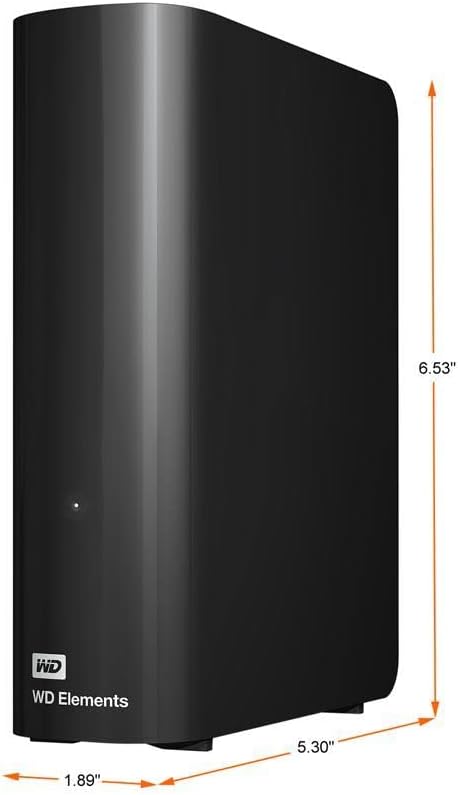
Image 7.1: Product dimensions of the WD Elements Desktop External Hard Drive.
8. الضمان والدعم
Your WD Elements Desktop External Hard Drive is covered by a limited warranty. For specific warranty terms, conditions, and duration, please refer to the warranty information included with your product or visit the official Western Digital webللحصول على الدعم الفني، وتسجيل المنتج، وموارد إضافية، يرجى زيارة الموقع. support.wdc.com.