1. المقدمة
The Oversteel Tombac Wireless Game Controller is designed for multi-platform gaming, offering compatibility with PC, Nintendo Switch, smartphones, tablets, and Android TVs. This manual provides detailed instructions for setting up, operating, and maintaining your controller to ensure optimal performance and an enhanced gaming experience.
2. محتويات العبوة
- 1 x Oversteel Tombac Wireless Game Controller
- 1 × كابل شحن USB
3. تصميم وحدة التحكم
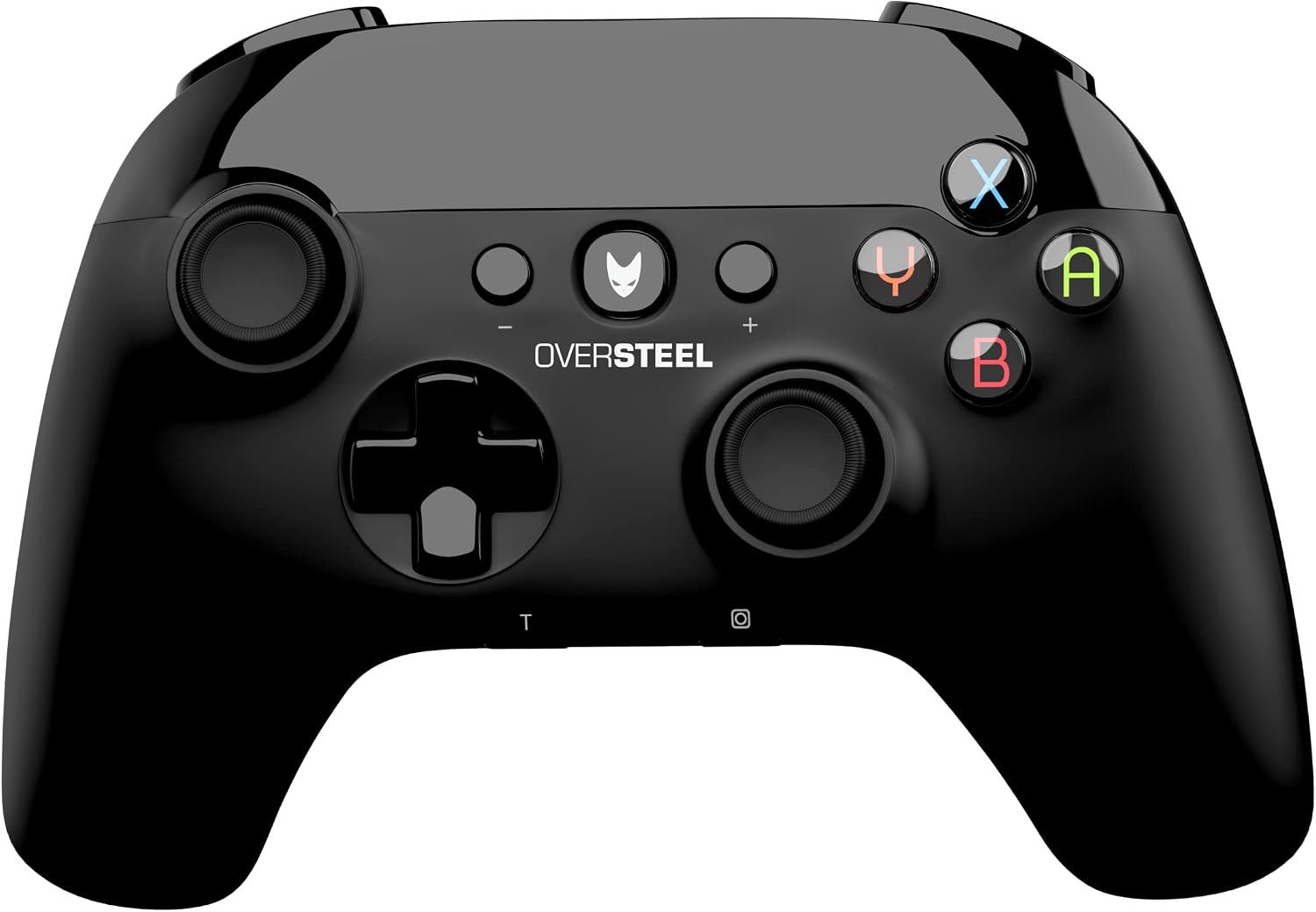
الصورة 3.1: أمام view of the Oversteel Tombac Wireless Game Controller, showing the dual analog sticks, D-pad, action buttons (A, B, X, Y), shoulder buttons, and central function buttons.

الصورة 3.2: قمة view of the Oversteel Tombac Wireless Game Controller, highlighting the shoulder buttons (L1, R1) and triggers (L2, R2).
The Oversteel Tombac controller features a standard layout for intuitive gameplay:
- الجانب الأيسر: Left Analog Stick, Directional Pad (D-pad).
- الجانب الأيمن: Right Analog Stick, Action Buttons (A, B, X, Y).
- مركز: Home/Power Button (Oversteel logo), Plus (+) Button, Minus (-) Button, Turbo (T) Button, Screenshot Button (Camera icon).
- قمة: Left Shoulder Button (L1), Right Shoulder Button (R1), Left Trigger (L2), Right Trigger (R2).
- المؤشرات: Player LED indicators at the bottom.
4. الإعداد
4.1. شحن وحدة التحكم
Before initial use, fully charge the controller. Connect the provided USB charging cable to the controller's USB port and the other end to a USB power source (e.g., PC, USB wall adapter). The charging indicator will illuminate. A full charge typically takes approximately 2-3 hours and provides up to 8 hours of continuous gameplay.
4.2. اتصال الكمبيوتر
4.2.1. اتصال سلكي عبر USB
- قم بتوصيل وحدة التحكم بجهاز الكمبيوتر الخاص بك باستخدام كابل الشحن USB.
- سيقوم الكمبيوتر تلقائيًا باكتشاف وتثبيت برامج التشغيل اللازمة.
- وحدة التحكم جاهزة للاستخدام.
4.2.2. اتصال لاسلكي عبر البلوتوث
- تأكد من تمكين تقنية Bluetooth في جهاز الكمبيوتر الخاص بك.
- On the controller, press and hold the Home/Power button for 3 seconds to enter pairing mode (player LEDs will flash rapidly).
- On your PC, go to 'Bluetooth & other devices' settings.
- Select 'Add Bluetooth or other device' > 'Bluetooth'.
- Select 'Oversteel Tombac' from the list of available devices to pair.
- Once paired, the player LED(s) on the controller will remain lit.
4.3. اتصال نينتندو سويتش
- من قائمة Nintendo Switch الرئيسية، حدد "وحدات التحكم" > "تغيير القبضة/الترتيب".
- On the Oversteel Tombac controller, press and hold the Home/Power button for 3 seconds to enter pairing mode (player LEDs will flash rapidly).
- The Switch will detect the controller. Once paired, the player LED(s) on the controller will remain lit.
4.4. Smartphone/Tablet/Android TV Connection (Bluetooth)
- Enable Bluetooth on your smartphone, tablet, or Android TV.
- On the controller, press and hold the Home/Power button for 3 seconds to enter pairing mode (player LEDs will flash rapidly).
- In your device's Bluetooth settings, search for new devices and select 'Oversteel Tombac' to pair.
- Once paired, the player LED(s) on the controller will remain lit.
5. تعليمات التشغيل
5.1. تشغيل/إيقاف التشغيل
- لتشغيل: Press the Home/Power Button (Oversteel logo).
- لإيقاف التشغيل: Press and hold the Home/Power Button for approximately 5 seconds until the controller shuts down.
5.2. وظيفة التوربو
The controller supports a Turbo function for rapid button presses.
- لتفعيل وضع التيربو: اضغط مع الاستمرار على T (Turbo) button, then press the desired action button (e.g., A, B, X, Y, L1, R1, L2, R2). The button will now repeatedly input as long as it is held down.
- لإلغاء تفعيل خاصية التيربو: Repeat the activation process for the same button.
5.3. وظيفة الاهتزاز
The Oversteel Tombac controller features dual vibration motors, providing immersive haptic feedback during compatible gameplay moments.
5.4. وظيفة الجيروسكوب (نينتندو سويتش)
When connected to a Nintendo Switch, the integrated gyroscope allows for motion control in compatible games, enhancing gameplay experiences like aiming or steering.
6. الصيانة
- Clean the controller regularly with a soft, dry cloth. Avoid using abrasive materials or harsh chemical cleaners.
- لا تعرض جهاز التحكم لدرجات حرارة شديدة أو أشعة الشمس المباشرة أو الرطوبة العالية.
- Store the controller in a dry, cool place when not in use.
- تجنب إسقاط وحدة التحكم أو تعريضها لصدمات قوية.
7. استكشاف الأخطاء وإصلاحها
7.1. عدم اتصال/اقتران وحدة التحكم
- تأكد من أن وحدة التحكم مشحونة بشكل كافٍ.
- Verify that Bluetooth is enabled on your device (PC, Switch, smartphone, etc.).
- Try re-pairing the controller by following the specific connection steps for your device.
- For PC wired connection, try a different USB port or cable.
- Ensure the controller is within the 10-meter wireless range of your device.
7.2. وحدة التحكم لا تشحن
- Ensure the USB cable is securely connected to both the controller and the power source.
- Try using a different USB port or a different USB wall adapter.
- Verify that the USB cable is not damaged.
7.3. تأخر الإدخال أو انقطاع الاتصال
- Ensure you are within the optimal 10-meter wireless range.
- Reduce potential interference from other wireless devices (e.g., Wi-Fi routers, other Bluetooth devices).
- تأكد من تحديث نظام تشغيل جهازك وبرامج تشغيل البلوتوث.
8. المواصفات
| ميزة | التفاصيل |
|---|---|
| ماركة | أوفيرستيل |
| نموذج | Tombac (NAT-OV-TOMBAC) |
| الاتصال | بلوتوث، يو اس بي |
| نوع البطارية | بطارية ليثيوم 600 مللي أمبير |
| وقت اللعب | ما يصل إلى 8 ساعات (بشحنة واحدة) |
| وقت الشحن | حوالي 2-3 ساعة |
| لاسلكي المدى | حتى 10 أمتار |
| عدد الأزرار | 16 |
| المميزات الخاصة | Vibration Feedback, Gyroscope (for Switch), Turbo Function, Ergonomic Design |
| الأبعاد (الطول × العرض × الارتفاع) | 17.3 × 13.2 × 7.5 سم |
| وزن | 320 جرام |
9. الضمان والدعم
For detailed warranty information, technical support, or customer service inquiries, please refer to the official Oversteel website or contact your product retailer. Keep your proof of purchase for any warranty claims.


