مقدمة
Thank you for choosing the Baseus True Wireless Earphones Bowie E3. These earphones are designed to provide a high-quality audio experience with advanced features such as low latency, fast charging, and IP64 dust and water resistance. This manual will guide you through the setup, operation, maintenance, and troubleshooting of your new earphones.
المنتج انتهىview

The Baseus Bowie E3 True Wireless Earphones, shown here in their open charging case, highlighting their compact and sleek white design.

Illustration demonstrating the Baseus Dual Channel Connection and Low Latency feature, indicating a delayed time of less than 0.06 seconds for fast response.

Visual representation of the Baseus Flash Charge capability, showing that 10 minutes of charging provides 2 hours of music playback.

عن قرب view of the 13mm Titanium Vibrating Diaphragms, designed for well-balanced triple frequency and clear sound quality.
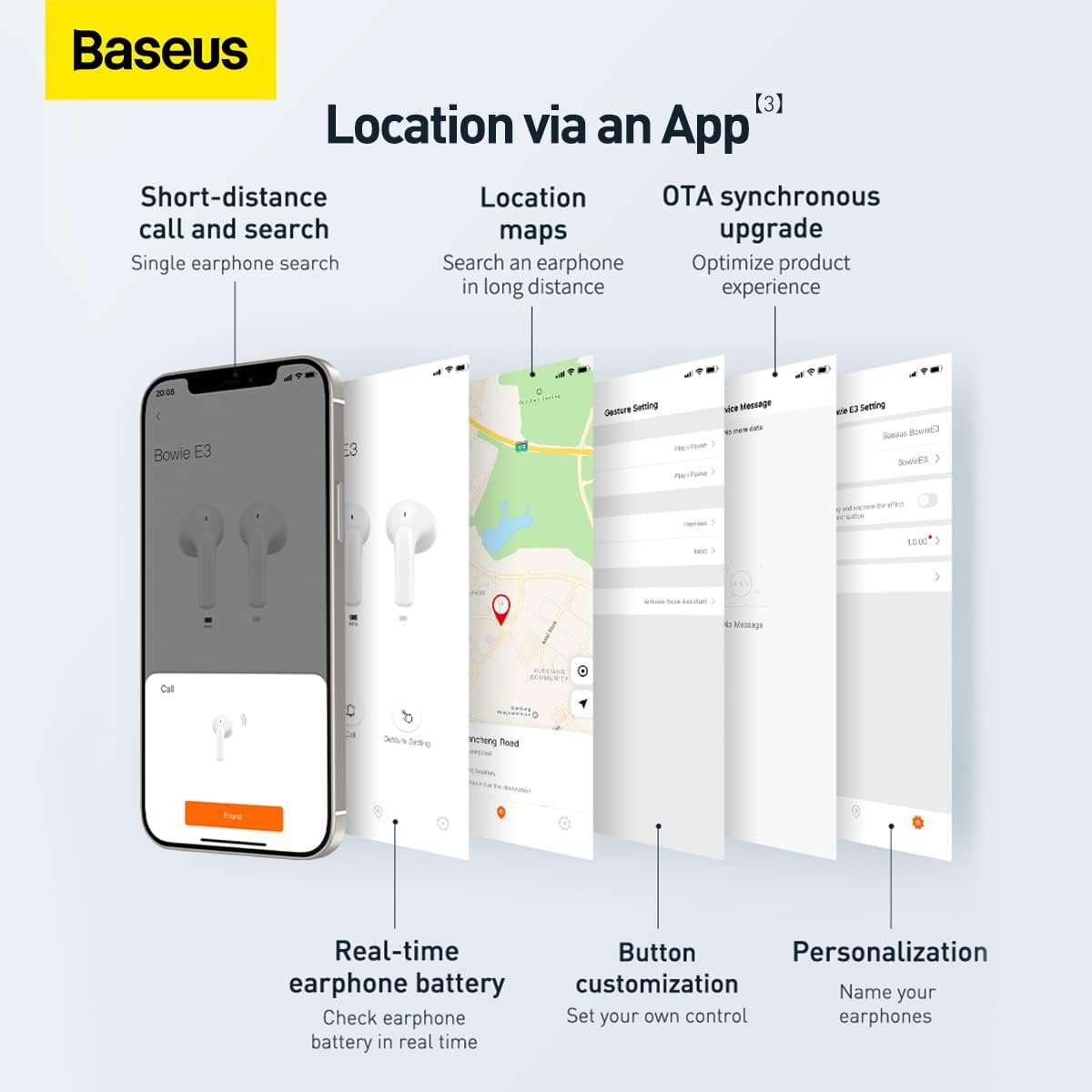
Screenshots illustrating the Baseus app features, including short-distance call and search, location maps, OTA synchronous upgrade, real-time earphone battery check, button customization, and personalization options.

Diagram showing the internal chip for Wireless 5.2 Stable Connection, indicating improved transmission rate and stability.

Summary of key features for Pure Music and Fast Response, including flash charge, 13mm PU+Titanium Moving Coils, 0.06 second delay, and location tracking via the app.

The retail packaging for the Baseus Bowie E3 True Wireless Earphones, displaying the product name and brand logo.
يثبت
1. شحن سماعات الأذن والعلبة
Before first use, fully charge the earphones and the charging case. Connect the charging case to a USB power source using a compatible USB-C cable. The indicator light on the case will show charging status.
- الشحن السريع: تتيح لك الشحنة لمدة 10 دقائق تشغيل الموسيقى لمدة ساعتين تقريبًا.
- Ensure the earphones are properly seated in the charging case for them to charge.
2. الاقتران بجهازك
- افتح علبة الشحن. ستدخل سماعات الأذن تلقائيًا في وضع الاقتران.
- على جهازك (الهاتف الذكي، الجهاز اللوحي، وما إلى ذلك)، قم بتمكين البلوتوث.
- بحث عن "Baseus Bowie E3" في قائمة أجهزة البلوتوث المتاحة.
- Select "Baseus Bowie E3" to connect. Once connected, a voice prompt will confirm successful pairing.
- في الاستخدامات اللاحقة، ستتصل سماعات الأذن تلقائيًا بآخر جهاز مقترن عند إخراجها من العلبة.
تعليمات التشغيل
عناصر التحكم باللمس
The Baseus Bowie E3 earphones feature touch-sensitive controls on each earbud. The following actions are typically supported:
- تشغيل/إيقاف مؤقت: انقر نقرًا مزدوجًا على إحدى سماعتي الأذن.
- المسار التالي: انقر ثلاث مرات على سماعة الأذن اليمنى.
- المسار السابق: اضغط ثلاث مرات على سماعة الأذن اليسرى.
- الرد/إنهاء المكالمة: انقر نقرًا مزدوجًا على إحدى سماعتي الأذن.
- رفض المكالمة: اضغط مع الاستمرار على أي من سماعات الأذن لمدة ثانيتين.
- تنشيط مساعد الصوت: اضغط مع الاستمرار على أي من سماعات الأذن لمدة ثانيتين.
Note: Specific touch controls may be customizable via the Baseus app.
استخدام تطبيق Baseus
Download the official Baseus app from your device's app store to unlock additional features and customization options:
- Earphone Location: Use the app to locate your earphones if misplaced.
- حالة البطارية: Check the real-time battery level of each earbud.
- تخصيص الزر: Personalize touch controls to your preference.
- التحديث المتزامن عبر الهواء (OTA): Receive firmware updates to optimize product experience.
- التخصيص: Name your earphones within the app.
صيانة
- تنظيف: نظّف سماعات الأذن وعلبة الشحن بانتظام باستخدام قطعة قماش ناعمة وجافة وخالية من الوبر. لا تستخدم المنظفات الكاشطة أو المذيبات.
- مقاومة الماء: The earphones are IP64 dustproof and waterproof. This means they are protected from dust ingress and splashing water from any direction. Do not submerge them in water or expose them to strong jets of water.
- تخزين: عند عدم استخدام سماعات الأذن، احفظها في علبة الشحن لحمايتها والحفاظ على شحنها. خزّنها في مكان بارد وجاف بعيدًا عن أشعة الشمس المباشرة ودرجات الحرارة المرتفعة والمنخفضة.
- العناية بالبطارية: لإطالة عمر البطارية، تجنب تفريغ سماعات الأذن بالكامل بشكل متكرر. اشحنها بانتظام، حتى لو لم تكن قيد الاستخدام المستمر.
استكشاف الأخطاء وإصلاحها
| مشكلة | السبب المحتمل | حل |
|---|---|---|
| سماعات الأذن غير مقترنة | Bluetooth is off; earphones not in pairing mode; interference. | Ensure Bluetooth is on. Place earphones back in case, close, then reopen. Try pairing again. Move away from other wireless devices. |
| لا يوجد صوت من سماعة أذن واحدة | Low battery; earbud not connected; dirty contacts. | Charge both earphones. Re-pair the earphones. Clean the charging contacts on the earbud and in the case. |
| حجم منخفض | Device volume too low; earbud placement; dirty earbud mesh. | Increase volume on your device. Adjust earbud position. Gently clean the earbud mesh. |
| قضايا الشحن | Cable or adapter fault; dirty charging port/contacts. | Try a different USB-C cable and power adapter. Clean the charging port and earbud contacts. |
| App not connecting to earphones | Earphones not paired to phone; app permissions. | Ensure earphones are connected via Bluetooth. Check app permissions in phone settings. Restart app. |
تحديد
- نموذج: NGTW080002
- ماركة: باسيس
- الاتصال: بلوتوث 5.2
- وضع الأذن: في الأذن
- عامل الشكل: في الأذن
- مقاومة: 32 أوم
- التحكم في الضوضاء: عزل الصوت
- السائقين: 13mm Titanium Vibrating Diaphragms
- كمون: 0.06 seconds (low latency)
- الشحن: Flash charge (10 min charge for 2h playback)
- مقاومة الماء: IP64 الغبار ومقاوم للماء
- بطارية: 1 Lithium Ion battery required (per earbud, case has its own)
- أبعاد المنتج: 3.8 x 9.2 x 9.2 cm (packaging/case); 100 g
- الشركة المصنعة: باسيس
- بلد المنشأ: الصين
- أول متاح: 1 مارس 2022
الضمان والدعم
معلومات الضمان
This product comes with a standard manufacturer's warranty. For specific warranty terms and conditions, please refer to the warranty card included in the product packaging or visit the official Baseus website. Extended warranty plans may also be available for purchase, such as 1-Year or 2-Year Extended Warranty Plans.
دعم العملاء
For technical assistance, troubleshooting beyond this manual, or warranty claims, please contact Baseus customer support through their official website or the contact information provided in your product documentation. Please have your product model number (NGTW080002) and purchase details ready when contacting support.
الموارد المتاحة على الإنترنت:
- باسوس الرسمي Webموقع: www.baseus.com (يرجى التحقق من المعلومات الإقليمية webمواقع للحصول على دعم محدد)
- Baseus App: Available on iOS App Store and Android Google Play Store.


