مقدمة
This manual provides detailed instructions for the installation, operation, and maintenance of your WGP Teleheer T6 Plus Motorcycle Bluetooth Headset. Please read this manual thoroughly before using the device to ensure proper function and safety. The T6 Plus is designed for motorcycle riders, offering full-duplex Bluetooth real-time intercom communication, hands-free calling, music playback, and voice assistant integration.
الميزات الرئيسية
- Full Duplex Bluetooth Real-time Intercom: Stable signal transmission up to 1500 meters (93 MPH) with ceramic antenna.
- Hands-free & Multi-function Keys: Bluetooth 5.1 connectivity, supports call handling (answer/refuse/redial), music playback. Automatic switch to phone mode for incoming calls. Large button design for easy operation with gloves.
- IP65 Waterproof & Dustproof Design: Withstands various weather conditions, operational down to -15°F.
- HD Speakers & Ultra High Quality Sound: High-definition sound quality, especially for bass, with effective wind noise reduction.
- All-in-One Type-C Port: Integrated audio, data transfer, and charging.
- عمر بطارية طويل: 850 mAh battery providing 30 hours of continuous use and 500 hours standby.
محتويات الحزمة
يرجى التأكد من وجود جميع العناصر في الحزمة الخاصة بك:
- WGP Teleheer T6 Plus Bluetooth Headset Unit (2 units for 2-pack)
- مكبرات الصوت خوذة
- Microphone (boom mic for open-face helmets, soft mic for full-face helmets)
- Mounting Clip (clamp and adhesive options)
- كابل شحن USB من النوع C
- دليل المستخدم

Image: A detailed diagram illustrating the components of the WGP Teleheer T6 Plus headset, including the main unit with its Type-C port, indicator light, and control buttons (OFF/ON, Volume+, Volume-, Telephone, Connect). It also shows the securing clip, microphone, and trumpet (speakers), providing a clear visual guide to the parts included and their connections.
الإعداد والتثبيت
1. شحن الجهاز
Before first use, fully charge the T6 Plus headset. Connect the provided USB Type-C cable to the headset's Type-C port and the other end to a USB power adapter (not included). The indicator light will show charging status and turn off when fully charged.
- وقت الشحن: حوالي 2-3 ساعات.
- Indicator light: Red during charging, off when fully charged.
2. تركيب سماعة الرأس في خوذتك
The T6 Plus can be installed using either the clamp mount or the adhesive mount.
- اختر موقع التركيب: Select a flat area on the left side of your helmet where the headset unit can be easily accessed.
- تركيب مكبرات الصوت: Attach the speakers inside the helmet's ear pockets using the adhesive pads. Ensure they are positioned directly over your ears for optimal sound quality.
- تركيب الميكروفون:
- For full-face helmets: Use the soft wire microphone and position it inside the chin bar, close to your mouth.
- For open-face or modular helmets: Use the boom microphone and position it in front of your mouth.
- تركيب الوحدة الرئيسية:
- Clamp جبل: حرك المفتاحamp between the helmet shell and the inner padding. Secure it tightly.
- جبل لاصق: Clean the chosen surface on the helmet. Peel off the protective film from the adhesive mount and firmly press it onto the helmet for at least 30 seconds. Allow 24 hours for the adhesive to cure before use.
- توصيل الكابلات: Plug the speaker/microphone cable into the Type-C port on the main headset unit.

Image: A WGP Teleheer T6 Plus headset unit mounted on the side of a motorcycle helmet. This image demonstrates the typical installation position of the headset on a helmet, showing its compact design and how it integrates with the helmet's exterior. The control buttons are visible, indicating ease of access for the rider.
تعليمات التشغيل
1. تشغيل/إيقاف التشغيل
- تشغيل الطاقة: اضغط مع الاستمرار على زر الطاقة لمدة 3 ثواني حتى يومض ضوء المؤشر.
- إيقاف التشغيل: اضغط مع الاستمرار على زر الطاقة لمدة 3 ثوانٍ حتى ينطفئ ضوء المؤشر.
2. Bluetooth Pairing with Mobile Phone
- Ensure the T6 Plus is powered off.
- اضغط مع الاستمرار على زر الطاقة for approximately 5-7 seconds until the indicator light flashes red and blue alternately, indicating pairing mode.
- On your mobile phone, enable Bluetooth and search for "Teleheer T6 Plus".
- Select "Teleheer T6 Plus" from the list of available devices to connect. Once connected, the indicator light will flash blue slowly.
3. Intercom Pairing (Two Units)
To establish intercom communication between two T6 Plus units:
- Ensure both T6 Plus units are powered off.
- On Unit 1, press and hold the زر الطاقة for 5-7 seconds until the indicator light flashes red and blue alternately.
- On Unit 2, press and hold the زر الطاقة for 5-7 seconds until the indicator light flashes red and blue alternately.
- اضغط لفترة وجيزة على زر الطاقة on either Unit 1 or Unit 2 (one short press). The units will search for each other.
- Once connected, the indicator lights on both units will flash blue slowly, and you will hear a confirmation tone.
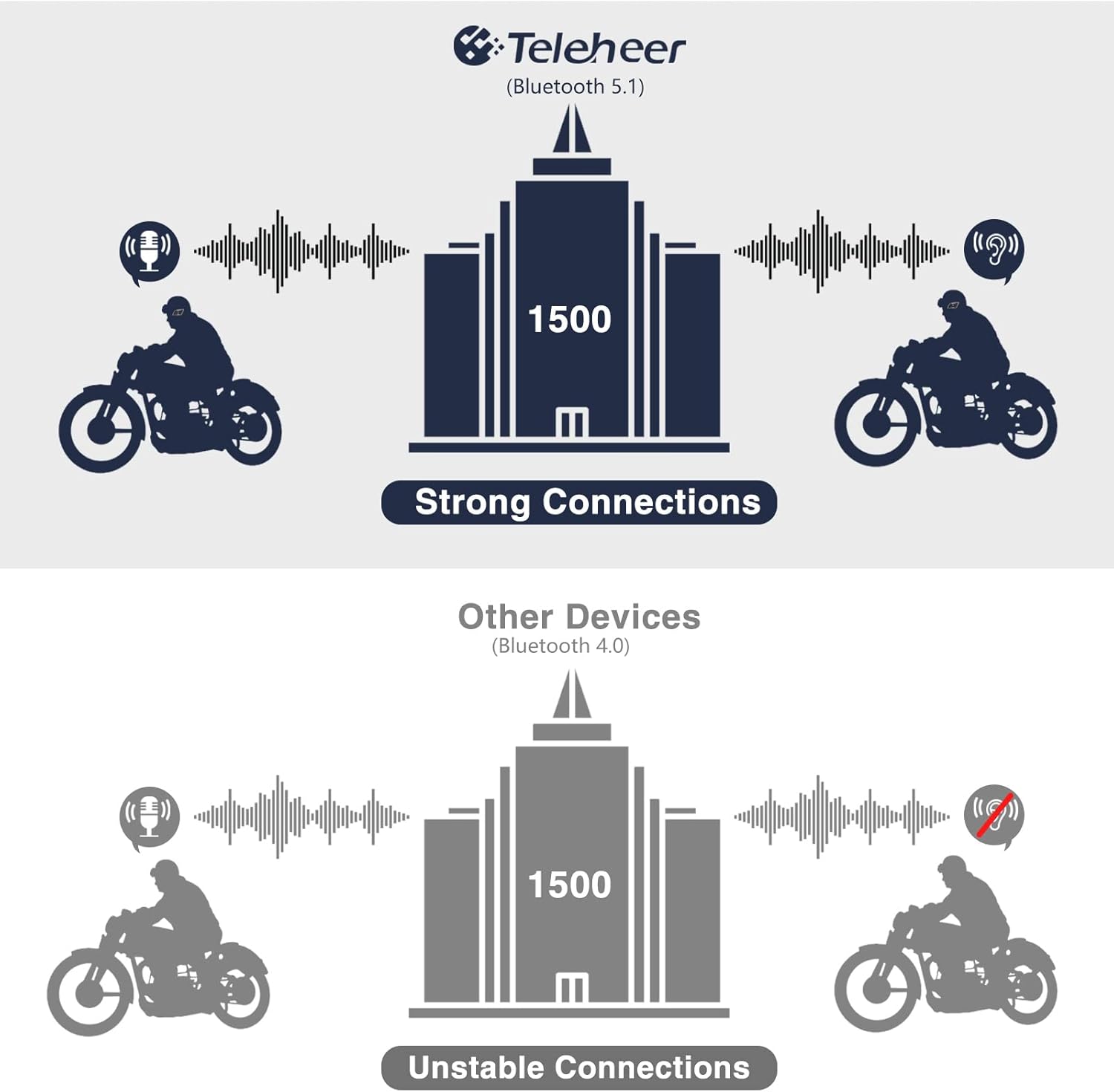
Image: A graphic illustrating the effective intercom range of the Teleheer T6 Plus (Bluetooth 5.1) compared to older Bluetooth 4.0 devices. The T6 Plus shows stable connections over 1500m, while older devices show unstable connections over shorter distances. This highlights the improved signal stability and range due to Bluetooth 5.1 and the ceramic antenna.
4. Phone Call Functions
- الرد على المكالمة: اضغط لفترة قصيرة على زر الهاتف.
- إنهاء المكالمة: اضغط لفترة قصيرة على زر الهاتف.
- رفض الاتصال: اضغط مع الاستمرار على زر الهاتف لمدة 2 ثواني.
- إعادة الاتصال بالرقم الأخير: اضغط مرتين على زر الهاتف.
5. تشغيل الموسيقى
- تشغيل/إيقاف مؤقت: اضغط لفترة قصيرة على زر الهاتف.
- المسار التالي: اضغط لفترة قصيرة على زر رفع الصوت.
- المسار السابق: اضغط لفترة قصيرة على زر خفض الصوت.
- ضبط مستوى الصوت: اضغط مع الاستمرار على أزرار رفع / خفض الصوت لزيادة الحجم أو خفضه.
6. Voice Assistant (Siri/Google Assistant)
- تنشيط مساعد الصوت: اضغط مرتين على زر الطاقة.

Image: A graphic depicting the voice assistant feature of the Teleheer T6 Plus, showing a helmeted rider interacting with their phone via voice commands like "Hey Siri" or "Ok Google". This illustrates the hands-free convenience for navigation, calls, and other smartphone functions while riding.
الصيانة والعناية
- تنظيف: امسح وحدة سماعة الرأس بقطعة قماش ناعمة و...amp قماش. لا تستخدم مواد كيميائية قاسية أو منظفات كاشطة.
- مقاومة الماء: The device is IP65 waterproof. While it can withstand water jets, avoid submerging it in water for extended periods. Ensure the Type-C port cover is securely closed when not charging.
- تخزين: يُحفظ الجهاز في مكان بارد وجاف عند عدم استخدامه. تجنب درجات الحرارة القصوى.
- العناية بالبطارية: To prolong battery life, avoid fully discharging the battery frequently. Charge the device regularly, even if not in use for long periods.

Image: A WGP Teleheer T6 Plus headset unit partially submerged in water with splashes, demonstrating its IP65 waterproof rating. The image emphasizes the device's ability to withstand water exposure, making it suitable for various weather conditions during riding.
استكشاف الأخطاء وإصلاحها
| مشكلة | السبب المحتمل | حل |
|---|---|---|
| الجهاز لا يعمل. | بطارية منخفضة. | اشحن الجهاز بالكامل. |
| لا يمكن الاقتران بالهاتف. | Device not in pairing mode; Bluetooth off on phone; too many paired devices. | Ensure device is in pairing mode (red/blue flashing). Turn on phone's Bluetooth. Delete old Bluetooth connections on phone. |
| Intercom connection unstable or short range. | Obstructions; out of range; interference. | Ensure clear line of sight. Stay within 1500m range. Avoid strong electromagnetic interference. |
| لا يوجد صوت من مكبرات الصوت. | Speakers not connected properly; volume too low. | Check speaker connection to Type-C port. Increase volume. |
| الميكروفون لا يلتقط الصوت. | Microphone not connected properly; microphone position. | Check microphone connection. Ensure microphone is close to your mouth. |
| Wind noise during calls/intercom. | High speed; improper microphone placement. | Ensure microphone is positioned correctly to minimize wind exposure. The device has DSP noise suppression, but extreme conditions may affect performance. |
تحديد
| ميزة | التفاصيل |
|---|---|
| اسم الموديل | Teleheer T6 Plus |
| نسخة البلوتوث | بلوتوث 5.1 |
| نطاق الاتصال الداخلي | Up to 1500 meters (93 MPH) |
| سعة البطارية | 850 مللي أمبير |
| وقت الاستخدام المستمر | 30 ساعات |
| وقت الاستعداد | 500 ساعات |
| منفذ الشحن | النوع-C |
| مقاومة الماء | IP65 (مقاوم للرذاذ) |
| درجة حرارة التشغيل | تصل درجة الحرارة إلى -15 درجة فهرنهايت |
| مادة الهوائي | سيراميك |
| طريقة التحكم | أزرار اللمس / المادية |
| وزن العنصر | 14.4 أونصة (حوالي 408 جرامًا) |
| الأبعاد (العبوة) | 8.54 × 3.9 × 2.95 بوصة |
الضمان والدعم
For warranty information and technical support, please refer to the official WGP webالموقع أو تواصل مع خدمة العملاء مباشرةً. احتفظ بإيصال الشراء كإثبات للشراء في حال وجود أي مطالبات بالضمان.
لمزيد من المساعدة، يمكنك زيارة صفحة المنتج على أمازون or contact the seller directly through the Amazon platform.


