مقدمة
This manual provides detailed instructions for the safe installation and operation of your Pipishell Full Motion TV Wall Mount. Please read all instructions carefully before beginning installation. If you have any questions, contact customer support.

الصورة: أكثر منview of Pipishell Full Motion TV Wall Mounts, models PIMFK3 and PILFK4, showing their articulating arm designs and TV mounting plates.
معلومات هامة حول السلامة
تحذير: قد يؤدي عدم قراءة هذه التعليمات واتباعها إلى إصابة شخصية خطيرة أو تلف في الممتلكات أو إبطال الضمان الخاص بك.
- Do not install this product on drywall alone. It must be mounted to a solid wood stud, concrete wall, or brick wall.
- تأكد من أن هيكل الجدار قادر على تحمل الوزن الإجمالي للحامل وجهاز التلفزيون بشكل آمن.
- Do not exceed the maximum weight capacity specified for each model: 99 lbs (45 kg) for PIMFK3 and 132 lbs (60 kg) for PILFK4.
- استعن دائمًا بمساعد لرفع التلفزيون ووضعه في مكانه.
- Tighten all screws firmly but do not overtighten. Overtightening can damage screws and components.
- تحقق من جميع الاتصالات بشكل دوري للتأكد من بقائها آمنة.
محتويات الحزمة
Verify that all components are present and undamaged before installation. If any parts are missing or defective, contact Pipishell customer service.
مكونات التركيب:
- تجميع لوحة الحائط
- حوامل التلفزيون (2x)
- مجموعة أدوات التثبيت (مسامير متنوعة، وغسالات، وفواصل)
- مستوى الفقاعة
- روابط الكابلات

الصورة: مفصلة view of the PIMFK3 mount, highlighting the security lock, compression hinges, and strong dual arms. Also shows the maximum weight capacity of 99 lbs and TV size range of 26-55 inches.

الصورة: مفصلة view of the PILFK4 mount, showcasing its six-arm structure, safety lock, extra-wide TV plate, and ultra-strong wall plate for heavy-duty support.
الأدوات المطلوبة (غير متضمنة)
- قلم رصاص
- أداة البحث عن العوارض الخشبية (لتركيب العوارض الخشبية)
- مثقاب كهربائي
- Drill Bits (appropriate size for wall type and lag bolts)
- مفتاح ربط ذو مقبس أو مفتاح ربط قابل للتعديل
- فيليبس رئيس مفك
- شريط قياس
متطلبات التثبيت
التوافق مع التلفاز:
- PIMFK3: Fits most 26-55 inch flat or curved LED, LCD, OLED TVs. Maximum weight capacity: 99 lbs (45 kg).
- PILFK4: Fits most 37-75 inch flat or curved LED, LCD, OLED TVs. Maximum weight capacity: 132 lbs (60 kg).
التوافق مع VESA:
This mount supports VESA patterns from 100x100mm up to 600x400mm. Measure the horizontal and vertical distance between the mounting holes on the back of your TV to determine its VESA pattern.
توافق نوع الجدار:
The mount is designed for installation on:
- Single Wood Studs (PIMFK3) or 16-inch Wood Studs (PILFK4)
- جدران خرسانية صلبة
- جدران من الطوب
DO NOT mount on drywall alone.

Image: Diagram illustrating VESA compatibility (Min 100mm, Max 400mm for PIMFK3) and suitable wall types: single wood stud, concrete wall, and brick wall.

Image: Diagram illustrating VESA compatibility (Max 600x400mm) and suitable wall types for PILFK4: 16-inch wood studs, concrete wall, and brick wall. A warning states: Do not mount on drywall alone.
الإعداد والتثبيت
Step 1: Determine Mounting Location and Wall Type
- Use a stud finder to locate the center of a wood stud if installing on wood. Mark the stud edges.
- For concrete or brick walls, ensure the wall is solid and free of obstructions.
- Hold the wall plate against the wall at your desired height and use a pencil to mark the pilot hole locations. Use the included bubble level to ensure it is level.
الخطوة 2: حفر ثقوب الطيار
- For wood studs: Drill pilot holes using a 7/32 inch (5.5mm) drill bit to a depth of 2.2 inches (55mm).
- For concrete/brick walls: Drill pilot holes using a 3/8 inch (10mm) masonry drill bit to a depth of 2.4 inches (60mm). Insert concrete anchors into the holes, ensuring they are flush with the wall surface.
الخطوة 3: إرفاق لوحة الحائط بالحائط
- Align the wall plate with the drilled holes.
- Secure the wall plate to the wall using the provided lag bolts and washers. Tighten firmly with a socket wrench.
الخطوة 4: قم بتوصيل دعامات التلفزيون بالتلفزيون
- ضع جهاز التلفاز ووجهه لأسفل على سطح ناعم ونظيف.
- Identify the correct diameter and length of screws for your TV's VESA mounting holes. Use the provided spacers if the TV back is uneven or if screws are too long.
- Attach the two TV brackets to the back of your TV using the chosen screws and washers. Ensure the brackets are centered and level.
الخطوة 5: تثبيت التلفزيون على لوحة الحائط
- With an assistant, carefully lift the TV and hook the TV brackets onto the wall plate.
- تأكد من تثبيت التلفزيون بإحكام على لوحة الحائط.
- Engage the safety locks on the bottom of the TV brackets to prevent accidental dislodging.
التشغيل والتعديلات
Your Pipishell Full Motion TV Wall Mount allows for various adjustments to optimize your viewتجربة رائعة.
تعديل الميل:
The mount allows for a tilt range of -15° to +5° (PIMFK3) or -15° to +5° (PILFK4). Loosen the tilt adjustment knobs on the TV brackets, adjust the TV to the desired angle, and then re-tighten the knobs to secure the position.
تعديل الدوران:
The articulating arm allows the TV to swivel up to 90° left or right (PIMFK3) or 120° (PILFK4), depending on TV size and wall distance. Gently push or pull the TV to the desired viewزاوية جي.
تعديل المستوى:
After installation, you can adjust the TV's level by ±3°. Loosen the leveling screws on the TV brackets, adjust the TV to be perfectly level, and then re-tighten the screws.
الامتداد والانكماش:
The mount can extend the TV away from the wall up to 19.5 inches (PIMFK3) or 16 inches (PILFK4) and retract it to a minimum distance of 3.2 inches (PIMFK3) or 3.1 inches (PILFK4) from the wall. Gently pull or push the TV to adjust the distance.

Image: Demonstrates the PIMFK3 mount's ability to pull out to 19.5 inches, tilt ±5° for anti-glaring, swivel ±90°, and level ±3° for an optimal viewتجربة رائعة.
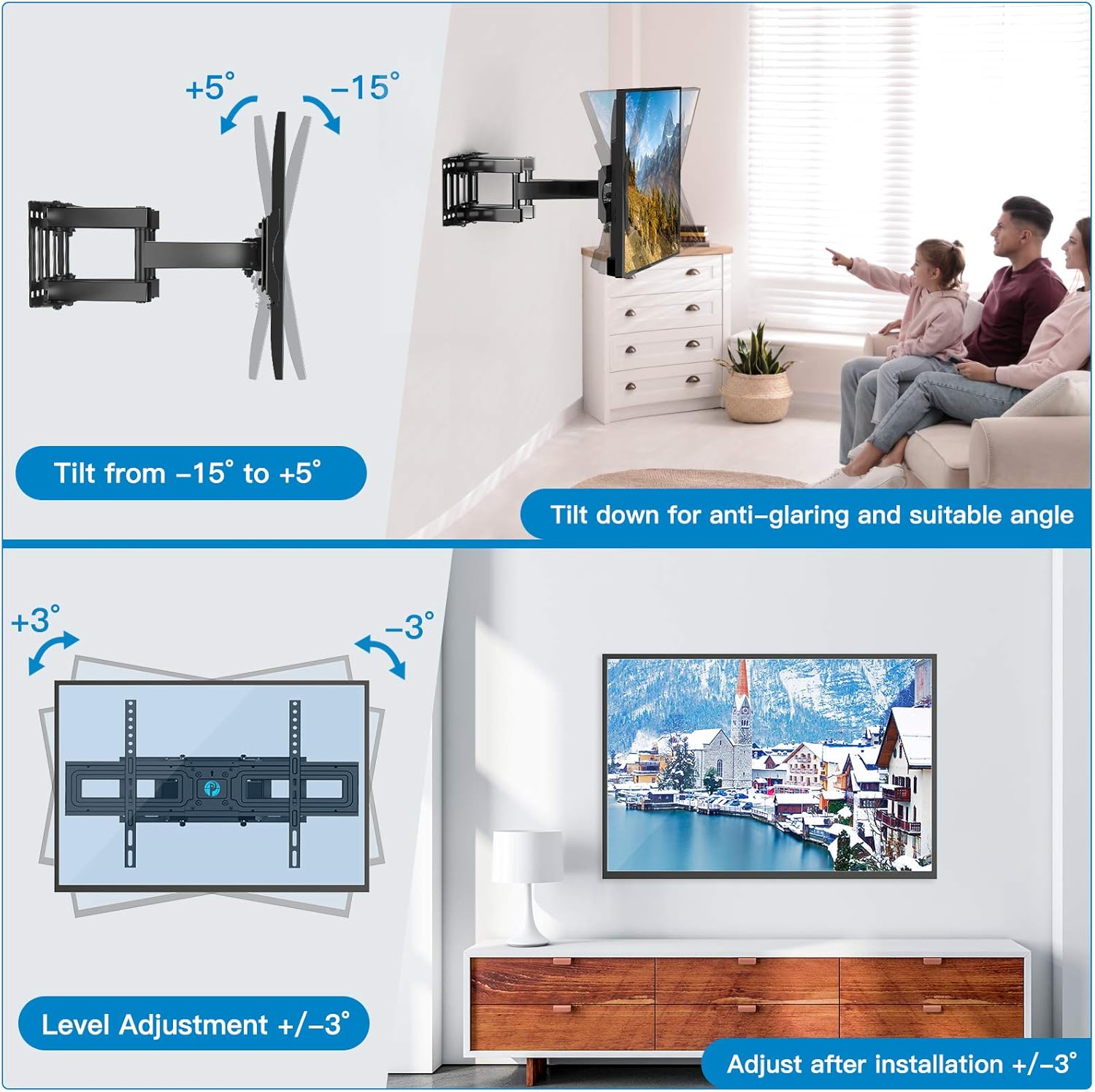
Image: Illustrates the PILFK4 mount's tilt range from -15° to +5° and level adjustment of ±3° for fine-tuning the TV's position after installation.

Image: Shows the PILFK4 mount's swivel capability of 120° and its ability to retract to 3.1 inches and extend up to 16 inches from the wall, allowing for flexible viewing positions and space saving.
صيانة
- Periodically check that all screws and connections are secure. Re-tighten if necessary.
- نظّف الحامل بقطعة قماش ناعمة وجافة. تجنّب استخدام المنظفات أو المذيبات الكاشطة.
- Ensure cables are properly managed and not pinched by moving parts of the mount. Use the provided cable ties to keep cables tidy.
استكشاف الأخطاء وإصلاحها
التلفزيون ليس مستويًا بعد التثبيت:
Loosen the level adjustment screws on the TV brackets, adjust the TV to the desired level using a bubble level, and then re-tighten the screws.
يبدو حامل الكاميرا غير ثابت على الحائط:
Immediately remove the TV from the mount. Check that all lag bolts securing the wall plate to the wall are fully tightened. If the wall material is damaged, consult a professional for repair before re-mounting.
صعوبة في ضبط الإمالة أو الدوران:
Ensure that the tilt adjustment knobs are sufficiently loosened before attempting to adjust the tilt. For swivel, ensure no cables are snagged or preventing movement. Do not force adjustments.
اجزاء مفقودة:
Refer to the 'Package Contents' section. If any parts are missing, contact Pipishell customer support for assistance.
تحديد
| ميزة | بيمفك3 | بيلفك 4 |
|---|---|---|
| نطاق حجم التلفزيون | 26 - 55 بوصة | 37 - 75 بوصة |
| الحد الأقصى لوزن السعة | 99 رطل (45 كجم) | 132 رطل (60 كجم) |
| التوافق مع VESA | 100x100mm إلى 400x400mm | 200x100mm إلى 600x400mm |
| زاوية الميل | -15 درجة إلى +5 درجة | -15 درجة إلى +5 درجة |
| زاوية الدوران | حتى ±90 درجة | حتى ±120 درجة |
| ضبط المستوى | ±3 درجة | ±3 درجة |
| مسافة الجدار (في وضع الانكماش) | 3.2 بوصة | 3.1 بوصة |
| مسافة الجدار (ممتدة) | 19.5 بوصة | 16 بوصة |
| مادة | سبائك الفولاذ | |
| لون | أسود | |
الضمان ودعم العملاء
Pipishell products are manufactured with quality and care. For warranty information or technical assistance, please contact Pipishell customer support through the retailer's platform or the official Pipishell webموقع.
Please have your product model number (PIMFK3 or PILFK4) and purchase date available when contacting support.


