1. المقدمة
The Waveshare ESP32-S2 MCU WiFi Development Board is a compact and versatile module designed for Internet of Things (IoT) applications. It integrates a low-power Wi-Fi System-on-Chip (SoC) and mass memory, making it suitable for various embedded projects. This manual provides essential information for setting up, operating, and maintaining your development board.
2. الميزات الرئيسية
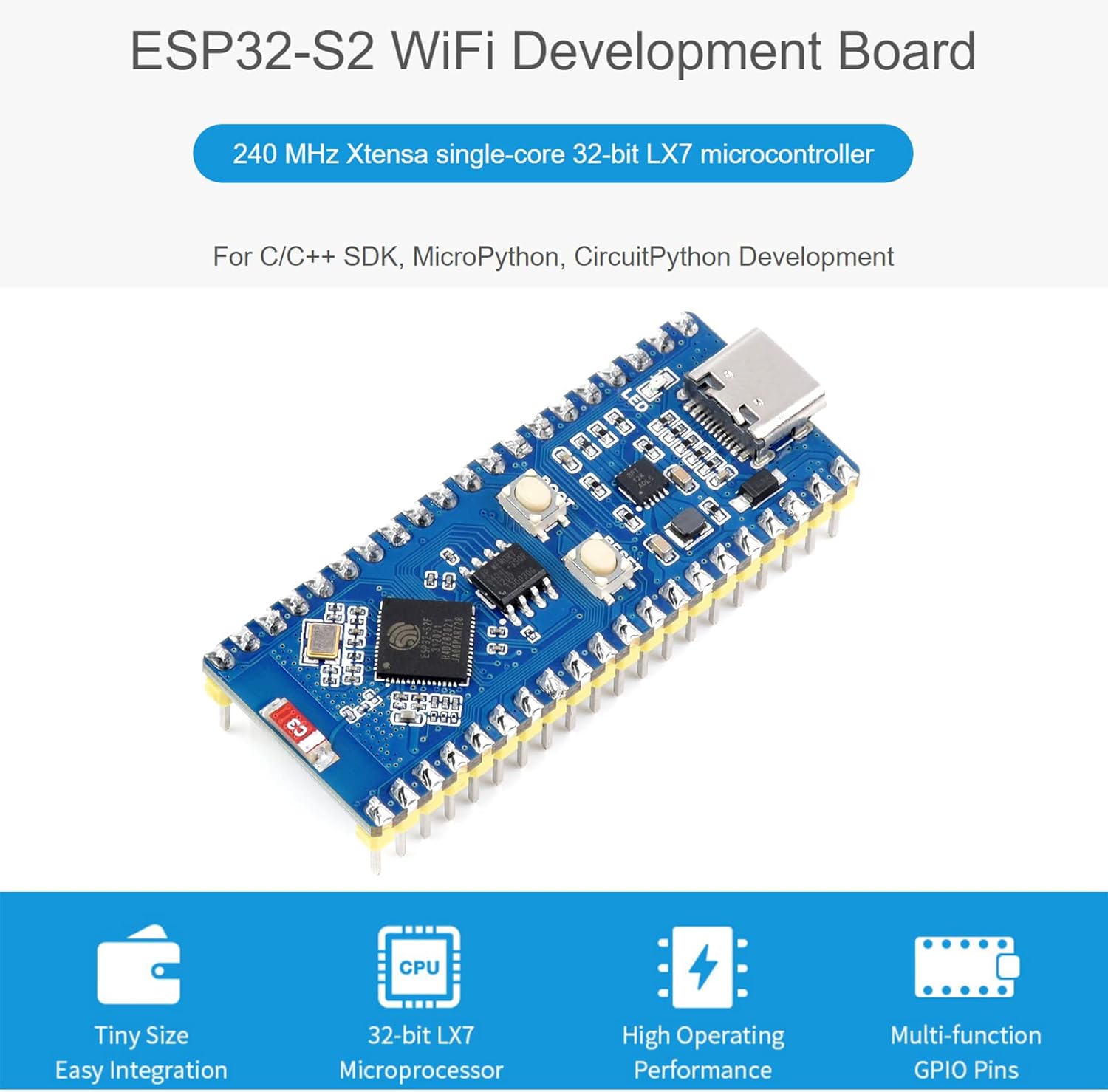
الصورة: أكثر منview of the ESP32-S2 WiFi Development Board highlighting its core features.
- 2.4 GHz WiFi Development Board: Supports Raspberry Pi Pico expansion board ecosystem for IoT application development.
- المعالجات الدقيقة: Based on single-core 32-bit LX7 microprocessor ESP32-S2FH4, with a clock frequency up to 240 MHz.
- ذاكرة: Integrated 320KB SRAM, 128KB ROM, 8MB PSRAM, and 4MB Flash memory.
- الربط اللاسلكي: Supports IEEE802.11 b/g/n with an on-board 2.4 GHz WiFi ceramic antenna, offering up to 150 Mbps data transfer rate.
- موصل USB-C: Features a USB-C connector for convenient connection and on-chip integrated full-speed USB OTG interface.
- الأجهزة الطرفية: Includes LCD interface (8-bit serial RGB/8080/6800), TWAI controller (ISO11898-1 compatible), capacitive sensor GPIO, temperature sensor, and RMT (TX/RX).
- دعم التطوير: Compatible with C/C++, MicroPython, and CircuitPython, with comprehensive SDK and development resources.
- تصميم مضغوط: Small form factor with castellated module for direct soldering to user-designed carrier boards.
3. انتهت الأجهزةview
This section details the main components and their functions on the ESP32-S2 Standard Version development board.
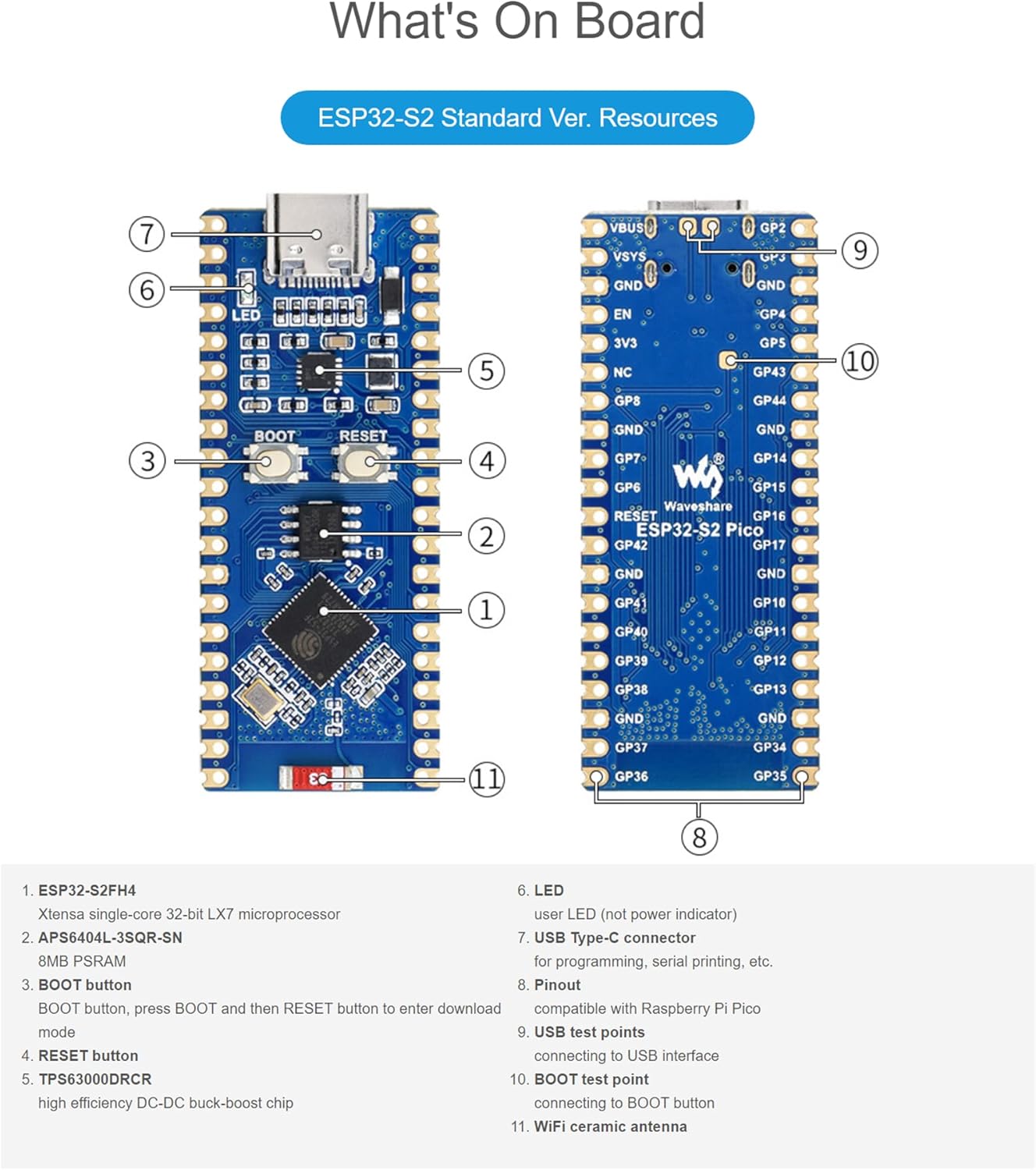
Image: Labeled diagram of the ESP32-S2 Standard Version board components.
- ESP32-S2FH4: Xtensa single-core 32-bit LX7 microprocessor.
- APS6404L-3SQR-SN: 8MB PSRAM.
- زر التشغيل: Button to enter download mode (press BOOT, then RESET).
- زر إعادة الضبط: يعيد ضبط اللوحة.
- TPS63000DRCR: شريحة تحويل التيار المستمر إلى تيار مستمر عالية الكفاءة (خفض ورفع الجهد).
- قاد: مؤشر LED للمستخدم (وليس مؤشر الطاقة).
- موصل USB من النوع C: For programming, serial printing, etc.
- التوصيل: Compatible with Raspberry Pi Pico.
- نقاط اختبار USB: For connecting to USB interface.
- نقطة اختبار الإقلاع: For connecting to BOOT button.
- WiFi ceramic antenna: On-board antenna for wireless communication.
4. مخطط Pinout
The ESP32-S2 development board features configurable pin functions, allowing flexible development and integration. Below are the pinout diagrams for the Standard Version and LCD Version.

Image: Pinout diagrams for the ESP32-S2 Standard Version and ESP32-S2 LCD Version, indicating various pin functions.
The pinout includes various interfaces such as Power, Ground, UART, GPIO, ADC, SPI, System Control, and I2C. Refer to the diagram for specific pin assignments and functions.
5. المواصفات الفنية
| ميزة | مواصفة |
|---|---|
| المعالج الدقيق | ESP32-S2FH4 (Single-core 32-bit LX7) |
| تردد على مدار الساعة | حتى 240 ميجا هرتز |
| سرام | 320 كيلو بايت |
| ذاكرة للقراءة فقط | 128 كيلو بايت |
| ذاكرة الوصول العشوائي PSRAM | 8 ميجا بايت |
| ذاكرة فلاش | 4 ميجا بايت |
| المعيار اللاسلكي | IEEE802.11 b/g/n (2.4 جيجاهرتز) |
| معدل نقل البيانات | تصل إلى 150 ميجابايت في الثانية |
| واجهة التوصيل | USB Type-C (OTG), GPIO, UART, SPI, I2C, ADC, LCD, TWAI |
| أبعاد | 3.5 × 2.05 × 0.87 بوصة (الحزمة) |
| وزن العنصر | 0.493 أونصات |
| الشركة المصنعة | وايفشير |
6. تعليمات الإعداد
To begin using your Waveshare ESP32-S2 development board, follow these basic setup steps:
- مزود الطاقة: Connect the board to a computer or a suitable 5V power adapter using a USB Type-C cable. The board will draw power through the USB connection.
- تثبيت برنامج التشغيل: Depending on your operating system, you may need to install USB-to-serial drivers (e.g., CP210x or CH340 drivers) if the board is not recognized automatically. Refer to the official ESP-IDF documentation or Waveshare's product page for specific driver links.
- بيئة التطوير: Install the necessary development tools. The ESP32-S2 supports the Espressif IoT Development Framework (ESP-IDF), Arduino IDE with ESP32 core, MicroPython, or CircuitPython. Choose the environment that best suits your project requirements.
- البرنامج الأول: Once the development environment is set up, you can upload your first program (e.g., a "blink" example) to verify the board's functionality. Use the USB Type-C connection for programming.
7. تشغيل المجلس
The ESP32-S2 board is designed for flexible operation across various programming paradigms.
- لغات البرمجة: Develop applications using C/C++, MicroPython, or CircuitPython.
- SDKs: Utilize the comprehensive SDKs provided by Espressif or community-driven libraries for specific functionalities.
- GPIO Control: Access and control the various General Purpose Input/Output (GPIO) pins for connecting sensors, actuators, and other peripherals. Refer to the pinout diagram for available pins.
- اتصال واي فاي: Implement Wi-Fi functionalities to connect to local networks, cloud services, or create access points for IoT applications.
- يو اس بي او تي جي: Leverage the USB On-The-Go (OTG) interface for advanced USB functionalities, such as acting as a USB host or device.
أدلة برمجة مفصلة ونماذجamples are available on the Waveshare wiki and Espressif documentation webالمواقع.
8. الصيانة والعناية
Proper care ensures the longevity and reliable operation of your development board:
- التعامل: Handle the board by its edges to avoid touching components, especially the pins, which can be sensitive to static electricity.
- تخزين: Store the board in an anti-static bag when not in use, in a cool, dry environment away from direct sunlight and extreme temperatures.
- تنظيف: If necessary, gently clean the board with a soft, dry brush or compressed air. Avoid using liquids or abrasive materials.
- مزود الطاقة: Always use a stable and appropriate 5V power supply. Over-voltagيمكن أن يؤدي ذلك إلى إتلاف اللوحة.
- تحديثات البرامج الثابتة: Regularly check for and apply firmware updates for the ESP32-S2 chip and your chosen development environment to benefit from bug fixes and new features.
9. استكشاف الأخطاء وإصلاحها
If you encounter issues with your ESP32-S2 development board, consider the following common troubleshooting steps:
- لم يتم اكتشاف اللوحة:
- Ensure the USB Type-C cable is securely connected to both the board and your computer.
- Verify that the correct USB-to-serial drivers are installed on your computer.
- حاول استخدام منفذ USB أو كابل مختلف.
- فشل تحميل البرنامج:
- Check that the correct board and COM port are selected in your development environment.
- Ensure the board is in download mode. For the ESP32-S2, this typically involves pressing and holding the BOOT button, then pressing and releasing the RESET button, and finally releasing the BOOT button.
- Verify your code for syntax errors or compilation issues.
- مشكلات اتصال WiFi:
- Double-check your Wi-Fi credentials (SSID and password).
- Ensure the board is within range of the Wi-Fi access point.
- Verify that the Wi-Fi antenna is not obstructed or damaged.
- سلوك غير متوقع:
- Review رمزك البرمجي للأخطاء المنطقية.
- التحقق من استقرار مصدر الطاقة.
- Consult online forums and the Waveshare/Espressif community for similar issues and solutions.
10. الضمان والدعم
Specific warranty details for the Waveshare ESP32-S2 MCU WiFi Development Board are not provided within this manual. For warranty information, technical support, and additional resources, please refer to the official Waveshare website or contact their customer service directly. Online documentation, forums, and community support are also valuable resources for development assistance.
ويفشير الرسمي Webموقع: www.waveshare.com


