1. المقدمة
The SmallRig NP-F Battery Adapter Mount Plate 3168B is designed to provide a versatile power solution for various cameras, including BMPCC 4K, 6K, 6K Pro, Canon R5 C, and other mirrorless cameras. It supports a wide range of NP-F series batteries (NP-F970, NP-F550, NP-F770, etc.) and features dual DC outputs (7.4V and 12V) as well as a bi-directional USB-C port for charging and power output. This manual provides detailed instructions for setup, operation, maintenance, and troubleshooting.
2. ماذا يوجد في الصندوق
يرجى التحقق من محتويات الحزمة الخاصة بك للتأكد من وجود جميع العناصر:
- NP-F Battery Adapter Mount Plate (Advanced Edition) x 1
- 1/4''-20 Screw x 1
- 5/32'' L-Shaped Allen Wrench x 1
- دليل المستخدم × 1

Image: Contents of the product package, including the battery plate, screw, and wrench.
3. انتهى المنتجview والميزات
The SmallRig NP-F Battery Adapter Mount Plate 3168B is engineered for durability and high performance. Key features include:
- التوافق الواسع: Supports NP-F970, NP-F550, NP-F770, and other NP-F series batteries, including original Sony and third-party batteries.
- Dual DC Outputs: Provides 7.4V (max 22W) and 12V (max 36W) DC outputs, compatible with DC 5521 and DC 5525 cables.
- منفذ USB-C: Bi-directional 36W USB-C interface for power output or charging NP-F batteries.
- Automatic Wake-up and Sleep Modes: Plug-and-play functionality with short circuit and high current protection.
- مؤشرات البطارية: Four LED lights to check battery connection and remaining life.
- بناء متين: Made from premium CNC aluminum alloy with gold-plated electrical contacts and a rubber pad to prevent scratches.
3.1 تحديد المكون

Image: Detailed diagram of the battery plate's components.
- DC 12V Output Port: الحد الأقصى للإخراج 36 واط.
- زر الطاقة: Press to check battery status.
- مؤشر البطارية: Four LED lights to show battery life.
- DC 7.4V Output Port: الحد الأقصى للإخراج 22 واط.
- USB-C In/Output Port: Bi-directional, maximum input/output 36W.
- مؤشر شحن USB-C: Orange for slow charge / slow discharge, blue for fast charge / fast discharge.
- Gold-plated Electrical Contacts: For stable and conductive connection.
- المسمار تصاعد: 1/4''-20 threaded hole for attachment.
- Inner Thread: For mounting/removing screws.
- Self-locking Button: For quick and secure battery installation.
- وسادة مطاطية: Prevents scratches to cameras and devices.
4. الإعداد
Follow these steps to set up your SmallRig NP-F Battery Adapter Mount Plate:
- Attach to Camera Rig/Cage: Use the integrated 1/4''-20 threaded hole and the provided screw to securely attach the battery plate to your camera cage, handle, or other mounting points. Ensure it is firmly tightened using the L-shaped Allen wrench.
- Insert NP-F Battery: Align your NP-F series battery (e.g., NP-F970, NP-F550) with the battery slot on the plate. Gently slide the battery into place until the self-locking button engages, securing the battery.
- الاتصال بالجهاز:
- For DC-powered devices (e.g., BMPCC 4K/6K, Canon R5 C): Use a compatible DC 5521 or DC 5525 cable (not included) to connect the appropriate DC output port (7.4V or 12V) on the plate to your camera or device.
- For USB-C powered devices: Use a USB-C to USB-C cable (not included) to connect the USB-C port on the plate to your device (e.g., smartphone, tablet, camera).

Image: Battery plate mounted on a camera setup.
5. تعليمات التشغيل
5.1 تزويد الأجهزة بالطاقة
Once a compatible NP-F battery is inserted, the plate automatically wakes up and is ready to supply power. Simply connect your device to the desired output port.

Image: Higher output power details for DC 12V and USB-C ports.
5.2 التحقق من حالة البطارية
Press the red power button on the side of the plate to check the remaining battery life. The four LED indicators will illuminate according to the charge level:
- 75% - 100%
- 50% - 75%
- 25% - 50%
- 10% - 25%
When the power level falls below 10%, the last indicator will start flashing to alert you to a low battery.
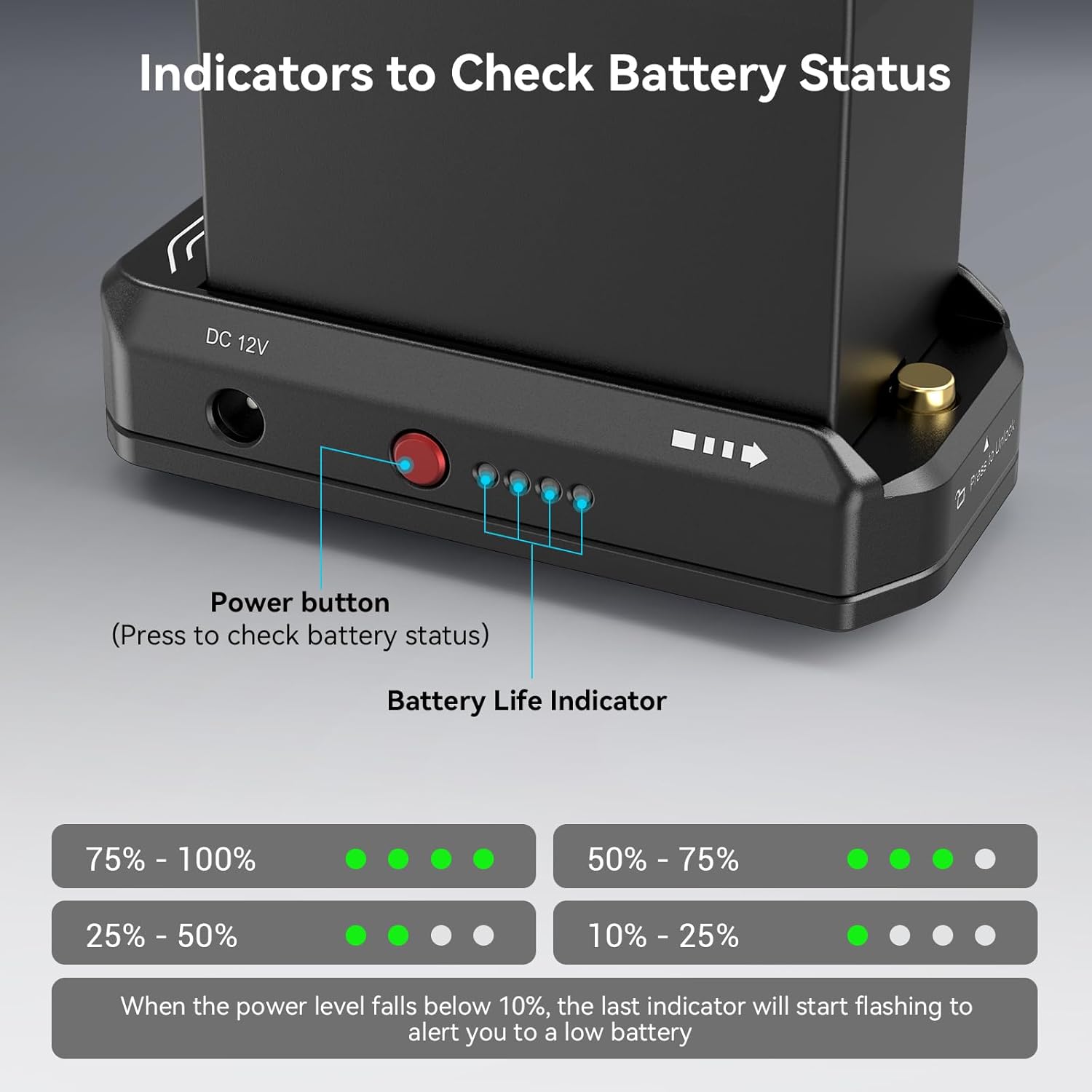
Image: Battery status indicators.
5.3 Charging NP-F Batteries via USB-C
The USB-C port supports bi-directional power. To charge an NP-F battery inserted in the plate, connect a USB-C power source (e.g., wall adapter, power bank) to the USB-C port on the plate using a USB-C to USB-C cable. The USB-C charging indicator will show:
- البرتقالي: Slow charge / slow discharge.
- أزرق: Fast charge / fast discharge.
6. الصيانة
- تنظيف: Use a soft, dry cloth to clean the surface of the battery plate. Do not use harsh chemicals or abrasive materials.
- تخزين: Store the plate in a cool, dry place away from direct sunlight and extreme temperatures when not in use.
- جهات الاتصال: Periodically inspect the gold-plated electrical contacts for any debris or corrosion. Clean gently if necessary to ensure optimal conductivity.
- تجنب الماء: This product is not waterproof. Avoid exposure to water or high humidity.
7. استكشاف الأخطاء وإصلاحها
| مشكلة | السبب المحتمل | حل |
|---|---|---|
| No power output from DC ports. | Battery not inserted correctly or depleted. | Ensure battery is fully seated and charged. Press power button to check status. |
| USB-C port not charging or powering device. | Incorrect cable, power source insufficient, or battery depleted. | Use a compatible USB-C to USB-C cable. Ensure power source meets 36W requirement for optimal charging. Check battery level. |
| Battery indicator LEDs not lighting up. | Battery not inserted, or power button not pressed. | Ensure battery is fully inserted. Press the red power button firmly. |
| Plate feels warm during operation. | التشغيل العادي تحت الأحمال الثقيلة. | This is normal. If it becomes excessively hot, disconnect and allow to cool. Ensure proper ventilation. |
8. المواصفات
| ميزة | التفاصيل |
|---|---|
| رقم الموديل | 3168ب |
| أبعاد المنتج | 3.69 × 1.85 × 0.92 بوصة (94.0 × 47.0 × 23.0 مم) |
| وزن العنصر | 0.176 أونصات (5 جرام) |
| مادة | سبائك الألومنيوم CNC |
| إخراج DC 12V | Max 36W (compatible with DC 5525 cable) |
| إخراج DC 7.4V | Max 22W (compatible with DC 5521 cable) |
| مدخل/مخرج USB-C | Bi-directional, Max 36W |
| بطاريات متوافقة | NP-F970, NP-F550, NP-F770, NP-F960, NP-F950, NP-F930, NP-F750, NP-F730, NP-F570 (Sony original and third-party) |
| نوع التركيب | 1/4" threaded hole |

صورة: أبعاد المنتج ومواصفاته.
9. الضمان والدعم
SmallRig products are designed and manufactured to high-quality standards. For warranty information and technical support, please visit the official SmallRig webالموقع أو اتصل بخدمة العملاء الخاصة بهم مباشرة.
SmallRig الرسمي Webموقع: www.smallrig.com
For further assistance, refer to the user guide PDF available at: SmallRig NP-F Battery Adapter Mount Plate User Guide (PDF)


