1. المقدمة
Thank you for choosing the Baseus Orange Dot Wireless Presenter. This device is designed to enhance your presentations with its RF2.4GHz wireless technology, integrated laser pointer, and versatile USB/Type-C receiver. This manual provides detailed instructions for setup, operation, maintenance, and troubleshooting to ensure optimal performance.
2. محتويات العبوة
قبل المتابعة، يرجى التأكد من وجود جميع العناصر في طردك:
- Baseus Orange Dot Wireless Presenter
- USB/Type-C Dual Receiver
- AAA Battery (for battery version)
- دليل المستخدم (هذا المستند)

صورة: Contents of the package include the wireless presenter, a USB/Type-C receiver, and an AAA battery.
3. تعليمات الإعداد
3.1 تركيب البطارية
If your presenter is the battery-powered version, follow these steps:
- Open the battery compartment cover located at the rear of the presenter.
- أدخل بطارية AAA واحدة، مع التأكد من محاذاة الأطراف الموجبة (+) والسالبة (-) بشكل صحيح مع العلامات الموجودة داخل الحجرة.
- أغلق غطاء حجرة البطارية جيدًا.
صورة: Insert one AAA battery into the designated compartment. Ensure correct polarity.
3.2 اتصال المتلقي
The presenter features a dual USB/Type-C receiver for broad compatibility.
- Locate the receiver stored magnetically within the presenter's body. Gently pull it out.
- Plug the receiver into an available USB-A or Type-C port on your computer or laptop. The system will automatically detect and install the necessary drivers. No additional software installation is required.

صورة: The dual USB/Type-C receiver connects to your computer for wireless operation.

صورة: The receiver can be stored magnetically within the presenter body when not in use.
4. تعليمات التشغيل
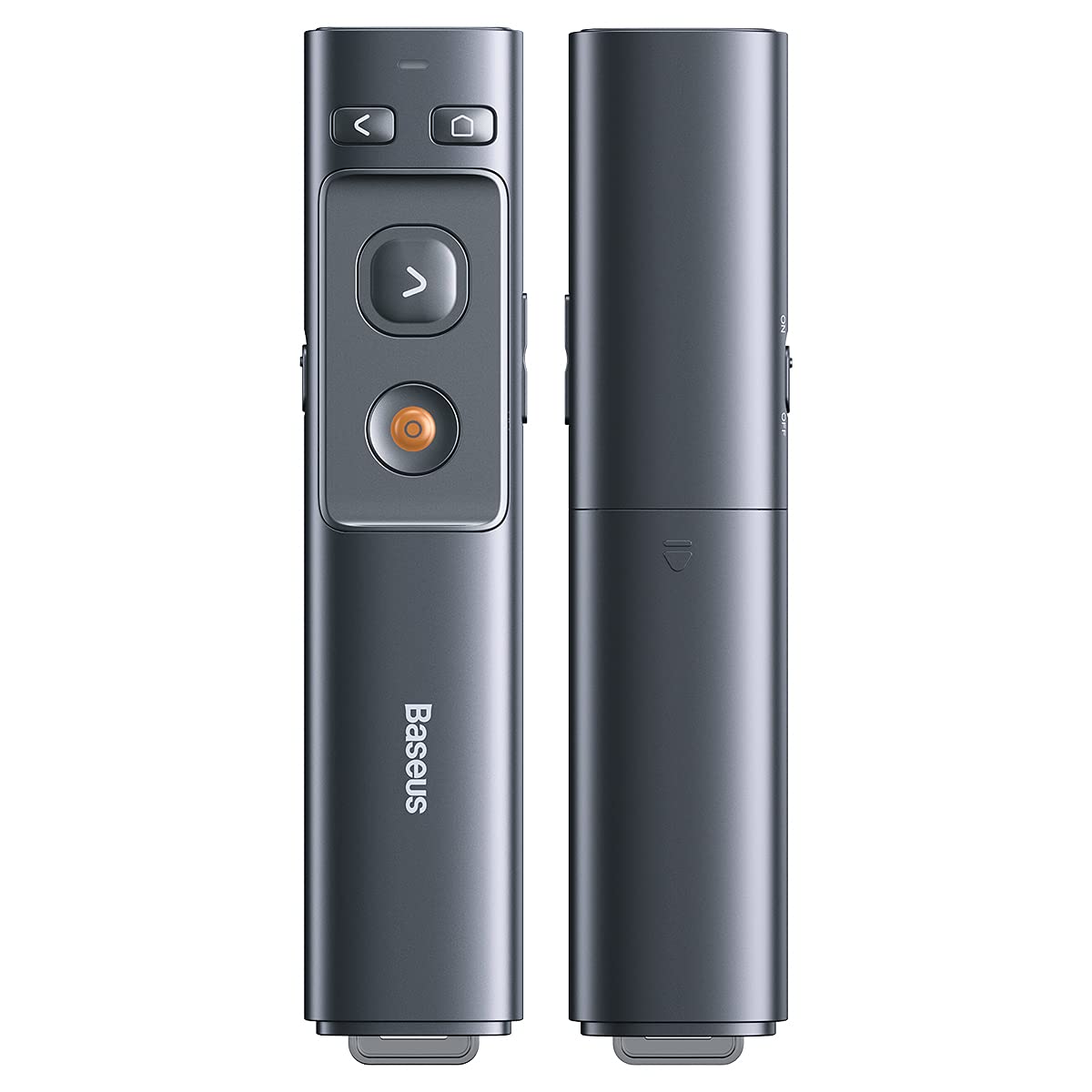
Familiarize yourself with the presenter's buttons for effective control during your presentation.

صورة: Control buttons for page navigation, laser activation, and volume adjustment.
4.1 تشغيل/إيقاف التشغيل
The presenter typically powers on automatically when the receiver is connected and a button is pressed. To conserve battery, ensure the receiver is disconnected when not in use.
4.2 Presentation Control
- Page Up Button (<): Press to move to the previous slide or page.
- Page Down Button (>): Press to move to the next slide or page.
- Full Screen/Black Screen Button: Press to toggle between full-screen mode and black screen mode in presentation software.
4.3 وظيفة مؤشر الليزر
Press and hold the dedicated laser button (usually a red dot icon) to activate the red laser pointer. Release the button to turn off the laser.

صورة: The laser pointer function highlights content on a display.
4.4 التحكم في مستوى الصوت
Use the designated volume buttons (if present) to adjust the audio output of your computer during a presentation.
5. الصيانة
Proper care ensures the longevity of your Baseus Orange Dot Wireless Presenter.
- تنظيف: Use a soft, dry cloth to clean the surface of the presenter. Avoid using harsh chemicals or abrasive materials.
- تخزين: When not in use, store the presenter and its receiver in a dry, cool place. Always store the receiver inside the presenter's magnetic compartment to prevent loss.
- العناية بالبطارية: For battery-powered versions, remove the AAA battery if the presenter will not be used for an extended period to prevent leakage.
6. استكشاف الأخطاء وإصلاحها
If you encounter issues with your presenter, refer to the following common problems and solutions:
- Presenter is unresponsive:
- Ensure the receiver is securely plugged into a USB-A or Type-C port on your computer.
- For battery versions, check if the AAA battery is inserted correctly and has sufficient charge. Replace if necessary.
- حاول توصيل جهاز الاستقبال بمنفذ USB مختلف على جهاز الكمبيوتر الخاص بك.
- أعد تشغيل الكمبيوتر الخاص بك.
- Laser pointer is not working:
- Ensure the presenter has power (battery charged/inserted).
- Confirm you are pressing and holding the correct laser activation button.
- Slides are not advancing/going back:
- Verify that your presentation software (e.g., PowerPoint, Keynote) is active and in presentation mode.
- Ensure the receiver is properly connected and recognized by your computer.
7. المواصفات
| ميزة | التفاصيل |
|---|---|
| ماركة | باسيس |
| اسم الموديل | مقدم العرض اللاسلكي Orange Dot |
| رقم الموديل | LFZ_OrangeDotPresenter |
| الاتصال | الترددات اللاسلكية 2.4 جيجا هرتز |
| نوع المستقبل | USB-A / Type-C Dual Interface |
| نوع الليزر | الليزر الأحمر |
| ليزر المسافة | حتى 100 أمتار |
| مسافة التحكم عن بعد | حتى 100 أمتار |
| مصدر الطاقة | 1 x AAA Battery (for battery version) |
| وزن العنصر | 60 جرام |
| أبعاد الحزمة | 19.5 × 7 × 1.9 سم |
| بلد المنشأ | الصين |
8. الضمان والدعم
صُممت منتجات Baseus لضمان الموثوقية والأداء. للحصول على معلومات الضمان، يُرجى مراجعة بطاقة الضمان المرفقة مع المنتج أو زيارة موقع Baseus الرسمي. website. For technical support or further assistance, please contact Baseus customer service through their official channels.


