1. المقدمة
Thank you for choosing the Dalton 2000VA Uninterruptible Power Supply (UPS). This device is designed to provide reliable power backup and protection for your electronic equipment against power outages, surges, and fluctuations. Please read this manual thoroughly before installation and operation to ensure optimal performance and safety.
2. تعليمات السلامة الهامة
اتبع دائمًا احتياطات السلامة الأساسية هذه لتقليل خطر الحريق والصدمة الكهربائية والإصابة:
- لا تفتح جهاز UPSasinز. لا توجد قطع قابلة للصيانة من قِبل المستخدم. يُرجى الاستعانة بفني صيانة مؤهل.
- Do not use the UPS in environments with excessive dust, humidity, or extreme temperatures.
- تأكد من توصيل جهاز UPS بمأخذ كهربائي مؤرض.
- Do not connect non-computer related items like medical equipment, life support equipment, or household appliances to the UPS.
- Position the UPS in a well-ventilated area, away from direct sunlight or heat sources.
- In case of emergency, press the power button to turn off the UPS and disconnect it from the AC power source.
3. محتويات العبوة
تأكد من وجود جميع العناصر في الحزمة الخاصة بك:
- Dalton 2000VA UPS Unit
- سلك الطاقة
- USB Communication Cable (if applicable)
- دليل المستخدم (هذا المستند)

الشكل 3.1: الجبهة view of the Dalton 2000VA UPS unit, showing the display screen and power button.
4. الإعداد والتثبيت
اتبع هذه الخطوات لإعداد جهاز UPS الخاص بك:
- فك التعبئة: أخرج جهاز UPS من عبوته بعناية. افحصه بحثًا عن أي ضرر ناتج عن الشحن.
- الموقع: Place the UPS on a flat, stable surface in a cool, dry, and well-ventilated area. Ensure there is adequate space around the unit for airflow.
- التهمة الاولية: Before connecting any devices, plug the UPS power cord into a grounded wall outlet. Allow the unit to charge for at least 8 hours to ensure the battery is fully charged. The display will indicate charging status.
- توصيل الأجهزة:
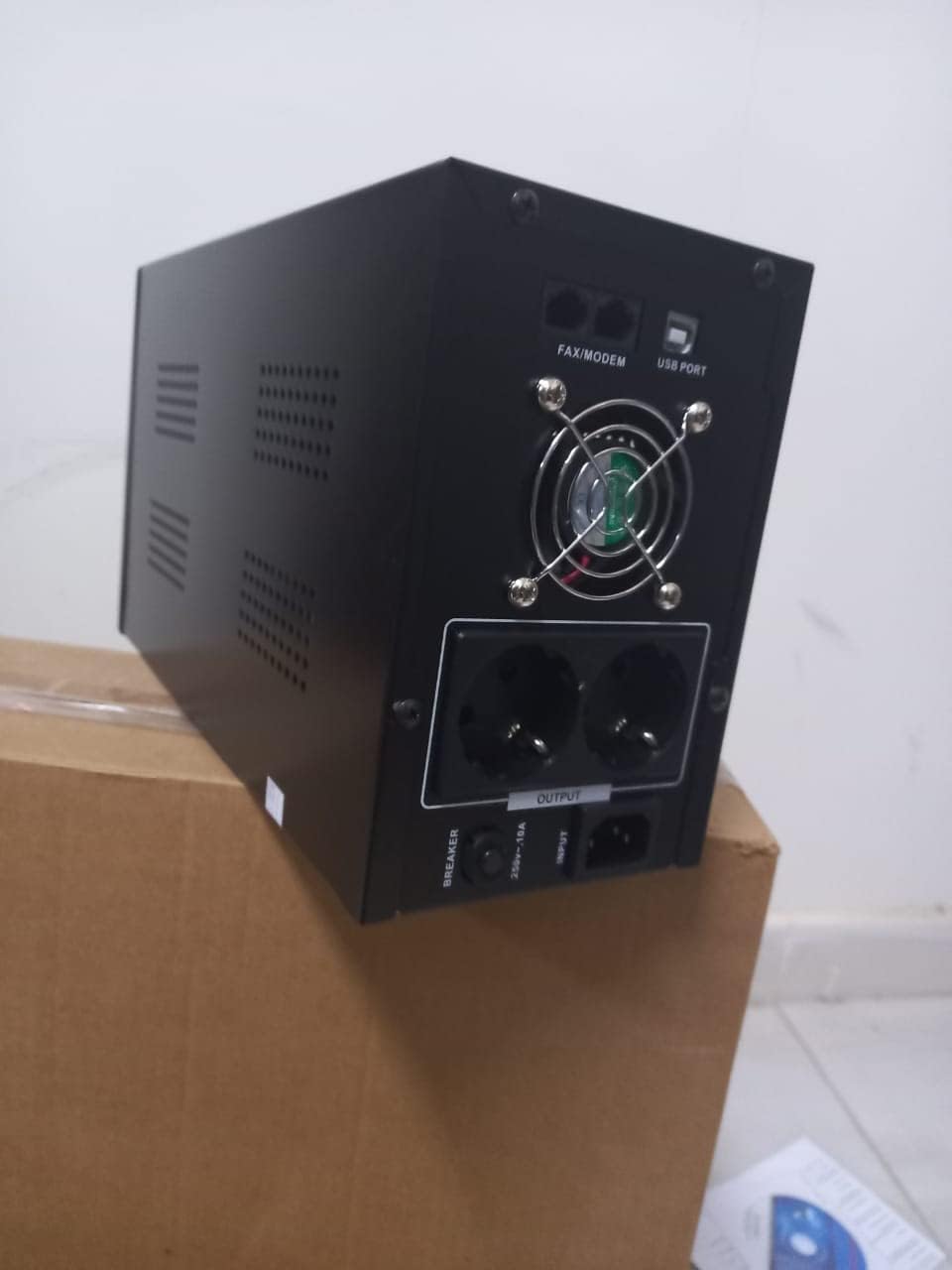
الشكل 4.1: خلفي view of the Dalton 2000VA UPS, highlighting the input power port, output sockets, and USB/Modem ports.
- Once the battery is charged, connect your computer, monitor, and other critical electronic devices to the UPS output sockets.
- Do not overload the UPS. Refer to the specifications section for maximum load capacity.
- If applicable, connect the USB communication cable from the UPS to your computer for monitoring software (software not included, check manufacturer's webموقع).
5. تشغيل جهاز UPS
5.1 تشغيل/إيقاف التشغيل
- لتشغيل: After connecting to AC power and charging, press and hold the power button on the front panel for approximately 3 seconds until you hear a beep and the display illuminates.
- لإيقاف التشغيل: Press and hold the power button for approximately 3 seconds until you hear a beep and the display turns off. If the UPS is running on battery, it will shut down immediately. If connected to AC, it will switch to bypass mode before shutting down.
5.2 فهم العرض
The front panel LCD display provides real-time status information:
- في: يعرض مستوى الصوت المدخلtage from the utility power.
- خارج: يعرض حجم الإخراجtage provided by the UPS to connected devices.
- طبيعي: يشير هذا إلى أن جهاز UPS يعمل على طاقة الشبكة الكهربائية.
- الخفاش: يعرض مستوى شحن البطارية الحالي.
- حمولة: يشير إلى بيرسينtagيتم استخدام جزء من سعة وحدة UPS بواسطة الأجهزة المتصلة.
- Battery Mode Icon: Appears when the UPS is running on battery power during an outage.

الشكل 5.1: الجانب view of the UPS, showing the illuminated display with power status indicators.
5.3 Battery Backup Function
في حالة انقطاع التيار الكهربائيtage, the UPS will automatically switch to battery power, providing continuous power to your connected devices. The duration of backup power depends on the load connected and the battery's charge level. The UPS will emit an audible alarm during battery operation.
When utility power returns, the UPS will automatically switch back to AC power and begin recharging its battery.
6. الصيانة
- العناية بالبطارية: To maximize battery life, ensure the UPS is always connected to an AC outlet to keep the battery charged. If the UPS is stored for an extended period, recharge it every three months for at least 8 hours.
- تنظيف: Disconnect the UPS from all power sources before cleaning. Use a soft, dry cloth to wipe the exterior. Do not use liquid or aerosol cleaners.
- تهوية: Regularly check that the ventilation openings are not blocked by dust or debris to prevent overheating.
7. استكشاف الأخطاء وإصلاحها
راجع الجدول أدناه للتعرف على المشكلات الشائعة وحلولها:
| مشكلة | السبب المحتمل | حل |
|---|---|---|
| لا يتم تشغيل UPS. | Battery not charged or power cord disconnected. | Ensure power cord is securely plugged in and allow battery to charge for 8 hours. |
| يصدر جهاز UPS صوت تنبيه مستمر في الوضع العادي. | حالة الزائد. | Disconnect non-essential equipment until the alarm stops. Check total load. |
| وقت نسخ احتياطي قصير. | Battery not fully charged or battery nearing end of life. | Allow UPS to charge for 8 hours. If issue persists, battery may need replacement (contact service center). |
| UPS does not provide power during outage. | Battery discharged or internal fault. | Ensure UPS was fully charged. If problem persists, contact authorized service center. |
8. المواصفات الفنية
| ميزة | التفاصيل |
|---|---|
| أبعاد المنتج | 12.5 × 22.5 × 38 سم |
| الشركة المصنعة | دالتون |
| العلامة التجارية | نوعي |
| لون | أسود |
| مادة | معدن |
| حاضِر | 5 Ampهنا |
| عامل الشكل | رف |
| نطاق التردد | 50-60 هرتز |
| حجم الإخراجtage | 220 فولت |
| نوع الموصل | AC |
9. الضمان والدعم
Dalton provides an authorized maintenance center for all Uninterruptible Power Supply units. For warranty claims, technical support, or service inquiries, please contact your local Dalton authorized distributor or service center. Keep your purchase receipt as proof of purchase for warranty validation.
For further assistance, please visit the official Dalton webالموقع أو الاتصال بدعم العملاء.


