1. المقدمة
Thank you for choosing the iPega PG-P4008 Wireless Game Controller. This manual provides detailed instructions on how to set up, operate, and maintain your controller. The PG-P4008 offers broad compatibility with PS4, PS3, Android (10.0+), iOS (13.0+), and Windows PC, connecting wirelessly via Bluetooth for an enhanced gaming experience.
2. انتهى المنتجview
The iPega PG-P4008 is designed for versatile gaming across multiple platforms. It features a comfortable ergonomic design, responsive controls, and several advanced functionalities to immerse you in your games.
المميزات الرئيسية:
- Wireless Bluetooth connectivity (BT2.1+EDR) with up to 8 meters range.
- No driver installation required for connection.
- Integrated colored LED light indicator for operational status.
- Dual motors for realistic vibration feedback during gameplay.
- Built-in three-dimensional acceleration sensor and gyroscope sensor with six-axis induction.
- Integrated speaker and 3.5mm earphone jack for game audio.
- Dual-point capacitive touchpad for enhanced control.
- Compatible with PS4, PS3, Android (10.0+), iOS (13.0+), and Windows PC.
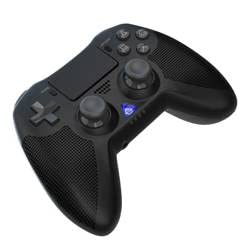
الصورة 1: أمام view of the iPega PG-P4008 Wireless Game Controller. This image displays the controller's ergonomic design, dual analog sticks, D-pad, action buttons, touchpad, and the central LED indicator.
3. الإعداد والاتصال
The PG-P4008 controller connects wirelessly via Bluetooth. Follow these steps to pair your controller with your device:
- تشغيل الطاقة: Ensure the controller is charged. Press and hold the زر PS (or equivalent power button) to turn on the controller.
- وضع الإقتران:
- For PS4/PS3: Connect the controller to the console using a USB cable. Once recognized, you can disconnect the cable for wireless play. The connection method is similar to the official P4 controller.
- For Android/iOS: Activate Bluetooth on your mobile device. On the controller, press and hold the SHARE button + PS button simultaneously until the LED indicator flashes rapidly, indicating pairing mode. Select "PG-P4008" (or similar) from your device's Bluetooth list to connect.
- For Windows PC: Ensure your PC has Bluetooth capability. On the controller, press and hold the PS button + OPTIONS button simultaneously until the LED indicator flashes rapidly. On your PC, go to Bluetooth settings, add a new device, and select "PG-P4008" (or similar) to pair.
- اتصال ناجح: Once connected, the LED indicator on the controller will change to a solid color, indicating a successful pairing.
ملحوظة: No additional driver software is required for operation. The controller supports a stable connection up to 8 meters.
4. تعليمات التشغيل
مؤشر LED:
The built-in colored LED light indicates the controller's operational status and player assignment, similar to the official PS4 controller. Different colors will signify different stages or player numbers.
ردود فعل الاهتزاز:
The controller features dual motors embedded in the handles, providing tactile vibration feedback to enhance your gaming immersion. This feedback will vary based on in-game events.
لوحة اللمس:
The dual-point capacitive touchpad allows for intuitive control in games that support touch input, offering an additional layer of interaction.
وظائف الصوت:
Connect your 3.5mm earphones to the integrated jack on the controller to experience game audio directly, providing a private and immersive sound experience.
5. الصيانة
- Keep the controller dry and away from moisture to prevent damage to internal components.
- نظّف وحدة التحكم بانتظام بقطعة قماش ناعمة وجافة. تجنّب استخدام المواد الكيميائية القاسية أو المواد الكاشطة.
- قم بتخزين وحدة التحكم في مكان بارد وجاف عند عدم استخدامها.
- تجنب تعريض وحدة التحكم لدرجات حرارة قصوى أو لأشعة الشمس المباشرة.
- Do not attempt to disassemble or modify the controller, as this will void any potential warranty and may cause damage.
6. استكشاف الأخطاء وإصلاحها
- وحدة التحكم غير متصلة:
- تأكد من أن وحدة التحكم مشحونة بالكامل.
- تأكد من تمكين البلوتوث على جهازك.
- Make sure the controller is in the correct pairing mode for your device (refer to Section 3).
- حاول إعادة تشغيل كل من وحدة التحكم وجهازك.
- قم بإزالة عمليات الاقتران السابقة من قائمة البلوتوث الخاصة بجهازك وحاول الاقتران مرة أخرى.
- تأخر الإدخال أو انقطاع الاتصال:
- Ensure you are within the 8-meter operating range.
- تقليل التداخل من الأجهزة اللاسلكية الأخرى.
- Check for any physical obstructions between the controller and the device.
- الاهتزاز لا يعمل:
- تأكد من أن اللعبة التي تلعبها تدعم خاصية الاهتزاز.
- تحقق من إعدادات اللعبة للتأكد من تفعيل خاصية الاهتزاز.
- Audio not working via 3.5mm jack:
- Ensure your earphones are properly plugged in.
- Check the volume settings on your device and in-game.
- Test with another pair of earphones to rule out earphone issues.
7. المواصفات
| رقم الموديل | PG-P4008 |
| ماركة | آي بيغا |
| الاتصال | Bluetooth (BT2.1+EDR) |
| لاسلكي المدى | حتى 8 أمتار |
| الأجهزة المتوافقة | PS4, PS3, Android (10.0+), iOS (13.0+), Windows PC |
| المميزات الخاصة | Wireless, Touchpad, Vibration, 6-axis Gyroscope, Built-in Speaker, 3.5mm Audio Jack |
| كمية الأزرار | 17 |
| مصدر الطاقة | تعمل بالبطارية |
8. الضمان والدعم
لا يتضمن هذا الدليل معلومات حول ضمان المنتج ودعم العملاء. يُرجى الرجوع إلى عبوة المنتج أو دليل البائع. webللحصول على تفاصيل حول تغطية الضمان وكيفية الاتصال بدعم العملاء للحصول على المساعدة، يرجى زيارة الموقع الإلكتروني.


