مقدمة
This manual provides comprehensive instructions for the safe and efficient use of your Coby True Wireless Earbuds (Model CETW535). Please read this manual thoroughly before using the product and retain it for future reference.
The Coby True Wireless Earbuds offer a seamless audio experience with Bluetooth 5.3 technology, a smart battery display, and intuitive controls for music and calls. They are designed for comfort and convenience, featuring a built-in microphone for hands-free communication.
محتويات الحزمة
- سماعات أذن لاسلكية حقيقية من كوبي (يسار ويمين)
- علبة شحن مزودة بشاشة عرض ذكية للبطارية
- كابل شحن USB
- دليل المستخدم (هذا المستند)
يثبت
1. الشحن الأولي
Before first use, fully charge the earbuds and the charging case. Connect the charging case to a USB power source using the provided USB cable. The digital display on the case will indicate the charging status and battery level.

Image: The Coby True Wireless Earbuds are shown inside their open charging case, which displays "100%" on its digital screen, indicating a full charge. The earbuds are black and fit snugly into their respective slots.
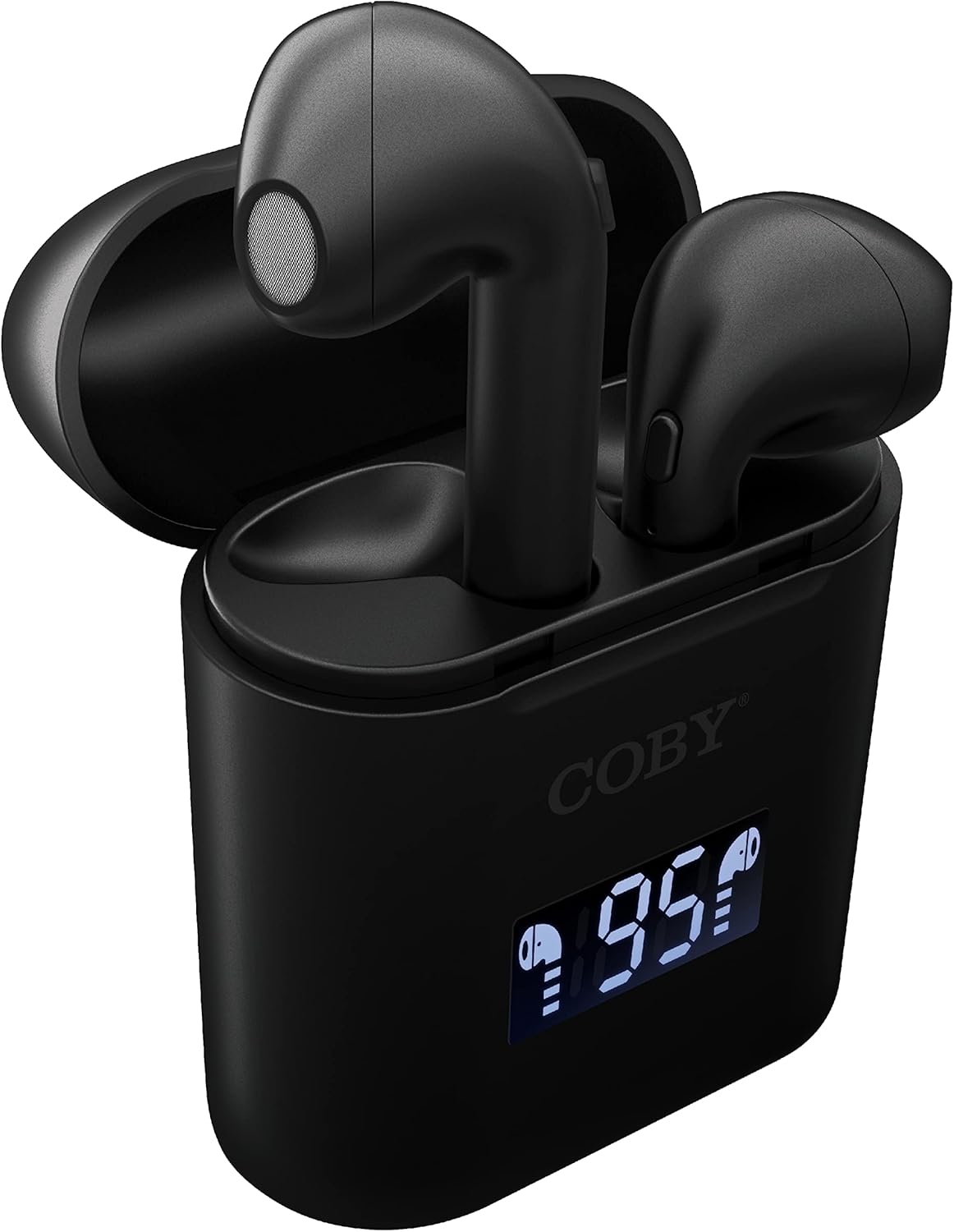
الصورة: لقطة مقربة view of the Coby True Wireless Earbuds resting in their open charging case. The case features a digital display showing "95%", indicating the current battery level of the case. The black earbuds are visible, with their microphones facing upwards.
2. الاقتران بجهاز بلوتوث
- تأكد من شحن سماعات الأذن ووضعها داخل علبة الشحن.
- افتح علبة الشحن. سيتم تشغيل سماعات الأذن تلقائيًا ودخول وضع الاقتران.
- على جهازك (الهاتف الذكي، الجهاز اللوحي، وما إلى ذلك)، قم بتمكين البلوتوث.
- بحث عن "CETW535" or "Coby Earbuds" in the list of available Bluetooth devices.
- Select the device name to connect. Once connected, you will hear a confirmation tone.
- The earbuds will automatically re-pair with the last connected device when removed from the case, if Bluetooth is enabled on the device.
3. تركيب سماعات الأذن
Gently insert each earbud into the corresponding ear (L for left, R for right). Adjust them slightly until they feel secure and comfortable. A proper fit ensures optimal sound quality and comfort.

Image: A woman is shown smiling while wearing a black Coby True Wireless Earbud in her right ear, demonstrating a comfortable and secure fit.
تعليمات التشغيل
تشغيل/إيقاف الطاقة
- تشغيل الطاقة: Open the charging case, or press and hold the touch control area on each earbud for 3 seconds.
- إيقاف التشغيل: Place the earbuds back into the charging case and close the lid, or press and hold the touch control area on each earbud for 5 seconds.
عناصر التحكم بالموسيقى
The earbuds feature touch-sensitive controls for easy management of your audio playback.
- تشغيل/إيقاف مؤقت: اضغط على إحدى سماعات الأذن مرة واحدة.
- المسار التالي: انقر نقرًا مزدوجًا على سماعة الأذن اليمنى.
- المسار السابق: انقر نقرًا مزدوجًا على سماعة الأذن اليسرى.
- رفع الصوت: انقر ثلاث مرات على سماعة الأذن اليمنى.
- اخفض الصوت: اضغط ثلاث مرات على سماعة الأذن اليسرى.

Image: A man is shown wearing a Coby True Wireless Earbud in his right ear, taking a drink from a water bottle, illustrating the earbuds' use during active moments.
ضوابط الاتصال
Manage your calls effortlessly with the built-in microphone and touch controls.
- الرد/إنهاء المكالمة: اضغط على إحدى سماعات الأذن مرة واحدة.
- رفض المكالمة: اضغط مع الاستمرار على أي من سماعات الأذن لمدة ثانيتين.

Image: A man is depicted wearing a Coby True Wireless Earbud in his left ear while concentrating on a laptop screen, highlighting the earbuds' suitability for work or study environments.
تفعيل المساعد الصوتي
Activate your device's voice assistant (Siri or Google Assistant) for hands-free commands.
- تنشيط مساعد الصوت: Press and hold either earbud for 3 seconds (after powering on, before powering off gesture).
Intelligent Digital Battery Display
The charging case features a digital display that shows the remaining battery percentage of the case and individual charging status of the earbuds.
- The large number indicates the charging case's battery percentage.
- Small icons next to the percentage indicate the charging status of the left and right earbuds.

Image: The Coby True Wireless Earbuds are shown in their open charging case, with the digital display indicating "95%" battery life for the case. The black earbuds are visible, ready for use or charging.
صيانة
- تنظيف: استخدم قطعة قماش ناعمة وجافة وخالية من الوبر لتنظيف سماعات الأذن وعلبة الشحن. لا تستخدم مواد كيميائية قاسية أو مواد كاشطة.
- تخزين: عند عدم الاستخدام، ضع سماعات الأذن في علبة الشحن لحمايتها والحفاظ على شحنها. خزّنها في مكان بارد وجاف بعيدًا عن درجات الحرارة العالية.
- الشحن: To prolong battery life, avoid fully discharging the battery frequently. Charge the case and earbuds regularly, even if not in constant use.
استكشاف الأخطاء وإصلاحها
| مشكلة | الحل المحتمل |
|---|---|
| سماعات الأذن غير مقترنة بالجهاز. |
|
| سماعة أذن واحدة فقط تصدر الصوت. |
|
| علبة الشحن لا تشحن. |
|
| جودة الصوت رديئة أو انقطاعات. |
|
تحديد
| ميزة | التفاصيل |
|---|---|
| ماركة | كوبي |
| اسم الموديل | سماعات أذن لاسلكية حقيقية |
| رقم الموديل | CETW535 |
| تكنولوجيا الاتصال | بلوتوث 5.3 |
| لون | أسود |
| وقت تشغيل سماعة الأذن | حتى 6.5 ساعات (عند الشحن الكامل) |
| إجمالي وقت اللعب (مع الحقيبة) | تصل إلى 22 ساعة |
| ميكروفون | مدمج |
| دعم المساعد الصوتي | سيري ، مساعد جوجل |
| الأبعاد (الطول × العرض × الارتفاع) | 0.99 × 1.85 × 2.44 بوصة (علبة الشحن) |
| وزن العنصر | 6.1 أونصات |
| رمز المنتج الموحد | 643620020982 |
| الشركة المصنعة | شركة ساميت للإلكترونيات، ذ.م.م |
الضمان والدعم
Specific warranty information for the Coby True Wireless Earbuds (Model CETW535) is not provided within this manual. For details regarding warranty coverage, terms, and conditions, please refer to the warranty card included with your product packaging or visit the official Coby webموقع.
For technical support or further assistance, please contact Coby customer service through the contact information provided on their official webتغليف الموقع أو المنتج.


