1. المقدمة
The FLYDIGI Vader 2 Pro is a versatile wireless game controller designed for an enhanced gaming experience across multiple platforms. This manual provides essential instructions for setting up, operating, and maintaining your controller.
The controller is compatible with Nintendo Switch, iOS, PC, and Android devices, offering a seamless transition between your preferred gaming systems.
2. انتهى المنتجview
The Vader 2 Pro controller integrates advanced features to optimize gameplay. Key components include dual vibration motors, a 6-axis gyroscope for motion sensing, and customizable RGB lighting.

الصورة 2.1: الجبهة view of the FLYDIGI Vader 2 Pro Game Controller, showcasinبفضل تصميمه المريح وتخطيط الأزرار.
المميزات الرئيسية:
- التوافق مع منصات متعددة: Supports Nintendo Switch, iOS, PC, and Android.
- محركات اهتزاز مزدوجة: Provides immersive haptic feedback with 3 adjustable levels.
- جيروسكوب سداسي المحاور: Enables precise motion sensing for compatible games.
- إضاءة RGB قابلة للتخصيص: Personalize the controller's aesthetic with millions of color options.
- الأزرار القابلة للتكوين: Four additional M1-M4 buttons on the rear for personalized controls.
- أوضاع اتصال متعددة: Bluetooth, 2.4GHz wireless (with dongle), and wired USB connection.

Image 2.2: The Vader 2 Pro controller shown with various compatible devices including a Nintendo Switch, PC laptop, iOS phone, and Android phone, illustrating its multi-platform support.

Image 2.3: The controller highlighting its built-in 6-axis gyro sensor for motion control.
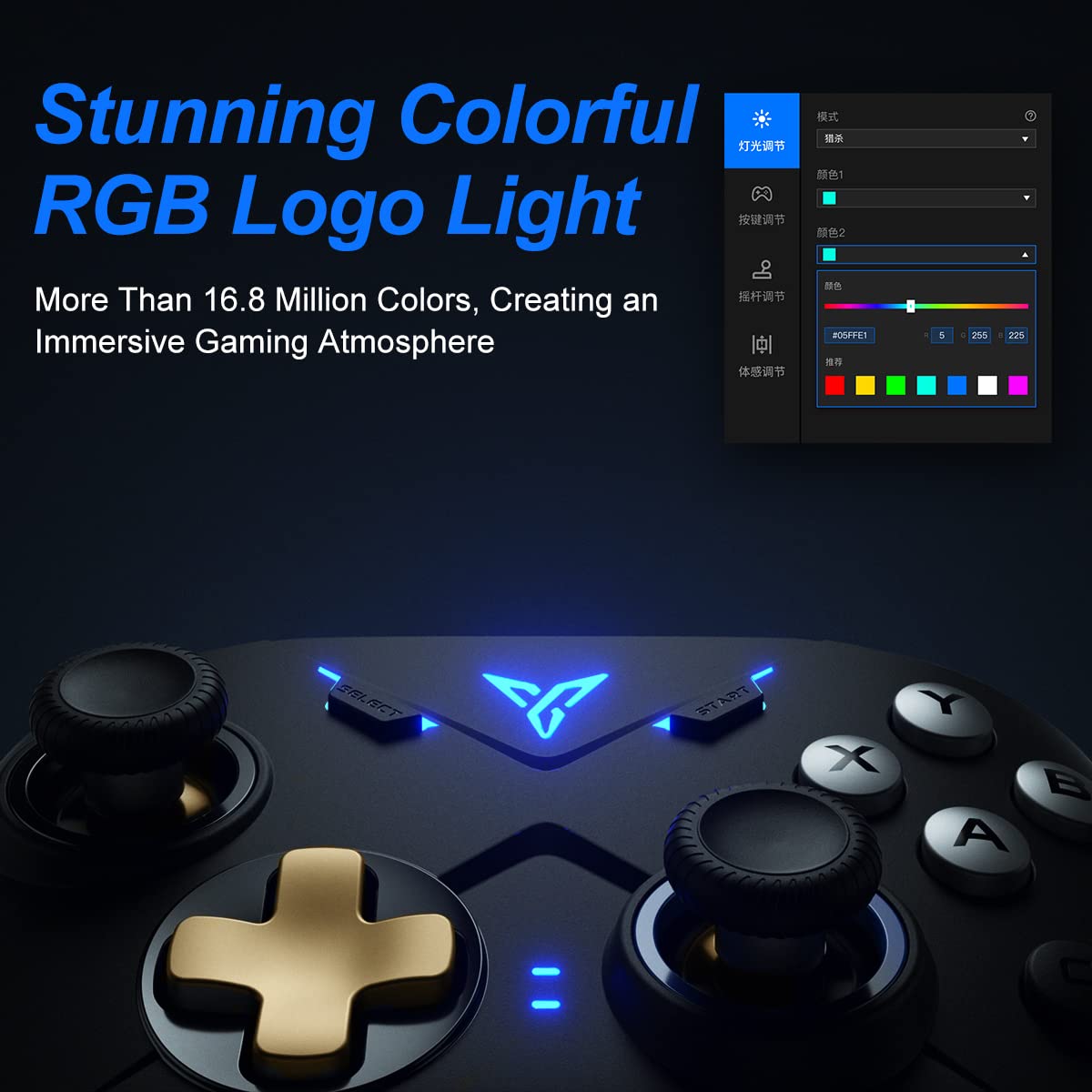
Image 2.4: Close-up of the controller's RGB logo light, demonstrating its customizable color options.

الصورة 2.5: خلفي view of the controller, showing the M1-M4 configurable buttons for personalized gameplay.

Image 2.6: Illustration of the controller's asymmetric dual motor design, indicating vibration feedback.
3. الإعداد والاتصال
The Vader 2 Pro controller offers multiple connection methods depending on your gaming platform. Refer to the table below for specific instructions.

Image 3.1: A table detailing connection instructions for Phone/Tablet, PC/Mac, and Nintendo Switch.
تعليمات الاتصال:
| تعليمات | Connect to Phone/Tablet | Connect to PC/Mac | الاتصال بالتبديل |
|---|---|---|---|
| طريقة التبديل | Press "+" and "B" buttons simultaneously for 3 seconds. | Press "+" and "A" buttons simultaneously for 3 seconds. | Press "+" and "X" buttons simultaneously for 3 seconds. |
| طريقة الاتصال | اتصال بلوتوث | 2.4GHz connector connection or USB wired connection | اتصال بلوتوث |
| الوضع الدعم | وضع البلوتوث | 360 mode, Android mode (Press "+" and "SELECT" to switch) | تبديل الوضع |
| حالة أضواء المؤشر | No. 1 Indicator light on blue | No. 1 Indicator light on white (No. 2 red for Android mode) | No. 1 Indicator light on orange |
Additional Connection Notes:
- For PC/Mac, a 2.4GHz USB dongle is included for wireless connection. A USB-C to A cable is also provided for wired play.
- Ensure your device's Bluetooth is enabled when connecting wirelessly to phones, tablets, or Nintendo Switch.
- For iOS devices running iOS 13.4 or higher, follow the specific pairing instructions: Press and hold '+' and 'C' until the first light blinks orange and the second light stays red. Then, long press '+' for more than 3 seconds until the first light flashes orange. Go to your iOS Bluetooth settings and select the device to connect.

Image 3.2: The included USB wireless dongle and USB-C charging/data cable.
4. تعليمات التشغيل
4.1. Button Mapping and Customization
The FLYDIGI Vader 2 Pro controller supports extensive customization through the dedicated FLYDIGI PC Space Station software. This software allows you to:
- Remap buttons, including the M1-M4 rear buttons.
- Adjust joystick curves for precision control.
- Fine-tune motion sensing sensitivity.
- Program macro combos for complex actions.
- Change RGB light settings and effects.
Up to 4 sets of custom configurations can be saved directly on the controller. Download the software from the official FLYDIGI webموقع: flydigi.com/index/down?nav_id=2
4.2. استشعار الحركة
The integrated 6-axis gyroscope provides accurate motion control in games that support this feature, enhancing your interactive experience.
4.3. ردود الفعل الاهتزازية
The asymmetric dual vibration motors offer tactile feedback. You can adjust the vibration intensity to one of three levels to suit your preference.
4.4. إضاءة RGB
The controller features a customizable RGB logo light, offering over 16.8 million colors. Use the FLYDIGI PC Space Station software to select your preferred lighting modes and colors.
5. الشحن وعمر البطارية
The Vader 2 Pro controller is equipped with a rechargeable battery designed to provide up to 80 hours of gameplay on a single charge. To charge the controller, connect it to a USB power source using the provided USB-C cable.

Image 5.1: The controller positioned above a charging indicator, symbolizing its rechargeable battery.
ملحوظة: Actual battery life may vary based on usage patterns, vibration intensity, and RGB lighting settings.
6. استكشاف الأخطاء وإصلاحها
If you encounter issues with your FLYDIGI Vader 2 Pro controller, refer to the following common solutions:
- وحدة التحكم غير متصلة:
- Ensure the controller is in the correct switching mode for your platform (Phone/Tablet, PC/Mac, Switch) as per Section 3.
- Verify that Bluetooth is enabled on your device or that the 2.4GHz dongle is properly inserted into your PC/Mac.
- حاول إعادة تشغيل كل من وحدة التحكم وجهازك.
- For PC connections, if Bluetooth fails, try using the 2.4GHz dongle or a wired USB connection.
- Buttons Not Responding/Mapping Issues:
- Ensure the FLYDIGI PC Space Station software is correctly installed and updated.
- Check your custom profiles within the software to ensure buttons are mapped as intended.
- Reset the controller to factory settings if custom mappings are causing issues (refer to software documentation for this process).
- عمر البطارية قصير:
- تأكد من شحن وحدة التحكم بالكامل قبل الاستخدام.
- Reduce vibration intensity or RGB lighting brightness/effects to conserve battery power.
- إذا تدهور عمر البطارية بشكل ملحوظ بمرور الوقت، فاتصل بدعم العملاء.
- Unstable Wireless Connection:
- Ensure there are no significant obstructions or sources of interference between the controller and your device/dongle.
- Keep the controller within the recommended operating range.
- Update controller firmware via the FLYDIGI PC Space Station software.
7. المواصفات
| ميزة | التفاصيل |
|---|---|
| رقم الموديل | VADER2PRO |
| ASIN | B09LCYB48V |
| أبعاد المنتج | 3.5 × 7.59 × 5.5 بوصة |
| وزن العنصر | 15.84 أونصات |
| الاتصال | بلوتوث، لاسلكي بتردد 2.4 جيجاهرتز، سلكي USB |
| التوافق | Nintendo Switch, iOS, PC, Android |
| المميزات الخاصة | Dual Vibration Motors, 6-Axis Gyroscope, RGB Lighting, Configurable M1-M4 Buttons |
| عمر البطارية | حتى 80 ساعة (تقريبًا) |
| تاريخ أول توفر | 21 ديسمبر 2021 |
8. الصيانة
To ensure the longevity and optimal performance of your FLYDIGI Vader 2 Pro controller, follow these maintenance guidelines:
- تنظيف: استخدم قطعة قماش ناعمة وجافة لتنظيف وحدة التحكم. تجنب استخدام المواد الكيميائية القاسية أو المواد الكاشطة.
- تخزين: قم بتخزين وحدة التحكم في مكان بارد وجاف بعيدًا عن أشعة الشمس المباشرة ودرجات الحرارة القصوى.
- التعامل: تجنب إسقاط وحدة التحكم أو تعريضها لصدمات قوية، حيث يمكن أن يؤدي ذلك إلى إتلاف المكونات الداخلية.
- الشحن: Do not overcharge the battery. Disconnect the charging cable once the controller is fully charged.
9. الضمان والدعم
For warranty information, technical support, or further assistance, please visit the official FLYDIGI webالموقع أو تواصل مع خدمة العملاء. احتفظ بإيصال الشراء لطلبات الضمان.
Official FLYDIGI Webموقع: www.flydigi.com


