1. المقدمة
This manual provides detailed instructions for the safe and effective operation of your POCOCO DJ Disco Stage Party Light. This versatile lighting unit features a combination of laser and LED effects, sound activation, and multiple operating modes, suitable for various indoor and outdoor entertainment settings. It is powered by a built-in rechargeable battery or via USB.

Figure 1.1: POCOCO Disco Light highlighting its battery and USB power capabilities, along with key features such as 60 patterns, remote control, sound control, built-in battery, USB charging, and timer function.
2. معلومات السلامة
يرجى قراءة جميع تحذيرات السلامة والتعليمات بعناية قبل استخدام هذا المنتج. قد يؤدي عدم اتباع هذه التعليمات إلى حدوث صدمة كهربائية أو حريق أو إصابة خطيرة.
- This product contains a laser. DO NOT LOOK DIRECTLY INTO THE LASER APERTURE. Direct exposure to the laser beam may cause eye damage.
- Keep the device away from water, moisture, and high humidity.
- Do not operate the device if it has been damaged or dropped.
- تأكد من التهوية الجيدة. لا تسد فتحات التهوية.
- Use only the provided USB cable and a compatible 5V power adapter for charging.
- يحفظ بعيدا عن متناول الأطفال. هذه ليست لعبة.
- لا تحاول تفكيك الجهاز أو تعديله. أحل جميع أعمال الصيانة إلى فنيين مؤهلين.
- تجنب تعريض الجهاز لدرجات حرارة شديدة أو لأشعة الشمس المباشرة لفترات طويلة.
3. محتويات العبوة
تأكد من تضمين جميع العناصر المدرجة أدناه في الحزمة الخاصة بك:
- POCOCO DJ Disco Stage Party Light (DQ-R50)
- جهاز التحكم عن بعد
- كابل شحن USB
- تزايد شريحة
- براغي تركيب (2)
- دليل المستخدم (هذا المستند)

Figure 3.1: The POCOCO Disco Light unit and its accompanying remote control.
4. انتهى المنتجview
Familiarize yourself with the components of your POCOCO Disco Stage Party Light and its remote control.
4.1 مكونات الجهاز

Figure 4.1: Labeled diagram of the POCOCO Disco Light, indicating the LED light, remote sensor, play mode indicator, red laser light, green laser light, cooling fan, sound active sensor, DC 5V power input, and power switch.
- ضوء LED: Projects various patterns and colors.
- Remote Sensor (IR): يستقبل اشارات من جهاز التحكم عن بعد.
- Play Mode Indicator: يعرض وضع التشغيل الحالي.
- Red Laser Light: Projects red laser patterns.
- Green Laser Light: Projects green laser patterns.
- مروحة التبريد: يبدد الحرارة أثناء التشغيل.
- Sound Active Sensor (MIC): Detects ambient sound for sound-activated mode.
- مدخل الطاقة (تيار مستمر 5 فولت): يتصل بكابل شحن USB.
- مفتاح الطاقة (تشغيل/إيقاف): يقوم بتشغيل الجهاز أو إيقاف تشغيله.
4.2 وظائف التحكم عن بعد
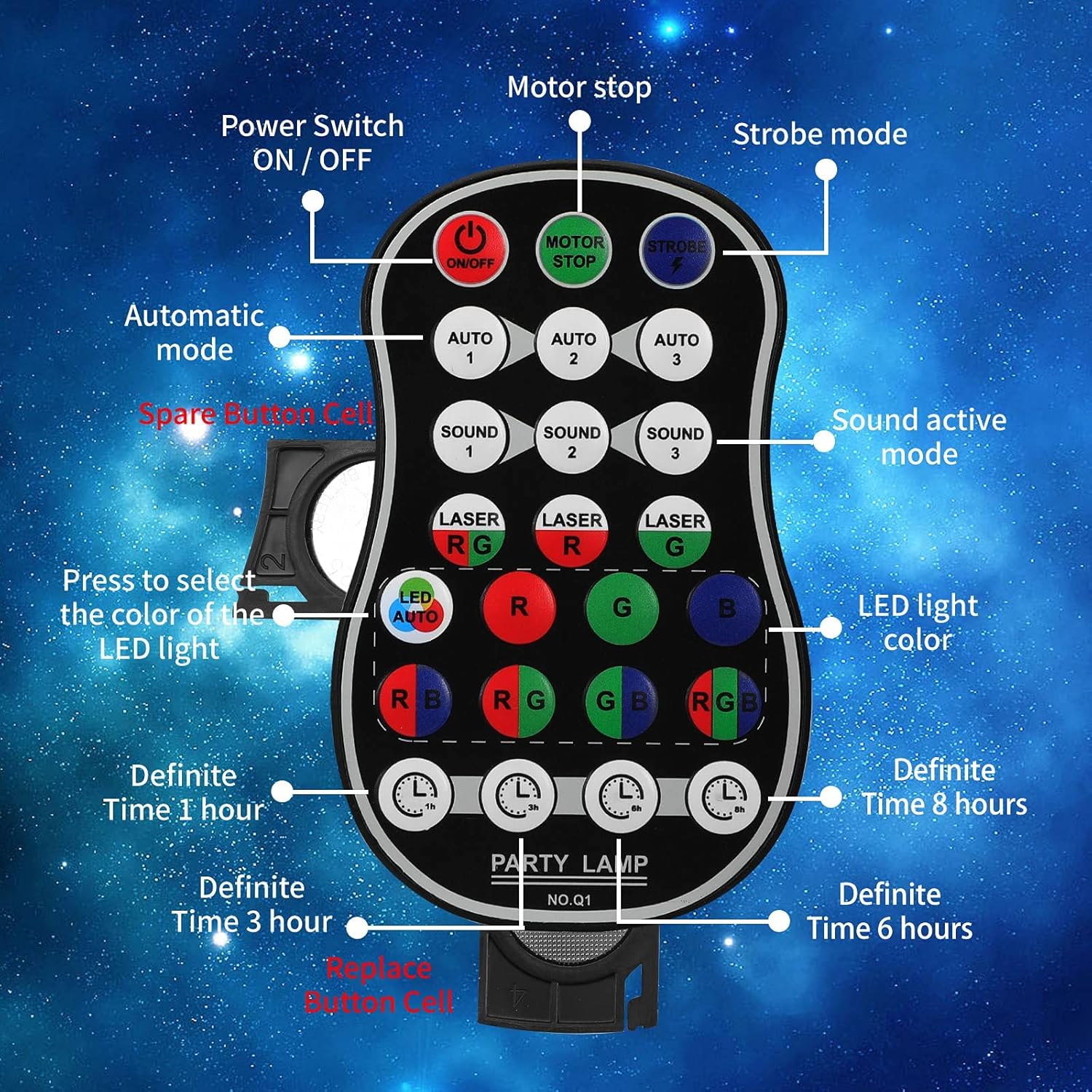
Figure 4.2: Labeled diagram of the remote control, showing buttons for Power ON/OFF, Motor Stop, Strobe Mode, Automatic Modes (Auto 1, 2, 3), Sound Active Modes (Sound 1, 2, 3), Laser Color Selection (RG, R, G), LED Light Color Selection (LED Auto, R, G, B, RB, RG, GB, RGB), and Definite Time settings (1h, 3h, 6h, 8h).
- تشغيل/إيقاف: مفتاح التشغيل.
- MOTOR STOP: Stops the motor movement of patterns.
- ستروب: يُفعّل تأثير الوميض.
- AUTO 1/2/3: Selects different automatic light color and pattern change modes.
- SOUND 1/2/3: Activates sound-controlled modes with varying sensitivities.
- LASER RG/R/G: Selects laser color combinations (Red & Green, Red only, Green only).
- LED AUTO/R/G/B/RB/RG/GB/RGB: Selects LED light colors or automatic color cycling.
- 1h/3h/6h/8h: Sets a timer for automatic shutdown after the selected duration.
5. الإعداد
5.1 شحن الجهاز
The device comes with a built-in 3000 mAh battery, providing up to 5 hours of operation on a full charge.
- Connect the small end of the provided USB charging cable to the DC 5V power input port on the back of the light.
- Connect the standard USB end of the cable to a USB power adapter (not included), a computer USB port, or a power bank.
- سيضيء مؤشر الشحن أثناء الشحن وينطفئ عند اكتمال الشحن.
5.2 خيارات التركيب
The POCOCO Disco Light is designed for flexible placement, including on a table, on the ground, or mounted on a ceiling or wall.
- Table/Ground Placement: Simply place the unit on a flat, stable surface. Adjust the angle of the light using the integrated bracket.
- تركيب السقف/الجدار: Use the provided mounting bracket and screws. Secure the bracket to the desired surface, then attach the light unit to the bracket. The bracket allows for 180-degree manual rotation to adjust the projection angle.
6. تعليمات التشغيل
After setup, use the remote control to operate the light.
- تشغيل/إيقاف التشغيل: اضغط على تشغيل/إيقاف button on the remote control or use the physical switch on the device.
- حدد وضع التشغيل:
- نظام آلي: يضعط تلقائي 1, تلقائي 2، أو تلقائي 3 for automatic color and pattern changes, creating a relaxed atmosphere.
- وضع ستروب: اضغط على STROBE button for rapid flashing effects.
- وضع التحكم في الصوت: يضعط الصوت 1, الصوت 2، أو الصوت 3. The lights will change colors and patterns according to the rhythm of surrounding music or sounds.
- Adjust Laser Colors: استخدم LASER RG, LASER R، أو LASER G buttons to select desired laser colors.
- Adjust LED Colors: استخدم الصمام التلقائي, R, G, B, RB, RG, GB، أو اللون الأحمر والأخضر والأزرق buttons to select specific LED colors or automatic cycling.
- Stop Motor Movement: اضغط على توقف المحرك button to pause the pattern movement while keeping the lights on.
- توقيت مجموعة: يضعط 1h, 3h, 6h، أو 8h to set the light to automatically turn off after the specified time.
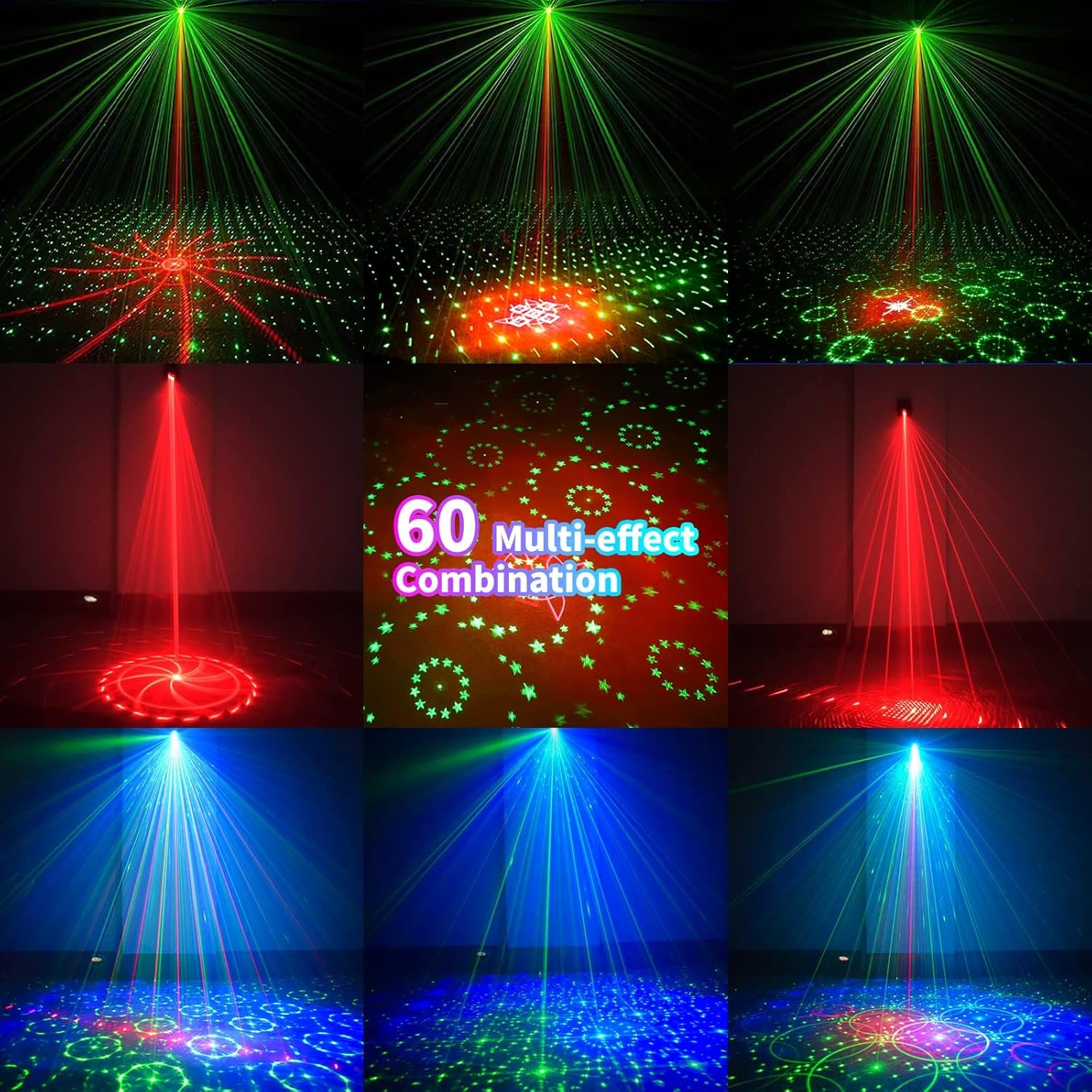
الشكل 6.1: مثالamples of the 60 multi-effect combinations produced by the POCOCO Disco Light, showcasing various laser and LED patterns in different colors.
7. الصيانة
تضمن الصيانة المناسبة طول عمر جهازك وأداءه الأمثل.
- تنظيف: Use a soft, dry cloth to clean the exterior of the device. Do not use abrasive cleaners or solvents. Ensure the laser aperture and LED lens are free of dust and smudges for clear projection.
- تخزين: عند عدم استخدام الجهاز لفترات طويلة، قم بتخزينه في مكان بارد وجاف، بعيدًا عن أشعة الشمس المباشرة ودرجات الحرارة القصوى.
- العناية بالبطارية: To maintain battery health, charge the device fully before long-term storage and recharge it every 3-6 months if not in regular use.
8. استكشاف الأخطاء وإصلاحها
If you encounter issues with your POCOCO Disco Light, refer to the following common problems and solutions:
| مشكلة | السبب المحتمل | حل |
|---|---|---|
| الجهاز لا يعمل. | نفدت طاقة البطارية. مفتاح الطاقة مغلق. نفدت بطارية جهاز التحكم عن بعد. | اشحن الجهاز باستخدام كابل USB. Ensure the physical power switch is in the ON position. استبدل البطارية في جهاز التحكم عن بعد. |
| No laser or LED projection. | Lens is obstructed. تم اختيار الوضع غير الصحيح. | Clean the lens and aperture. Ensure a projection mode (Auto, Sound, Strobe) is active. |
| Sound control not working. | Microphone is obstructed. Ambient sound is too low. تم اختيار وضع الصوت غير الصحيح. | Ensure the microphone opening is clear. Increase the volume of the music or sound source. Try different SOUND modes (SOUND 1, 2, 3). |
| جهاز التحكم عن بعد لا يستجيب. | بطارية جهاز التحكم عن بعد فارغة. Obstruction between remote and sensor. Remote is too far from the device. | استبدل بطارية جهاز التحكم عن بعد. Ensure a clear line of sight to the IR sensor on the device. اقترب أكثر من الجهاز. |
| Patterns are static (not moving). | MOTOR STOP button pressed. | Press the MOTOR STOP button again to resume movement. |
If the problem persists after trying these solutions, please contact POCOCO customer support.
9. المواصفات
| ميزة | مواصفة |
|---|---|
| رقم الموديل | دي كيو-R50 |
| الأبعاد (الطول × العرض × الارتفاع) | 2.91 بوصة × 2.79 بوصة × 2.83 بوصة (7.39 سم × 7.09 سم × 7.19 سم) |
| وزن العنصر | 13.1 أونصة (371 جرام) |
| مصدر الطاقة | Battery Powered (Built-in Lithium Ion) / USB Powered |
| سعة البطارية | 3000 مللي أمبير |
| حجم التشغيلtage | 5 فولت |
| نوع مصدر الضوء | Light Emitting Diode (LED) / Laser |
| مادة | سبائك الألومنيوم |
| طريقة التحكم | Remote Control / Sound Activated |
| لون | أسود |
| رمز المنتج الموحد | 704078007977 |
10. الضمان والدعم
For warranty information and customer support, please refer to the documentation provided at the time of purchase or contact the seller directly. You can also visit the official POCOCO store for more information:


