1. المقدمة
This manual provides comprehensive instructions for the Rebel KOM1060 USB DVB-T2 H.265 HEVC Digital TV Tuner. This device allows you to receive digital television and radio broadcasts on your personal computer. It supports DVB-T, DVB-T2, and DVB-C standards, along with H.265 HEVC decoding for high-quality video. Key features include Full HD channel support, recording capabilities, TimeShift functionality, and EPG (Electronic Program Guide) support.

الصورة 1.1: الأعلى view of the Rebel KOM1060 USB Digital TV Tuner.
يرجى قراءة هذا الدليل بعناية قبل استخدام المنتج لضمان التركيب والتشغيل الصحيحين.
2. محتويات العبوة
تأكد من تضمين جميع العناصر المدرجة أدناه في الحزمة الخاصة بك:
- Rebel KOM1060 USB Digital TV Tuner
- جهاز التحكم عن بعد
- هوائي قابل للتمديد
- برنامج تشغيل القرص
- دليل المستخدم (هذا المستند)

Image 2.1: Rebel KOM1060 USB Digital TV Tuner, antenna, and connecting cable.
3. متطلبات النظام
To ensure optimal performance, your computer system should meet the following specifications:
- نظام التشغيل: نظام التشغيل Windows XP / Vista / 7 / 8 / 10
- المعالج: Intel Pentium 4 2.0 GHz or equivalent AMD Athlon XP (minimum)
- كبش: 512 MB (1 GB recommended for Full HD viewعمل)
- سعة التخزين: 300 MB free space (1 GB recommended)
- بطاقة الرسوميات: متوافق مع DirectX 9.0
- بطاقة الصوت: مطلوب
- منفذ USB: منفذ يو اس بي 2.0
- محرك الأقراص الضوئية: CD drive for driver installation
- اتصال الانترنت: Recommended for software updates and EPG data
4. دليل الإعداد
4.1 تركيب الأجهزة
- ربط الهوائي: Attach the extendable antenna to the BLC antenna connection port on the USB TV tuner. For best reception, position the antenna in an area with clear signal.
- Insert the Tuner: Plug the Rebel KOM1060 USB Digital TV Tuner into an available USB 2.0 port on your computer.

Image 4.1: Rebel KOM1060 USB Digital TV Tuner with its protective cap removed, showing the USB connector.
4.2 تثبيت البرنامج
- أدخل قرص تعريف الجهاز: Place the provided Driver CD into your computer's CD drive.
- تشغيل برنامج الإعداد: Follow the on-screen instructions to install the necessary drivers and application software. If auto-run does not start, navigate to the CD drive in 'My Computer' or 'This PC' and run the 'setup.exe' file.
- التثبيت الكامل: أعد تشغيل جهاز الكمبيوتر الخاص بك إذا طُلب منك ذلك بعد اكتمال التثبيت.
- تحديثات البرامج: It is recommended to check the manufacturer's website for the latest software updates to ensure compatibility and access to new features.
5. تعليمات التشغيل
5.1 Launching the Application
After successful installation, launch the TV application from your desktop shortcut or Start Menu. The application interface will appear, allowing you to control the tuner.
5.2 مسح القناة
- Upon first launch, the software will typically prompt you to perform a channel scan. If not, locate the 'Channel Scan' or 'Settings' menu within the application.
- Select your region and the type of broadcast (DVB-T, DVB-T2, or DVB-C) you wish to scan for.
- Initiate the scan. This process may take several minutes.
- Once complete, the available TV and radio channels will be listed.
5.3 Watching TV and Listening to Radio
- اختيار القناة: Use the channel list within the application or the provided remote control (Image 5.1) to navigate between channels.
- التحكم في مستوى الصوت: Adjust the volume using the application's controls or the remote control.
- دعم دقة Full HD: The tuner supports Full HD channels, providing high-resolution viewing where available.
- استقبال الراديو: Switch to radio mode within the application to access FM, DAB, DAB+, VHF, and UHF radio stations.
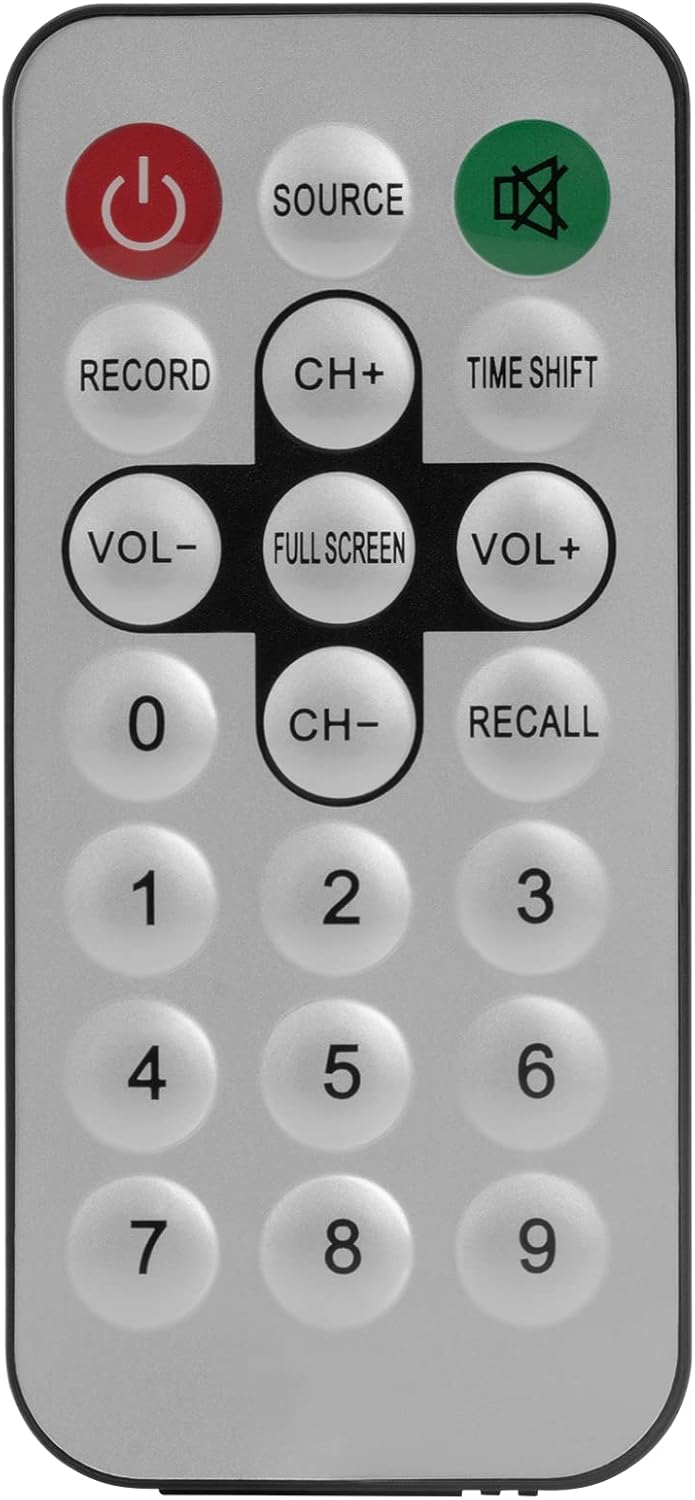
Image 5.1: The included remote control for the Rebel KOM1060 tuner.
5.4 Recording and TimeShift
- وظيفة التسجيل: Use the 'Record' button on the remote control or the corresponding option in the software to record live TV programs. Ensure you have sufficient storage space on your computer.
- TimeShift Function: The TimeShift feature allows you to pause live TV and resume watching later. Activate TimeShift via the remote control or software interface.
- تسجيل الفيديو: The device supports direct video recording of broadcasts.
5.5 EPG and Teletext
- EPG (دليل البرامج الإلكتروني): Access the EPG through the software to view upcoming program schedules and information.
- قناة المعلومات: The tuner supports teletext services, which can be accessed via the software interface.
6. الصيانة
- حافظ على نظافة جهازك وخلوه من الغبار. استخدم قطعة قماش ناعمة وجافة للتنظيف.
- Avoid exposing the tuner to extreme temperatures, humidity, or direct sunlight.
- لا تحاول تفكيك الجهاز أو إصلاحه بنفسك. استشر فني صيانة مؤهلًا.
- Ensure the antenna connection is secure for optimal signal reception.
7. استكشاف الأخطاء وإصلاحها
- لا يوجد إشارة / استقبال ضعيف:
- Ensure the antenna is properly connected and positioned for best reception.
- قم بإجراء مسح للقنوات مرة أخرى.
- Check for local broadcast availability in your area.
- Software Not Launching/Crashing:
- Verify that your system meets the minimum requirements.
- Reinstall the drivers and software from the provided CD or the manufacturer's webموقع.
- تأكد من أن نظام التشغيل لديك محدث.
- No Audio/Video Issues:
- Check your computer's sound settings.
- Ensure the correct codecs are installed (usually included with the software).
- قم بتحديث برامج تشغيل بطاقة الرسومات الخاصة بك.
- جهاز التحكم عن بعد لا يعمل:
- Ensure there are no obstructions between the remote and the tuner's IR receiver.
- Check if the remote control requires batteries and if they are correctly inserted and charged.
8. المواصفات
| ميزة | التفاصيل |
|---|---|
| ماركة | المتمرد |
| رقم الموديل | كوم 1060 |
| لون | أسود |
| الواجهة | يو اس بي 2.0 |
| مجموعة الشرائح | ر828د |
| توصيل الهوائي | بي إل سي |
| Supported TV Standards | DVB-T, DVB-T2, DVB-C |
| Supported Radio Standards | FM, DAB, DAB+, VHF, UHF |
| برامج الترميز المدعومة | MPEG-2, H.264, H.265, HEVC |
| دعم كامل الوضوح | نعم |
| وظيفة التسجيل | نعم |
| TimeShift Function | نعم |
| دعم دليل البرامج الإلكتروني | نعم |
| Teletext Support | نعم |
| جهاز التحكم عن بعد متضمن | نعم |
| الأجهزة المتوافقة | PC (Windows XP/Vista/7/8/10) |
9. الضمان والدعم
Rebel products are designed for reliability and performance. For warranty information, please refer to the documentation included with your purchase or visit the official Rebel website. For technical support, driver updates, or further assistance, please visit the manufacturer's support page or contact their customer service.
احتفظ بإثبات الشراء الخاص بك لمطالبات الضمان.


