1. المقدمة
This manual provides comprehensive instructions for the installation, operation, and maintenance of your Cabletech URZ0336B DVB-T2 H.265 HEVC Digital Tuner. Please read this manual thoroughly before using the device to ensure proper functionality and to prevent damage.
2. معلومات السلامة
Always observe the following safety precautions to avoid electric shock, fire, or damage to the device:
- لا تعرض الجهاز للمطر أو الرطوبة.
- لا تفتح الصندوقasinز. إحالة جميع أعمال الصيانة إلى موظفين مؤهلين.
- تأكد من وجود تهوية مناسبة حول الجهاز. لا تسد فتحات التهوية.
- استخدم فقط محول الطاقة المرفق مع الجهاز.
- احفظ الجهاز بعيدًا عن مصادر الحرارة وأشعة الشمس المباشرة.
- Disconnect the power plug from the wall outlet if the device will not be used for a long period.
3. محتويات العبوة
يرجى التحقق من الحزمة للعناصر التالية:
- Cabletech URZ0336B DVB-T2 H.265 HEVC Digital Tuner
- جهاز التحكم عن بعد
- بطاريات AAA (2x)
- محول الطاقة
- دليل المستخدم (هذا المستند)
4. انتهى المنتجview
Familiarize yourself with the main components and connections of your Cabletech URZ0336B tuner.
4.1. Device and Remote Control
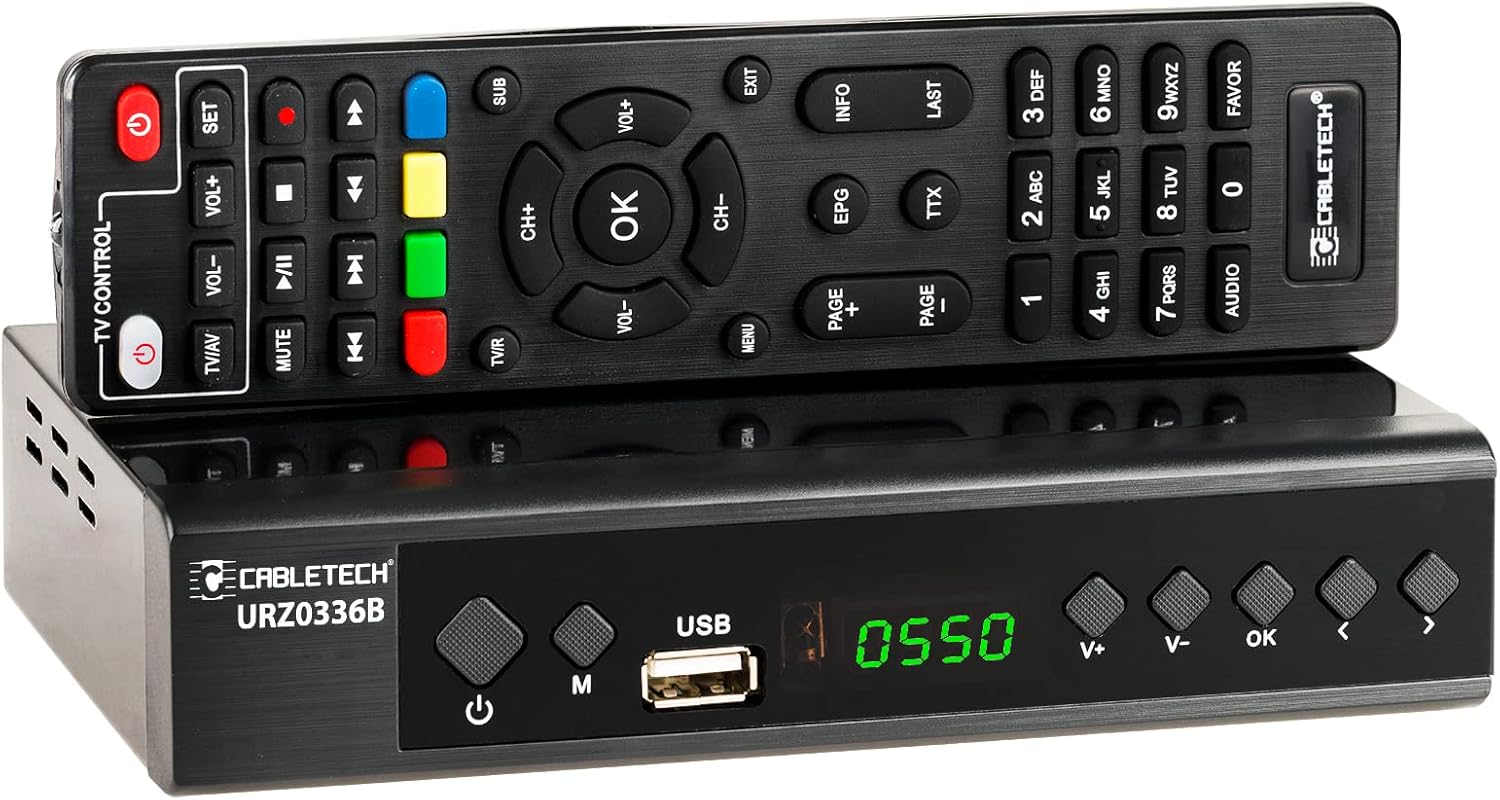
Image: The Cabletech URZ0336B DVB-T2 H.265 HEVC Digital Tuner shown with its accompanying remote control. The tuner is a compact black box, and the remote is also black with various control buttons.
4.2. اللوحة الأمامية
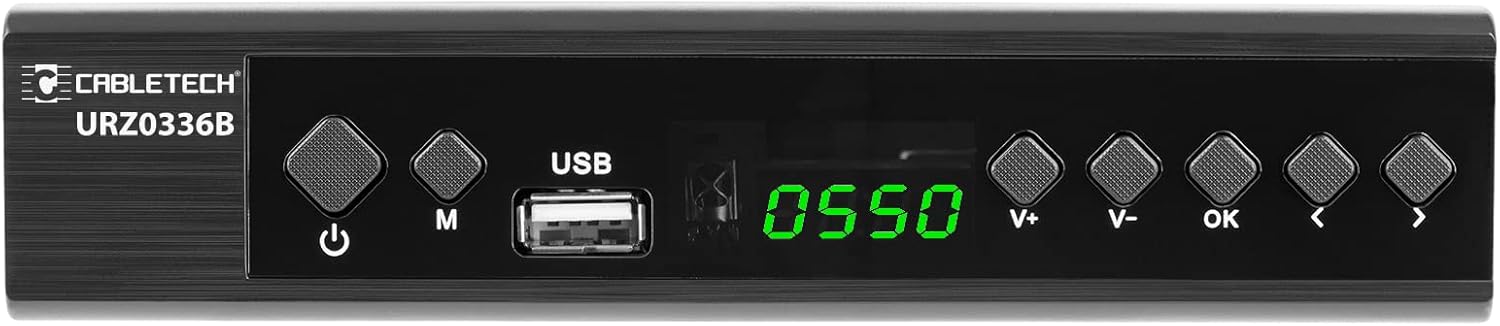
Image: Close-up of the Cabletech URZ0336B front panel, featuring a power button, menu button (M), USB 2.0 port, LED display showing "0550", and navigation/volume buttons (V+, V-, OK, <, >).
- زر الطاقة: Turns the device on/off or to standby.
- زر القائمة (M): يصل إلى القائمة الرئيسية.
- منفذ USB 2.0: For software updates, PVR recording, and media playback.
- عرض الصمام: يعرض رقم القناة أو الوقت.
- أزرار V+/V-: يضبط مستوى الصوت.
- زر موافق: يؤكد التحديدات.
- أزرار: Navigates through menus or changes channels.
4.3. اتصالات اللوحة الخلفية

Image: The rear panel of the Cabletech URZ0336B, showing various input and output ports: ANT IN (IEC socket), COAXIAL, USB, HD OUT (HDMI), SCART, and the power input (110-240V~ 50/60Hz).
- النمل في: Connects to your DVB-T/T2 antenna.
- متحد المحور: إخراج الصوت الرقمي.
- USB: Additional USB 2.0 port for external devices.
- HD OUT (HDMI): يتصل بجهاز التلفزيون الخاص بك للحصول على فيديو وصوت عالي الدقة.
- سكارت: يتصل بأجهزة التلفزيون أو أجهزة الفيديو القديمة.
- مدخلات الطاقة: يتصل بمحول الطاقة.
4.4. تصميم جهاز التحكم عن بعد

الصورة: مفصلة view of the Cabletech URZ0336B remote control, showing buttons for power, TV/AV, volume, channel, mute, playback controls, EPG, TTX, INFO, numeric keypad, and special function buttons.
The remote control provides full functionality for operating your tuner. Insert 2x AAA batteries into the battery compartment before first use.
5. الإعداد
5.1. Connecting the Tuner
- توصيل الهوائي: Connect your DVB-T/T2 antenna cable to the نملة في منفذ على اللوحة الخلفية لجهاز الاستقبال.
- الاتصال بالتلفزيون:
- For HD TVs: Connect an HDMI cable from the HD OUT (HDMI) port on the tuner to an HDMI input on your TV.
- For older TVs: Connect a SCART cable from the سكارت port on the tuner to the SCART input on your TV.
- توصيل الطاقة: Connect the power adapter to the tuner's power input and then plug it into a wall outlet.
- أدخل البطاريات: Open the battery compartment on the remote control and insert 2x AAA batteries, observing polarity.
5.2. First-Time Installation and Channel Scan
- Turn on your TV and select the correct HDMI or SCART input source that the tuner is connected to.
- Power on the Cabletech URZ0336B tuner using the power button on the front panel or remote control.
- The first-time installation wizard should appear on your TV screen. Follow the on-screen prompts.
- Select your preferred language and country.
- ابدأ البحث التلقائي for channels. The tuner will scan for all available DVB-T/T2 channels in your area. This process may take several minutes.
- Once the scan is complete, the tuner will save the found channels and display the first channel.
Note: If you experience poor signal quality, adjust your antenna position or consider using a signal ampمكبر.
6. تعليمات التشغيل
6.1. الوظائف الأساسية
- تشغيل/إيقاف التشغيل: اضغط على قوة الزر الموجود على جهاز التحكم عن بعد.
- تغيير القناة: استخدم CH + / CH- buttons or the numeric keypad to enter a channel number.
- التحكم في مستوى الصوت: استخدم المجلد + / المجلد- أزرار.
- صامت: اضغط على كتم الصوت زر لإيقاف الصوت مؤقتًا.
- قائمة طعام: اضغط على قائمة طعام زر للوصول إلى القائمة الرئيسية للإعدادات والميزات.
- OK: Confirms selections in menus or displays the channel list.
- EXIT: للخروج من القائمة أو الشاشة الحالية.
6.2. دليل البرامج الإلكتروني (EPG)
The 7-day EPG provides a schedule of current and upcoming programs.
- اضغط على دليل البرامج الإلكتروني الزر الموجود على جهاز التحكم عن بعد.
- Navigate through channels and program times using the arrow buttons.
- يضعط OK ل view details about a selected program.
6.3. PVR (Program Recording) and Timeshift
Connect a USB storage device (e.g., USB flash drive or external hard drive) to one of the USB 2.0 ports to use PVR and Timeshift functions.
- PVR Recording:
- اضغط على ريك button (red circle) on the remote to start immediate recording of the current program. Press قف (square) to end recording.
- Schedule recordings via the EPG: Select a program in the EPG and press OK, then choose the record option.
- تغير وقت زمني:
- أثناء مشاهدة البرنامج، اضغط على يوقف button. The tuner will begin recording the live broadcast to the USB device.
- يمكنك بعد ذلك يلعب, التقديم السريع، أو إعادة within the buffered content.
- يضعط قف to exit Timeshift and return to live TV.
6.4. تشغيل الوسائط
The tuner supports playback of various media fileمن جهاز تخزين USB متصل.
- Connect your USB device to a USB port on the tuner.
- Go to the main menu and select "Media" or "USB".
- انتقل إلى الملف المطلوب file type (MP3, WMA, JPEG, BMP, AVI) and select the file للعب.
6.5. Supported Applications
The tuner supports various online applications when connected to the internet via an external MT7601 Wi-Fi adapter (not included).
- طقس: View local weather forecasts.
- IPTV: Access Internet Protocol Television streams.
- يوتيوب: Watch videos from YouTube.
- RSS: Read RSS news feeds.
Note: An external MT7601 Wi-Fi adapter is required for internet connectivity and access to these applications.
6.6. الرقابة الأبوية
Set up parental control to restrict access to certain channels or programs based on age ratings.
- Access the "Parental Control" section in the main menu.
- Enter your PIN (default is usually 0000 or 1234, check your device for specifics).
- Configure age restrictions or lock specific channels.
6.7. وظيفة الموقت
The timer function allows you to schedule the tuner to turn on/off at specific times or to switch to a particular channel.
- Navigate to the "Timer" section in the main menu.
- Set the event type (e.g., Power On, Power Off, Record), time, and duration.
7. الصيانة
7.1. التنظيف
To clean the device, disconnect it from the power supply and wipe the exterior with a soft, dry cloth. Do not use liquid or aerosol cleaners.
7.2. تحديث البرنامج
Software updates can improve performance and add new features. Updates are performed via the USB port.
- تنزيل أحدث البرامج الثابتة file from the official Cabletech support webالموقع (إن وجد).
- نسخ البرامج الثابتة file to the root directory of a USB flash drive.
- Connect the USB flash drive to the tuner's USB port.
- Go to the "System" or "Tools" menu, then select "Software Update" or "Upgrade by USB".
- Follow the on-screen instructions to complete the update. Do not power off the device during the update process.
8. استكشاف الأخطاء وإصلاحها
If you encounter issues with your tuner, refer to the following common problems and solutions:
| مشكلة | السبب المحتمل | حل |
|---|---|---|
| لا يوجد صورة أو صوت | Incorrect TV input selected; Loose cable connections; Tuner not powered on. | Select correct TV input (HDMI/SCART); Check all cable connections; Ensure tuner is powered on. |
| رسالة "لا توجد إشارة" | Antenna not connected; Poor antenna signal; No channels scanned. | Connect antenna properly; Adjust antenna position; Perform an automatic channel scan. |
| جهاز التحكم عن بعد لا يعمل | Batteries are dead or inserted incorrectly; Obstruction between remote and tuner. | Replace batteries; Check battery polarity; Remove any obstructions; Point remote directly at the tuner. |
| لا يمكن التسجيل على USB | USB device not connected or formatted incorrectly; Insufficient storage space. | Ensure USB device is connected; Format USB device to FAT32 or NTFS; Free up space on USB device. |
| No internet access for apps | No MT7601 Wi-Fi adapter connected; Network configuration issues. | Connect a compatible MT7601 Wi-Fi adapter; Check network settings in the tuner's menu. |
9. المواصفات
| ميزة | التفاصيل |
|---|---|
| رقم الموديل | URZ0336B |
| وحدة المعالجة المركزية | GX6702S5 |
| الذاكرة الداخلية | 32 ميجا بايت |
| كبش | 512 ميجا بايت DDR2 |
| موصل ANT | مقبس IEC |
| نطاق التردد | VHF: 170–230 MHz, UHF: 470–862 MHz |
| فك التعديل | QPSK، 16QAM، 64QAM، 256QAM |
| النطاق الترددي | 7 ميجا هرتز، 8 ميجا هرتز |
| فك الشفرة | MPEG-1, MPEG-2, MPEG-4, H.264, H.265, AAC, HE-AAC, AC-3, DD+ |
| المدخلات/المخرجات | 2x USB 2.0, HDMI, SCART, COAXIAL |
| نسبة العرض إلى الارتفاع | Auto, 16:9 WS, 16:9 PB, 16:9 PS; 4:3 LB, 4:3 PS, 4:3 Full |
| التنسيقات المدعومة | MP3, WMA, JPEG, BMP, AVI |
| دقة الشاشة | 480i ، 480p ، 576i ، 576p ، 720p ، 1080i ، 1080p |
| دقة الفيديو | 1920 × 1080 بكسل |
| فك تشفير الصوت | MPEG-1 LayerI/II, Dolby-Downmix 2-Channel (License), AAC LC, HE-AAC v1/V2, PCM-Downmix, IEC958 SPDIF |
| File نظام | FAT32، NTFS |
| التوافق | Fully compatible with DVB-T2/DVB-T |
| جهاز التحكم عن بعد | Requires 2x AAA batteries |
| استهلاك الطاقة | Max. 6 W (Operating), Max. 50/60 Hz (Standby) |
| الأبعاد (العرض × الارتفاع) | 168 مم × 36 مم |
| دعم الواي فاي | Requires external MT7601 chip adapter |
| Tuner Bit Depth | 10 بت |
10. الضمان والدعم
This product comes with a standard manufacturer's warranty. For specific warranty terms and conditions, please refer to the documentation included with your purchase or contact Cabletech customer support.
For technical assistance, troubleshooting beyond this manual, or warranty claims, please contact your retailer or the official Cabletech support channels.


