1. المقدمة
This manual provides detailed instructions for the MOKiN 18-in-1 USB-C Docking Station. Please read this manual carefully before using the product to ensure proper operation and to maximize its features. This docking station is designed to expand the connectivity of your USB-C enabled laptop, providing multiple ports for displays, peripherals, network, and storage.

Figure 1: MOKiN 18-in-1 USB-C Docking Station, showcasing its compact design and removable top cover.
2. انتهى المنتجview
The MOKiN 18-in-1 USB-C Docking Station offers a comprehensive solution for expanding your laptop's connectivity. It features a wide array of ports to connect various devices simultaneously.
2.1 تخطيط المنافذ

Figure 2: Detailed diagram illustrating the 18-in-1 ports of the MOKiN docking station, including USB-C, USB 3.0, SD/Micro SD, 3.5mm Audio, HDMI, VGA, Ethernet, and Power Delivery.
The docking station includes the following ports:
- USB-C (Host 1 & Host 2): Connects to your laptop.
- 3 x HDMI (4K@60Hz/30Hz): لتوصيل الشاشات الخارجية.
- 1 x DisplayPort (4K@60Hz): لتوصيل شاشة خارجية.
- 1 x VGA (1080P@60Hz): لتوصيل شاشة خارجية.
- 1 x RJ45 Ethernet (10/100/1000Mbps): للاتصال بالشبكة السلكية.
- 1 x USB-C Power Delivery (PD3.0, 100W): For charging your laptop.
- 3 x USB 3.0 (5Gbps): لنقل البيانات بسرعة عالية وتوصيل الأجهزة الطرفية.
- 2 منافذ يو إس بي 2.0: لتوصيل الأجهزة الطرفية القياسية عبر منفذ USB.
- 1 × قارئ بطاقة SD: For reading SD, SDHC, SDXC cards.
- 1 x Micro SD (TF) Card Reader: For reading Micro SD, Micro SDHC, Micro SDXC cards.
- 1 x 3.5mm Audio/Mic (2-in-1): لسماعات الرأس ومكبرات الصوت والميكروفونات.
- 1 x M.2 SATA 3.0 NGFF SSD Enclosure: Supports M Key, B&M Key, and B Key SSDs up to 2TB.


الشكل 3: الصورة عن قرب views of the RJ45 Ethernet port and the 3.5mm Audio/Mic port.
3. تعليمات الإعداد
Follow these steps to set up your MOKiN 18-in-1 USB-C Docking Station.
3.1 الاتصال بجهاز الكمبيوتر المحمول الخاص بك
- Connect the included USB-C cable from the docking station's 'HOST' port to a USB-C or Thunderbolt 3 port on your laptop.
- For optimal performance and charging, connect your laptop's power adapter to the USB-C Power Delivery (PD) port on the docking station. This port supports up to 100W power delivery to your laptop.

Figure 4: The docking station connected to a laptop, illustrating stable and reliable connections for RJ45 Ethernet (10/100/1000Mbps) and 100W Power Delivery.
3.2 توصيل الأجهزة الطرفية
- الشاشات الخارجية: Connect your monitors to the HDMI, DisplayPort, or VGA ports using appropriate cables.
- جهاز USB:٪ s: Plug in your USB peripherals (e.g., keyboard, mouse, external hard drives) into the USB 3.0 or USB 2.0 ports.
- إيثرنت: Connect an Ethernet cable from your router or modem to the RJ45 port for a stable wired network connection.
- صوتي: Connect headphones, speakers, or a microphone to the 3.5mm Audio/Mic port.
- بطاقات SD/TF: Insert your SD or Micro SD cards into the respective card reader slots.

Figure 5: The docking station connected to a MacBook Pro, highlighting USB 3.0 ports (up to 5Gbps) and SD/TF card reader functionality, along with a 3.5mm audio jack.
3.3 Installing an M.2 SATA SSD
- Gently remove the top cover of the docking station to access the SSD enclosure.
- Insert your M.2 SATA 3.0 NGFF SSD (M Key, B&M Key, or B Key) into the slot. Ensure it is properly seated.
- Secure the SSD with the provided screw or clip, if applicable.
- استبدل الغطاء العلوي.
- The SSD will appear as an external drive on your computer. You may need to initialize and format it through your operating system's Disk Management utility before use.

Figure 6: Diagram detailing the M.2 SATA 3.0 NGFF SSD enclosure, showing compatibility with M Key, B&M Key, and B Key SSDs, and various sizes (22*30, 22*42, 22*60, 22*80) up to 2TB capacity.
4. تعليمات التشغيل
4.1 طرق العرض
The docking station supports various display configurations, including Mirror Mode and Extend Mode. The specific capabilities depend on your laptop's operating system and graphics card.
أنظمة ويندوز:
Windows systems generally support both Mirror and Extend modes across multiple displays.

Figure 7: Visual representation of 'Extend Mode' for multiple monitors, showing Mirror Mode with HDMI1+HDMI2 4K@60Hz, Mirror Mode with HDMI1+VGA 1080P@60Hz, and Mirror Mode with HDMI1+HDMI2+VGA 1080P@60Hz.
- وضع المرآة: All connected external displays show the same content as your laptop screen.
- تمديد الوضع: Each connected external display can show different content, extending your desktop workspace.
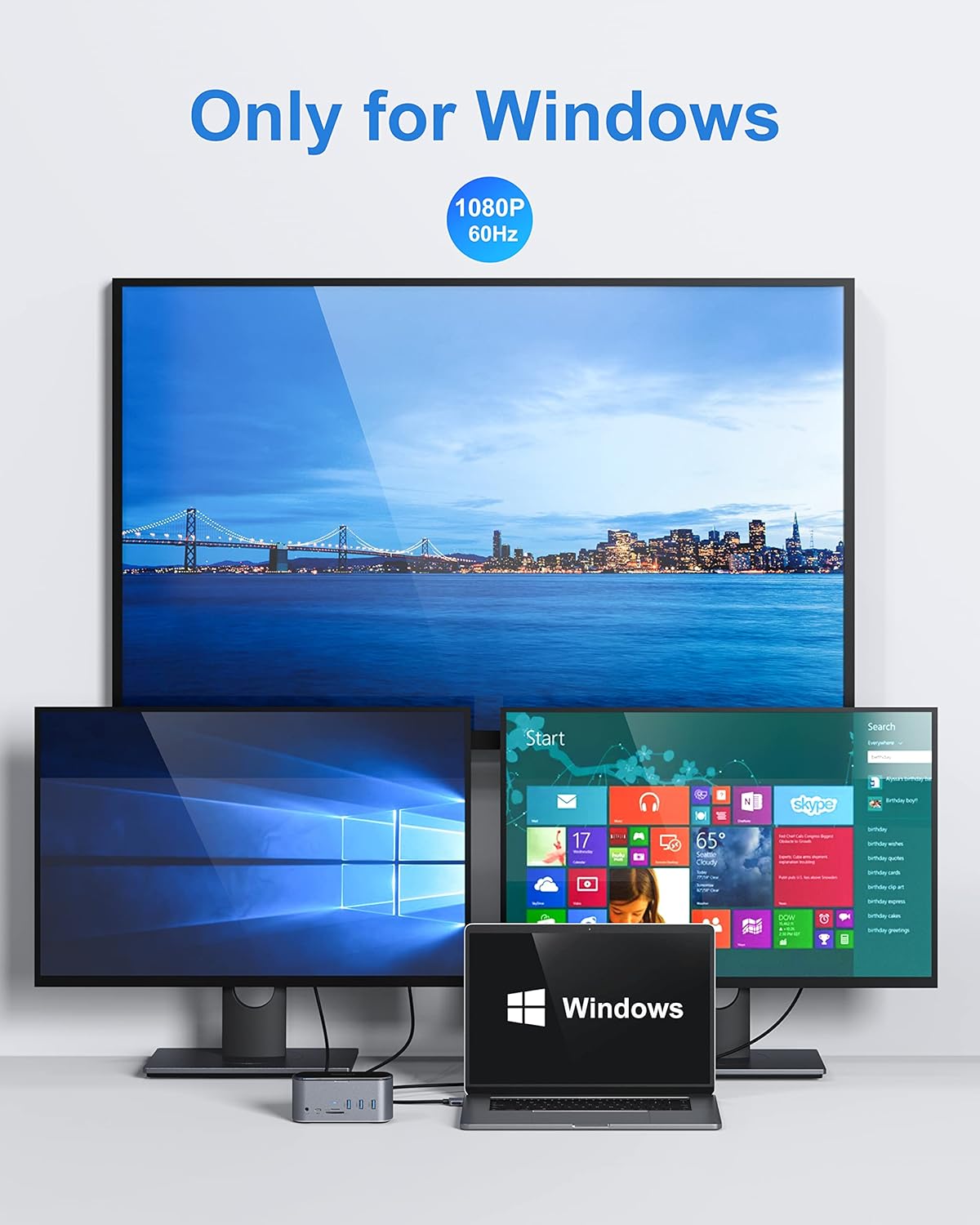
الشكل 8: مثالample of a Windows setup with one large external monitor and two smaller ones, all displaying content at 1080P 60Hz.

الشكل 9: مثال آخرample of a Windows setup with one large external monitor and two smaller ones, showing various application icons, all displaying content at 1080P 60Hz.
أنظمة macOS:
macOS systems typically support Mirror Mode across all displays. For Extend Mode, macOS may have limitations depending on the specific MacBook model and chip (e.g., M1/M2 chips may support fewer external displays in extend mode than Intel-based Macs or Windows systems). Please refer to your MacBook's specifications for multi-display support.
4.2 نقل البيانات
The USB 3.0 ports support data transfer speeds up to 5Gbps, ideal for external hard drives, SSDs, and other high-speed peripherals. The SD and Micro SD card readers also provide fast access to your memory card data.
5. المواصفات
| ميزة | مواصفة |
|---|---|
| نموذج | محطة إرساء 18 في 1 USB-C |
| ماركة | موكين |
| لون | أسود |
| واجهة الأجهزة | Solid State Drive (for enclosure) |
| الأجهزة المتوافقة | MacBook Pro, Windows Laptops with USB-C/Thunderbolt 3 |
| توصيل الطاقة | طاقة تصل إلى 100 واط عبر منفذ USB-C PD |
| سرعة الإيثرنت | 10/100/1000 ميجابايت في الثانية |
| سرعة يو اس بي 3.0 | تصل إلى 5 جيجابت في الثانية |
| الضميمة SSD | M.2 SATA 3.0 NGFF (M Key, B&M Key, B Key), up to 2TB |
| مخرج الفيديو | 3x HDMI (4K@60Hz/30Hz), 1x DisplayPort (4K@60Hz), 1x VGA (1080P@60Hz) |
| أبعاد الحزمة | 7.24 × 5.51 × 3.43 بوصة |
| وزن العنصر | 1.17 رطل |
| ASIN | B09KTZWZBM |
| تاريخ أول توفر | 22 أغسطس 2023 |
6. استكشاف الأخطاء وإصلاحها
إذا واجهت مشكلات مع محطة الإرساء الخاصة بك، فيرجى الرجوع إلى الحلول الشائعة التالية:
- لا يوجد إخراج للعرض:
- Ensure all display cables are securely connected to both the docking station and the monitors.
- Verify your laptop's display settings (e.g., 'Duplicate', 'Extend', 'Second screen only').
- حاول توصيل شاشة واحدة في كل مرة لعزل المشكلة.
- تأكد من أن برامج تشغيل الرسومات الخاصة بالكمبيوتر المحمول لديك محدثة.
- Some laptops may require specific display drivers for multi-monitor setups via USB-C.
- لا يوجد توصيل للطاقة إلى الكمبيوتر المحمول:
- Ensure your laptop's original power adapter is connected to the docking station's USB-C PD port.
- تأكد من أن محول الطاقة يعمل بشكل صحيح وموصول بمأخذ كهربائي يعمل.
- تحقق مما إذا كان منفذ USB-C الخاص بجهاز الكمبيوتر المحمول يدعم خاصية توصيل الطاقة.
- أجهزة USB غير معترف بها:
- أعد توصيل جهاز USB.
- جرب منفذ USB مختلفًا على محطة الإرساء.
- تأكد من توصيل قاعدة التوصيل بجهاز الكمبيوتر المحمول الخاص بك بشكل صحيح.
- For high-power USB devices, ensure sufficient power is supplied to the docking station.
- مشاكل اتصال الإيثرنت:
- تحقق من اتصال كابل Ethernet بكل من محطة الإرساء وجهاز التوجيه/المودم الخاص بك.
- تحقق من إعدادات الشبكة على جهاز الكمبيوتر المحمول الخاص بك.
- أعد تشغيل جهاز التوجيه/المودم والكمبيوتر المحمول.
- لم يتم اكتشاف SSD:
- Ensure the SSD is correctly installed in the enclosure and the top cover is secured.
- Check Disk Management (Windows) or Disk Utility (macOS) to see if the SSD needs to be initialized or formatted.
- Verify the SSD is an M.2 SATA NGFF type, as NVMe SSDs are not compatible with this enclosure.
7. الصيانة
To ensure the longevity and optimal performance of your MOKiN docking station, follow these maintenance guidelines:
- تنظيف: استخدم قطعة قماش ناعمة وجافة لتنظيف الجزء الخارجي من قاعدة الشحن. تجنب استخدام المنظفات السائلة أو المواد الكاشطة.
- تخزين: قم بتخزين محطة الإرساء في مكان بارد وجاف بعيدًا عن أشعة الشمس المباشرة ودرجات الحرارة القصوى.
- التعامل: تجنب إسقاط الجهاز أو تعريضه لصدمات قوية.
- تهوية: Ensure the docking station has adequate ventilation to prevent overheating, especially during prolonged use with multiple connected devices.
8. الضمان والدعم
MOKiN products are designed for reliability and performance. This product comes with a standard manufacturer's warranty. For specific warranty terms and conditions, please refer to the documentation included with your purchase or visit the official MOKiN webموقع.
If you require technical assistance or have questions not covered in this manual, please contact MOKiN customer support through their official channels. When contacting support, please have your product model and purchase information ready.
الشركة المصنعة: موكين
ASIN: B09KTZWZBM


